1. ആമുഖവും അവസാനവുംview
The FOXWELL NT809BT Pro is an advanced wireless diagnostic scan tool designed for comprehensive automotive system analysis. This device offers full system diagnostics, bidirectional control capabilities, and over 30 specialized reset functions, making it suitable for various automotive service needs. It operates on an Android 9 OS with a 7-inch HD touchscreen and features a wireless VCI (Vehicle Communication Interface) for flexible operation.

Figure 1: The FOXWELL NT809BT Pro diagnostic scan tool.
വീഡിയോ 1: കഴിഞ്ഞുview of the NT809BT Pro's simple and intuitive interface.
2. ബോക്സിൽ എന്താണുള്ളത്?
അൺബോക്സിംഗ് ചെയ്യുമ്പോൾ, എല്ലാ ഘടകങ്ങളും ഉണ്ടെന്ന് ഉറപ്പാക്കുക:
- NT809BT Main unit (tablet)
- VCI (Vehicle Communication Interface) dongle
- USB കേബിൾ
- ഉപയോക്തൃ മാനുവൽ (ഈ പ്രമാണം)
- ദ്രുത ആരംഭ ഗൈഡ്
3. സജ്ജീകരണം
3.1 പ്രാരംഭ ഉപകരണ സജ്ജീകരണം
- Power on the NT809BT Pro unit.
- Follow the on-screen prompts to select your language and time zone.
- Connect the device to a Wi-Fi network to enable software updates.
3.2 ഒരു വാഹനവുമായി ബന്ധിപ്പിക്കൽ
- വാഹനത്തിന്റെ OBD2 പോർട്ട് കണ്ടെത്തുക, സാധാരണയായി ഡ്രൈവറുടെ വശത്തുള്ള ഡാഷ്ബോർഡിന് താഴെ.
- Plug the VCI dongle into the vehicle's OBD2 port. Ensure a secure connection.
- The NT809BT Pro tablet will automatically establish a wireless Bluetooth connection with the VCI dongle. The connection range is up to 10 meters (33 feet).

Figure 2: Wireless connection between the NT809BT Pro tablet and the VCI dongle.
Video 2: Demonstration of the wireless diagnostic capabilities with the VCI dongle.
4. പ്രവർത്തന നിർദ്ദേശങ്ങൾ
4.1 പൂർണ്ണ സിസ്റ്റം ഡയഗ്നോസ്റ്റിക്സ്
The NT809BT Pro can access and diagnose all available electronic control systems in a vehicle. This includes, but is not limited to, Engine, Transmission, ABS, SRS, SAS, Body Control Module, TPMS, and DPF systems. The tool performs an automatic VIN scan to identify the vehicle and then allows for reading/clearing diagnostic trouble codes (DTCs), viewing live data, and performing active tests.

ചിത്രം 3: ഓവർview of OE-level full system diagnostic capabilities.
Video 3: Demonstration of all systems car diagnostic scanning.
4.2 ദ്വിദിശ നിയന്ത്രണം (സജീവ പരിശോധനകൾ)
This function allows the diagnostic tool to send commands to the vehicle's ECUs to perform specific component tests. This is crucial for pinpointing system malfunctions by directly activating components like fuel pumps, cooling fans, or individual injectors. Examples ഉൾപ്പെടുന്നു:
- Turning on/off the A/C fan
- Modulating the throttle
- Turning on/off headlights
- Performing injector tests

Figure 4: Bidirectional control in action, sending commands to vehicle systems.
Video 4: Guide on how to perform bidirectional diagnostics.
4.3 Service Reset Functions
The tool supports over 30 common maintenance and reset services, which include:
- ഓയിൽ റീസെറ്റ്
- ഇപിബി (ഇലക്ട്രോണിക് പാർക്കിംഗ് ബ്രേക്ക്) റീസെറ്റ്
- എ ബി എസ് രക്തസ്രാവം
- എസ്എഎസ് (സ്റ്റിയറിങ് ആംഗിൾ സെൻസർ) കാലിബ്രേഷൻ
- ഇൻജക്ടർ കോഡിംഗ്
- ക്രാങ്ക് സെൻസർ റീലേൺ
- ബാറ്ററി രജിസ്ട്രേഷൻ
- നിഷ്ക്രിയമായി വീണ്ടും പഠിക്കുക
- ഡിപിഎഫ് പുനരുജ്ജീവനം
- TPMS റീസെറ്റ്
- സൺറൂഫ് ഇനിഷ്യലൈസേഷൻ
- ട്രാൻസ്മിഷൻ അഡാപ്റ്റേഷൻ
- Fuel Pressure Test
- ഹെഡ്amp പുനഃസജ്ജമാക്കുക
Note: The availability of specific functions may vary depending on the vehicle's make, model, and year.

Figure 5: A selection of the 30+ reset services offered by the tool.
Video 5: Demonstration of various reset functions on the FOXWELL NT809BT Pro.
4.4 ലൈവ് ഡാറ്റ ഗ്രാഫിംഗ്
The NT809BT Pro allows for real-time graphing of live sensor data, enabling detailed analysis of vehicle performance. It supports 4-in-1 live data graphing, which helps in identifying intermittent issues and monitoring system parameters simultaneously.
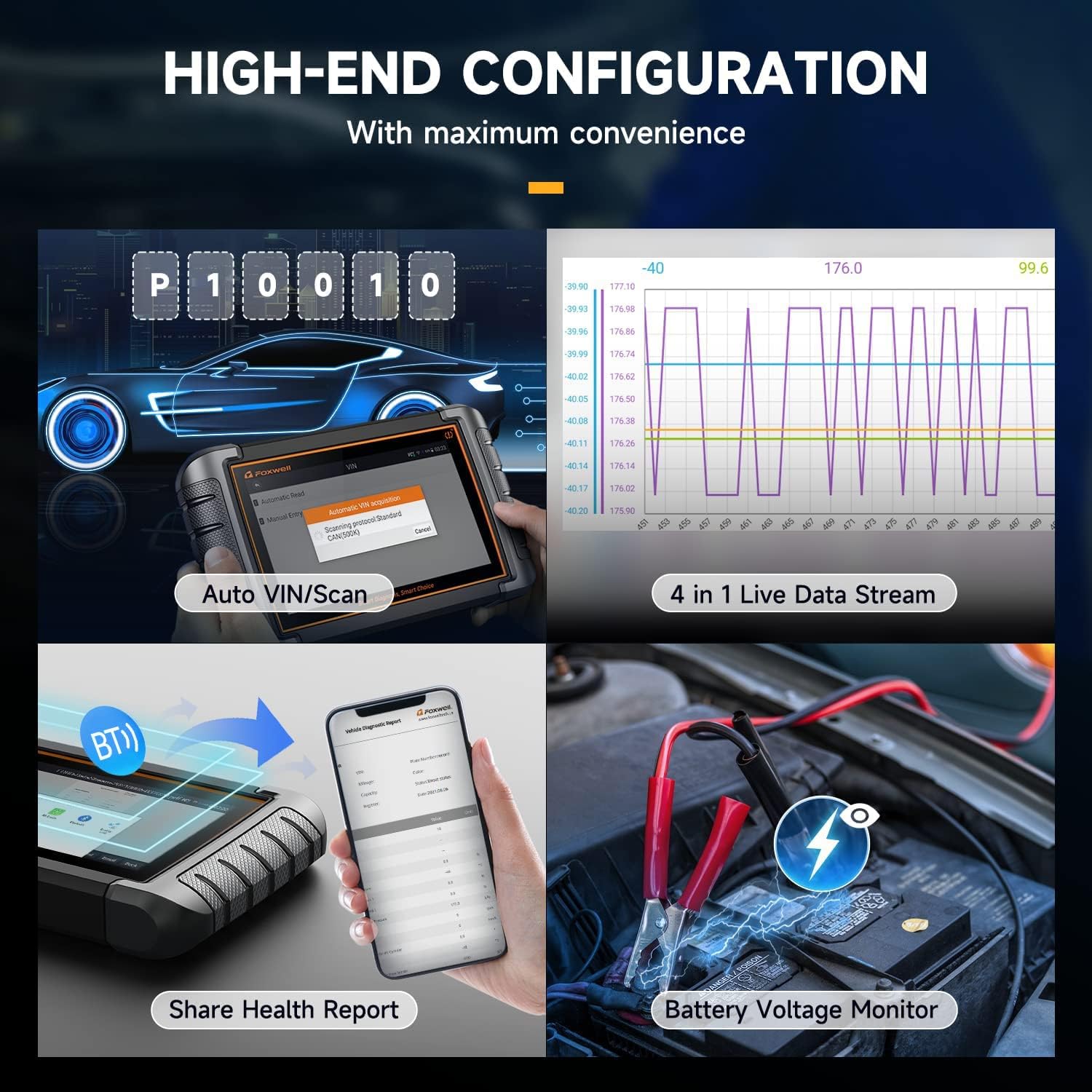
Figure 6: Live data stream and battery voltage monitoring interface.
4.5 Vehicle Coverage and Protocols
The tool supports over 150 car brands and 10,000+ car models from 1996 to 2024, covering US, European, and Asian markets. It is compatible with various diagnostic protocols, including CAN-FD, CAN, KWP, and DOIP. For FCA SGW (Security Gateway) vehicles, an additional 12+8 adapter may be required to access active tests and system diagnostics.

Figure 7: Extensive vehicle coverage and protocol support.
5. പരിപാലനം
5.1 സോഫ്റ്റ്വെയർ അപ്ഡേറ്റുകൾ
The NT809BT Pro includes 3 years of free software updates via Wi-Fi. Regular updates ensure compatibility with new vehicle models and the latest diagnostic functions. Connect the device to a stable Wi-Fi network and navigate to the 'Update' section on the main menu to check for and install available updates.
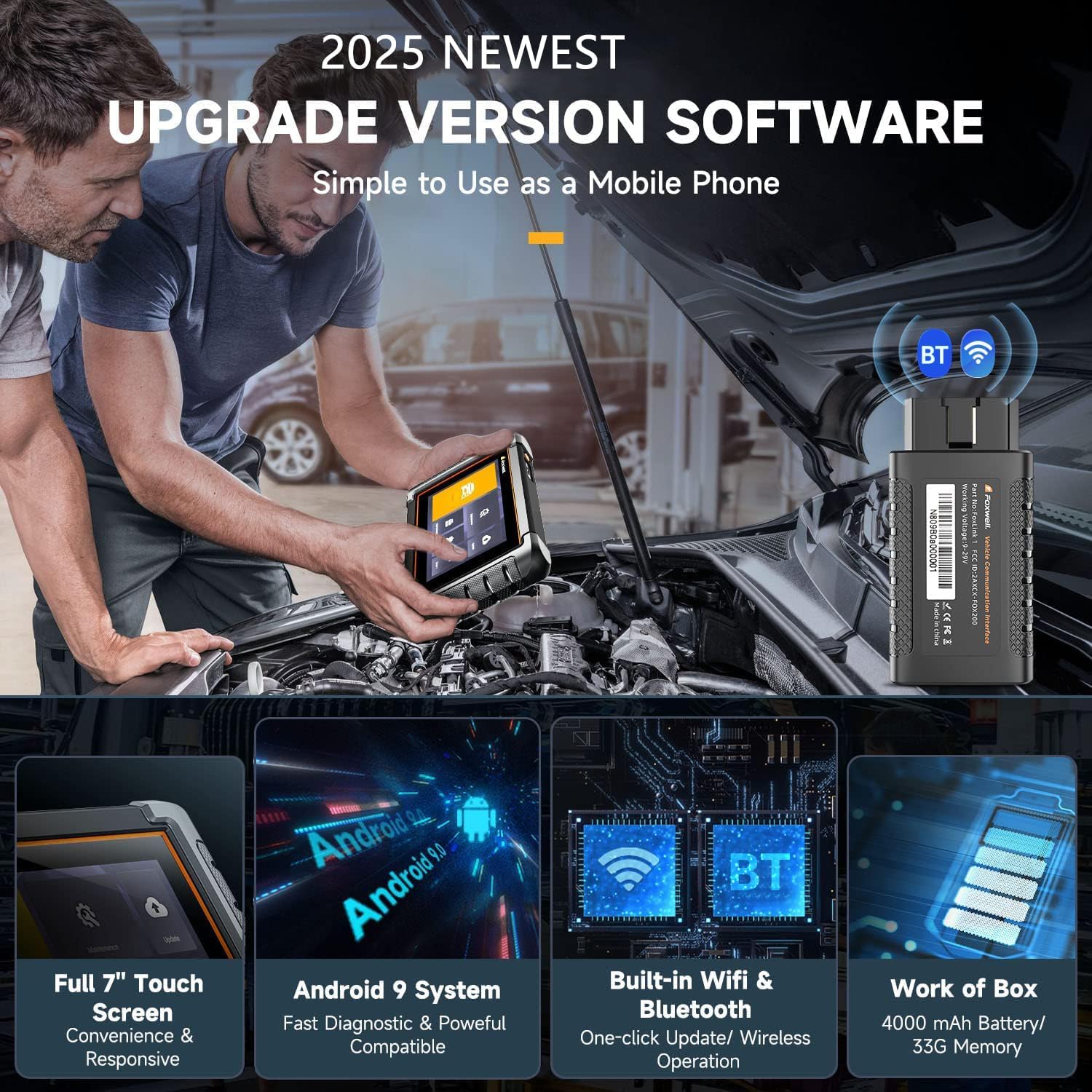
Figure 8: Key hardware and software features of the NT809BT Pro.
6. പ്രശ്നപരിഹാരം
If you encounter issues with the NT809BT Pro, consider the following:
- കണക്ഷൻ പ്രശ്നങ്ങൾ: Ensure the VCI dongle is securely plugged into the OBD2 port and the vehicle's ignition is on. Verify Bluetooth is enabled on the tablet.
- സോഫ്റ്റ്വെയർ തകരാറുകൾ: Ensure the device has the latest software updates installed. A stable Wi-Fi connection is required for updates.
- Functionality Limitations: Some advanced functions may not be supported on all vehicle models or years. Refer to the vehicle coverage list or contact support for specific compatibility inquiries.
- ഉപകരണം പവർ ചെയ്യുന്നില്ല: Ensure the device battery is charged. If the battery is low, connect the device to the charger.
7 സ്പെസിഫിക്കേഷനുകൾ
| ഫീച്ചർ | സ്പെസിഫിക്കേഷൻ |
|---|---|
| നിർമ്മാതാവ് | ഫോക്സ്വെൽ |
| മോഡൽ | FOXWELL NT809BT PRO |
| ഇനത്തിൻ്റെ ഭാരം | 2.97 പൗണ്ട് |
| ഉൽപ്പന്ന അളവുകൾ | 8.07 x 5.32 x 1.18 ഇഞ്ച് |
| ബാറ്ററികൾ | 1 ലിഥിയം അയൺ ബാറ്ററികൾ ആവശ്യമാണ് |
| നിർമ്മാതാവിൻ്റെ ഭാഗം നമ്പർ | NT809BT |
| പവർ ഉറവിടം | ബാറ്ററി പവർ |
| ഓപ്പറേറ്റിംഗ് സിസ്റ്റം | ആൻഡ്രോയിഡ് 9.0 |
| സ്ക്രീൻ വലിപ്പം | 7.1 ഇഞ്ച് |

ചിത്രം 9: പിൻഭാഗം view of the NT809BT Pro unit with product information.
8. വാറൻ്റിയും പിന്തുണയും
FOXWELL provides a warranty for the NT809BT Pro. For specific warranty details, please refer to the documentation included with your product or contact FOXWELL customer support.
For any questions, technical assistance, or compatibility inquiries before or after purchase, please contact FOXWELL customer support. When contacting support, provide your product model, release year, and VIN (Vehicle Identification Number) for efficient assistance.
Contact information: amazonsupport@foxwelltech.com


