1. ആമുഖം
The LAUNCH X431 CRP919E is a professional automotive diagnostic scan tool designed for comprehensive vehicle system analysis, maintenance, and advanced functions. This manual provides detailed instructions for its setup, operation, and troubleshooting, ensuring you can effectively utilize all features of your device.

The LAUNCH X431 CRP919E OBD2 Scanner, showing its 7-inch touchscreen display and robust casing, along with its protective carrying case.
2. ബോക്സിൽ എന്താണുള്ളത്?
നിങ്ങളുടെ പാക്കേജിൽ എല്ലാ ഇനങ്ങളും ഉണ്ടെന്ന് ദയവായി പരിശോധിക്കുക:
- 1 * LAUNCH X431 CRP919E OBD2 Scanner
- 1 * OBD II Diagnostic Cable
- 1 * DC 5V Charging Cable
- 1 * US/UK/EU Plug Adapter
- 1 * Multilingual Quick Start Guide
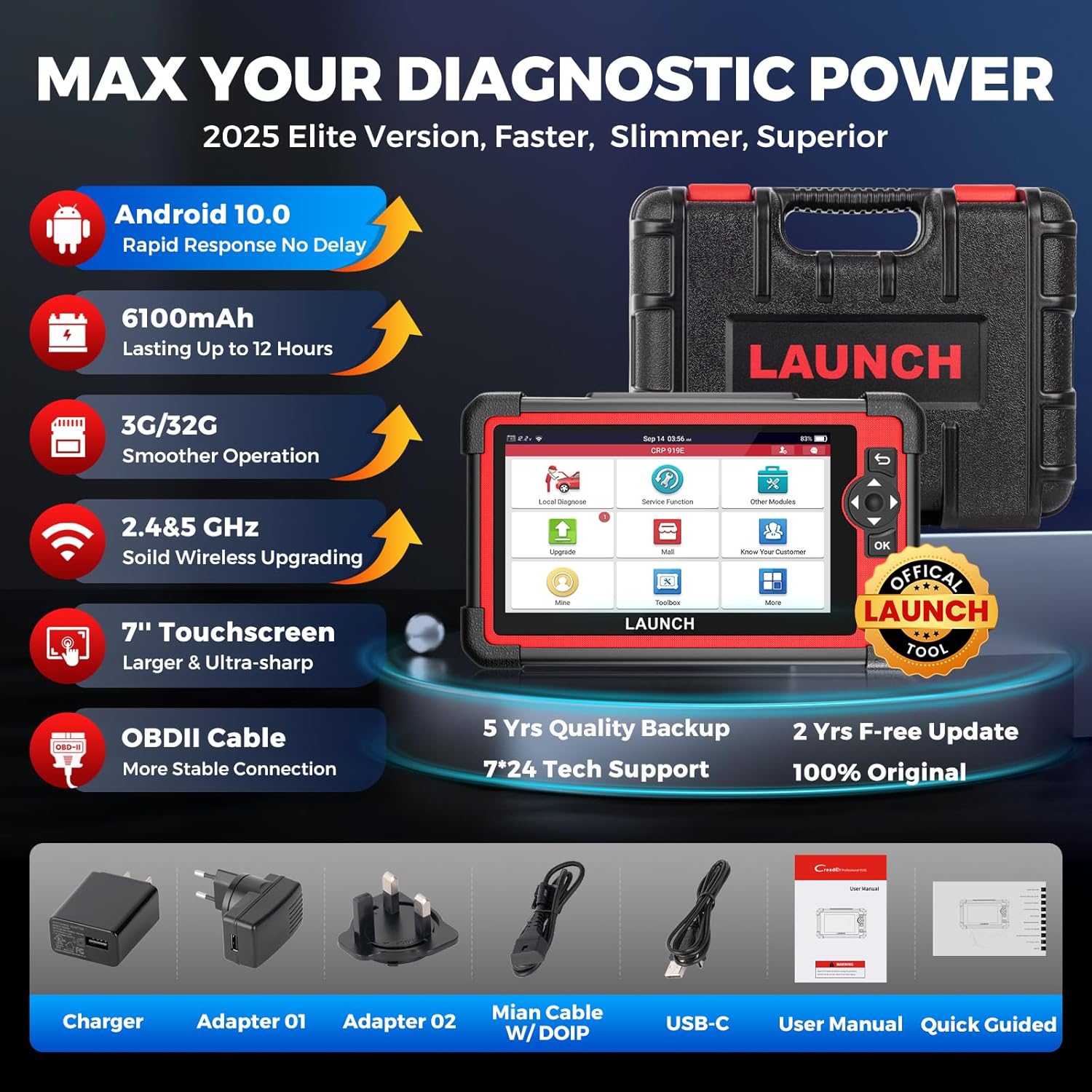
Image showing the LAUNCH X431 CRP919E device and its included accessories: charger, adapters, main cable with DoIP, USB-C cable, user manual, and quick guide.
3. സജ്ജീകരണ ഗൈഡ്
- അൺപാക്ക് ചെയ്യുന്നു: പാക്കേജിംഗിൽ നിന്ന് എല്ലാ ഘടകങ്ങളും ശ്രദ്ധാപൂർവ്വം നീക്കം ചെയ്യുക.
- ചാർജിംഗ്: Connect the DC 5V Charging Cable to the device and a suitable power adapter. Ensure the device is fully charged before first use. The battery indicator will show charging status.
- പവർ ഓൺ: Press and hold the power button (usually located on the side or top) to turn on the device.
- പ്രാരംഭ കോൺഫിഗറേഷൻ: Follow the on-screen prompts to select your preferred language, set the time zone, and connect to a stable Wi-Fi network. Wi-Fi connectivity is essential for software updates and online functions.
- സോഫ്റ്റ്വെയർ അപ്ഡേറ്റ്: After connecting to Wi-Fi, navigate to the 'Upgrade' section on the main menu and perform a one-click update to ensure your device has the latest software and vehicle coverage.
4. Operating Instructions & Key Features
The LAUNCH X431 CRP919E offers a wide array of diagnostic and maintenance functionalities. Below are the primary features and how to access them.
4.1. OE-Level Full Systems Diagnostic
The CRP919E performs comprehensive diagnostics on all available vehicle systems, including Engine, Transmission, ABS, SRS, TPMS, BMS, and more. This allows for in-depth analysis of vehicle health.
- ECU വിവരങ്ങൾ വായിക്കുക: Retrieves detailed information about the control units.
- ഡിടിസികൾ വായിക്കുക/മായ്ക്കുക: Identifies diagnostic trouble codes and allows for their clearing after repairs.
- View തത്സമയ ഡാറ്റ: Displays real-time data streams from various sensors in text or graph format.
- ഫ്രീസ് ഫ്രെയിം: Captures a snapshot of sensor values at the moment a fault occurred.
- Perform Active Tests: വിശദാംശങ്ങൾക്ക് വിഭാഗം 4.3 കാണുക.
- Perform Special Functions: വിശദാംശങ്ങൾക്ക് വിഭാഗം 4.4 കാണുക.
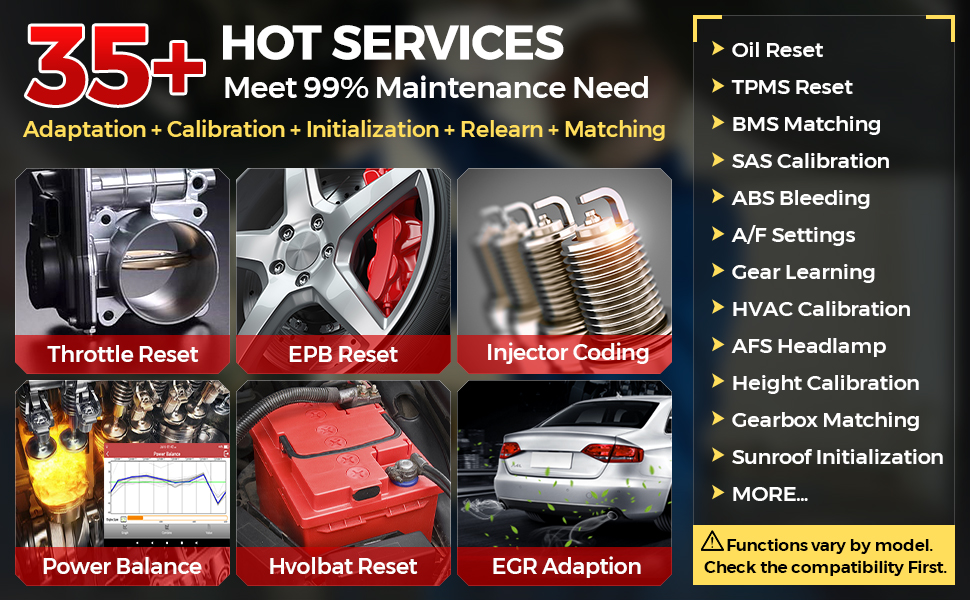
Diagram illustrating the comprehensive OE-level full system diagnostic capabilities of the LAUNCH X431 CRP919E, showing how it reads and clears codes, views live data, and performs active tests across various vehicle modules like ABS, SRS, Engine, and Transmission.
4.2. Advanced ECU Coding
The device supports advanced ECU coding functions, allowing for customization and adaptation of vehicle modules.
- ഓൺലൈൻ കോഡിംഗ്: Compatible with VW/Audi/Skoda/Ford/Lincoln/Mazda. Accesses online vehicle repair data for high-level repairs.
- PMI Function: For Ford/Lincoln/Mazda, allows copying data from original modules to new units for replacement.
- ഓഫ്ലൈൻ കോഡിംഗ്: Compatible with Benz/BMW/Ford/Mazda/Jaguar/Vauxhall/Opel. Reads and writes codes between modules.
- Refresh Hidden Features (Personalization): Enables or disables specific vehicle functions (e.g., auto start-stop, daytime running lights).
- ഘടക പൊരുത്തപ്പെടുത്തൽ: Performs matching, relearning, calibration, or initialization for components after replacement (e.g., gearbox, suspension, seats).
- Customize OE-Settings (Retrofitting/Modification): Activates high-end features or adapts to different components (e.g., xenon fog lamps, different battery/tire sizes).
An illustration detailing the advanced ECU coding functions, including online coding, PMI function, component matching, refreshing hidden features, and customizing OE-settings for various vehicle systems.
4.3. Bi-Directional Control (Active Tests)
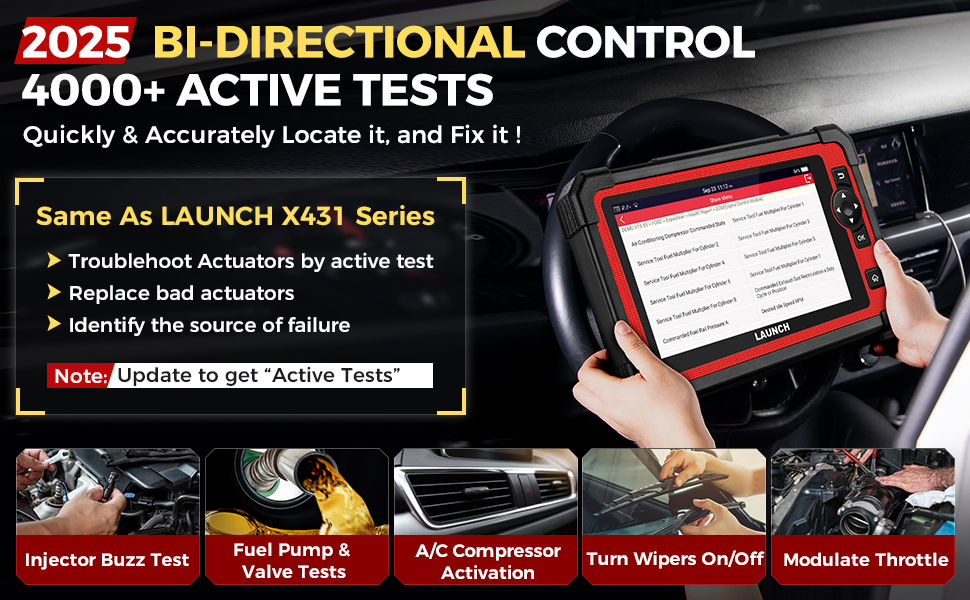
The CRP919E features bi-directional control, also known as Active Tests, allowing the tool to send commands to vehicle ECUs to perform specific tests on actuators. This helps in quickly pinpointing faulty components without extensive disassembly.
- Fuel System Tests: Fuel Pressure Control Valve Test, Fuel Injector Tests, Fuel Pump & Valve Tests, Injector Buzz Test.
- തണുപ്പിക്കൽ സംവിധാനം: Cooling Fan Test, Activate Radiator Shutter.
- Body Control: Window/Wipers/Sunroof/Door Lock/Headlamp Test, Interior Lighting Test, Horn activation.
- EVAP Tests: EVAP Purge Solenoid Valve, EVAP Vent Solenoid Valve, EVAP Purge/Seal.
- മറ്റുള്ളവ: HVAC Calibration, Vehicle Level Position Calibration, Modulate Throttle, Cycling A/C Clutch Relay, Cycling ABS Motor Pump.

Visual representation of the bi-directional control (active test) functionality, demonstrating the ability to command specific vehicle components like radiator fans, sunroofs, injectors, and fuel pumps to test their operational status.
4.4. 35+ Hot Reset Services
The tool provides over 35 commonly used maintenance and reset functions to address various vehicle service needs.
- ഓയിൽ മെയിൻ്റനൻസ് റീസെറ്റ്
- ഇൻജക്ടർ കോഡിംഗ്
- EPB (Electronic Park Brake) Reset
- എ ബി എസ് രക്തസ്രാവം
- Throttle Adaptation (Idle Relearn)
- പവർ ബാലൻസ്
- BMS റീസെറ്റ്
- SAS കാലിബ്രേഷൻ (സ്റ്റിയറിങ് ആംഗിൾ സെൻസർ)
- എയർബാഗ് റിപ്പയർ
- Fuel Trim Learn
- സ്പീഡ് ലിമിറ്റഡ്
- Air/Fuel Reset
- AdBlue റീസെറ്റ്
- AFS (Adaptive Front-Lighting System) Reset
- NOX Sensor Reset
- Tire Reset
- പുനഃസജ്ജമാക്കൽ നിർത്തുക/ആരംഭിക്കുക
- Delete Transport Mode
- Air Level Calibration
- വിൻഡോസ് കാലിബ്രേഷൻ
- CCS (Cruise Control System) Calibration
- Seat Occupancy Calibration
- സൺറൂഫ് ഇനിഷ്യലൈസേഷൻ
- AC Initialization
- Crankshaft Position Sensor Adaptive Relearn
- ഗിയർബോക്സ് പൊരുത്തപ്പെടുത്തൽ
- TPMS റീസെറ്റ്
- ശീതീകരണ രക്തസ്രാവം
- EGR അഡാപ്ഷൻ
- GPF (Gas Particular Filter) Regeneration
- ഉയർന്ന വോളിയംtage Battery Detection
- ഭാഷാ മാറ്റം
- FRM Reset
- ഇന്ധന ആൽക്കഹോൾ ഉള്ളടക്കം പുനഃസജ്ജമാക്കൽ
- Fuel Economy Test
- EVAP ടെസ്റ്റ്
- HVAC Calibration
- Seat Standardisation
- A/T Code reset
- സസ്പെൻഷൻ കാലിബ്രേഷൻ
- വിജിടി റീലേൺ
- ഇലക്ട്രോണിക് പമ്പ് സജീവമാക്കൽ
- VIN Registration (Write)
- Camshaft/Crankshaft Sensor Relearn
- ഗിയർ ലേണിംഗ്
- ക്ലച്ച് അഡാപ്റ്റേഷൻ
- Cylinder Compression Test
- Cylinder Leakage Test
- TEC Learn
Note: The availability of specific functions may vary by vehicle model and year. More than 100 repair functions can be found under "1.Diagnose" > "2.Car Model" > "3.System" > "4.Special Function".

A collage of icons representing over 35 hot reset services available on the LAUNCH X431 CRP919E, such as Oil Reset, Brake Reset, SAS Calibration, Gearbox Relearn, Battery Reset, Injector Coding, Power Balance, and Crankshaft Relearn.
4.5. വാഹന കവറേജും പ്രോട്ടോക്കോളുകളും
The CRP919E supports over 150 vehicle brands and 100,000+ models from 1996-2025, covering America, Asia, and Europe. It also includes support for modern communication protocols.
- CAN FD പ്രോട്ടോക്കോൾ: Compatible with GM models (2019 and later), offering higher data transfer rates. No additional adapter required.
- DoIP പ്രോട്ടോക്കോൾ: Compatible with BMW (F&G chassis), Volvo models (2018 later), and Land Rover & Jaguar models (2017 later). Enables diagnostics over TCP/IP and Ethernet for faster data rates.
- എഫ്സിഎ ഓട്ടോഓത്ത്: Provides secure access to FCA vehicles (Chrysler, Dodge, Fiat, etc.) after 2017 for diagnostic functions. (Note: AutoAuth account needs to be purchased separately by the user.)

A graphic displaying the extensive vehicle coverage of the LAUNCH X431 CRP919E, supporting over 150 brands from Europe, America, Asia, Australia, and Brazil, along with support for CAN FD, DoIP, and FCA AutoAuth protocols.
4.6. ഉപയോക്തൃ-സൗഹൃദ സവിശേഷതകൾ
The device incorporates several features to enhance user experience and diagnostic efficiency.
- Auto VIN & Auto Scan: Quickly identifies vehicle information and performs a full system scan.
- One-Click WiFi Update: Simplifies software updates to keep the device current.
- 8-IN-1 Graphing Merge Display: Allows simultaneous viewing of up to 8 live data streams for detailed analysis.
- Diagnostic Report Sharing and Printing: Generates and shares PDF diagnostic reports.
- ഓൺലൈൻ ഫീഡ്ബാക്ക്: Provides a channel for reporting issues or suggestions.
- ബാറ്ററി വോളിയംtagഇ മോണിറ്റർ: Monitors the vehicle's battery voltagഇ തത്സമയം.
- DTC LookUp: Provides definitions for diagnostic trouble codes.
- Multi-Lingual Support: Supports 11 languages: English, Spanish, French, German, Russian, Italian, Portuguese, Japanese, Korean, Polish, and Traditional Chinese.
- Expandable Modules: Supports optional modules like the BST360 Battery Tester and X431 i-TPMS tool (sold separately).
- വിദൂര സഹായം: Allows technicians to provide remote support via TeamViewer.

ഒരു ഓവർview of user-friendly features including Auto VIN & Auto Scan, one-click WiFi update, 8-in-1 live data stream, diagnostic report printing and sharing, diagnostic feedback, and support for 11 languages.
5. പരിപാലനം
- സോഫ്റ്റ്വെയർ അപ്ഡേറ്റുകൾ: Regularly connect your CRP919E to Wi-Fi and perform one-click updates to ensure optimal performance, access to new features, and expanded vehicle coverage. The device includes 2 years of free updates.
- വൃത്തിയാക്കൽ: Clean the screen and device exterior with a soft, dry, lint-free cloth. Avoid using abrasive cleaners or solvents.
- സംഭരണം: When not in use, store the device in its protective carrying case in a cool, dry environment, away from direct sunlight and extreme temperatures.
- ബാറ്ററി കെയർ: To prolong battery life, avoid fully discharging the device frequently. Charge it regularly, especially if storing for extended periods.
6. പ്രശ്നപരിഹാരം
ചില പൊതുവായ പ്രശ്നങ്ങളും അവയുടെ പരിഹാരങ്ങളും ഇതാ:
- ഉപകരണം ഓണാക്കുന്നില്ല: Ensure the device is fully charged. Connect it to the charger and wait for a few minutes before attempting to power it on again.
- Connectivity issues (Wi-Fi/OBD-II): Verify your Wi-Fi connection settings. For OBD-II connection, ensure the diagnostic cable is securely connected to both the device and the vehicle's OBD-II port. Check the vehicle's ignition status.
- "Received product is broken or used": If you receive a damaged or previously used item, please contact the seller directly for assistance and replacement.
- "Topology map not working after two years free upgrade": The topology map and other core functions will continue to work after the free update period expires. Updates primarily fix bugs, optimize performance, add new functions, and expand vehicle model coverage.
- General technical issues: For specific technical problems, utilize the 'Diagnostic Feedback' feature on the device or contact the seller's technical support.
7 സ്പെസിഫിക്കേഷനുകൾ
| ഫീച്ചർ | വിശദാംശങ്ങൾ |
|---|---|
| മോഡൽ | LAUNCH ELITE CRP919E |
| ഓപ്പറേറ്റിംഗ് സിസ്റ്റം | ആൻഡ്രോയിഡ് 10.0 |
| ബാറ്ററി | 6100mAh Lithium Metal (included) |
| മെമ്മറി (റാം/റോം) | 3G/32G |
| സ്ക്രീൻ വലിപ്പം | 7-inch Touchscreen (1024*600) |
| കണക്റ്റിവിറ്റി | 2.4G & 5GHz Dual WiFi, OBDII Cable |
| ഉൽപ്പന്ന അളവുകൾ | 16.85 x 4.88 x 14.25 ഇഞ്ച് |
| ഇനത്തിൻ്റെ ഭാരം | 6.47 പൗണ്ട് |
| നിർമ്മാതാവിൻ്റെ ഭാഗം നമ്പർ | YZB08 |
| യു.പി.സി | 884508008689 |
8. വാറൻ്റിയും പിന്തുണയും
The LAUNCH X431 CRP919E comes with a commitment to quality and ongoing support:
- സൗജന്യ അപ്ഡേറ്റുകൾ: Enjoy 2 years of free software updates from the date of purchase. After this period, core diagnostic functions will remain operational, but new features and expanded vehicle coverage will require a subscription.
- ഗുണനിലവാര ബാക്കപ്പ്: The product is backed by 5 years of quality assurance.
- സാങ്കേതിക സഹായം: For any technical assistance, operational queries, or warranty claims, please contact the seller directly. Refer to your purchase documentation for specific contact information. Avoid contacting LAUNCH Tech USA as they may not provide support for Amazon purchases.


