1. ആമുഖം
This user manual provides detailed instructions for the FUJITSU FUTRO MU937 lightweight notebook. It covers essential information for setting up, operating, maintaining, and troubleshooting your device. Please read this manual thoroughly to ensure proper use and to maximize the lifespan of your notebook.
The FUJITSU FUTRO MU937 is equipped with a 7th Generation Intel Celeron 3865U processor, 8GB of RAM, and a 256GB Solid State Drive (SSD) for fast performance. It features a 13.3-inch Full HD (1920x1080) display and comes pre-installed with Windows 10 Pro 64-bit and WPS Office for productivity.

ചിത്രം 1.1: മുൻഭാഗം view of the FUJITSU FUTRO MU937 notebook displaying the operating system interface.
2 സുരക്ഷാ വിവരങ്ങൾ
To prevent injury, electric shock, fire, or damage to the product, please observe the following safety precautions:
- Do not expose the notebook to extreme temperatures, humidity, or direct sunlight.
- Avoid placing heavy objects on the notebook or applying excessive pressure to the screen.
- Keep liquids away from the device. In case of accidental spills, immediately power off the notebook and disconnect it from the power source.
- Do not attempt to disassemble or repair the notebook yourself. Refer all servicing to qualified personnel.
- Use only the power adapter supplied with the notebook or a compatible replacement.
- Ensure proper ventilation to prevent overheating. Do not block the ventilation openings.
3. ഘടക ഐഡന്റിഫിക്കേഷൻ
Familiarize yourself with the various components and ports of your FUJITSU FUTRO MU937 notebook.
3.1. വർഷം View തുറമുഖങ്ങളും
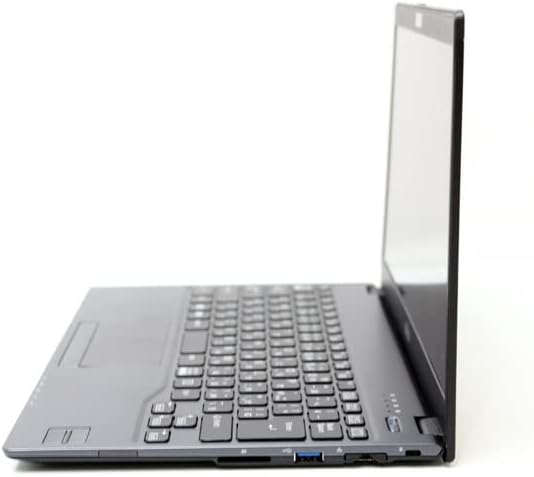
ചിത്രം 3.1: ഇടതുവശം view of the notebook, highlighting the USB 3.0 port, HDMI port, and SD card slot.
The side of the notebook features essential connectivity options including USB 3.0 ports for high-speed data transfer, an HDMI port for external display connections, and an SD card slot for memory expansion or data transfer from cameras and other devices.
3.2. കീബോർഡും ടച്ച്പാഡും
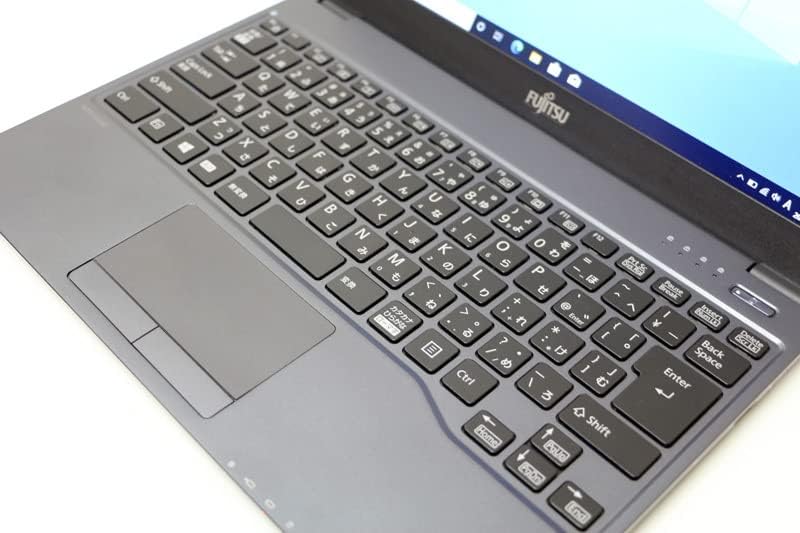
ചിത്രം 3.2: വിശദമായി view of the notebook's keyboard layout and integrated touchpad.
The notebook features a standard QWERTY keyboard for comfortable typing and a multi-touch touchpad for precise cursor control. The touchpad supports various gestures for enhanced navigation within the operating system.
3.3. ടോപ്പ് കവർ
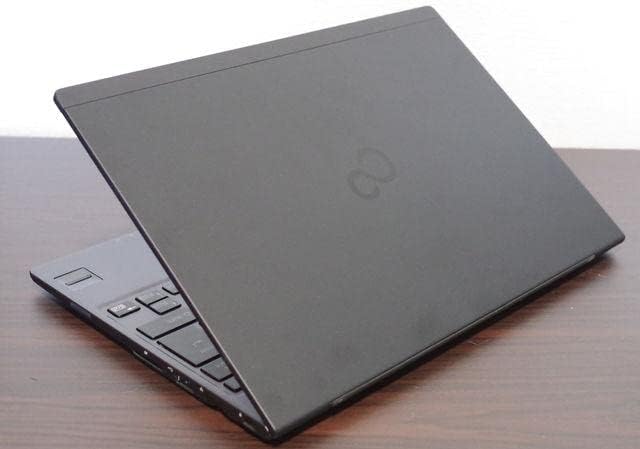
ചിത്രം 3.3: മുകളിൽ view of the FUJITSU FUTRO MU937 notebook when closed, showing the sleek design.
The top cover of the notebook features a minimalist design with the FUJITSU logo, emphasizing its lightweight and thin profile.
4. പ്രാരംഭ സജ്ജീകരണം
Follow these steps to set up your FUJITSU FUTRO MU937 notebook for the first time:
- പവർ ബന്ധിപ്പിക്കുക: Plug the AC adapter into the notebook's power input port and then into a wall outlet.
- പവർ ഓൺ: Open the lid and press the power button, usually located above the keyboard or on the side.
- പ്രാരംഭ വിൻഡോസ് സജ്ജീകരണം: The notebook comes with Windows 10 Pro 64-bit pre-installed. Follow the on-screen prompts to complete the initial Windows setup, including region, language, network connection, and user account creation.
- WPS Office Activation: Your notebook includes WPS Office. Refer to the provided WPS Office license card for activation instructions.

Figure 4.1: WPS Office 2 Standard Edition license card with serial number and activation instructions.
The WPS Office license card contains the serial number required for activation. Follow the instructions on the card or visit the Kingsoft support website for detailed steps on downloading and activating WPS Office.
- പെരിഫറലുകൾ ബന്ധിപ്പിക്കുക: Connect any external devices such as an external webcam (if applicable), mouse, or external storage devices to the available USB ports.
5. അടിസ്ഥാന പ്രവർത്തനം
5.1. പവർ മാനേജ്മെന്റ്
- പവർ ഓൺ: പവർ ബട്ടൺ അമർത്തുക.
- ഷട്ട് ഡൗൺ: Click the Start button (Windows icon) > Power > Shut down.
- പുനരാരംഭിക്കുക: Click the Start button (Windows icon) > Power > Restart.
- ഉറക്കം: Click the Start button (Windows icon) > Power > Sleep, or close the lid.
5.2. നെറ്റ്വർക്ക് കണക്റ്റിവിറ്റി
- വൈഫൈ: ടാസ്ക്ബാറിലെ Wi-Fi ഐക്കണിൽ ക്ലിക്ക് ചെയ്യുക, നിങ്ങൾക്ക് ആവശ്യമുള്ള നെറ്റ്വർക്ക് തിരഞ്ഞെടുക്കുക, പാസ്വേഡ് നൽകുക, തുടർന്ന് കണക്റ്റുചെയ്യുക ക്ലിക്ക് ചെയ്യുക.
- ബ്ലൂടൂത്ത്: To connect Bluetooth devices, go to Settings > Devices > Bluetooth & other devices, and turn Bluetooth on.
5.3. Using WPS Office
WPS Office provides word processing, spreadsheet, and presentation applications compatible with Microsoft Office formats. Launch WPS Office from the Start Menu or desktop shortcut to begin creating and editing documents.
6. പരിപാലനവും പരിചരണവും
- വൃത്തിയാക്കൽ: സ്ക്രീനും എക്സ്റ്റീരിയറും വൃത്തിയാക്കാൻ മൃദുവായ, ലിന്റ് രഹിത തുണി ഉപയോഗിക്കുക. കഠിനമായ പാടുകൾക്ക്, ചെറുതായി dampതുണിയിൽ വെള്ളം അല്ലെങ്കിൽ സ്ക്രീൻ ക്ലീനർ ഉപയോഗിക്കുക. കഠിനമായ രാസവസ്തുക്കൾ ഒഴിവാക്കുക.
- ബാറ്ററി കെയർ: ബാറ്ററി ലൈഫ് വർദ്ധിപ്പിക്കാൻ, ബാറ്ററി ഇടയ്ക്കിടെ പൂർണ്ണമായും ഡിസ്ചാർജ് ചെയ്യുന്നത് ഒഴിവാക്കുക. ദീർഘനേരം ഉപയോഗിച്ചിട്ടില്ലെങ്കിൽ, നോട്ട്ബുക്ക് തണുത്തതും വരണ്ടതുമായ സ്ഥലത്ത് സൂക്ഷിക്കുക.
- സോഫ്റ്റ്വെയർ അപ്ഡേറ്റുകൾ: Regularly check for and install Windows updates and driver updates to ensure optimal performance and security. Go to Settings > Update & Security > Windows Update.
- ഡാറ്റ ബാക്കപ്പ്: ഡാറ്റ നഷ്ടപ്പെടുന്നത് തടയാൻ നിങ്ങളുടെ പ്രധാനപ്പെട്ട ഡാറ്റ ഇടയ്ക്കിടെ ഒരു ബാഹ്യ ഡ്രൈവിലേക്കോ ക്ലൗഡ് സ്റ്റോറേജിലേക്കോ ബാക്കപ്പ് ചെയ്യുക.
7. പ്രശ്നപരിഹാരം
This section addresses common issues you might encounter with your notebook.
| പ്രശ്നം | സാധ്യമായ കാരണം | പരിഹാരം |
|---|---|---|
| നോട്ട്ബുക്ക് ഓണാകുന്നില്ല. | ബാറ്ററി തീർന്നു അല്ലെങ്കിൽ AC അഡാപ്റ്റർ ശരിയായി ബന്ധിപ്പിച്ചിട്ടില്ല. | Ensure the AC adapter is securely connected to both the notebook and a working power outlet. Allow the battery to charge for a few minutes before attempting to power on again. |
| വൈഫൈ കണക്ഷൻ പ്രശ്നങ്ങൾ. | Incorrect Wi-Fi password, router issues, or Wi-Fi adapter disabled. | Verify the Wi-Fi password. Restart your router and modem. Check if the Wi-Fi adapter is enabled in Windows settings. |
| WPS Office applications are not launching. | Software corruption or incomplete installation/activation. | Ensure WPS Office is properly activated using the provided license card. Try repairing or reinstalling WPS Office from the official Kingsoft webആവശ്യമെങ്കിൽ സൈറ്റ്. |
| മന്ദഗതിയിലുള്ള പ്രകടനം. | വളരെയധികം ആപ്ലിക്കേഷനുകൾ പ്രവർത്തിക്കുന്നു, കുറഞ്ഞ ഡിസ്ക് സ്ഥലം അല്ലെങ്കിൽ കാലഹരണപ്പെട്ട ഡ്രൈവറുകൾ. | ആവശ്യമില്ലാത്ത ആപ്ലിക്കേഷനുകൾ അടയ്ക്കുക. ഡിസ്ക് സ്ഥലം ശൂന്യമാക്കുക. വിൻഡോസും ഉപകരണ ഡ്രൈവറുകളും അപ്ഡേറ്റ് ചെയ്യുക. |
8 സാങ്കേതിക സവിശേഷതകൾ
| ഫീച്ചർ | സ്പെസിഫിക്കേഷൻ |
|---|---|
| ബ്രാൻഡ് | ഫുജിത്സു |
| മോഡലിൻ്റെ പേര് | ഫ്യൂട്രോ MU937 |
| ഉൽപ്പന്ന മോഡൽ നമ്പർ | FMVC07007 |
| സ്ക്രീൻ വലിപ്പം | 13.3 ഇഞ്ച് |
| ഡിസ്പ്ലേ റെസല്യൂഷൻ | 1920x1080 pixels (Full HD) |
| സിപിയു ബ്രാൻഡ് | ഇൻ്റൽ |
| സിപിയു തരം | സെലറോൺ 3865U |
| സിപിയു വേഗത | 1.8 GHz |
| റാം വലിപ്പം | 8 ജിബി (ഡിഡിആർ4 എസ്ഡിആർഎഎം) |
| ഹാർഡ് ഡിസ്ക് വലിപ്പം | 256 ജിബി |
| ഹാർഡ് ഡിസ്ക് തരം | SSD (സോളിഡ് സ്റ്റേറ്റ് ഡ്രൈവ്) |
| ഗ്രാഫിക്സ് കോപ്രൊസസർ | ഇൻ്റൽ എച്ച്ഡി ഗ്രാഫിക്സ് 610 |
| ഓപ്പറേറ്റിംഗ് സിസ്റ്റം | വിൻഡോസ് 10 പ്രോ |
| കണക്റ്റിവിറ്റി | Wireless LAN, Bluetooth, USB 3.0, HDMI, SD Card Slot |
9. വാറൻ്റി വിവരങ്ങൾ
This product is covered by a standard manufacturer's warranty. For specific details regarding warranty duration, coverage, and terms, please refer to the warranty card included with your purchase or visit the official FUJITSU support webസൈറ്റ്. വാറന്റി ക്ലെയിമുകൾക്കായി നിങ്ങളുടെ വാങ്ങലിന്റെ തെളിവ് സൂക്ഷിക്കുക.
10. ഉപഭോക്തൃ പിന്തുണ
If you encounter issues not covered in this manual or require further assistance, please contact customer support:
- ഓൺലൈൻ പിന്തുണ: Visit the official FUJITSU support website for FAQs, drivers, and troubleshooting guides.
- സാങ്കേതിക സഹായം: For direct technical support, refer to the contact information provided on the FUJITSU support webസൈറ്റ് അല്ലെങ്കിൽ നിങ്ങളുടെ ഉൽപ്പന്ന ഡോക്യുമെന്റേഷൻ.
When contacting support, please have your product model number (FUTRO MU937 / FMVC07007) and serial number ready.


