1. ആമുഖം
The Klein Tools MM720 is an automatically ranging True Root Mean Squared (TRMS) digital multimeter designed for precise electrical measurements. This device measures AC/DC voltage, AC/DC current, and resistance. Additionally, it offers functions for measuring temperature, capacitance, frequency, duty-cycle, diodes, and continuity. Its high-visibility, reverse-contrast LCD display features an optical sensor that automatically adjusts for optimal viewability in various lighting conditions.
This manual provides essential information for the safe and effective use of your MM720 Digital Multimeter. Please read it thoroughly before operation and retain it for future reference.
2 സുരക്ഷാ വിവരങ്ങൾ
Always adhere to safety precautions when using electrical test equipment to prevent injury or damage to the meter. Observe all local and national safety codes.
- അപകടകരമായ വോളിയംtage: അപകടകരമായ വോളിയത്തെക്കുറിച്ച് അറിഞ്ഞിരിക്കുകtages. Contact with live circuits can result in severe injury or death.
- വ്യക്തിഗത സംരക്ഷണ ഉപകരണങ്ങൾ: Always wear approved eye protection and other personal protective equipment (PPE) when working near live electrical circuits.
- Insulated Test Leads: Use only insulated test leads with finger guards. Ensure they are in good condition, free from cracks or damage.
- CAT റേറ്റിംഗ്: This meter is rated CAT IV 600V and CAT III 1000V. Do not exceed these voltage limits. CAT IV is for measurements at the source of the low-voltage installation, such as electricity meters and primary overcurrent protection devices. CAT III is for measurements in building installations, such as distribution boards, circuit breakers, wiring, and cables.
- ഫ്യൂസ് സംരക്ഷണം: The current measurement inputs are fuse protected. Never attempt to measure current on circuits exceeding the specified fuse rating.
- ഉപയോഗിക്കുന്നതിന് മുമ്പ് പരിശോധിക്കുക: Before each use, inspect the meter and test leads for any signs of damage. Do not use if damaged.
- Proper Function Selection: Ensure the function selector switch is in the correct position for the measurement being performed.
- ബാറ്ററി മാറ്റിസ്ഥാപിക്കൽ: കൃത്യമായ റീഡിംഗുകൾ ഉറപ്പാക്കാൻ കുറഞ്ഞ ബാറ്ററി സൂചകം ദൃശ്യമാകുമ്പോൾ ഉടൻ ബാറ്ററികൾ മാറ്റിസ്ഥാപിക്കുക.
- പരിസ്ഥിതി വ്യവസ്ഥകൾ: Do not operate the meter in wet conditions or in environments with explosive gas or dust.
3. പാക്കേജ് ഉള്ളടക്കം
Your Klein Tools MM720 Digital Multimeter package includes the following items:
- MM720 ഡിജിറ്റൽ മൾട്ടിമീറ്റർ
- ചുമക്കുന്ന കേസ്
- Test Leads with CAT III/CAT IV Safety Caps
- തെർമോകപ്പിൾ പ്രോബ്
- ഇൻസ്ട്രക്ഷൻ മാനുവൽ
- 2 x AAA ബാറ്ററികൾ

The image above displays the red and black test leads, which are essential for making electrical measurements. These leads come with safety caps to ensure secure connections and user protection during operation.

The image above shows the thermocouple probe, which is used for measuring temperature. It connects to the multimeter to provide accurate temperature readings.
4. ഉൽപ്പന്ന സവിശേഷതകളും ഘടകങ്ങളും
The MM720 Digital Multimeter is designed with user-friendly features and robust construction.

This image presents the front view of the Klein Tools MM720 Digital Multimeter, showcasing its display, function buttons, rotary switch, and input jacks.

The image above highlights key components: the high-visibility, reverse-contrast LCD display, an optical sensor for automatic viewability optimization, auto-ranging capability with a manual option, and the central function selector switch for various measurements.

This image shows the rear of the multimeter, featuring a built-in kickstand for hands-free operation, integrated test lead storage, and a mount for an optional magnetic hanger (Cat. Nos. 69445 or 69417, sold separately).
പ്രധാന സവിശേഷതകൾ:
- ബഹുമുഖ പ്രവർത്തനം: AC/DC വോളിയം അളക്കുന്നുtage up to 1000V, 10A AC/DC current, and 60MΩ resistance. Includes continuity, temperature, capacitance, frequency/duty cycle, diode test, and low impedance (LoZ).
- Low Impedance (LoZ) Mode: Specifically designed to identify and eliminate ghost or stray voltages, providing more accurate readings.
- Reverse-Contrast Display: Features a large, high-visibility reverse-contrast LCD for improved readability in all lighting conditions.
- കൃത്യമായ അളവുകൾ: Utilizes auto-ranging and True Root Mean Squared (TRMS) technology for precise and accurate measurements of non-sinusoidal waveforms.
- സൗകര്യപ്രദമായ ഡിസൈൻ: Includes test lead holders on the back, a kickstand, and compatibility with optional magnetic hangers for hands-free operation.
- നീണ്ടുനിൽക്കുന്ന നിർമ്മാണം: Rated CAT IV 600V and IP42, built to withstand a 6.6-foot (2 m) drop, making it suitable for demanding professional environments.
5. സജ്ജീകരണം
5.1 ബാറ്ററി ഇൻസ്റ്റാളേഷൻ
- മൾട്ടിമീറ്റർ ഓഫ് ആണെന്ന് ഉറപ്പാക്കുക.
- മീറ്ററിന്റെ പിൻഭാഗത്ത് ബാറ്ററി കമ്പാർട്ട്മെന്റ് കവർ കണ്ടെത്തുക.
- നിലനിർത്തുന്ന സ്ക്രൂ(കൾ) അഴിച്ച് കവർ നീക്കം ചെയ്യുക.
- Insert the two AAA batteries, observing correct polarity (+/-).
- ബാറ്ററി കമ്പാർട്ട്മെന്റ് കവർ മാറ്റി സ്ക്രൂ(കൾ) ഉപയോഗിച്ച് ഉറപ്പിക്കുക.
5.2 ടെസ്റ്റ് ലീഡുകൾ ബന്ധിപ്പിക്കുന്നു
- Insert the black test lead into the common (COM) input jack.
- വോളിയത്തിന്tage, resistance, continuity, diode, capacitance, frequency, duty cycle, and temperature measurements, insert the red test lead into the VΩHzCAPTemp input jack.
- For current measurements (up to 10A), insert the red test lead into the 10A input jack.
- മില്ലിക്ക്ampere (mA) or microampere (µA) current measurements, insert the red test lead into the mAµA input jack.
Always ensure test leads are fully inserted and securely connected before taking any measurements.
6. പ്രവർത്തന നിർദ്ദേശങ്ങൾ
The MM720 features a rotary switch for function selection and several buttons for additional controls.
6.1 പവർ ഓൺ/ഓഫ്
Rotate the function selector switch from the OFF position to any measurement function to power on the meter. To power off, rotate the switch back to the OFF position.
6.2 ഫംഗ്ഷൻ ബട്ടണുകൾ
- റേഞ്ച്: Manually selects the measurement range instead of auto-ranging. Press repeatedly to cycle through available ranges. Hold to return to auto-ranging.
- REL Δ (Relative): Measures the difference between a stored reference value and the current measurement.
- MAX MIN: Captures and displays the maximum and minimum values during a measurement session.
- ഹോൾഡ്: നിലവിലെ ഡിസ്പ്ലേ റീഡിംഗ് മരവിപ്പിക്കുന്നു. റിലീസ് ചെയ്യാൻ വീണ്ടും അമർത്തുക.
- SEL (Select): Toggles between different functions within a single rotary switch position (e.g., AC/DC voltage, continuity/diode).
- Backlight Button (Lightbulb icon): ഡിസ്പ്ലേ ബാക്ക്ലൈറ്റ് സജീവമാക്കുന്നു അല്ലെങ്കിൽ നിർജ്ജീവമാക്കുന്നു.
6.3 അളക്കൽ പ്രവർത്തനങ്ങൾ
Follow these general steps for most measurements:
- റോട്ടറി സ്വിച്ച് ഉപയോഗിച്ച് ആവശ്യമുള്ള ഫംഗ്ഷൻ തിരഞ്ഞെടുക്കുക.
- Connect the test leads to the appropriate input jacks.
- ടെസ്റ്റ് പ്രോബുകൾ പരീക്ഷണത്തിലിരിക്കുന്ന സർക്യൂട്ടിലേക്കോ ഘടകത്തിലേക്കോ ബന്ധിപ്പിക്കുക.
- ഡിസ്പ്ലേയിലെ അളവ് വായിക്കുക.
6.3.1 വോളിയംtagഇ മെഷർമെന്റ് (എസി/ഡിസി)
- Rotate the switch to V~ (AC Voltage) or V- (DC Voltage). Use the SEL button to toggle if both are on one position.
- Connect the red lead to VΩHzCAPTemp and the black lead to COM.
- Apply probes across the circuit points where voltage ആണ് അളക്കേണ്ടത്.
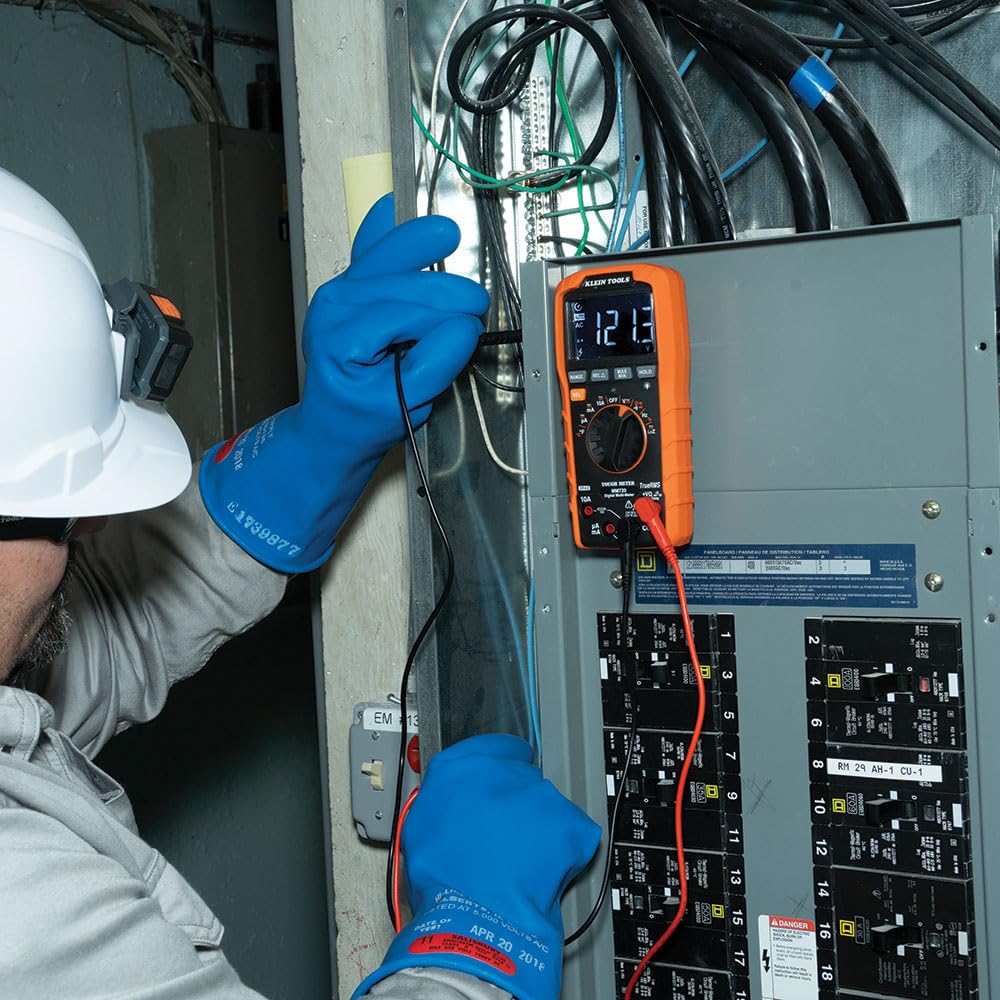
The image above illustrates an electrician using the MM720 to measure voltage within an electrical panel, demonstrating proper probe placement.
6.3.2 കറന്റ് മെഷർമെന്റ് (എസി/ഡിസി)
- Rotate the switch to 10A~ (AC Current), 10A- (DC Current), mA~ (AC mA), mA- (DC mA), µA~ (AC µA), or µA- (DC µA). Use the SEL button to toggle if needed.
- Connect the red lead to the appropriate current input (10A or mAµA) and the black lead to COM.
- പ്രധാനപ്പെട്ടത്: Connect the meter in series with the circuit to measure current. Never connect in parallel across a voltage source when in current mode.

The image above shows an electrician measuring current in an electrical panel, highlighting the series connection required for accurate current readings.
6.3.3 പ്രതിരോധം അളക്കൽ
- Rotate the switch to Ω.
- Connect the red lead to VΩHzCAPTemp and the black lead to COM.
- പ്രതിരോധം അളക്കുന്നതിന് മുമ്പ് സർക്യൂട്ട് അല്ലെങ്കിൽ ഘടകം ഡീ-എനർജൈസ് ചെയ്തിട്ടുണ്ടെന്ന് ഉറപ്പാക്കുക.
- Apply probes across the component.
6.3.4 തുടർച്ച പരിശോധന
- Rotate the switch to the continuity/diode position (often indicated by a speaker icon). Press SEL if needed to select continuity.
- Connect the red lead to VΩHzCAPTemp and the black lead to COM.
- Apply probes across the circuit or component. A continuous beep indicates continuity.
6.3.5 ഡയോഡ് ടെസ്റ്റ്
- Rotate the switch to the continuity/diode position. Press SEL to select diode test (often indicated by a diode symbol).
- Connect the red lead to VΩHzCAPTemp and the black lead to COM.
- Apply probes across the diode. The display will show the forward voltage drop. Reverse the leads to check for open circuit.
6.3.6 ശേഷി അളക്കൽ
- Rotate the switch to the capacitance position (often indicated by a capacitor symbol).
- Connect the red lead to VΩHzCAPTemp and the black lead to COM.
- പരിശോധിക്കുന്നതിന് മുമ്പ് കപ്പാസിറ്റർ പൂർണ്ണമായും ഡിസ്ചാർജ് ചെയ്തിട്ടുണ്ടെന്ന് ഉറപ്പാക്കുക.
- Apply probes across the capacitor terminals.
6.3.7 Frequency/Duty Cycle Measurement
- Rotate the switch to the Hz/% position.
- Connect the red lead to VΩHzCAPTemp and the black lead to COM.
- Apply probes to the signal source. Press SEL to toggle between frequency (Hz) and duty cycle (%).
6.3.8 താപനില അളക്കൽ
- Rotate the switch to the °F/°C position.
- Connect the thermocouple probe to the VΩHzCAPTemp and COM input jacks, observing polarity.
- Place the tip of the thermocouple on the object or area where temperature is to be measured. Press SEL to toggle between Fahrenheit and Celsius.
6.3.9 Low Impedance (LoZ) Mode
- Rotate the switch to the LoZ position.
- Connect the red lead to VΩHzCAPTemp and the black lead to COM.
- This mode applies a low impedance load across the circuit to drain ghost voltages, providing a more accurate reading of actual voltage.
7. പരിപാലനം
7.1 വൃത്തിയാക്കൽ
Ensure the meter is turned off and disconnected from all circuits. Wipe the meter with a clean, dry, lint-free cloth. Do not use abrasive cleaners or solvents.
7.2 ബാറ്ററി മാറ്റിസ്ഥാപിക്കൽ
When the low battery indicator appears on the display, replace the batteries as described in Section 5.1. Failure to do so may result in inaccurate readings.
7.3 ഫ്യൂസ് മാറ്റിസ്ഥാപിക്കൽ
If the current measurement functions cease to operate, the internal fuses may need replacement. Refer to the full user manual for detailed instructions on fuse replacement. This procedure typically requires opening the meter casing and should only be performed by qualified personnel.
7.4 സംഭരണം
When not in use for extended periods, remove the batteries to prevent leakage. Store the meter and its accessories in the provided carrying case in a cool, dry environment, away from direct sunlight and extreme temperatures.
8. പ്രശ്നപരിഹാരം
If the meter is not functioning correctly, review ഇനിപ്പറയുന്ന പൊതുവായ പ്രശ്നങ്ങൾ:
- ഡിസ്പ്ലേ ഇല്ല: Check if the batteries are correctly installed and have sufficient charge. Replace if necessary. Ensure the rotary switch is not in the OFF position.
- കൃത്യമല്ലാത്ത വായനകൾ: Verify that the correct function is selected for the measurement. Check test lead connections and ensure they are not damaged. Replace batteries if the low battery indicator is on.
- കറന്റ് അളക്കൽ പ്രവർത്തിക്കുന്നില്ല: Check the internal fuses. If blown, they need to be replaced (refer to Section 7.3). Ensure test leads are connected to the correct current input jacks.
- "OL" (Overload) Display: This indicates that the input value exceeds the selected range or the meter's maximum capability. Select a higher range if available, or ensure the measurement is within the meter's specifications.
For persistent issues, contact Klein Tools customer support.
9 സ്പെസിഫിക്കേഷനുകൾ
Below are the technical specifications for the Klein Tools MM720 Digital Multimeter.
| സ്പെസിഫിക്കേഷൻ | മൂല്യം |
|---|---|
| മോഡൽ നമ്പർ | MM720 |
| എസി/ഡിസി വോളിയംtage | 1000V വരെ |
| എസി / ഡിസി കറന്റ് | 10A വരെ |
| പ്രതിരോധം | 60 MΩ വരെ |
| താപനില പരിധി | -40°F മുതൽ 1832°F വരെ (-40°C മുതൽ 1000°C വരെ) |
| കപ്പാസിറ്റൻസ് | അതെ |
| ഫ്രീക്വൻസി / ഡ്യൂട്ടി സൈക്കിൾ | അതെ |
| ഡയോഡ് ടെസ്റ്റ് | അതെ |
| തുടർച്ച | അതെ |
| Low Impedance (LoZ) | അതെ |
| യഥാർത്ഥ RMS | അതെ |
| ഓട്ടോ-റേഞ്ചിംഗ് | അതെ |
| പ്രദർശിപ്പിക്കുക | High visibility, reverse contrast LCD |
| സുരക്ഷാ റേറ്റിംഗ് | CAT IV 600V, CAT III 1000V |
| ഇൻഗ്രെസ്സ് പ്രൊട്ടക്ഷൻ (IP) റേറ്റിംഗ് | IP42 |
| ഡ്രോപ്പ് പ്രൊട്ടക്ഷൻ | 6.6-Foot (2 m) |
| പവർ ഉറവിടം | 2 x AAA ബാറ്ററികൾ |
| ഉൽപ്പന്ന അളവുകൾ | 10.63 x 5.87 x 3.73 ഇഞ്ച് |
| ഇനത്തിൻ്റെ ഭാരം | 12.17 ഔൺസ് (345 ഗ്രാം) |

The image above provides a comparison table detailing the features of the MM720 alongside other Klein Tools multimeter models, allowing for a quick overview of its capabilities relative to similar products.
10. വാറൻ്റിയും പിന്തുണയും
Klein Tools products are manufactured to high standards of quality and durability. For specific warranty information, please refer to the warranty card included with your product or visit the official Klein Tools webസൈറ്റ്.
For technical support, service, or replacement parts, please contact Klein Tools customer service. You can find more information and contact details by visiting the Klein Tools Store.


