1. ആമുഖം
The Poolin EOC2720 Computerized Sewing Machine is designed for a wide range of sewing projects, offering 293 stitch applications, including 200 decorative stitches and 100 alphabet stitches. Its user-friendly features, such as self-threading and one-click operations, make it suitable for both beginners and experienced sewers. This manual provides essential information for safe and effective use of your new sewing machine.

Figure 1: Poolin EOC2720 Computerized Sewing Machine overview.
ഉൽപ്പന്നം കഴിഞ്ഞുview വീഡിയോ
വീഡിയോ 1: ഒരു ഓവർview of the Computerized Sewing Machine, highlighting its key features and design.
2. സജ്ജീകരണം
2.1 Checking Accessories
Before starting, ensure all accessories are present. The machine comes with a variety of presser feet, needles, bobbins, and other tools stored in the accessory box.

Figure 2: Included accessories for the Poolin EOC2720 sewing machine.
2.2 പവർ ഓൺ/ഓഫ്
To power on the machine, locate the power switch at the back. Ensure the machine is placed on a stable surface. The machine can be operated using the start/stop button or the foot pedal.
Video 2: Demonstrates how to power on and off the sewing machine and the different control methods.
2.3 Attaching the Expansion Table
For larger projects like quilts, attach the included expansion table to provide a wider working surface.

Figure 3: The expansion table provides additional workspace for large sewing projects.
2.4 ബോബിൻ വൈൻഡിംഗ്
Proper bobbin winding is crucial for consistent stitching. Follow these steps to wind your bobbin correctly.
Video 3: A step-by-step guide on how to wind the bobbin for the Poolin EOC2720.
2.5 മെഷീനിൽ ത്രെഡിംഗ്
Accurate threading ensures smooth operation and prevents skipped stitches or thread breakage. The machine features a self-threading mechanism for convenience.
Video 4: Instructions on how to thread the machine for single needle sewing mode.

Figure 4: The convenient drop-in top bobbin system.
3. മെഷീൻ പ്രവർത്തിപ്പിക്കുക
3.1 അടിസ്ഥാന നിയന്ത്രണങ്ങൾ
The EOC2720 features intuitive controls for ease of use. The start/stop button allows for hands-free operation, while the speed dial adjusts sewing pace. The needle position button lifts the bobbin thread with one click.
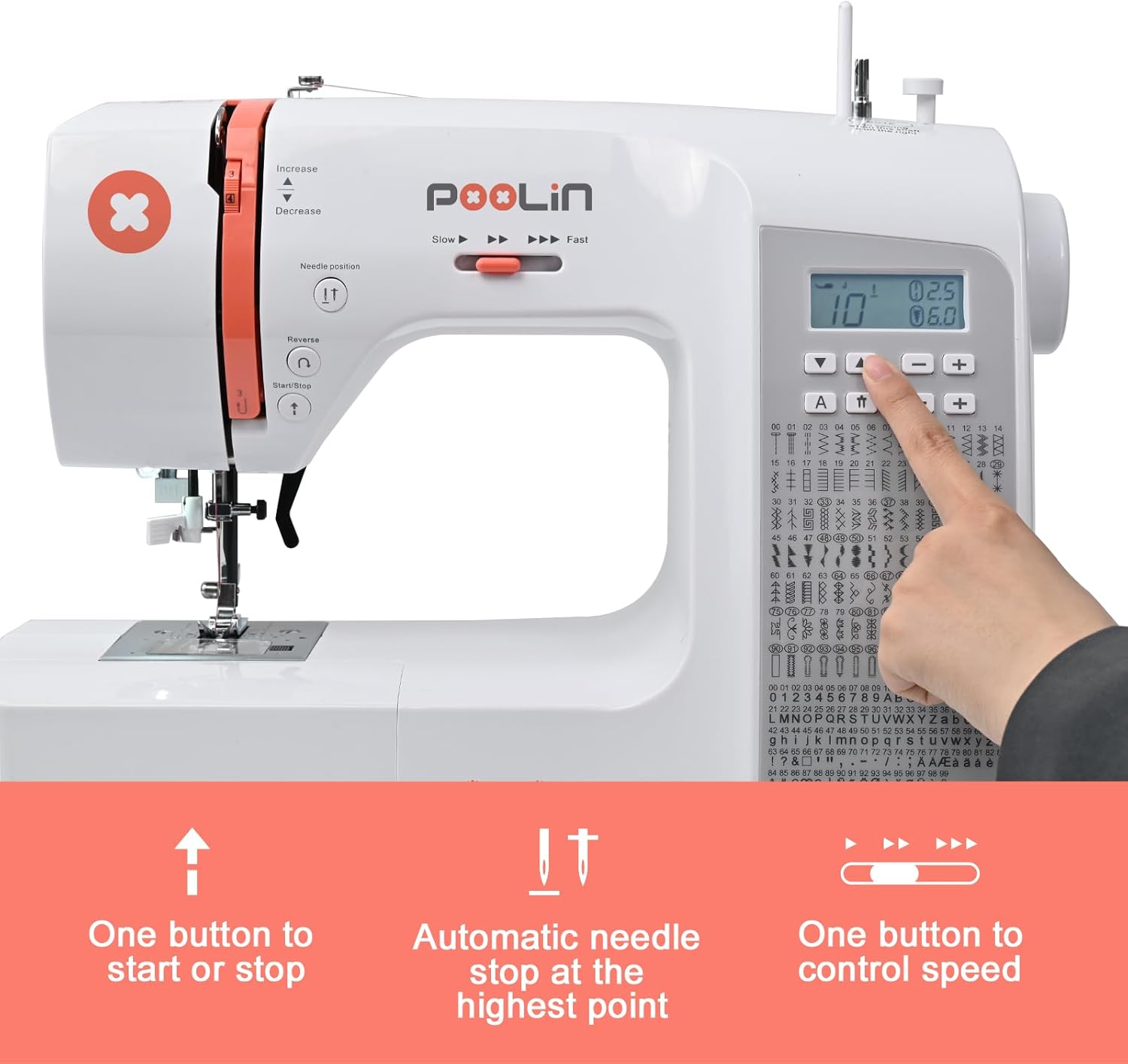
Figure 5: Key control buttons for starting, stopping, and adjusting speed.
3.2 തുന്നൽ തിരഞ്ഞെടുപ്പും ക്രമീകരണവും
Select from 200 built-in stitches and 100 alphabet stitches using the control panel. Adjust stitch length and width to customize your projects.

Figure 6: A visual guide to the available stitch patterns, including decorative and alphabet options.
Video 5: Learn how to select and adjust stitches for single needle sewing mode.
3.3 Using Specialty Presser Feet
The machine comes with 7 presser feet for various sewing tasks. Replace the standard presser foot with the appropriate one for your project.
- Buttonhole Foot: For creating perfect buttonholes.
- Zipper Foot: For easily sewing zippers.
- Blind Stitch Foot: For invisible hems.
- Button Foot: For attaching buttons.

ബട്ടൺഹോൾ കാൽ

സിപ്പർ കാൽ

ബ്ലൈൻഡ് സ്റ്റിച്ച് ഫൂട്ട്

Button Foot
Buttonhole Sewing
Video 6: Detailed instructions on how to sew buttonholes using the specialized presser foot.
സിപ്പർ തയ്യൽ
Video 7: Guide to using the zipper foot for precise zipper installation.
3.4 Number and Letter Sewing Mode
Personalize your projects with custom text using the number and letter sewing mode.
Video 8: Instructions on how to use the number and letter sewing mode.
3.5 Double Needle Sewing Mode
For parallel stitching, use the double needle sewing mode. Ensure proper threading for both needles.
Video 9: Learn how to set up and use the double needle sewing mode.
4. Project Exampലെസ്
The Poolin EOC2720 is versatile for various projects, from garments to home decor.
Video 10: Example of making canvas bags with the EOC2720 sewing machine.
Video 11: Creating coasters from scrap fabric using the EOC2720 sewing machine.
5. പരിപാലനം
Regular maintenance ensures the longevity and optimal performance of your sewing machine. Keep the machine clean from lint and dust, especially around the bobbin area and feed dogs. Refer to the detailed user guide for specific cleaning and lubrication instructions.
Always ensure the machine is unplugged before performing any maintenance or cleaning.

Figure 7: The metal frame ensures durability and stability for consistent sewing.
6. പ്രശ്നപരിഹാരം
The Poolin EOC2720 is designed with error prompts to assist in problem-solving. If you encounter issues such as skipped stitches, thread breakage, or tension problems, consult the troubleshooting section of the comprehensive user guide. Many common issues can be resolved by re-threading the machine, checking bobbin installation, or adjusting tension settings.
For complex issues, refer to the technical support options mentioned in the Warranty & Support section.
7 സ്പെസിഫിക്കേഷനുകൾ
| ഫീച്ചർ | വിശദാംശങ്ങൾ |
|---|---|
| ഉൽപ്പന്ന അളവുകൾ | 7.48 x 16.14 x 12.2 ഇഞ്ച് |
| ഇനത്തിൻ്റെ ഭാരം | 13.1 പൗണ്ട് |
| മോഡൽ നമ്പർ | EOC2720 |
| തുന്നൽ ആപ്ലിക്കേഷനുകൾ | 293 (200 stitches + 100 alphabet stitches) |
| Presser Feet Included | 7 |
| നിറം | വെള്ള |

Figure 8: Detailed dimensions of the Poolin EOC2720 sewing machine.
8. വാറണ്ടിയും പിന്തുണയും
Poolin is committed to providing excellent customer support. Your machine has been tested before leaving the factory to ensure normal operation.
8.1 Free Training & Technical Support
A dedicated support team is available to guide you through assembly, threading, and testing, helping you overcome the learning curve quickly.
8.2 Social Media Support
Join the "Poolin Embroidery & Sewing Machine" user group on social media to connect with other users for tips and tricks. Access a variety of helpful video tutorials by searching "POOLIN Sewing Machine" on video platforms.
For additional assistance, you can download the official User Guide (PDF) from the product page or contact Poolin customer service directly.


