ഉൽപ്പന്നം കഴിഞ്ഞുview
The Karlsson Silver Mirror LED Oval Alarm Clock (Model: PTG-KA5876BK) is a modern digital alarm clock designed for clear time display and reliable alarm functionality. Its sleek design features an oval mirror LED screen, making it a functional and aesthetic addition to any space.

ചിത്രം: മുൻഭാഗം view of the Karlsson Silver Mirror LED Oval Alarm Clock, showing the digital display set to 20:00. The clock has a black frame and a reflective screen.
സജ്ജീകരണ ഗൈഡ്
അലാറം ക്ലോക്ക് പവർ ചെയ്യുന്നു
The alarm clock can be powered using either AAA batteries or a DC 5V USB power source.
- ബാറ്ററി ഇൻസ്റ്റാളേഷൻ:
Locate the battery compartment on the back of the alarm clock. Open the cover and insert 3x AAA batteries, ensuring correct polarity (+/-). Close the battery compartment cover securely.

ചിത്രം: പിൻഭാഗം view of the alarm clock, highlighting the battery compartment with an "OPEN" label and the DC 5V power input port.
- USB Power Connection:
Connect the provided USB cable to the DC 5V input port on the back of the alarm clock. Plug the other end of the USB cable into a compatible USB power adapter (not included) or a USB port on a computer or power bank.

Image: A coiled black USB power cable, used for connecting the alarm clock to a power source.
Upon successful power connection, the digital display will illuminate.
പ്രവർത്തന നിർദ്ദേശങ്ങൾ
The alarm clock features several buttons on its top surface for various functions:
- അലാറം: Used to set and activate/deactivate the alarm.
- വഴികൾ: Used to switch between time display, alarm setting, and other modes.
- പ്രകാശം/സ്നൂസ്: Used to adjust display brightness or activate the snooze function when the alarm sounds.
- യു.പി.: Used to increase values during setting or navigate menus.
- ഡ: ൺ: Used to decrease values during setting or navigate menus.
സമയം ക്രമീകരിക്കുന്നു
- അമർത്തുക മോഡ് button once to enter time setting mode. The hour digits will flash.
- ഉപയോഗിക്കുക UP or താഴേക്ക് മണിക്കൂർ ക്രമീകരിക്കാനുള്ള ബട്ടണുകൾ.
- അമർത്തുക മോഡ് വീണ്ടും ബട്ടൺ അമർത്തുക. മിനിറ്റുകണക്കുകൾ മിന്നിമറയും.
- ഉപയോഗിക്കുക UP or താഴേക്ക് മിനിറ്റ് ക്രമീകരിക്കാൻ ബട്ടണുകൾ.
- അമർത്തുക മോഡ് സമയ ക്രമീകരണ മോഡ് സ്ഥിരീകരിക്കാനും പുറത്തുകടക്കാനും മൂന്നാം തവണ ബട്ടൺ അമർത്തുക.
അലാറം സജ്ജീകരിക്കുന്നു
- അമർത്തുക അലാറം button once to enter alarm setting mode. The alarm hour digits will flash.
- ഉപയോഗിക്കുക UP or താഴേക്ക് അലാറം സമയം ക്രമീകരിക്കാനുള്ള ബട്ടണുകൾ.
- അമർത്തുക അലാറം വീണ്ടും ബട്ടൺ അമർത്തുക. അലാറം മിനിറ്റ് അക്കങ്ങൾ മിന്നിമറയും.
- ഉപയോഗിക്കുക UP or താഴേക്ക് അലാറം മിനിറ്റ് ക്രമീകരിക്കാനുള്ള ബട്ടണുകൾ.
- അമർത്തുക അലാറം button a third time to confirm and exit alarm setting mode.
- അലാറം സജീവമാക്കാനോ നിർജ്ജീവമാക്കാനോ, അമർത്തുക അലാറം button briefly when not in setting mode. An alarm icon will appear on the display when activated.
Snooze Function and Display Brightness
- സ്നൂസ്: അലാറം മുഴങ്ങുമ്പോൾ, അമർത്തുക ലൈറ്റ് / സ്നൂസ് button to temporarily silence the alarm. The alarm will sound again after a set snooze interval (e.g., 5-10 minutes).
- പ്രദർശന തെളിച്ചം: അമർത്തുക ലൈറ്റ് / സ്നൂസ് button when the alarm is not sounding to cycle through different brightness levels of the LED display.

Image: The Karlsson alarm clock showing the time 14:52, placed on a dark surface, possibly a bedside table, with a wristwatch in the foreground.
പരിപാലനവും പരിചരണവും
- വൃത്തിയാക്കൽ: ക്ലോക്ക് വൃത്തിയാക്കാൻ, മൃദുവായതും ഉണങ്ങിയതുമായ ഒരു തുണി ഉപയോഗിച്ച് പ്രതലം സൌമ്യമായി തുടയ്ക്കുക. കഠിനമായ അടയാളങ്ങൾക്ക്, അല്പം damp cloth can be used, followed by immediate drying. Do not use abrasive cleaners, solvents, or strong chemicals, as these may damage the finish or display.
- ബാറ്ററി മാറ്റിസ്ഥാപിക്കൽ: If using batteries, replace them when the display dims or functions become erratic. Always replace all batteries at the same time with new ones of the same type.
- പ്ലേസ്മെൻ്റ്: Avoid placing the clock in direct sunlight, near heat sources, or in areas with high humidity, as these conditions can affect performance and lifespan.
ട്രബിൾഷൂട്ടിംഗ്
| പ്രശ്നം | സാധ്യമായ കാരണം | പരിഹാരം |
|---|---|---|
| ഡിസ്പ്ലേ ശൂന്യമോ മങ്ങിയതോ ആണ്. | No power, low batteries, or incorrect power connection. | Ensure batteries are correctly installed and not depleted. Check USB cable connection and power adapter. |
| അലാറം മുഴങ്ങുന്നില്ല. | Alarm not activated, alarm volume too low (if adjustable), or incorrect alarm time set. | Verify alarm is activated (check for alarm icon on display). Re-set the alarm time. |
| സമയം തെറ്റാണ്. | Time was not set correctly or power interruption. | Re-set the current time following the "Setting the Time" instructions. |
സ്പെസിഫിക്കേഷനുകൾ
| ഫീച്ചർ | വിശദാംശങ്ങൾ |
|---|---|
| മോഡൽ നമ്പർ | പി.ടി.ജി-കെ.എ.5876ബി.കെ. |
| ബ്രാൻഡ് | കാൾസൺ |
| മെറ്റീരിയൽ | അക്രിലോണിട്രൈൽ ബ്യൂട്ടാഡീൻ സ്റ്റൈറൈൻ (എബിഎസ്) |
| നിറം | കറുപ്പ് |
| ഡിസ്പ്ലേ തരം | ഡിജിറ്റൽ LED |
| പവർ ഉറവിടം | 3x AAA Batteries (not included) or DC 5V USB |
| ഉൽപ്പന്ന അളവുകൾ (W x H x D) | 12.2 cm x 6 cm x 4 cm (approx. 12W x 6H cm) |
| ഭാരം | 200 ഗ്രാം |
| പ്രത്യേക സവിശേഷതകൾ | Alarm, Snooze, Adjustable Display Brightness |
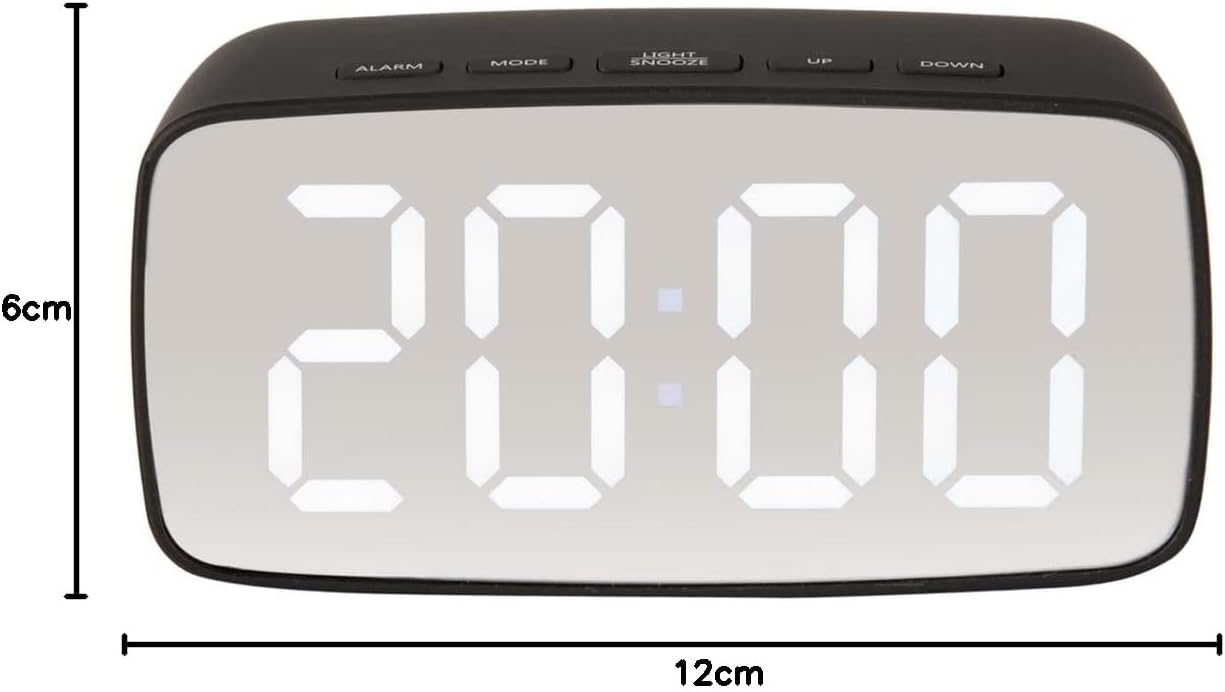
ചിത്രം: മുൻഭാഗം view of the alarm clock with overlaid measurements indicating a width of 12cm and a height of 6cm.


