1. ആമുഖം
This manual provides essential information for the safe and efficient operation of the MATRIX MPS-3010H-1FBM Adjustable Linear DC Power Supply. This high-precision laboratory power supply features a 5-digit display, SENSE setting for voltage compensation, and a toroidal transformer design. It offers voltage accuracy of ≤0.01%+10mV and current accuracy of ≤0.1%+10mA. Key functionalities include memory data storage and OVP/OCP (Over Voltage Protection/Over Current Protection) settings for enhanced safety.
2 സുരക്ഷാ വിവരങ്ങൾ
ഉപകരണത്തിന് പരിക്കേൽക്കുന്നതും കേടുപാടുകൾ സംഭവിക്കുന്നതും തടയാൻ ഇനിപ്പറയുന്ന സുരക്ഷാ മുൻകരുതലുകൾ എപ്പോഴും പാലിക്കുക:
- Ensure the power supply is connected to a grounded outlet.
- വെറ്റ് അല്ലെങ്കിൽ ഡിയിൽ ഉപകരണം പ്രവർത്തിപ്പിക്കരുത്amp വ്യവസ്ഥകൾ.
- ഇൻപുട്ട് വോളിയം പരിശോധിക്കുകtage selector switch (110V/220V) on the rear panel matches your local power supply before connecting.
- ഔട്ട്പുട്ട് ടെർമിനലുകളിൽ ഷോർട്ട് സർക്യൂട്ട് ഒഴിവാക്കുക.
- സി തുറക്കരുത്.asing; ഉള്ളിൽ ഉപയോക്തൃ-സേവനയോഗ്യമായ ഭാഗങ്ങളില്ല. യോഗ്യതയുള്ള ഉദ്യോഗസ്ഥരെ സർവീസ് ചെയ്യാൻ റഫർ ചെയ്യുക.
- അമിതമായി ചൂടാക്കുന്നത് തടയാൻ ശരിയായ വായുസഞ്ചാരം ഉറപ്പാക്കുക.
3. ഉൽപ്പന്നം കഴിഞ്ഞുview
The MPS-3010H-1FBM is a linear DC power supply designed for laboratory and industrial applications requiring precise and stable power output. It features a robust design with advanced protection mechanisms.
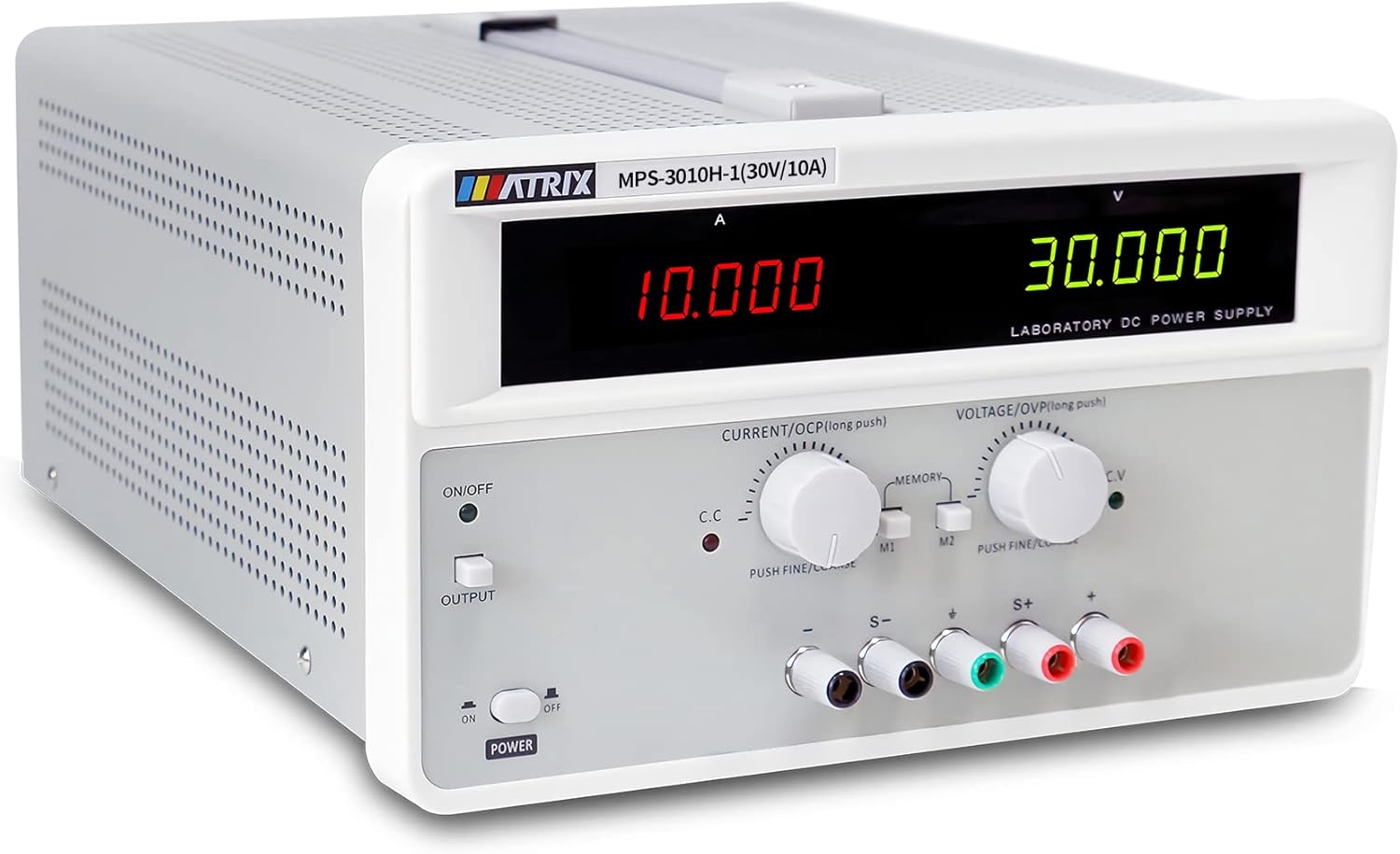
ചിത്രം 3.1: മുൻഭാഗം view of the MPS-3010H-1FBM power supply, showing the digital displays and control knobs.
3.1 ഫ്രണ്ട് പാനൽ വിവരണം

ചിത്രം 3.2: വിശദമായി view of the front panel with labels for each control and display element.
- Current Display Window: ഔട്ട്പുട്ട് കറന്റ് കാണിക്കുന്നത് Ampഈറസ് (എ).
- വാല്യംtage Display Window: ഔട്ട്പുട്ട് വോളിയം കാണിക്കുന്നുtage വോൾട്ടുകളിൽ (V).
- Output Switch Menu Function Key: Toggles the output on/off.
- Current Regulation Knob (OCP Setting): Adjusts the output current limit. Push for fine/coarse adjustment. Long push for OCP setting.
- വാല്യംtage Regulation Knob (OVP Setting): ഔട്ട്പുട്ട് വോളിയം ക്രമീകരിക്കുന്നുtage. Push for fine/coarse adjustment. Long push for OVP setting.
- Store/Call Buttons (M1, M2): പ്രീസെറ്റ് വോളിയം സേവ് ചെയ്യാനും തിരിച്ചുവിളിക്കാനും ഉപയോഗിക്കുന്നുtagഇ/നിലവിലെ മൂല്യങ്ങൾ.
- Instrument Power Switch: യൂണിറ്റിനുള്ള പ്രധാന പവർ സ്വിച്ച്.
- Output Terminal Negative Terminal (-): Connects to the negative side of the load.
- ഗ്രൗണ്ടിംഗ് ടെർമിനൽ: സുരക്ഷാ ഗ്രൗണ്ടിംഗിനായി.
- Remote Compensation Terminals (S-, S+): Used for remote sensing to compensate for voltage drop across load wires.
- Positive End of Output Terminal (+): Connects to the positive side of the load.
3.2 പിൻ പാനൽ വിവരണം
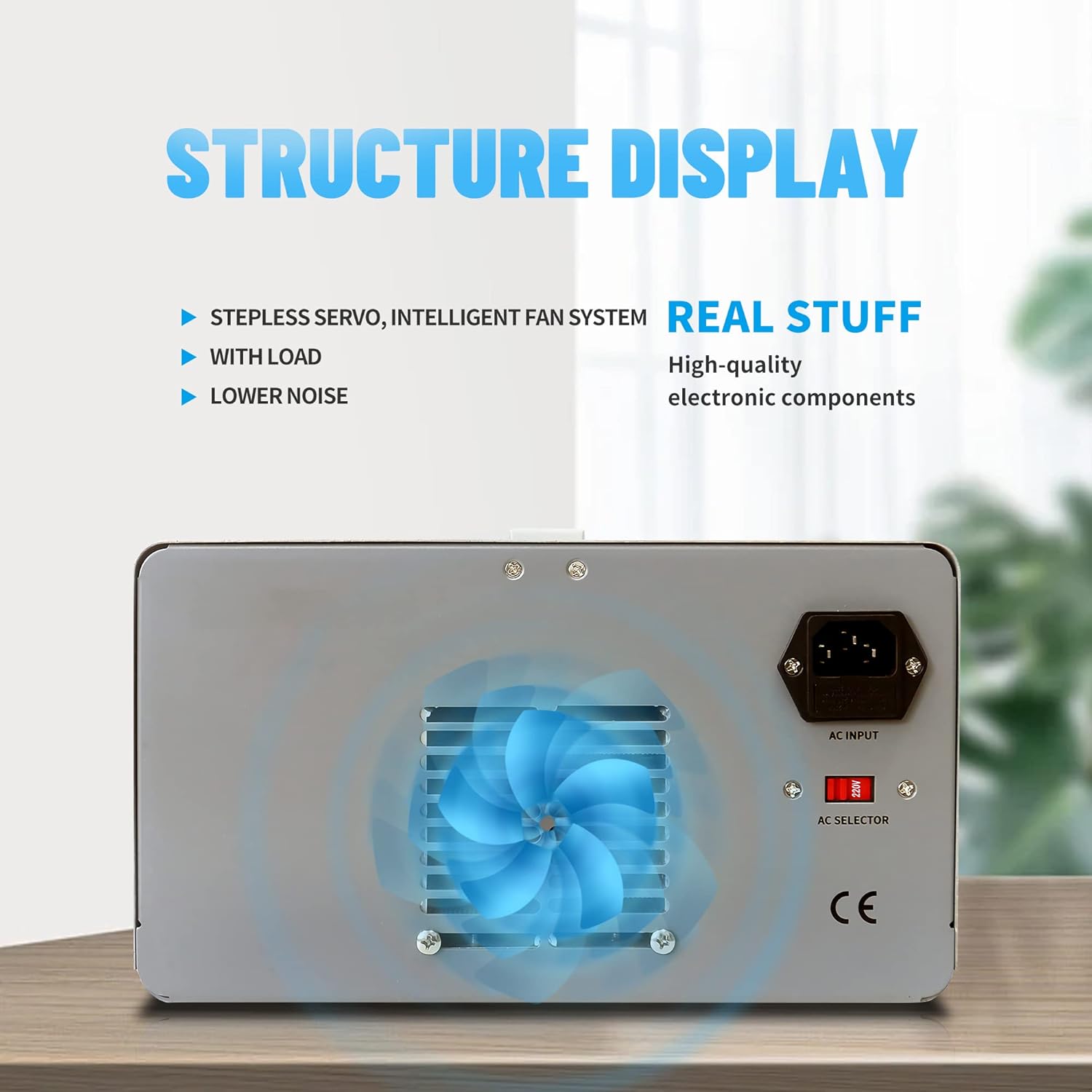
Figure 3.3: Rear panel of the power supply, highlighting the cooling fan and AC input.
- എസി ഇൻപുട്ട് സോക്കറ്റ്: For connecting the main power cord.
- AC Selector Switch (110V/220V): ഉചിതമായ ഇൻപുട്ട് വോളിയം തിരഞ്ഞെടുക്കുന്നുtage.
- കൂളിംഗ് ഫാൻ: Provides air circulation for heat dissipation.
4. സജ്ജീകരണം
Follow these steps to set up your power supply:
- അൺപാക്ക് ചെയ്യുന്നു: Carefully remove the power supply from its packaging. Inspect for any signs of damage.
- പ്ലേസ്മെൻ്റ്: Place the unit on a stable, level surface with adequate ventilation around the rear cooling fan.
- ഇൻപുട്ട് വോളിയംtagഇ തിരഞ്ഞെടുക്കൽ: Locate the AC selector switch on the rear panel. Ensure it is set to match your local mains voltagഇ (110V അല്ലെങ്കിൽ 220V). Incorrect setting can damage the unit.

Figure 4.1: AC input and voltagഇ സെലക്ടർ സ്വിച്ച്.
- പവർ കണക്ഷൻ: Connect the provided power cord to the AC input socket on the rear panel and then to a grounded wall outlet.
- Output Cable Connection: Connect the provided banana-to-alligator clip cables to the output terminals (+ and -) on the front panel. The red cable connects to the positive (+) terminal, and the black cable connects to the negative (-) terminal. Ensure connections are secure.

Figure 4.2: Output terminals for connecting load cables.
5. പ്രവർത്തന നിർദ്ദേശങ്ങൾ
5.1 അടിസ്ഥാന പ്രവർത്തനം
- പവർ ഓൺ: Flip the Instrument Power Switch on the front panel to the 'ON' position. The display will illuminate.
- വോളിയം സജ്ജമാക്കുകtage: Rotate the Voltage Regulation Knob to adjust the desired output voltage. Push the knob for fine adjustment, release for coarse adjustment.
- നിലവിലെ പരിധി സജ്ജമാക്കുക: Rotate the Current Regulation Knob to set the maximum output current limit. Push the knob for fine adjustment, release for coarse adjustment. This acts as a current protection threshold.
- ഔട്ട്പുട്ട് പ്രാപ്തമാക്കുക: Press the Output Switch Menu Function Key to enable the power output. The 'OUTPUT' indicator will light up. The voltage and current displays will show the actual output values.

Figure 5.1: Output ON/OFF switch.
- കണക്റ്റ് ലോഡ്: With the output disabled, connect your load to the output terminals. Ensure correct polarity.
- Output ട്ട്പുട്ട് നിരീക്ഷിക്കുക: The 5-digit displays provide real-time readings of the output voltagഇയും കറൻ്റും.

Figure 5.2: High-resolution current display.
- പവർ ഓഫ്: Press the Output Switch Menu Function Key to disable the output, then flip the Instrument Power Switch to 'OFF'.
5.2 മെമ്മറി പ്രവർത്തനം
The power supply allows you to save and recall two sets of voltage and current settings (M1, M2).
- സേവിംഗ് ക്രമീകരണങ്ങൾ:
- വോളിയം ക്രമീകരിക്കുകtage Regulation Knob and Current Regulation Knob to your desired values.
- ഒന്നുകിൽ അമർത്തിപ്പിടിക്കുക M1 or M2 button until a confirmation beep or indicator appears, indicating the settings are saved.
- ക്രമീകരണങ്ങൾ തിരിച്ചുവിളിക്കുന്നു:
- ചുരുക്കത്തിൽ അമർത്തുക M1 or M2 button. The saved voltage and current values will be loaded and displayed.

Figure 5.3: Control knobs and memory function buttons.
5.3 OVP/OCP Settings (Over Voltage/Current Protection)
The unit features adjustable Over Voltage Protection (OVP) and Over Current Protection (OCP) to safeguard connected devices and the power supply itself.
- Setting OVP:
- With the output disabled, long-press the Voltage Regulation Knob. The display will show the current OVP setting.
- Rotate the knob to adjust the OVP threshold. This value should be set slightly above your desired maximum operating voltage.
- Briefly press the knob again to confirm and exit OVP setting mode.
- Setting OCP:
- With the output disabled, long-press the Current Regulation Knob. The display will show the current OCP setting.
- Rotate the knob to adjust the OCP threshold. This value should be set slightly above your desired maximum operating current.
- Briefly press the knob again to confirm and exit OCP setting mode.
6. പരിപാലനം
ശരിയായ അറ്റകുറ്റപ്പണി നിങ്ങളുടെ വൈദ്യുതി വിതരണത്തിന്റെ ദീർഘായുസ്സും വിശ്വസനീയമായ പ്രവർത്തനവും ഉറപ്പാക്കുന്നു.
- വൃത്തിയാക്കൽ: വൃത്തിയാക്കുന്നതിന് മുമ്പ് മെയിനിൽ നിന്ന് വൈദ്യുതി വിതരണം വിച്ഛേദിക്കുക. പുറംഭാഗം തുടയ്ക്കാൻ മൃദുവായതും ഉണങ്ങിയതുമായ തുണി ഉപയോഗിക്കുക. അബ്രസീവ് ക്ലീനറുകളോ ലായകങ്ങളോ ഉപയോഗിക്കരുത്.
- വെൻ്റിലേഷൻ: Ensure the ventilation holes and cooling fan on the rear panel are free from dust and obstructions. Periodically clean with compressed air if necessary.
- സംഭരണം: When not in use for extended periods, store the power supply in a dry, dust-free environment.

Figure 6.1: Heat dissipation holes for optimal cooling.
7. പ്രശ്നപരിഹാരം
പൊതുവായ പ്രശ്നങ്ങളും അവയുടെ പരിഹാരങ്ങളും അറിയാൻ ഈ വിഭാഗം കാണുക.
| പ്രശ്നം | സാധ്യമായ കാരണം | പരിഹാരം |
|---|---|---|
| സ്വിച്ച് ഓൺ ചെയ്യുമ്പോൾ വൈദ്യുതിയില്ല | Power cord not connected; AC selector switch incorrect; Blown fuse | Check power cord connection; Verify AC selector switch setting; Replace fuse (refer to qualified personnel) |
| ട്ട്പുട്ട് വോളിയം ഇല്ലtagഇ/കറൻ്റ് | Output switch is OFF; OVP/OCP triggered; Load disconnected or faulty | Press the Output switch; Check OVP/OCP settings and reset if necessary; Verify load connection and functionality |
| Putട്ട്പുട്ട് വോളിയംtagഇ/കറന്റ് അസ്ഥിരം | Poor load connection; Overheating; Internal fault | Check load connections; Ensure adequate ventilation; Contact support if problem persists |
| ഫാൻ പ്രവർത്തിക്കുന്നില്ല | Unit not under load/not hot enough (intelligent fan control); Fan fault | Fan operates based on temperature; If unit is hot and fan is off, contact support |
8 സ്പെസിഫിക്കേഷനുകൾ
Technical specifications for the MPS-3010H-1FBM model:
- മോഡൽ: MPS-3010H-1FBM
- Putട്ട്പുട്ട് വോളിയംtage: 0-30V (ക്രമീകരിക്കാവുന്നത്)
- ഔട്ട്പുട്ട് കറൻ്റ്: 0-10A (ക്രമീകരിക്കാവുന്നത്)
- ഔട്ട്പുട്ട് വാട്ട്tage: 300 വാട്ട്സ്
- വാല്യംtagഇ കൃത്യത: ≤0.01%+10mV
- നിലവിലെ കൃത്യത: ≤0.1%+10mA
- ഡിസ്പ്ലേ: 5-ഡിജിറ്റൽ LED
- ഇൻപുട്ട് വോളിയംtage: 110V/220V AC (Switchable)
- തണുപ്പിക്കൽ രീതി: എയർ (ഇന്റലിജന്റ് ഫാൻ കൺട്രോൾ)
- ആരാധക എണ്ണം: 1
- ഇനത്തിൻ്റെ ഭാരം: 29 പൗണ്ട്
- പാക്കേജ് അളവുകൾ: 17 x 14 x 10 ഇഞ്ച്

Figure 8.1: Product dimensions (approximate).
9. വാറൻ്റിയും പിന്തുണയും
The MATRIX MPS-3010H-1FBM Adjustable Linear DC Power Supply comes with a 3 വർഷത്തെ വാറൻ്റി വാങ്ങിയ തീയതി മുതൽ. സാധാരണ ഉപയോഗത്തിലുള്ള മെറ്റീരിയലുകളിലെയും വർക്ക്മാൻഷിപ്പുകളിലെയും വൈകല്യങ്ങൾ ഈ വാറന്റി ഉൾക്കൊള്ളുന്നു.
For technical support, warranty claims, or service inquiries, please contact MATRIX customer service. Refer to the official MATRIX webബന്ധപ്പെടാനുള്ള വിശദാംശങ്ങൾക്ക് സൈറ്റ് അല്ലെങ്കിൽ നിങ്ങളുടെ വാങ്ങൽ ഡോക്യുമെന്റേഷൻ.


