1. ആമുഖം
This manual provides essential information for the safe and effective operation of your Goopow Kids Digital Video Camcorder Camera. Designed for children aged 3-8, this camera features photo capture, video recording, playback, and built-in games. Please read this manual thoroughly before use and retain it for future reference.
2. പാക്കേജ് ഉള്ളടക്കം
എല്ലാ ഇനങ്ങളും ഉണ്ടെന്ന് ഉറപ്പാക്കാൻ പാക്കേജ് പരിശോധിക്കുക:
- 1 x Goopow Kids Camera
- 1 x USB കേബിൾ
- 1 x 32GB മെമ്മറി കാർഡ്
- 1 X കാർഡ് റീഡർ
- 1 x ലാനിയാർഡ്
- 1 x ഉപയോക്തൃ മാനുവൽ
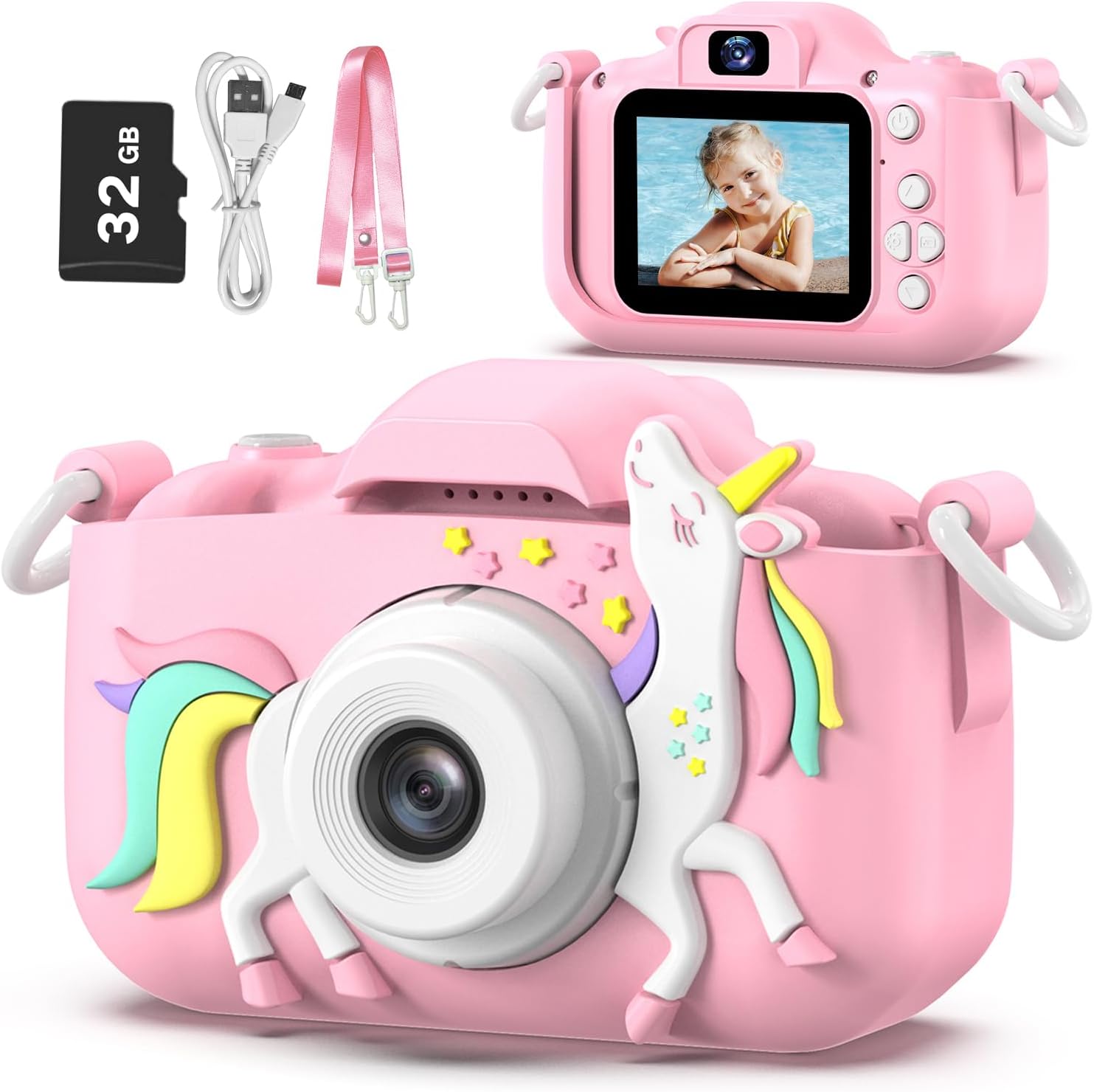
Image: The Goopow Kids Camera in pink with a unicorn design, alongside its included accessories: a 32GB SD card, USB charging cable, and a pink lanyard.
3. ഉൽപ്പന്ന സവിശേഷതകൾ
- ഹൈ-ഡെഫനിഷൻ ക്യാപ്ചർ: Supports 1080P video recording and 12MP photo resolution.
- 2.0-ഇഞ്ച് LCD സ്ക്രീൻ: Clear display for viewഫോട്ടോകളും വീഡിയോകളും.
- ഒന്നിലധികം പ്രവർത്തനങ്ങൾ: Photo capture, video recording, playback, games, and date setting.
- സെൽഫി മോഡ്: Front-facing camera for self-portraits.
- ഡിജിറ്റൽ സൂം: Up to 8x digital zoom for closer shots.
- Creative Options: 28 kinds of scene selections, multiple funny frames, and 5 special effects.
- അന്തർനിർമ്മിത ഗെയിമുകൾ: Includes multiple puzzle games for entertainment.
- റീചാർജ് ചെയ്യാവുന്ന ബാറ്ററി: Built-in 3.7V lithium battery, USB rechargeable.
- ഒതുക്കമുള്ളതും ഭാരം കുറഞ്ഞതും: Easy for small hands to hold and carry with the included lanyard.

ചിത്രം: ഒരു ഓവർview of the camera's features, including 1080p video, playback, selfie function, funny frames, 2.4-inch screen, games, 8x digital zoom, and portability, shown with children using the camera.
4. ആരംഭിക്കുന്നു
4.1. ക്യാമറ ചാർജ് ചെയ്യുന്നു
The camera has a built-in 3.7V rechargeable lithium battery. Before first use, fully charge the camera.
- Connect the small end of the USB cable to the camera's charging port.
- USB കേബിളിന്റെ വലിയ അറ്റം ഒരു സ്റ്റാൻഡേർഡ് USB പവർ അഡാപ്റ്ററുമായി (ഉൾപ്പെടുത്തിയിട്ടില്ല) അല്ലെങ്കിൽ ഒരു കമ്പ്യൂട്ടറിന്റെ USB പോർട്ടുമായി ബന്ധിപ്പിക്കുക.
- ചാർജിംഗ് ഇൻഡിക്കേറ്റർ ലൈറ്റ് പ്രകാശിക്കും. പൂർണ്ണമായി ചാർജ് ചെയ്തുകഴിഞ്ഞാൽ, ലൈറ്റ് നിറം മാറുകയോ ഓഫാകുകയോ ചെയ്യാം.
- Charging typically takes 1.5-2 hours for continuous photograph time.
IMPORTANT TIP: Charging must be supervised by adults. Do NOT charge this camera with chargers exceeding 1A or other fast chargers, as this may damage the battery.
4.2. മെമ്മറി കാർഡ് ചേർക്കുന്നു
A 32GB SD card is included. The camera supports a maximum capacity of 32GB.
- Locate the SD card slot on the side of the camera.
- Insert the 32GB SD card into the slot with the metal contacts facing the front of the camera until it clicks into place.
- SD കാർഡ് നീക്കം ചെയ്യാൻ, അത് ക്ലിക്ക് ചെയ്യുന്നതുവരെ സൌമ്യമായി അകത്തേക്ക് തള്ളുക, തുടർന്ന് വിടുക, അത് പുറത്തെടുക്കും.
5. അടിസ്ഥാന പ്രവർത്തനം
5.1. പവർ ഓൺ/ഓഫ്
- To power on, press and hold the Power button for a few seconds.
- To power off, press and hold the Power button again until the screen turns off.
5.2. ഫോട്ടോ എടുക്കൽ
- Turn on the camera. It will usually start in photo mode.
- എൽസിഡി സ്ക്രീൻ ഉപയോഗിച്ച് നിങ്ങളുടെ ഷോട്ട് ഫ്രെയിം ചെയ്യുക.
- Press the Shutter button (usually a prominent button on top or front) to take a picture.
5.3. വീഡിയോകൾ റെക്കോർഡുചെയ്യുന്നു
- From photo mode, use the Mode button to switch to video recording mode.
- Press the Shutter button to start recording. A red 'REC' indicator will typically appear on the screen.
- റെക്കോർഡിംഗ് നിർത്താൻ ഷട്ടർ ബട്ടൺ വീണ്ടും അമർത്തുക.

Image: The Goopow Kids Camera displaying a video recording in progress, with a red 'REC' icon, showing children playing in a field.
5.4. പ്ലേബാക്ക് മോഡ്
- Use the Mode button to navigate to playback mode.
- Use the navigation buttons (up/down or left/right) to browse through your captured photos and videos.
- Press the Shutter button or OK button to view ഒരു ഫോട്ടോ അല്ലെങ്കിൽ ഒരു വീഡിയോ പ്ലേ ചെയ്യുക.
5.5. സെൽഫി മോഡ്
- The camera supports a selfie mode, allowing you to take pictures of yourself.
- Typically, there is a dedicated button or a menu option to switch to the front-facing camera. Consult the on-screen icons for guidance.

Image: The Goopow Kids Camera showing a selfie being taken on its screen, with three girls smiling, illustrating the 'Enjoy Selfie Time' feature.
5.6. ഡിജിറ്റൽ സൂം ഉപയോഗം
- In photo or video mode, use the zoom buttons (often marked with '+' and '-' or up/down arrows) to adjust the 8x digital zoom.

Image: A demonstration of the camera's 8x digital zoom, showing a child's face at 1x, 2x, 4x, and 8x magnification.
5.7. Applying Photo Frames and Special Effects
- In photo mode, access the menu to find options for photo frames and special effects.
- Choose from 28 scene selections and various funny frames to add creativity to your pictures.

Image: A collage of various photo frames and effects available on the Goopow Kids Camera, demonstrating creative options for pictures.
5.8. Time-Lapse Photography
- Access the camera's settings or mode options to find the time-lapse feature.
- Select a delay setting (e.g., 2s, 5s, 10s) before the photo is taken automatically.

Image: A demonstration of the camera's time-lapse function, showing a child in a field with options for 2-second, 5-second, and 10-second delays.
5.9. ഗെയിമുകൾ കളിക്കൽ
- Use the Mode button to navigate to the games menu.
- Select from the available puzzle games and use the navigation buttons to play.

Image: Icons representing three puzzle games available on the Goopow Kids Camera: a block puzzle, a character-based puzzle, and Snake.
5.10 തീയതിയും സമയവും ക്രമീകരണം
- Access the camera's main menu or settings to find the date and time adjustment options.
- Use the navigation buttons to set the correct date and time.
6. ഒരു കമ്പ്യൂട്ടറിലേക്ക് ബന്ധിപ്പിക്കുന്നു
To transfer photos and videos to a computer:
- ക്യാമറ ഓണാണെന്ന് ഉറപ്പാക്കുക.
- നൽകിയിരിക്കുന്ന USB കേബിൾ ഉപയോഗിച്ച് നിങ്ങളുടെ കമ്പ്യൂട്ടറിലേക്ക് ക്യാമറ ബന്ധിപ്പിക്കുക.
- The camera should appear as a removable disk drive on your computer.
- Open the drive to access the DCIM folder, where your photos and videos are stored.
- Alternatively, you can remove the SD card and use the included card reader to connect it to your computer.
7. പരിചരണവും പരിപാലനവും
- വൃത്തിയാക്കൽ: Use a soft, dry cloth to clean the camera body. For the lens and screen, use a specialized lens cleaning cloth. Do not use liquid cleaners.
- സംഭരണം: നേരിട്ടുള്ള സൂര്യപ്രകാശവും ഉയർന്ന താപനിലയും ഏൽക്കാത്ത തണുത്തതും വരണ്ടതുമായ സ്ഥലത്ത് ക്യാമറ സൂക്ഷിക്കുക.
- ജല പ്രതിരോധം: This camera is NOT water resistant. Avoid exposure to water or high humidity.
- ബാറ്ററി കെയർ: Do not attempt to replace the internal battery. If the camera will not be used for an extended period, charge it periodically to maintain battery health.
8. പ്രശ്നപരിഹാരം
| പ്രശ്നം | സാധ്യമായ കാരണം | പരിഹാരം |
|---|---|---|
| ക്യാമറ ഓണാകുന്നില്ല. | ബാറ്ററി തീർന്നു. | നൽകിയിരിക്കുന്ന USB കേബിൾ ഉപയോഗിച്ച് ക്യാമറ പൂർണ്ണമായും ചാർജ് ചെയ്യുക. |
| ഫോട്ടോകൾ/വീഡിയോകൾ എടുക്കാൻ കഴിയില്ല. | SD card is full or not inserted correctly. | Check if the SD card is inserted properly. Delete unnecessary files or replace the SD card. |
| Images/videos are blurry. | Lens is dirty or insufficient lighting. | Clean the lens with a soft cloth. Ensure adequate lighting when taking pictures. |
| ക്യാമറ മരവിക്കുന്നു അല്ലെങ്കിൽ പ്രതികരിക്കുന്നില്ല. | സോഫ്റ്റ്വെയർ തകരാർ. | Press and hold the Power button for 10 seconds to force a restart. If the issue persists, allow the battery to fully discharge and then recharge. |
| Computer does not recognize the camera. | Faulty USB connection or driver issue. | Try a different USB port or cable. Ensure the camera is powered on. Use the included card reader to transfer files directly from the SD card. |
9 സാങ്കേതിക സവിശേഷതകൾ
| ഫീച്ചർ | സ്പെസിഫിക്കേഷൻ |
|---|---|
| മോഡലിൻ്റെ പേര് | H11 |
| ബ്രാൻഡ് | goopow |
| നിറം | Pink-DJS |
| സ്ക്രീൻ വലിപ്പം | 2 ഇഞ്ച് |
| ഡിസ്പ്ലേ തരം | എൽസിഡി |
| ഫോട്ടോ സെൻസർ റെസല്യൂഷൻ | 12 എം.പി |
| വീഡിയോ റെസല്യൂഷൻ | 1080p |
| ഡിജിറ്റൽ സൂം | 8 x |
| മെമ്മറി സ്റ്റോറേജ് കപ്പാസിറ്റി | 32 GB (SD Card Included) |
| ബാറ്ററി തരം | Lithium Ion (3.7V) |
| ബാറ്ററി ശരാശരി ആയുസ്സ് | 2 Hours (continuous photograph time) |
| കണക്റ്റിവിറ്റി ടെക്നോളജി | USB |
| ഇനത്തിൻ്റെ ഭാരം | 105 ഗ്രാം |
| ഇനത്തിൻ്റെ അളവുകൾ (D x W x H) | 1.3"D x 7.52"W x 4.45"H |
| ജല പ്രതിരോധ നില | വാട്ടർ റെസിസ്റ്റൻ്റ് അല്ല |

Image: A visual comparison of the Goopow Kids Camera's compact size next to a smartphone, illustrating its dimensions (4.05 inches wide, 2.48 inches high with cover; 3.28 inches wide, 2.08 inches high without cover).
10. വാറൻ്റി വിവരങ്ങൾ
ഈ ഉൽപ്പന്നം എ 12 മാസ വാറൻ്റി from the date of purchase. Please retain your proof of purchase for warranty claims. The warranty covers manufacturing defects but does not cover damage caused by misuse, accidents, unauthorized repairs, or normal wear and tear.
11. പിന്തുണ
For further assistance or inquiries, please contact Goopow customer support through the retailer's platform or the contact information provided with your purchase. Please have your model number (H11) and purchase details ready when contacting support.