1. ആമുഖം
The NUROUM V21 2K Webcam is designed for high-quality video calls and live streaming, offering advanced features such as 2K resolution, AI-powered auto-framing, 5X digital zoom, HDR technology, and a 4-element noise-canceling microphone array. This manual provides detailed instructions for setting up and operating your webമികച്ച പ്രകടനം ഉറപ്പാക്കാൻ ക്യാമറ.
2. ബോക്സിൽ എന്താണുള്ളത്?
- ന്യൂറോം വി21 Webക്യാമറ
- റിമോട്ട് കൺട്രോൾ
- USB2.0 ടൈപ്പ്-സി കേബിൾ
- വാറൻ്റി കാർഡ്
- ഇൻസ്ട്രക്ഷൻ മാനുവൽ
സജ്ജീകരണവുമായി മുന്നോട്ടുപോകുന്നതിനുമുമ്പ് എല്ലാ ഇനങ്ങളും ഉണ്ടെന്ന് ഉറപ്പാക്കുക.
3. ഉൽപ്പന്നം കഴിഞ്ഞുview
The NUROUM V21 webcam features a sleek design with integrated components for enhanced functionality.

ചിത്രം 3.1: Diagram showing the main components of the NUROUM V21 Webcam, including the 2K QHD Lens, 4 MEMS Microphone Array, Privacy Cover, USB Cable, Sony CMOS Sensor, and Base with 1/4'' screw.
- 2K QHD Lens: Captures video at up to 1440P@30fps or 1080P@60fps.
- 4 MEMS Microphone Array: Built-in microphones for stereo audio capture with AI noise cancellation.
- സ്വകാര്യതാ കവർ: Integrated slide to physically block the camera lens for privacy.
- യൂഎസ്ബി കേബിൾ: Type-C cable for power and data connection.
- Sony CMOS Sensor: Premium Starvis CMOS sensor for crisp, natural video even in low light.
- Base with 1/4'' screw: Universal mounting clip compatible with laptops, monitors, and tripods.
4. സജ്ജീകരണം
4.1 മൌണ്ട് ചെയ്യുന്നു Webക്യാമറ
The NUROUM V21 webcam features a versatile mounting clip. You can place it on top of a desktop monitor, a laptop screen, or attach it to a compatible tripod using the 1/4'' screw hole on the base.
4.2 Connecting to Your Computer (Plug and Play)
ദി webcam is designed for plug-and-play functionality. Simply connect the provided USB2.0 Type-C cable from the webcam to an available USB port on your computer. The computer will automatically recognize the device without requiring additional software or driver installation.

ചിത്രം 4.1: The NUROUM V21 Webcam mounted on a laptop, illustrating the simple USB plug-and-play connection.
5. പ്രവർത്തന നിർദ്ദേശങ്ങൾ
5.1 Video Quality and HDR
വി 21 webcam supports FHD 1080P@60fps and 1440P@30fps video calls. It incorporates HDR technology and auto light correction to optimize your appearance even in challenging lighting conditions (low-light or backlit environments).
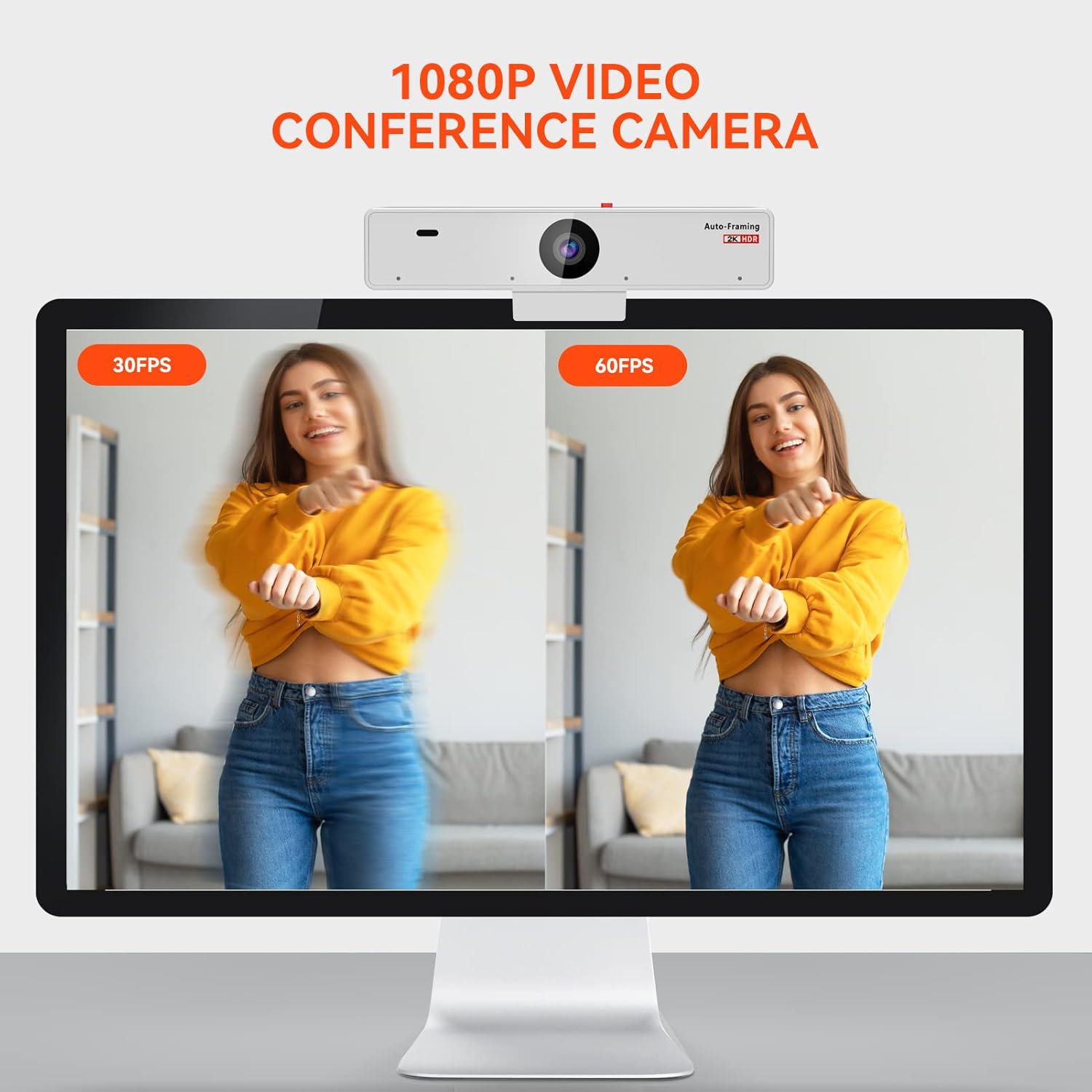
ചിത്രം 5.1: Visual comparison demonstrating the smoother motion of 60fps video compared to 30fps.

ചിത്രം 5.2: A split image showing the improved clarity and exposure with auto light correction enabled versus disabled.
5.2 AI-Powered Auto-Framing and 5X Zoom
The AI-powered auto-framing function automatically detects and centers the presenter within its 93.1° field of view. This feature is active under 1080P@30fps. The 5X digital zoom allows you to adjust the field of view, either widening it to include more of the environment or narrowing it to focus on yourself. Both auto-framing and zoom can be controlled via the remote.

ചിത്രം 5.3: ദി webcam intelligently tracks and frames individuals in a meeting room, ensuring they remain centered.

ചിത്രം 5.4: Illustration of 1X, 3X, and 5X digital zoom levels, controlled by the remote.
5.3 AI നോയ്സ് റദ്ദാക്കൽ
The integrated 4-element microphone array records stereo audio up to 5m/16ft. It utilizes 120° circular-sector directional voice pickup technology and AI noise suppression to filter out unwanted background noises like wind or keyboard typing. Automatic Gain Control ensures your voice is clearly picked up even from a distance.

ചിത്രം 5.5: Diagram illustrating how the 4-element microphone array captures voice and filters out noise.

ചിത്രം 5.6: A user demonstrating the 16ft/5m 120° circular voice pickup range of the webക്യാം

ചിത്രം 5.7: Visual representation of audio waveforms, showing how noise (like keyboard typing or fan noise) is reduced after noise cancellation.
5.4 വിദൂര നിയന്ത്രണ പ്രവർത്തനങ്ങൾ
The included remote control allows for convenient adjustment of webcam settings without physical interaction. Functions include manual zoom in/out, portrait mode, mirror mode, and toggling auto-framing and HDR.
വീഡിയോ 5.1: ഒരു ചെറിയ പ്രീview video demonstrating the remote control's functionality, including zoom and auto-framing adjustments. This video is provided by the seller.
6 അനുയോജ്യത
The NUROUM V21 webcam offers broad compatibility with various operating systems and conferencing platforms:
- ഓപ്പറേറ്റിംഗ് സിസ്റ്റങ്ങൾ: Windows, macOS, Linux, ChromeOS.
- Conferencing Platforms: Zoom, Skype, Slack, Google Hangouts, GoToMeeting, Facebook, YouTube Live, Webex, Twitch, TikTok.

ചിത്രം 6.1: Icons representing various compatible operating systems (Chromebook, Windows, Mac, Linux) and conferencing platforms (Skype, YouTube, Twitch, Zoom, Webex, Slack, Gotomeeting, TikTok).
7. പരിപാലനം
To ensure the longevity and optimal performance of your NUROUM V21 webക്യാം:
- മൃദുവായതും ഉണങ്ങിയതുമായ തുണി ഉപയോഗിച്ച് ലെൻസ് വൃത്തിയായി സൂക്ഷിക്കുക.
- Utilize the inbuilt privacy cover when the camera is not in use to protect the lens and your privacy.
- തുറന്നുകാട്ടുന്നത് ഒഴിവാക്കുക webതീവ്രമായ താപനിലകളിലേക്കോ ഈർപ്പത്തിലേക്കോ കാം.
- ഉപകരണം ഡിസ്അസംബ്ലിംഗ് ചെയ്യാൻ ശ്രമിക്കരുത്.
8. പ്രശ്നപരിഹാരം
If you encounter issues with your NUROUM V21 webcam, consider the following common solutions:
- വീഡിയോ/ഓഡിയോ ഇല്ല: യുഎസ്ബി കേബിൾ രണ്ടിലേക്കും സുരക്ഷിതമായി ബന്ധിപ്പിച്ചിട്ടുണ്ടെന്ന് ഉറപ്പാക്കുക webcam and your computer. Try a different USB port. Check your computer's privacy settings to ensure camera and microphone access is granted to your applications.
- മോശം വീഡിയോ നിലവാരം: Verify that your lighting conditions are adequate. While HDR and auto light correction help, extreme darkness or direct backlighting can still affect quality. Ensure the lens is clean.
- Remote Control Unresponsive: Check if the remote's batteries need replacement. Ensure there are no obstructions between the remote and the webക്യാം
- Auto-Framing Issues: Remember that auto-framing functions optimally under 1080P@30fps. Rapid movements or multiple subjects might affect its performance.
For further assistance, refer to the warranty card for support contact information.
9 സ്പെസിഫിക്കേഷനുകൾ
| ഫീച്ചർ | വിശദാംശങ്ങൾ |
|---|---|
| ബ്രാൻഡ് | NUROUM |
| മോഡൽ നമ്പർ | V21 |
| വീഡിയോ ക്യാപ്ചർ റെസല്യൂഷൻ | 1440P@30fps, 1080P@60fps |
| ഫോട്ടോ സെൻസർ ടെക്നോളജി | CMOS (Premium Starvis) |
| മൈക്രോഫോൺ | 4-element array with AI Noise Cancellation |
| സൂം ചെയ്യുക | 5X ഡിജിറ്റൽ സൂം |
| പ്രത്യേക സവിശേഷതകൾ | HDR, Auto Light Correction, Auto-Framing, Privacy Cover |
| കണക്റ്റിവിറ്റി ടെക്നോളജി | USB (ടൈപ്പ്-സി) |
| ഇനത്തിൻ്റെ ഭാരം | 1.17 പൗണ്ട് |
| പാക്കേജ് അളവുകൾ | 8.74 x 5.67 x 3.23 ഇഞ്ച് |
10. വാറൻ്റിയും പിന്തുണയും
Your NUROUM V21 Webcam comes with a warranty. Please refer to the included Warranty Card for detailed information regarding warranty coverage, terms, and conditions. For technical support or service inquiries, please contact NUROUM customer service using the information provided on your warranty card or visit the official NUROUM webസൈറ്റ്.


