1. ആമുഖം
This manual provides comprehensive instructions for the Varmilo MA Series V2 Koi TKL EC Mechanical Keyboard, model VA87M. It covers setup, operation, maintenance, and troubleshooting to ensure optimal performance and longevity of your device. The Varmilo MA Series V2 features an upgraded design with enhanced functionality and aesthetic details.

Figure 1.1: Varmilo MA Series V2 Koi TKL EC Mechanical Keyboard
2. ഉൽപ്പന്ന സവിശേഷതകൾ
The Varmilo MA Series V2 Koi keyboard incorporates several key features designed for an enhanced user experience:
- Thick Dye Sub PBT Keycaps: Durable keycaps with legends that will not fade over time.
- Space-Saving TKL Form Factor: Tenkeyless design (87 keys) provides a compact footprint without sacrificing essential keys.
- USB-C കണക്റ്റിവിറ്റി: Modern and reversible USB-C port for reliable connection.
- Original Varmilo Koi Colorway: Unique aesthetic design featuring Koi fish and traditional art.
- Genuine Varmilo Electrocapacitive Switches: Provides a smooth and consistent typing experience.
- Double-Section Kickstand: Upgraded kickstand offers multiple height adjustment options.
- വടക്കോട്ട് അഭിമുഖമായുള്ള LED-കൾ: Ensures optimal illumination for keycap legends.
- Cable Grooves: Integrated grooves on the bottom case allow for flexible cable routing (left, right, or middle).
- സൗണ്ട്-പ്രൂഫ് സിലിക്കൺ പാഡുകൾ: Placed between the PCB and positioning plate to reduce typing noise.
- Relocated Indicator Lights: Indicator lights are moved to the top right to minimize distractions during use.
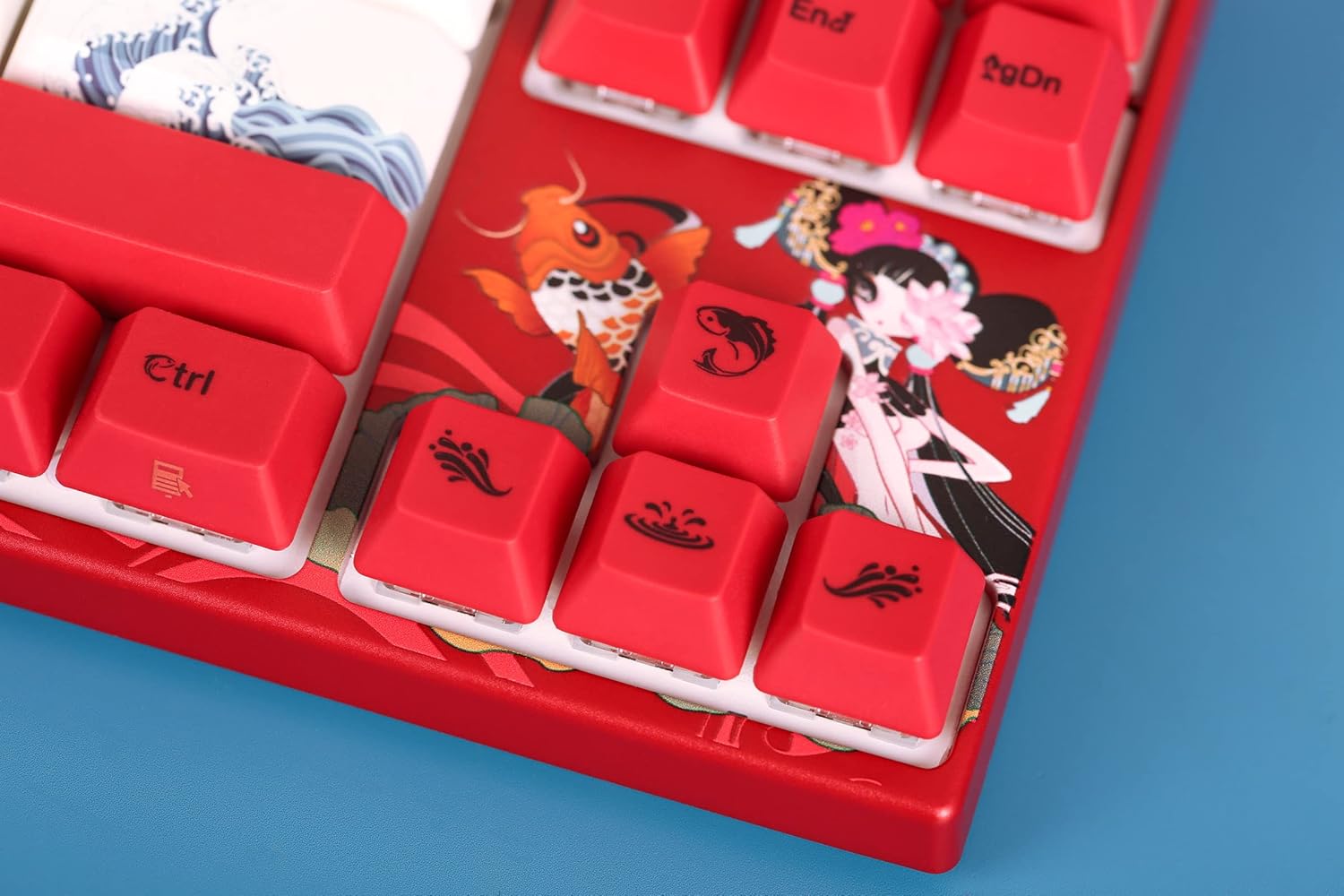
ചിത്രം 2.1: വിശദമായി view of special keycaps
3. പാക്കേജ് ഉള്ളടക്കം
പാക്കേജ് തുറക്കുമ്പോൾ, ഇനിപ്പറയുന്ന എല്ലാ ഇനങ്ങളും ഉൾപ്പെടുത്തിയിട്ടുണ്ടെന്ന് ദയവായി ഉറപ്പാക്കുക:
- Varmilo MA Series V2 Koi TKL EC Mechanical Keyboard (VA87M)
- യുഎസ്ബി-സി കേബിൾ
- കീക്യാപ് പുള്ളർ
- Additional/Replacement Keycaps (specific to Koi design)
- ഉപയോക്തൃ മാനുവൽ (ഈ പ്രമാണം)

Figure 3.1: Included accessories: keycap puller and extra keycaps
4. സജ്ജീകരണം
Follow these steps to set up your Varmilo MA Series V2 Koi keyboard:
- കീബോർഡ് അൺപാക്ക് ചെയ്യുക: പാക്കേജിംഗിൽ നിന്ന് കീബോർഡും എല്ലാ അനുബന്ധ ഉപകരണങ്ങളും ശ്രദ്ധാപൂർവ്വം നീക്കം ചെയ്യുക.
- USB-C കേബിൾ ബന്ധിപ്പിക്കുക: Insert one end of the provided USB-C cable into the USB-C port on the back of the keyboard.
- Route the Cable (Optional): Utilize the cable grooves on the bottom of the keyboard to route the USB-C cable to the left, right, or center, depending on your desk setup.
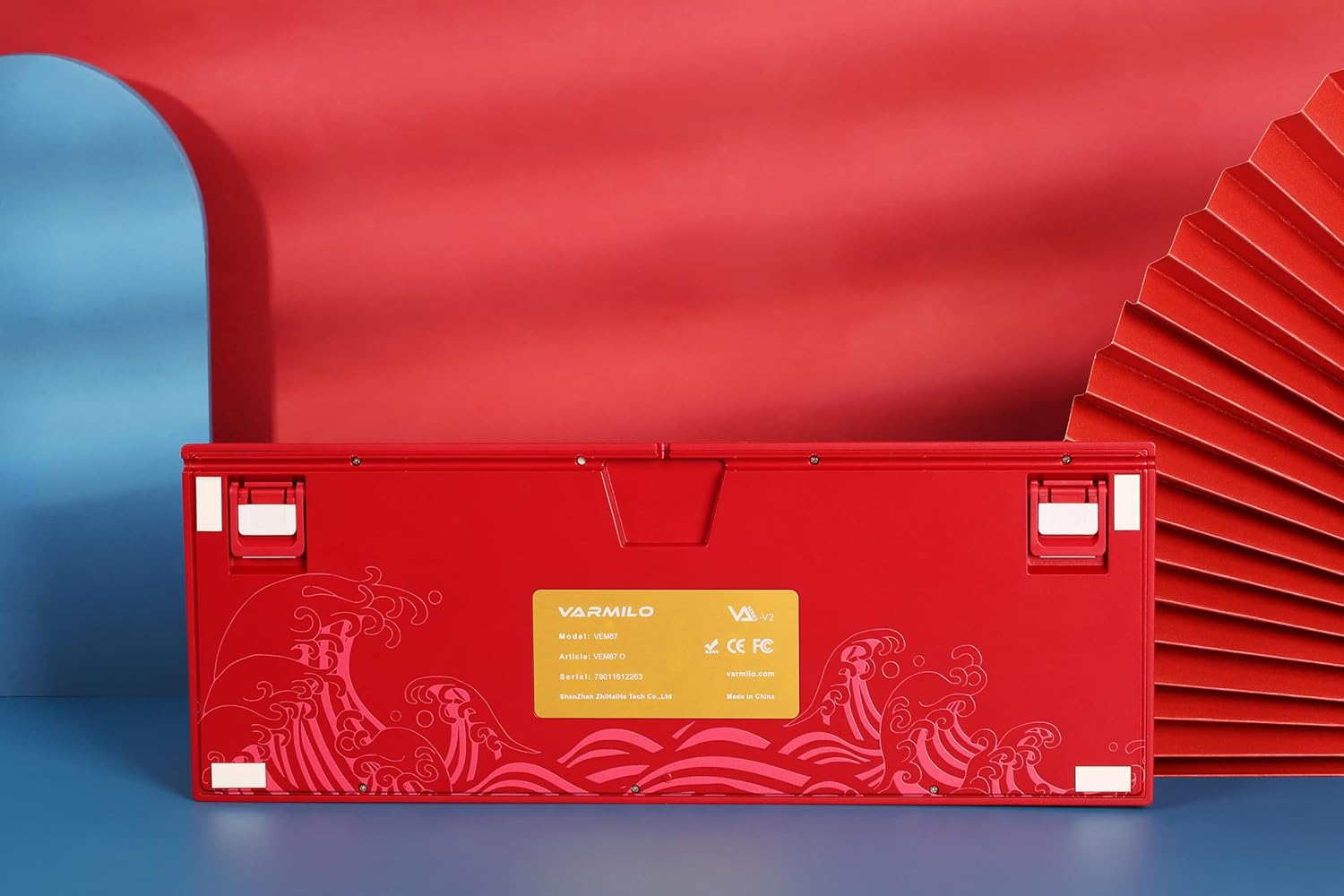
ചിത്രം 4.1: താഴെ view with cable grooves and kickstands
- കമ്പ്യൂട്ടറുമായി ബന്ധിപ്പിക്കുക: നിങ്ങളുടെ കമ്പ്യൂട്ടറിൽ ലഭ്യമായ USB പോർട്ടിലേക്ക് USB-C കേബിളിൻ്റെ മറ്റേ അറ്റം പ്ലഗ് ചെയ്യുക.
- കിക്ക്സ്റ്റാൻഡുകൾ ക്രമീകരിക്കുക: Flip out the double-section kickstands on the bottom of the keyboard to adjust the typing angle to your preference.
- ഡ്രൈവർ ഇൻസ്റ്റാളേഷൻ: The keyboard is plug-and-play and typically does not require specific drivers for basic functionality. Your operating system should automatically recognize the device.
5. പ്രവർത്തന നിർദ്ദേശങ്ങൾ
The Varmilo MA Series V2 Koi keyboard operates as a standard mechanical keyboard. Below are some common functions and key combinations:
- സ്റ്റാൻഡേർഡ് ടൈപ്പിംഗ്: ടെക്സ്റ്റ് ഇൻപുട്ടിനായി ആൽഫാന്യൂമെറിക് കീകൾ ഉപയോഗിക്കുക.
- ഫംഗ്ഷൻ കീകൾ (F1-F12): These keys perform their standard functions. Some may have secondary multimedia or system functions accessible via the Fn key (if present and indicated on keycaps).
- ഇൻഡിക്കേറ്റർ ലൈറ്റുകൾ: Located on the top right, these lights indicate Caps Lock, Scroll Lock, and Num Lock status.
- ബാക്ക്ലൈറ്റിംഗ്: The keyboard features single-color LED backlighting. Specific key combinations (often Fn + arrow keys or dedicated lighting keys) may control brightness or lighting modes. Refer to the keycap legends for specific lighting controls.
For advanced functions or specific key remapping, refer to any accompanying software or Varmilo's official support resources.
6. പരിപാലനം
ശരിയായ അറ്റകുറ്റപ്പണി നിങ്ങളുടെ കീബോർഡിന്റെ ദീർഘായുസ്സും പ്രകടനവും ഉറപ്പാക്കുന്നു.
- കീക്യാപ്പുകൾ വൃത്തിയാക്കൽ:
- Use the provided keycap puller to carefully remove keycaps.
- Clean keycaps with a soft cloth dampവീര്യം കുറഞ്ഞ സോപ്പും വെള്ളവും ഉപയോഗിച്ച് തുടച്ചുമാറ്റുക. വീണ്ടും ഘടിപ്പിക്കുന്നതിന് മുമ്പ് അവ പൂർണ്ണമായും ഉണങ്ങിയെന്ന് ഉറപ്പാക്കുക.
- കഠിനമായ രാസവസ്തുക്കളോ ഉരച്ചിലുകളോ ഉള്ള വസ്തുക്കളോ ഒഴിവാക്കുക.
- കീബോർഡ് ബോഡി വൃത്തിയാക്കൽ:
- Use a soft, dry cloth to wipe down the keyboard body.
- താക്കോലുകൾക്കിടയിലുള്ള പൊടിയും അവശിഷ്ടങ്ങളും ഒഴിവാക്കാൻ, കംപ്രസ് ചെയ്ത വായു ഉപയോഗിക്കുക.
- സംഭരണം: നേരിട്ടുള്ള സൂര്യപ്രകാശവും കടുത്ത താപനിലയും ഏൽക്കാത്ത തണുത്തതും വരണ്ടതുമായ സ്ഥലത്ത് കീബോർഡ് സൂക്ഷിക്കുക.
- ചോർച്ച ഒഴിവാക്കുക: Liquid spills can severely damage the keyboard. In case of a spill, immediately disconnect the keyboard and allow it to dry completely before attempting to use it again. Professional inspection may be required.
7. പ്രശ്നപരിഹാരം
If you encounter issues with your Varmilo MA Series V2 Koi keyboard, try the following troubleshooting steps:
| പ്രശ്നം | സാധ്യമായ കാരണം | പരിഹാരം |
|---|---|---|
| കീബോർഡ് പ്രതികരിക്കുന്നില്ല | അയഞ്ഞ കേബിൾ കണക്ഷൻ, തകരാറുള്ള യുഎസ്ബി പോർട്ട്, ഡ്രൈവർ പ്രശ്നം. |
|
| കീകൾ രജിസ്റ്റർ ചെയ്യുന്നില്ല. | Debris under keycap, faulty switch. |
|
| ബാക്ക്ലൈറ്റിംഗ് പ്രവർത്തിക്കുന്നില്ല | Lighting disabled, brightness set to minimum. |
|
If the problem persists after attempting these solutions, please contact Varmilo customer support.
8 സ്പെസിഫിക്കേഷനുകൾ
| ആട്രിബ്യൂട്ട് | വിശദാംശങ്ങൾ |
|---|---|
| മോഡൽ നമ്പർ | VA87M ഡെവലപ്പറിൽ നിന്ന് കൂടുതൽ ഇനങ്ങൾ |
| കീബോർഡ് തരം | Mechanical, Electrocapacitive Switches |
| ഫോം ഫാക്ടർ | ടെൻകീലെസ് (TKL), 87 കീകൾ |
| കണക്റ്റിവിറ്റി | USB-C (Corded Electric) |
| കീക്യാപ് മെറ്റീരിയൽ | Dye Sub PBT (Polybutylene Terephthalate) |
| ബാക്ക്ലൈറ്റിംഗ് | സിംഗിൾ കളർ LED |
| Colorway | Koi (Varmilo EC Rose V2) |
| ഇനത്തിൻ്റെ ഭാരം | 4.75 പൗണ്ട് |
| പാക്കേജ് അളവുകൾ | 17.83 x 7.83 x 7.28 ഇഞ്ച് |
| നിർമ്മാതാവ് | വർമ്മിലോ |
| ആദ്യം ലഭ്യമായ തീയതി | ജൂലൈ 12, 2022 |
9. വാറൻ്റിയും പിന്തുണയും
For information regarding warranty coverage, returns, or technical support, please refer to the official Varmilo webസൈറ്റിൽ ബന്ധപ്പെടുക അല്ലെങ്കിൽ അവരുടെ ഉപഭോക്തൃ സേവനവുമായി നേരിട്ട് ബന്ധപ്പെടുക. വാങ്ങിയതിന്റെ തെളിവായി നിങ്ങളുടെ വാങ്ങൽ രസീത് സൂക്ഷിക്കുക.
വർമ്മിലോ ഉദ്യോഗസ്ഥൻ Webസൈറ്റ്: www.varmilo.com (കുറിപ്പ്: ഇതൊരു പ്ലെയ്സ്ഹോൾഡറാണ് URL പ്രത്യേക പിന്തുണ ഇല്ലാത്തതിനാൽ URL was provided in the input. Users should verify the correct official webസൈറ്റ്.)


