ആമുഖം
This manual provides detailed instructions for the setup, operation, maintenance, and troubleshooting of your Cuifati universal air conditioner remote control. This remote is designed as a direct replacement for various Panasonic air conditioner models, including A75C2563, A75C2565, A75C2432, and A75C8464.
Please read this manual thoroughly before using the remote control to ensure proper functionality and to extend the product's lifespan.
ഉൽപ്പന്നം കഴിഞ്ഞുview

ചിത്രം 1: ഫ്രണ്ട് view of the Cuifati A75C2563 remote control, displaying the LCD screen and various function buttons such as power, mode, temperature, fan speed, and air swing.
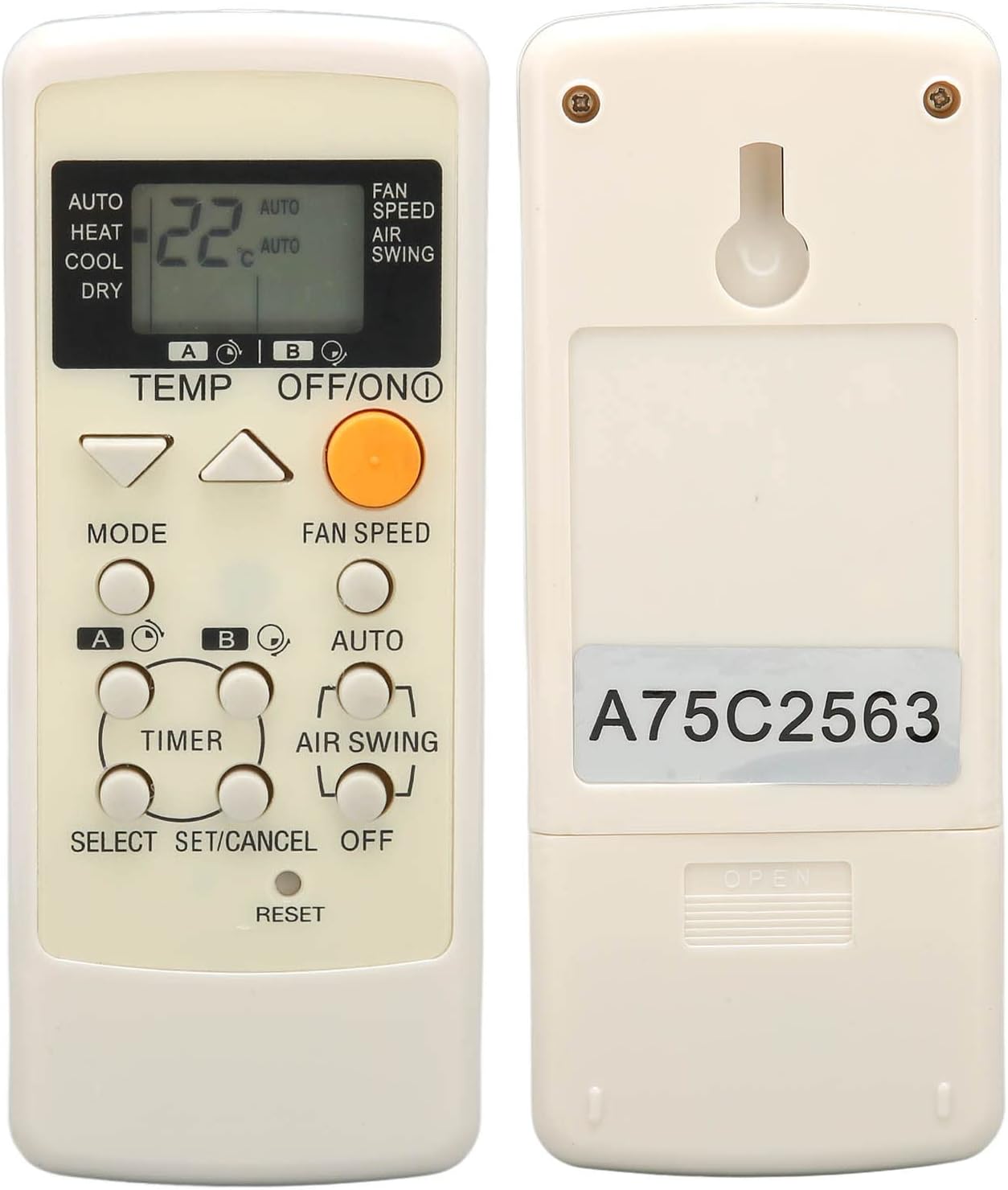
ചിത്രം 2: തിരികെ view of the remote control, highlighting the battery compartment and the model identification sticker "A75C2563".
The Cuifati remote control is constructed from durable ABS material, ensuring longevity and resistance to wear. It features an ergonomic design for comfortable handling and clear, easy-to-read buttons and an LCD display.
പ്രധാന സവിശേഷതകൾ:
- സാർവത്രിക അനുയോജ്യത: Designed for Panasonic A75C2563, A75C2565, A75C2432, A75C8464 air conditioner models.
- നേരിട്ടുള്ള മാറ്റിസ്ഥാപിക്കൽ: Ideal for replacing lost, damaged, or non-functional original remote controls.
- എർഗണോമിക് ഡിസൈൻ: Easy to grip and operate for users of all ages.
- മികച്ച പ്രകടനം: Provides a strong signal, multi-angle detection, and responsive controls.
- നീണ്ടുനിൽക്കുന്ന നിർമ്മാണം: Made from high-quality ABS material for extended lifespan.
സജ്ജമാക്കുക
ബാറ്ററി ഇൻസ്റ്റാളേഷൻ:
റിമോട്ട് കൺട്രോളിന് രണ്ട് AAA ബാറ്ററികൾ ആവശ്യമാണ് (ഉൾപ്പെടുത്തിയിട്ടില്ല). ബാറ്ററികൾ ഇൻസ്റ്റാൾ ചെയ്യാൻ ഈ ഘട്ടങ്ങൾ പാലിക്കുക:
- റിമോട്ട് കൺട്രോളിന്റെ പിൻഭാഗത്ത് ബാറ്ററി കമ്പാർട്ട്മെന്റ് കണ്ടെത്തുക.
- ബാറ്ററി കമ്പാർട്ട്മെന്റ് കവർ തുറക്കാൻ താഴേക്ക് സ്ലൈഡ് ചെയ്യുക.
- കമ്പാർട്ടുമെന്റിനുള്ളിലെ അടയാളപ്പെടുത്തലുകളുമായി പോസിറ്റീവ് (+), നെഗറ്റീവ് (-) ടെർമിനലുകൾ ശരിയായി വിന്യസിക്കുന്നുണ്ടെന്ന് ഉറപ്പാക്കാൻ രണ്ട് AAA ബാറ്ററികൾ ഇടുക.
- സുരക്ഷിതമായി ക്ലിക്ക് ചെയ്യുന്നതുവരെ ബാറ്ററി കമ്പാർട്ട്മെന്റ് കവർ തിരികെ സ്ഥലത്തേക്ക് സ്ലൈഡ് ചെയ്യുക.

ചിത്രം 3: Open battery compartment of the remote control, ready for AAA battery insertion.
കുറിപ്പ്: No setup or programming is required after battery installation. The remote is pre-programmed for the specified Panasonic air conditioner models.
പ്രവർത്തന നിർദ്ദേശങ്ങൾ
ബട്ടണുകളും അവയുടെ പ്രവർത്തനങ്ങളും ഉപയോഗിച്ച് സ്വയം പരിചയപ്പെടുക:
ചിത്രം 4: ഫ്രണ്ട് view of the remote control, illustrating the layout of its operational buttons.
ബട്ടൺ പ്രവർത്തനങ്ങൾ:
| ബട്ടൺ | ഫംഗ്ഷൻ |
|---|---|
| ഓഫ്/ഓൺ (Orange Button) | എയർ കണ്ടീഷണർ ഓൺ അല്ലെങ്കിൽ ഓഫ് ചെയ്യുന്നു. |
| താപനില ▲ / ▼ | താപനില സജ്ജീകരണം കൂട്ടുകയോ കുറയ്ക്കുകയോ ചെയ്യുന്നു. |
| മോഡ് | Cycles through operating modes: Auto, Heat, Cool, Dry. |
| ഫാൻ സ്പീഡ് | ഫാൻ വേഗത ക്രമീകരിക്കുന്നു. |
| ഓട്ടോ | Activates the automatic operating mode. |
| എയർ സ്വിംഗ് | Controls the air swing (louver movement). |
| ടൈമർ | ടൈമർ പ്രവർത്തനം സജ്ജമാക്കുന്നു അല്ലെങ്കിൽ റദ്ദാക്കുന്നു. |
| SELECT / SET/CANCEL | Used for selecting and confirming settings, or canceling operations. |
| പുനഃസജ്ജമാക്കുക | Resets the remote control to default settings. (Often a recessed button requiring a pointed object). |
അടിസ്ഥാന പ്രവർത്തനം:
- പവർ ഓൺ/ഓഫ്: ഓറഞ്ച് അമർത്തുക ഓഫ്/ഓൺ എയർ കണ്ടീഷണർ ഓണാക്കാനോ ഓഫാക്കാനോ ഉള്ള ബട്ടൺ.
- താപനില ക്രമീകരിക്കൽ: ഉപയോഗിക്കുക TEMP ▲ or ▼ buttons to set your desired temperature. The current temperature will be displayed on the LCD screen.
- മാറ്റുന്ന മോഡ്: അമർത്തുക മോഡ് button repeatedly to cycle through available modes (Auto, Heat, Cool, Dry).
- ഫാൻ വേഗത ക്രമീകരിക്കുന്നു: അമർത്തുക ഫാൻ സ്പീഡ് button to change the fan's intensity.
- Controlling Air Swing: ഉപയോഗിക്കുക എയർ സ്വിംഗ് button to adjust the direction of the airflow.
മെയിൻ്റനൻസ്
ശരിയായ അറ്റകുറ്റപ്പണി നിങ്ങളുടെ റിമോട്ട് കൺട്രോളിന്റെ ദീർഘായുസ്സും മികച്ച പ്രകടനവും ഉറപ്പാക്കുന്നു.
- വൃത്തിയാക്കൽ: Wipe the remote control with a soft, dry cloth. Do not use liquid cleaners, abrasive cleaners, or chemical solvents, as these can damage the surface and internal components.
- ബാറ്ററി മാറ്റിസ്ഥാപിക്കൽ: Replace batteries when the remote's range decreases or the display becomes dim. Always replace both batteries at the same time with new ones of the same type (AAA). Do not mix old and new batteries, or different types of batteries.
- സംഭരണം: If the remote control will not be used for an extended period (e.g., more than one month), remove the batteries to prevent leakage and corrosion. Store the remote in a cool, dry place away from direct sunlight and extreme temperatures.
- തുള്ളികളും ആഘാതങ്ങളും ഒഴിവാക്കുക: Protect the remote from physical shocks, as internal components can be damaged.
ട്രബിൾഷൂട്ടിംഗ്
നിങ്ങളുടെ റിമോട്ട് കൺട്രോളിൽ പ്രശ്നങ്ങൾ നേരിടുകയാണെങ്കിൽ, ഇനിപ്പറയുന്ന പൊതുവായ പ്രശ്നങ്ങളും പരിഹാരങ്ങളും പരിശോധിക്കുക:
| പ്രശ്നം | സാധ്യമായ കാരണം / പരിഹാരം |
|---|---|
| റിമോട്ട് പ്രതികരിക്കുന്നില്ല. |
|
| ഡിസ്പ്ലേ മങ്ങിയതോ ശൂന്യമോ ആണ്. |
|
| Air conditioner does not respond to specific functions. |
|
സ്പെസിഫിക്കേഷനുകൾ
| ആട്രിബ്യൂട്ട് | വിശദാംശങ്ങൾ |
|---|---|
| ബ്രാൻഡ് | ക്യൂഫാറ്റി |
| മോഡൽ | A75C2563 (Compatible with A75C2565, A75C2432, A75C8464) |
| മെറ്റീരിയൽ | എബിഎസ് |
| വൈദ്യുതി വിതരണം | 2 x AAA ബാറ്ററികൾ (ഉൾപ്പെടുത്തിയിട്ടില്ല) |
| അളവുകൾ | ഏകദേശം 17.1 x 6.3 x 2.9 സെ.മീ (6.7 x 2.5 x 1.1 ഇഞ്ച്) |
| ഭാരം | ഏകദേശം 70 ഗ്രാം (2.5 oz) |
| നിറം | Default (typically off-white/beige) |
വാറൻ്റിയും പിന്തുണയും
For warranty information or technical support, please refer to the seller's policy on the platform where the product was purchased. Typically, replacement products are covered by the platform's return and refund policies.
For further assistance, you may contact the seller directly through the platform's messaging system.