പ്രധാനപ്പെട്ട സുരക്ഷാ വിവരങ്ങൾ
Before using the DXQ Siluet Fitness S6900070 Elliptical Trainer, please read and understand all safety instructions. Failure to follow these instructions may result in injury or damage to the equipment.
- ഏതെങ്കിലും വ്യായാമ പരിപാടി ആരംഭിക്കുന്നതിന് മുമ്പ് ഒരു ഡോക്ടറെ സമീപിക്കുക.
- പ്രവർത്തന സമയത്ത് ഉപകരണങ്ങളിൽ നിന്ന് കുട്ടികളെയും വളർത്തുമൃഗങ്ങളെയും അകറ്റി നിർത്തുക.
- Place the elliptical trainer on a stable, level surface. Ensure adequate space around the equipment.
- Wear appropriate exercise clothing and athletic footwear. Avoid loose clothing that could get caught in moving parts.
- ഈ എലിപ്റ്റിക്കൽ ട്രെയിനറുടെ പരമാവധി ഉപയോക്തൃ ഭാരം 100 കി.ഗ്രാം (220 പൗണ്ട്).
- The maximum recommended usage frequency is ആഴ്ചയിൽ 6 മണിക്കൂർ.
- നിങ്ങൾക്ക് ക്ഷീണം, തലകറക്കം, അല്ലെങ്കിൽ വേദന അനുഭവപ്പെടുകയാണെങ്കിൽ ഉടൻ വ്യായാമം നിർത്തുക.
- Inspect the equipment for loose parts or wear before each use. Do not use if damaged.
ഉൽപ്പന്നം കഴിഞ്ഞുview
The DXQ Siluet Fitness S6900070 is a compact elliptical trainer designed for regular home use. It features a magnetic resistance system, a 5 kg flywheel, and an LCD monitor to track your workout progress.
പ്രധാന സവിശേഷതകൾ:
- കാന്തിക പ്രതിരോധം: Provides smooth and quiet operation with 8 manual resistance levels.
- 5 kg Flywheel: Located at the rear for consistent momentum.
- LCD മോണിറ്റർ: Displays 7 functions including Speed, Time, Distance, Calories, Scan, Pulse, and Odometer.
- ഹാൻഡ് പൾസ് സെൻസറുകൾ: ഹൃദയമിടിപ്പ് നിരീക്ഷണത്തിനായി ഹാൻഡിൽബാറുകളിൽ സംയോജിപ്പിച്ചിരിക്കുന്നു.
- Device Holder: Conveniently holds your mobile device or book.
- ഗതാഗത ചക്രങ്ങൾ: Two wheels for easy relocation of the equipment.
- Anti-slip Pedals: Ensure secure footing during your workout.
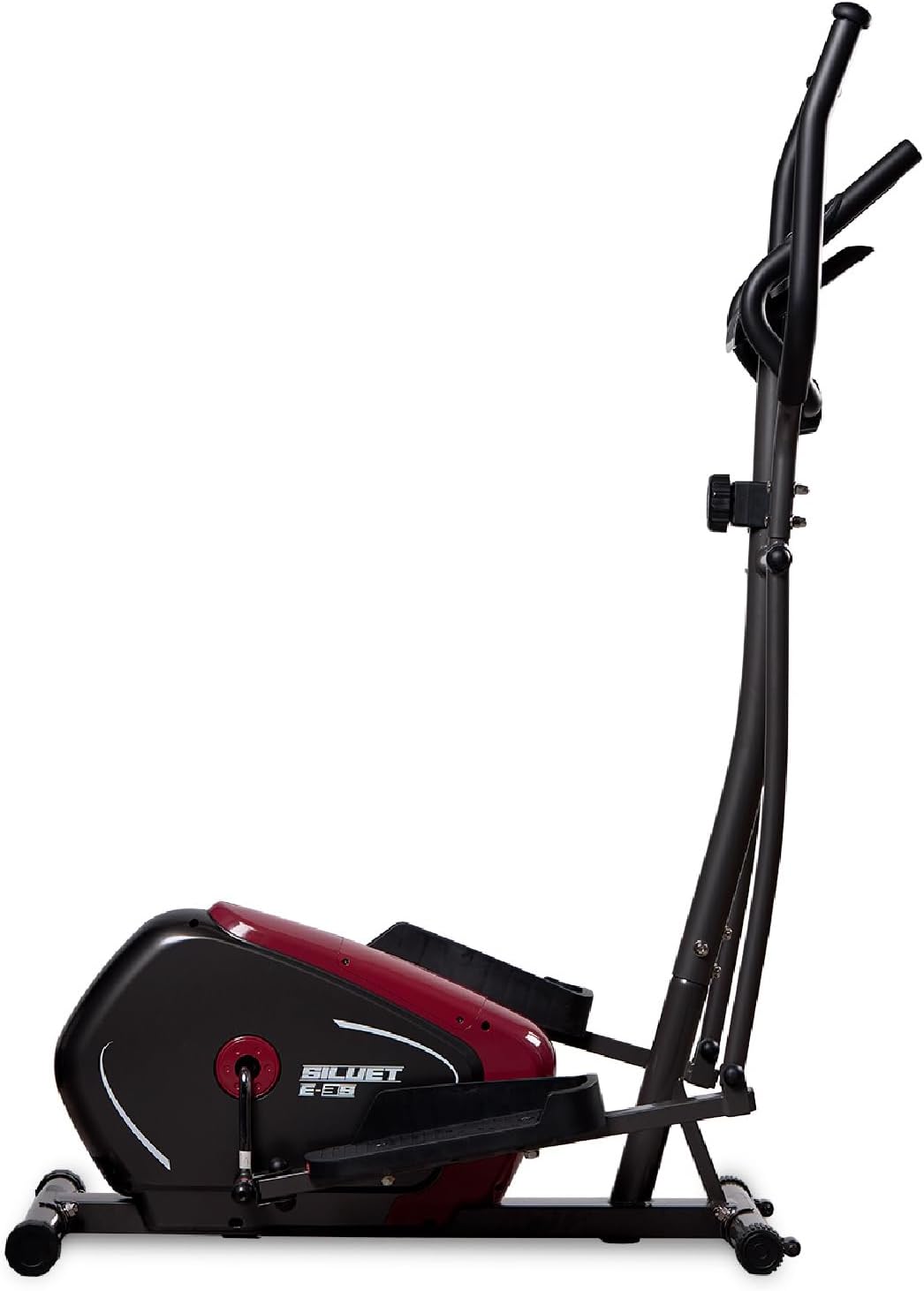
ചിത്രം 1: വശം view of the DXQ Siluet Fitness S6900070 Elliptical Trainer, showcasing its compact design and main structure.
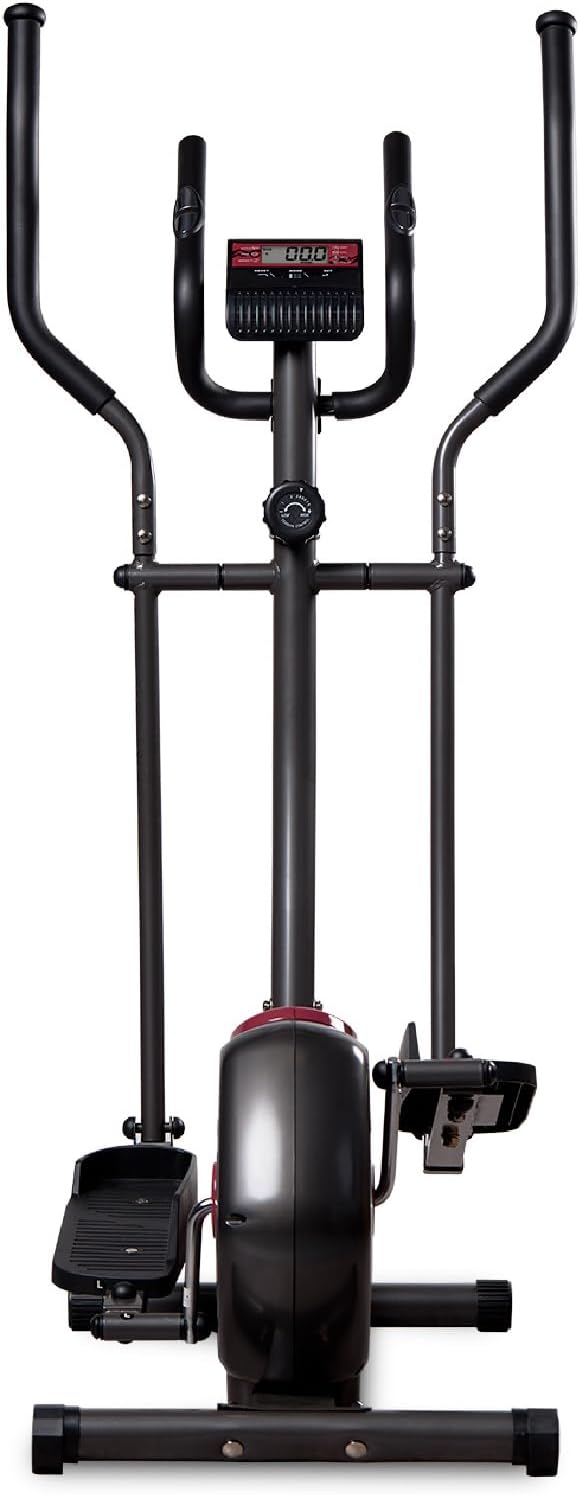
ചിത്രം 2: മുൻഭാഗം view of the elliptical trainer, highlighting the console and handlebars.
സജ്ജീകരണവും അസംബ്ലിയും
The DXQ Siluet Fitness S6900070 Elliptical Trainer features a Plug&Run pre-assembly system, simplifying the setup process. Most major components are pre-assembled, requiring minimal final assembly.
അസംബ്ലി ഘട്ടങ്ങൾ:
- ഘടകങ്ങൾ അൺപാക്ക് ചെയ്യുക: പാക്കേജിംഗിൽ നിന്ന് എല്ലാ ഭാഗങ്ങളും ശ്രദ്ധാപൂർവ്വം നീക്കം ചെയ്യുക. വൃത്തിയുള്ളതും പരന്നതുമായ പ്രതലത്തിൽ വയ്ക്കുക.
- സ്റ്റെബിലൈസറുകൾ ഘടിപ്പിക്കുക: Secure the front and rear stabilizer bars to the main frame using the provided bolts and tools.
- ഹാൻഡിൽബാറുകൾ ഇൻസ്റ്റാൾ ചെയ്യുക: Connect the moving handlebars and fixed handlebars to the main upright post. Ensure all connections are tight.
- Mount Pedals: Attach the left and right pedals to their respective crank arms. Note that pedals are often marked 'L' and 'R'.
- Connect Console Cables: Carefully connect the sensor and pulse cables from the main frame to the back of the console. Mount the console onto its bracket.
- സ്ഥിരത പരിശോധിക്കുക: Once assembled, ensure all bolts are securely tightened. Use the adjustable levelers on the base to ensure the elliptical is stable and does not wobble on uneven floors.

Figure 3: Diagram illustrating the assembled elliptical trainer with its approximate dimensions: 115.5 cm (length) x 75 cm (width) x 158 cm (height).
പ്രവർത്തന നിർദ്ദേശങ്ങൾ
ഒരു വർക്ക്ഔട്ട് ആരംഭിക്കുന്നു:
- Step onto the anti-slip pedals, one foot at a time, ensuring you have a firm grip on the fixed handlebars for balance.
- Begin pedaling in a smooth, elliptical motion. You can hold either the fixed or moving handlebars.
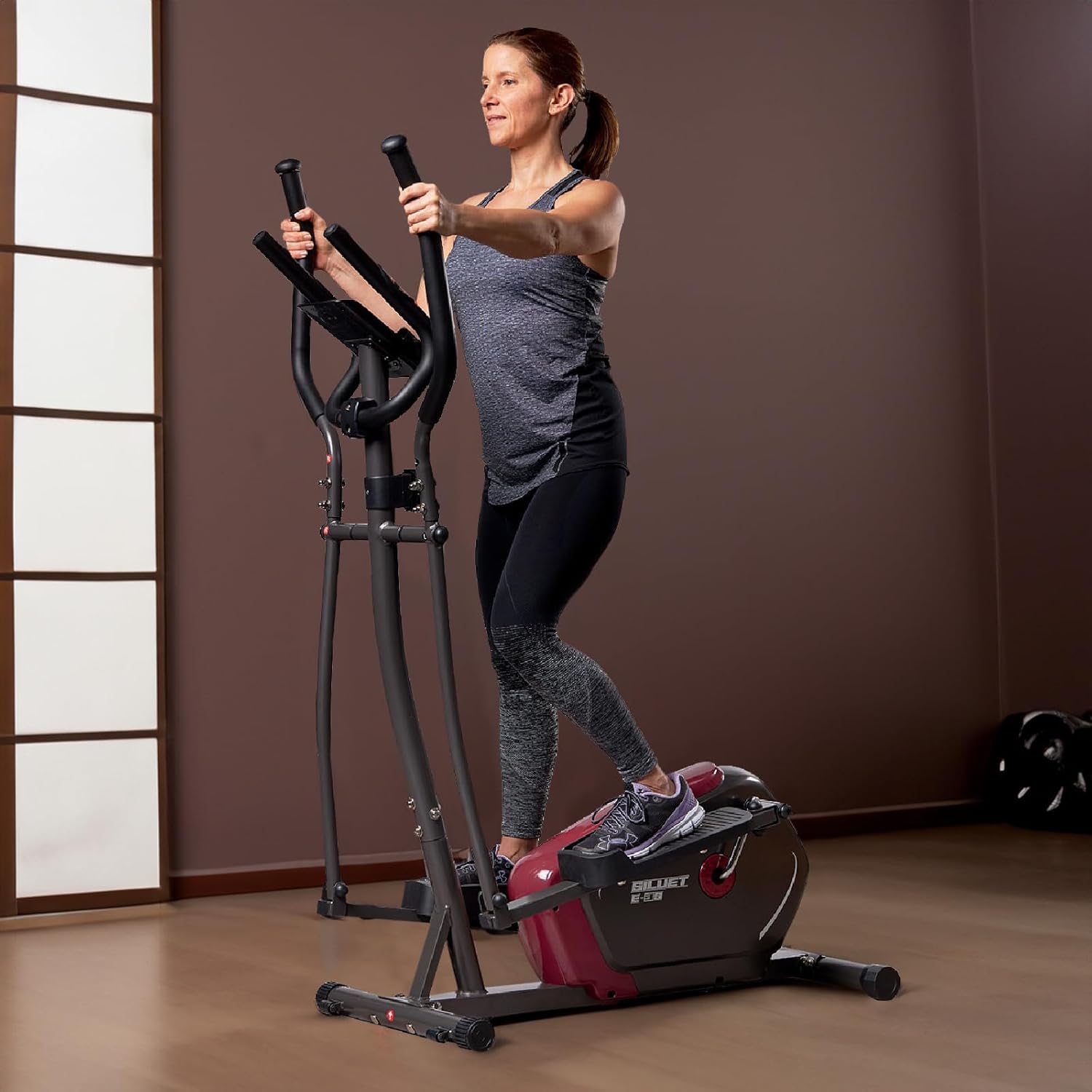
Figure 4: A user demonstrating proper form while exercising on the elliptical trainer, utilizing the moving handlebars.
പ്രതിരോധം ക്രമീകരിക്കൽ:
The elliptical trainer features 8 levels of manual magnetic resistance. To adjust the intensity of your workout:
- Locate the resistance knob on the main upright post, below the console.
- Turn the knob clockwise to increase resistance (higher number for more intensity).
- Turn the knob counter-clockwise to decrease resistance (lower number for less intensity).
കൺസോൾ പ്രവർത്തനങ്ങൾ:
The LCD monitor tracks your workout data. It typically activates automatically when you start pedaling or press any button.

ചിത്രം 5: വിശദമായി view of the LCD console, showing the display and control buttons (RESET, MODE, SET).
- മോഡ് ബട്ടൺ: Press to cycle through the display functions:
- സ്കാൻ: Automatically cycles through all functions every few seconds.
- സമയം: Displays the duration of your current workout.
- വേഗത: Shows your current workout speed.
- ദൂരം: Displays the distance covered during your current workout.
- കലോറികൾ: നിങ്ങളുടെ വ്യായാമ വേളയിൽ കത്തിച്ച കലോറികളുടെ എണ്ണം കണക്കാക്കുന്നു.
- പൾസ്: Shows your heart rate when holding the hand pulse sensors.
- ഓഡോമീറ്റർ: ആകെ സഞ്ചിത ദൂരം പ്രദർശിപ്പിക്കുന്നു.
- റീസെറ്റ് ബട്ടൺ: Press and hold to clear all current workout data (Time, Distance, Calories).
- SET ബട്ടൺ: Used for setting target values for Time, Distance, or Calories (refer to console specific instructions for detailed setting procedures).
പൾസ് അളക്കൽ:
To measure your heart rate, firmly grasp the hand pulse sensors located on the fixed handlebars. Your pulse will be displayed on the console after a few seconds.
Using the Device Holder:
Place your mobile device or book securely in the integrated holder located above the console for entertainment or reading during your workout.
മെയിൻ്റനൻസ്
Regular maintenance ensures the longevity and safe operation of your elliptical trainer.
- വൃത്തിയാക്കൽ: പരസ്യം ഉപയോഗിച്ച് ഉപകരണങ്ങൾ തുടച്ചുമാറ്റുകamp ഓരോ ഉപയോഗത്തിനു ശേഷവും വിയർപ്പും പൊടിയും നീക്കം ചെയ്യാൻ തുണി ഉപയോഗിക്കുക. ഉരച്ചിലുകൾ ഉണ്ടാക്കുന്ന ക്ലീനറുകളോ ലായകങ്ങളോ ഒഴിവാക്കുക.
- പരിശോധന: എല്ലാ ബോൾട്ടുകൾ, നട്ടുകൾ, ചലിക്കുന്ന ഭാഗങ്ങൾ എന്നിവയുടെ ഇറുകിയതും തേയ്മാനവും ഇടയ്ക്കിടെ പരിശോധിക്കുക. അയഞ്ഞ ഫാസ്റ്റനറുകൾ മുറുക്കുക.
- ലൂബ്രിക്കേഷൻ: Moving joints may require occasional lubrication. Refer to specific product guidelines if unusual squeaking or friction occurs.
- സംഭരണം: Store the elliptical trainer in a dry, cool place away from direct sunlight and moisture. Use the transport wheels to move the unit carefully.

Figure 6: A user tilting the elliptical trainer to engage the transport wheels, facilitating easy movement and storage.
ട്രബിൾഷൂട്ടിംഗ്
If you encounter issues with your elliptical trainer, refer to the following common problems and solutions:
| പ്രശ്നം | സാധ്യമായ കാരണം | പരിഹാരം |
|---|---|---|
| Console not displaying | Loose cable connection, dead batteries | Check all cable connections to the console. Replace console batteries (if applicable). |
| പ്രതിരോധത്തിൽ മാറ്റമില്ല. | Resistance cable disconnected or damaged, mechanism fault | Inspect the resistance cable connection to the knob and flywheel. Contact support if issue persists. |
| ഞരക്കുകയോ പൊടിക്കുകയോ ചെയ്യുന്ന ശബ്ദം | Loose bolts, lack of lubrication, worn parts | Tighten all visible bolts and nuts. Apply lubricant to moving joints if necessary. |
| പൾസ് റീഡിംഗ് കൃത്യമല്ല | Hands not firmly on sensors, dry hands | Ensure firm contact with both hand pulse sensors. Slightly moisten hands if they are too dry. |
സ്പെസിഫിക്കേഷനുകൾ
Detailed technical specifications for the DXQ Siluet Fitness S6900070 Elliptical Trainer:
| ഫീച്ചർ | വിശദാംശങ്ങൾ |
|---|---|
| മോഡൽ | എസ് 6900070 |
| ബ്രാൻഡ് | DXQ Siluet Fitness |
| ഉൽപ്പന്ന അളവുകൾ (L x W x H) | 115.5 സെ.മീ x 75 സെ.മീ x 158 സെ.മീ |
| ഉൽപ്പന്ന ഭാരം | 30.5 കി.ഗ്രാം |
| പരമാവധി ഉപയോക്തൃ ഭാരം | 100 കി.ഗ്രാം |
| ഫ്ലൈ വീൽ ഭാരം | 5 കി.ഗ്രാം |
| റെസിസ്റ്റൻസ് സിസ്റ്റം | Magnetic, Manual Control |
| പ്രതിരോധ നിലകൾ | 8 graduated levels |
| ട്രാൻസ്മിഷൻ സിസ്റ്റം | പോളി-വി ബെൽറ്റ് |
| കൺസോൾ പ്രവർത്തനങ്ങൾ | Speed, Time, Distance, Calories, Scan, Pulse, Odometer |
| പൾസ് അളക്കൽ | Integrated Hand Pulse Sensors |
| ഉപകരണ ഉടമ | അതെ |
| ഗതാഗത ചക്രങ്ങൾ | അതെ (2) |
| ശുപാർശ ചെയ്യുന്ന ഉപയോഗം | Regular, up to 6 hours/week |
| Main Material (as per specification) | Acrylic (Note: Typically refers to specific components, main frame is usually steel) |
വാറൻ്റിയും പിന്തുണയും
Specific warranty details for the DXQ Siluet Fitness S6900070 Elliptical Trainer may vary by region and retailer. Please retain your proof of purchase for any warranty claims.
For technical assistance, spare parts, or warranty inquiries, please contact your retailer or the manufacturer directly. Refer to the contact information provided with your purchase documentation.