1. ഉൽപ്പന്നം കഴിഞ്ഞുview
The DEKCO DC6L is a 100% wireless, battery-operated security camera designed for outdoor use. It provides 1080P Full HD video, smart PIR human motion detection, two-way audio, and multiple night vision modes to ensure comprehensive home security. Its IP66 weather-resistant design allows for reliable operation in various environmental conditions.

Image: The DEKCO DC6L security camera mounted on a wall, with a hand holding a smartphone displaying the camera's live view of a house.
പ്രധാന സവിശേഷതകൾ:
- PIR മനുഷ്യ കണ്ടെത്തൽ: Advanced smart PIR sensor for accurate human detection, reducing false alarms.
- 100% Wireless & Battery Powered: Operates without power cords or network cables, powered by a 5200mAh rechargeable battery.
- 1080P FHD Video & Color Night Vision: Delivers clear 1080P images and supports full-color night vision with built-in strobe light.
- Sound-light Alarms: Automatically triggers audio and strobe light alarms upon detecting human motion.
- ടു-വേ ഓഡിയോ: Enables real-time communication through the camera's built-in microphone and speaker.
- 2.4GHz വൈഫൈ കണക്റ്റിവിറ്റി: Stable and fast connection (does not support 5GHz WiFi).
- സുരക്ഷിതമായ ലോക്കൽ & ക്ലൗഡ് സംഭരണം: Supports Micro SD card (8-128G, C10, Fat32) and encrypted cloud storage.
- IP66 കാലാവസ്ഥാ പ്രതിരോധം: വിവിധ ബാഹ്യ കാലാവസ്ഥകളെ നേരിടാൻ രൂപകൽപ്പന ചെയ്തിരിക്കുന്നു.
2. ഉൽപ്പന്ന ഘടകങ്ങൾ
Familiarize yourself with the different parts of your DEKCO security camera:

Image: Detailed diagram of the DEKCO DC6L camera highlighting its various components including the lens, infrared LEDs, spotlight, PIR motion sensor, microphone, base bracket, power port, micro USB port, SD card slot, and reset button.
ഉൾപ്പെടുത്തിയ ഘടകങ്ങൾ:
- DEKCO DC6L Security Camera
- മൌണ്ടിംഗ് ബ്രാക്കറ്റ്
- മൗണ്ടിംഗ് സ്ക്രൂകളും വാൾ പ്ലഗുകളും
- യുഎസ്ബി ചാർജിംഗ് കേബിൾ
- ഉപയോക്തൃ മാനുവൽ (ഈ പ്രമാണം)
- 1 AAA battery (included, pre-installed)
Note: A Micro SD card (8-128G, C10, Fat32) and a 5V&1A power adapter (charger) are not included and must be purchased separately if needed.
3. സജ്ജീകരണ ഗൈഡ്
3.1 പ്രാരംഭ ചാർജിംഗ്
Before first use, fully charge the camera. It takes approximately 12 hours for the camera to be fully charged using the provided USB cable and a compatible 5V&1A power adapter (not included). A full charge can support the camera for 1-2 months, depending on usage and environmental factors.

Image: The DEKCO camera on a table with text indicating its 5200mAh large battery capacity and instructions for initial charging and battery life.
3.2 ആപ്പ് ഡൗൺലോഡും ഇൻസ്റ്റാളേഷനും
The DEKCO camera operates with the 'CloudEdge' app. Follow these steps to download and install the app:
- Scan the QR code on the product packaging or search for 'CloudEdge' in your device's app store (App Store for iOS, Google Play for Android).
- Download and install the 'CloudEdge' app.
- ഒരു അക്കൗണ്ട് രജിസ്റ്റർ ചെയ്ത് ലോഗിൻ ചെയ്യുക.

Image: A visual guide showing the three steps for easy setup: downloading the CloudEdge app, powering on the camera and connecting to 2.4GHz WiFi, and selecting 'Battery Camera' in the app.
3.3 വൈഫൈ കണക്ഷൻ
നിങ്ങളുടെ വൈഫൈ നെറ്റ്വർക്ക് 2.4GHz ആണെന്ന് ഉറപ്പാക്കുക. ക്യാമറ 5GHz വൈഫൈ പിന്തുണയ്ക്കുന്നില്ല.
- ക്യാമറ ഓൺ ചെയ്യുക.
- In the 'CloudEdge' app, tap the '+' icon to add a new device.
- ഉപകരണ ലിസ്റ്റിൽ നിന്ന് 'ബാറ്ററി ക്യാമറ' തിരഞ്ഞെടുക്കുക.
- Follow the on-screen prompts to connect the camera to your 2.4GHz Wi-Fi network. This typically involves scanning a QR code displayed on your phone with the camera.

Image: A visual representation showing the DEKCO camera connecting to a 2.4GHz Wi-Fi signal, with a clear indication that 5GHz Wi-Fi is not supported.
3.4 ക്യാമറ മൗണ്ടിംഗ്
ക്യാമറ ചുമരിൽ ഘടിപ്പിക്കുന്നതിനായി രൂപകൽപ്പന ചെയ്തിരിക്കുന്നു. ആവശ്യമുള്ള സ്ഥലം നൽകുന്ന ഒരു സ്ഥലം തിരഞ്ഞെടുക്കുക viewആംഗിൾ ആണ്, നിങ്ങളുടെ 2.4GHz വൈഫൈ നെറ്റ്വർക്കിന്റെ പരിധിയിലാണ്.
- Mark the drilling positions using the mounting bracket as a template.
- മേസൺറിയിൽ ഘടിപ്പിക്കുകയാണെങ്കിൽ ദ്വാരങ്ങൾ തുരന്ന് വാൾ പ്ലഗുകൾ ഇടുക.
- നൽകിയിരിക്കുന്ന സ്ക്രൂകൾ ഉപയോഗിച്ച് മൗണ്ടിംഗ് ബ്രാക്കറ്റ് ഭിത്തിയിൽ ഉറപ്പിക്കുക.
- Attach the camera to the mounting bracket and adjust the angle as needed.
4. പ്രവർത്തന നിർദ്ദേശങ്ങൾ
4.1 PIR Human Detection and App Notifications
The camera's upgraded smart PIR sensor focuses on humanoid detection, significantly reducing false alarms from pets or swaying branches. When human motion is detected, the camera will:
- Begin recording video (requires an inserted SD card).
- Send instant alerts to your 'CloudEdge' app.

Image: A scene depicting smart human detection, where the DEKCO camera identifies a person and triggers a sound-light alarm, simultaneously sending an alert message to a smartphone.
4.2 Video Quality and Night Vision Modes
The camera provides 1080P Full HD images and videos. It features three night vision modes:
- ഇൻഫ്രാറെഡ് മോഡ്: ഇൻഫ്രാറെഡ് എൽഇഡികൾ ഉപയോഗിച്ചുള്ള സ്റ്റാൻഡേർഡ് കറുപ്പും വെളുപ്പും രാത്രി ദർശനം.
- പൂർണ്ണ വർണ്ണ മോഡ്: Activates the built-in spotlight to provide full-color video even in low light conditions. This can be set in the camera settings within the app.
- അലാറം മോഡ്: Triggers the strobe light and siren upon detection to deter intruders.

Image: A comparison of the three night vision modes: Infrared Mode for standard black and white viewing, Full Color Mode for illuminated color viewing, and Alarm Mode which activates a strobe light and siren.
4.3 ടു-വേ ഓഡിയോ
Communicate directly through the camera using the two-way audio feature. This allows you to speak to visitors or deter unwanted guests from your smartphone via the 'CloudEdge' app.
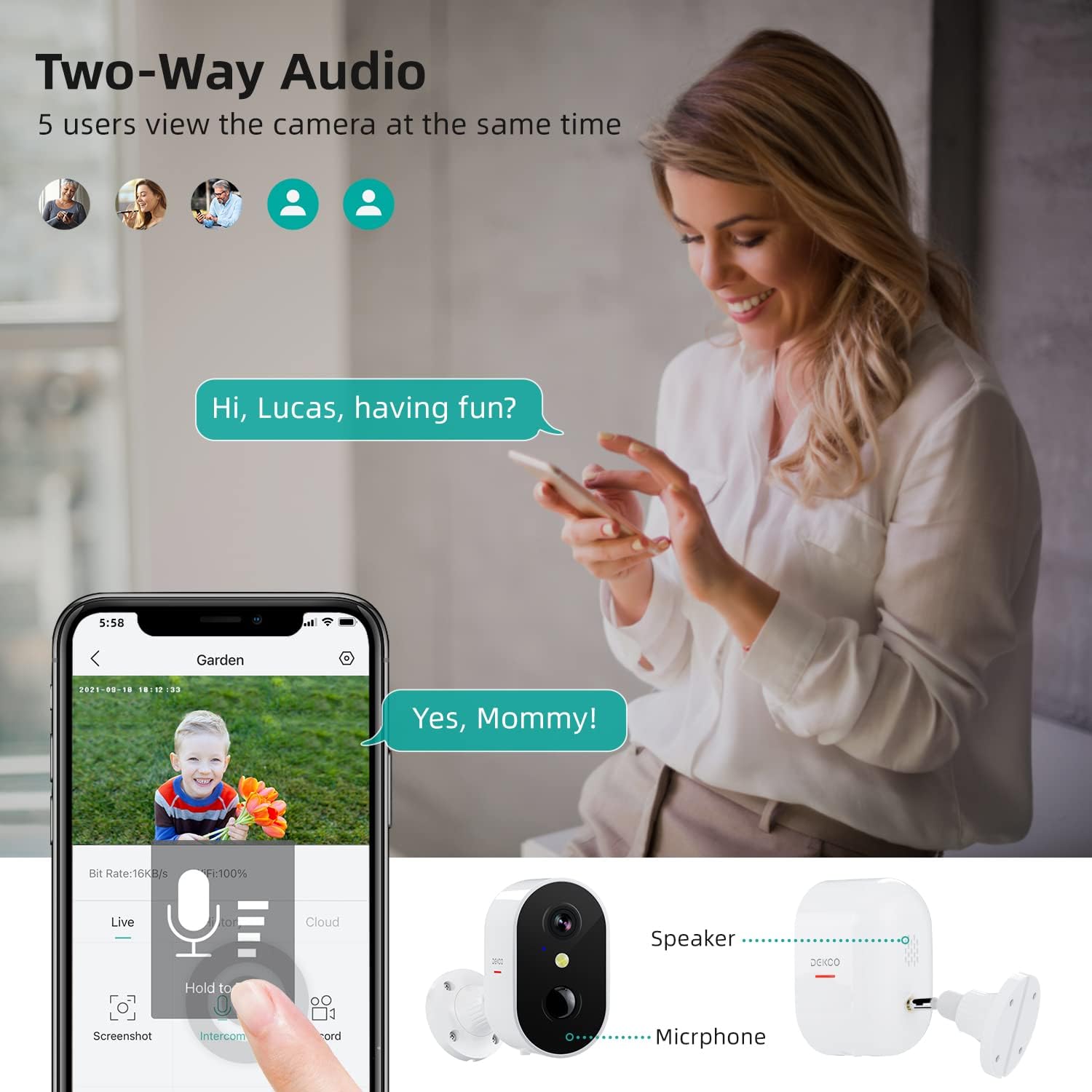
Image: A woman interacting with a child via the DEKCO camera's two-way audio feature, as seen on her smartphone, with icons indicating multiple users can view ഒരേസമയം.
4.4 സംഭരണ ഓപ്ഷനുകൾ
The DEKCO camera offers flexible storage solutions for your recordings:
- മൈക്രോ എസ്ഡി കാർഡ് സംഭരണം: A built-in slot supports Micro SD cards from 8GB to 128GB (Class 10, Fat32 format). Recordings are stored locally and can be played back at any time.
- ക്ലൗഡ് സംഭരണം: Encrypted secure cloud storage is also supported for convenient access to your video history from anywhere.

Image: The DEKCO camera mounted on a wall, with an arrow indicating the location of the Micro SD card slot for secure local storage, allowing playback of recorded footage.
5. പരിപാലനം
5.1 ബാറ്ററി മാനേജ്മെൻ്റ്
To maximize battery life and ensure continuous operation:
- Fully charge the camera before initial use and whenever the battery level is low.
- Consider adding a compatible solar panel (not included) for a non-stop power supply, especially for locations with frequent sunlight.
- Battery life can vary based on the number of motion detections, recording duration, and environmental temperature.
5.2 കാലാവസ്ഥാ പ്രതിരോധം
The DEKCO DC6L camera has an IP66 rating, meaning it is protected against dust and powerful water jets. It is designed to withstand outdoor elements, including rain, sun, and temperatures ranging from -20°C to +50°C (-4°F to +122°F).

Image: The DEKCO camera shown in a rainy outdoor environment, highlighting its IP66 waterproof rating and resistance to sun, cold, and dust.
5.3 വൃത്തിയാക്കൽ
To maintain optimal performance, periodically clean the camera lens and body. Use a soft, damp cloth. Avoid using harsh chemicals or abrasive cleaners that could damage the camera's surface or lens.
6. പ്രശ്നപരിഹാരം
പൊതുവായ പ്രശ്നങ്ങളും പരിഹാരങ്ങളും:
| പ്രശ്നം | സാധ്യമായ കാരണം / പരിഹാരം |
|---|---|
| ക്യാമറ വൈഫൈയിലേക്ക് കണക്റ്റ് ചെയ്യുന്നില്ല | Ensure your Wi-Fi is 2.4GHz (5GHz is not supported). Check Wi-Fi signal strength at the camera's location. Restart your router and the camera. Ensure correct Wi-Fi password is entered. |
| പതിവ് തെറ്റായ അലാറങ്ങൾ | Adjust PIR sensitivity settings in the 'CloudEdge' app. Ensure the camera is not pointed at areas with constant motion (e.g., busy roads, swaying trees). The human detection feature helps reduce these. |
| മോശം രാത്രി കാഴ്ച നിലവാരം | Ensure the camera lens is clean. Check for obstructions blocking the infrared LEDs or spotlight. Ensure there are no strong light sources directly facing the camera at night. |
| ചെറിയ ബാറ്ററി ലൈഫ് | High frequency of motion detections and recordings will consume more battery. Reduce detection sensitivity or recording duration if possible. Ensure the camera is fully charged (takes 12 hours). Consider a solar panel. |
| ആപ്പ് അറിയിപ്പുകളൊന്നുമില്ല | Check app notification settings on your smartphone and within the 'CloudEdge' app. Ensure the app has necessary permissions. Verify internet connection. |
| കഴിയില്ല view റെക്കോർഡ് ചെയ്ത വീഡിയോകൾ | Ensure a compatible Micro SD card is inserted and correctly formatted (Fat32). Check cloud storage subscription status if using cloud. Verify camera is online. |
If you encounter issues not listed here, please refer to the support section for contact information.
7 സ്പെസിഫിക്കേഷനുകൾ
| ഫീച്ചർ | വിശദാംശങ്ങൾ |
|---|---|
| മോഡൽ നമ്പർ | DC6L |
| വീഡിയോ ക്യാപ്ചർ റെസല്യൂഷൻ | 1080P (1920 x 1080 Pixels) |
| കണക്റ്റിവിറ്റി ടെക്നോളജി | വയർലെസ് (വൈ-ഫൈ) |
| Wi-Fi ഫ്രീക്വൻസി | 2.4GHz (Does not support 5GHz) |
| പവർ ഉറവിടം | Battery Powered (5200mAh Lithium battery included) |
| വാല്യംtage | 5 വോൾട്ട് |
| വാട്ട്tage | 3 വാട്ട് മണിക്കൂർ |
| സംഭരണം | Micro SD Card (8-128GB, C10, Fat32) & Cloud Storage |
| കാലാവസ്ഥ പ്രതിരോധം | IP66 |
| പ്രവർത്തന താപനില | -20°C മുതൽ +50°C വരെ (-4°F മുതൽ +122°F വരെ) |
| മൗണ്ടിംഗ് തരം | മതിൽ മൗണ്ട് |
| അളവുകൾ (L x W x H) | 9.65 x 15.24 x 10.16 സെ.മീ (3.8 x 6 x 4 ഇഞ്ച്) |
| ഇനത്തിൻ്റെ ഭാരം | 330 ഗ്രാം |
| അനുയോജ്യമായ ഉപകരണങ്ങൾ | Smartphone (via CloudEdge app) |
8. വാറൻ്റിയും പിന്തുണയും
8.1 ലിമിറ്റഡ് വാറൻ്റി
DEKCO provides a 1-Year Limited Warranty for this product. The actual warranty period shall be implemented according to the requirements of local laws and regulations.
8.2 ഉപഭോക്തൃ പിന്തുണ
DEKCO offers lifetime support for all DEKCO brand products. If you have any questions, require assistance, or encounter any issues, please do not hesitate to contact our support team:
- Webസൈറ്റ്: www.dekcolife.com
- After Service E-mail: support@dekcolife.com
- United States Support: +1-877-277-5797 (Mon-Fri 9AM-5PM EST)
- United Kingdom Support: +44-20-3885-0802 (Mon-Fri 9AM-5PM GMT)
- ജർമ്മനി പിന്തുണ: +49-69-3109-0128 (Mon-Fri 9AM-5PM CET)
- Facebook: @ഡെക്കോളിഫ്


