1. ആമുഖം
Thank you for choosing the OneOdio A70 Bluetooth Over-Ear Headphones. This manual provides essential information for setting up, operating, and maintaining your headphones to ensure optimal performance and longevity. Please read this manual thoroughly before use.
2. പാക്കേജ് ഉള്ളടക്കം
താഴെ ലിസ്റ്റ് ചെയ്തിരിക്കുന്ന എല്ലാ ഇനങ്ങളും നിങ്ങളുടെ പാക്കേജിൽ ഉൾപ്പെടുത്തിയിട്ടുണ്ടെന്ന് ഉറപ്പാക്കുക:
- OneOdio A70 Wireless Headphones
- ഹെഡ്ഫോണുകൾക്കുള്ള സഞ്ചി
- 3.5mm Audio Plug Cable
- Dual-duty cable (6.35mm to 3.5mm)
- യുഎസ്ബി ചാർജിംഗ് കേബിൾ
- ഉപയോക്തൃ മാനുവൽ (ഈ പ്രമാണം)
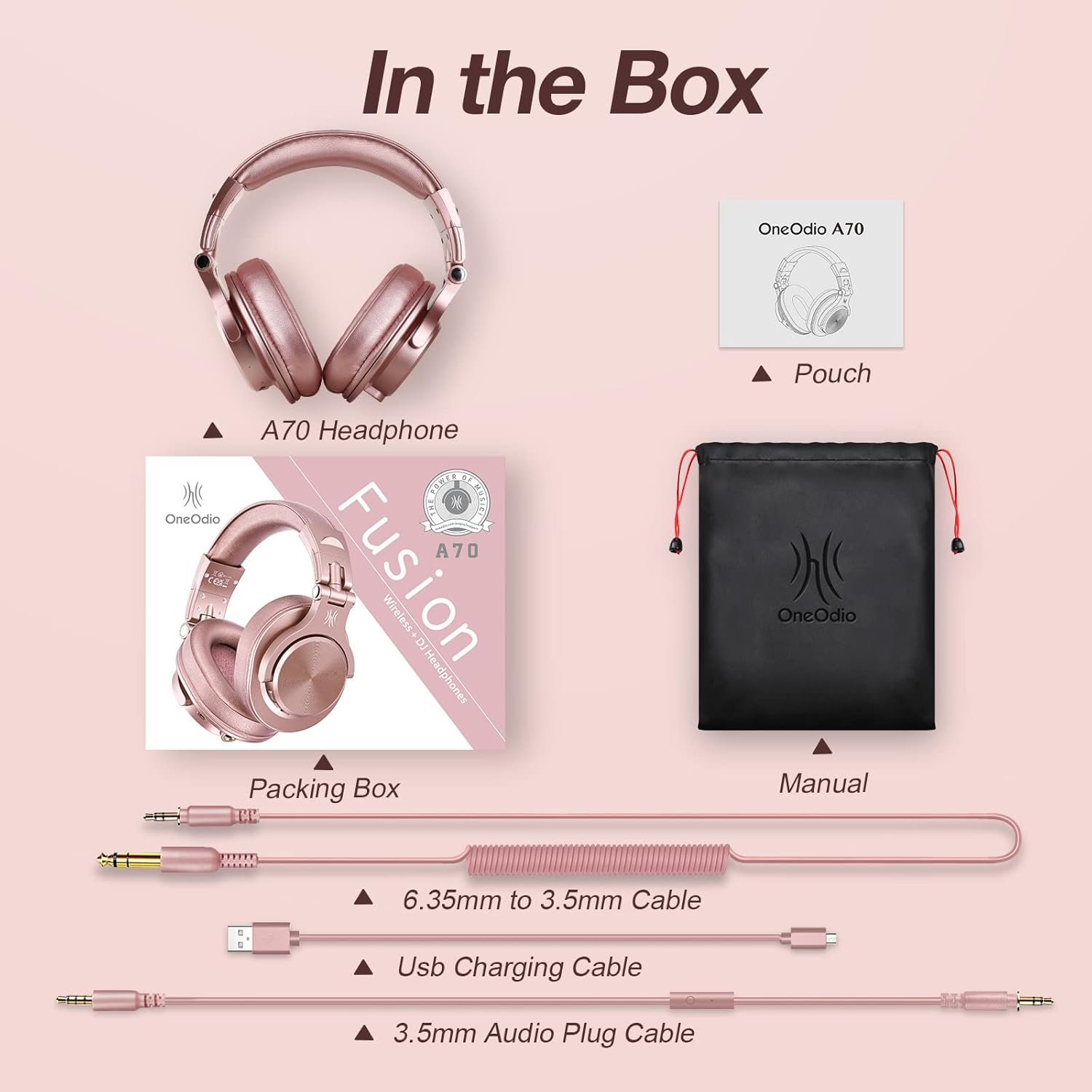
Image: All items included in the OneOdio A70 headphone package, including the headphones, various cables, and a carrying pouch.
3. ഉൽപ്പന്നം കഴിഞ്ഞുview
The OneOdio A70 headphones are designed for versatility, offering both wireless Bluetooth and wired connectivity options. They feature a comfortable over-ear design with soft ear pads and an adjustable headband for extended wear.

Image: A pair of OneOdio A70 over-ear headphones in Rose Gold, showcasing their design and included audio cables.
പ്രധാന സവിശേഷതകൾ:
- High-Resolution Sound: Equipped with 40mm neodymium drivers for powerful bass and dynamic stereo sound.
- ഡ്യുവൽ മോഡ്: Seamlessly switch between wireless Bluetooth and wired connections.
- വിപുലീകരിച്ച കളിസമയം: Up to 72 hours of audio playback in wireless mode.
- സുഖപ്രദമായ ഡിസൈൻ: Over-ear, ergonomic design with soft memory cotton and skin-friendly protein leather ear pads.
- Foldable and Rotatable: Space-saving design with 90-degree swiveling ear pads and a foldable headband.
- ഓഡിയോ പങ്കിടൽ: Unique SharePort feature allows multiple users to listen simultaneously.
- Wired Aux Jack Lock: Ensures a stable connection for wired use.
4. സജ്ജീകരണം
4.1 ഹെഡ്ഫോണുകൾ ചാർജ് ചെയ്യുന്നു
Before first use, fully charge your headphones. Use the provided USB charging cable to connect the headphones to a USB power source (e.g., computer USB port, wall adapter). The LED indicator will show charging status and turn off or change color when fully charged.
4.2 ബ്ലൂടൂത്ത് ജോടിയാക്കൽ
- ഹെഡ്ഫോണുകൾ ഓഫാണെന്ന് ഉറപ്പാക്കുക.
- Press and hold the Multi-function button (usually the power button) for approximately 5-7 seconds until the LED indicator flashes blue and red alternately, indicating pairing mode.
- നിങ്ങളുടെ ഉപകരണത്തിൽ (സ്മാർട്ട്ഫോൺ, ടാബ്ലെറ്റ്, ലാപ്ടോപ്പ്), ബ്ലൂടൂത്ത് പ്രവർത്തനക്ഷമമാക്കി ലഭ്യമായ ഉപകരണങ്ങൾക്കായി തിരയുക.
- Select "OneOdio A70" from the list of found devices.
- കണക്ട് ചെയ്തുകഴിഞ്ഞാൽ, LED ഇൻഡിക്കേറ്റർ സാവധാനം നീല നിറത്തിൽ മിന്നിമറയും അല്ലെങ്കിൽ കടും നീലയായി തുടരും.

Image: A smartphone screen displaying the Bluetooth settings, with "OneOdio A70" highlighted as a discoverable device, illustrating the pairing process.
4.3 വയർഡ് കണക്ഷൻ
The A70 headphones support two types of wired connections:
- 3.5mm to 3.5mm Cable: Connect one end to the 3.5mm jack on your headphones and the other end to the 3.5mm audio output of your device (e.g., smartphone, laptop, tablet).
- 6.35mm to 3.5mm Cable: Connect the 6.35mm end to professional audio equipment (e.g., DJ mixer, guitar amplifier) and the 3.5mm end to the headphones.
The wired connection automatically disables Bluetooth, conserving battery life.

Image: A visual guide demonstrating the wide compatibility of the headphones, showing connections via 3.5mm jack to mobile devices and 6.35mm jack to professional audio equipment like guitar ampജീവപര്യന്തം.

Image: A detailed diagram illustrating the different wired connection options, including 3.5mm to 3.5mm for cellphones/laptops and 6.35mm to 3.5mm for turntables/ampജീവപര്യന്തം.
5. ഓപ്പറേഷൻ
5.1 പവർ ഓൺ/ഓഫ്
- പവർ ഓൺ: Press and hold the Multi-function button until the LED indicator lights up.
- പവർ ഓഫ്: Press and hold the Multi-function button until the LED indicator turns off.
5.2 Music Playback and Call Management (Bluetooth Mode)
The headphones feature integrated controls for managing audio and calls:
- പ്ലേ/താൽക്കാലികമായി നിർത്തുക: മൾട്ടി-ഫംഗ്ഷൻ ബട്ടൺ ഒരിക്കൽ അമർത്തുക.
- അടുത്ത ട്രാക്ക്: വോളിയം അപ്പ് ബട്ടൺ അമർത്തിപ്പിടിക്കുക.
- മുമ്പത്തെ ട്രാക്ക്: വോളിയം ഡൗൺ ബട്ടൺ അമർത്തിപ്പിടിക്കുക.
- വോളിയം കൂട്ടുക: വോളിയം അപ്പ് ബട്ടൺ ചുരുക്കി അമർത്തുക.
- വോളിയം താഴേക്ക്: വോളിയം ഡൗൺ ബട്ടൺ ചുരുക്കി അമർത്തുക.
- ഉത്തരം/അവസാന കോൾ: മൾട്ടി-ഫംഗ്ഷൻ ബട്ടൺ ഒരിക്കൽ അമർത്തുക.
- കോൾ നിരസിക്കുക: മൾട്ടി-ഫംഗ്ഷൻ ബട്ടൺ അമർത്തിപ്പിടിക്കുക.
5.3 In-Line Mic Controls (Wired Mode with compatible cable)
If using the 3.5mm audio cable with an in-line microphone, you can control playback and calls directly from the cable:
- പ്ലേ/താൽക്കാലികമായി നിർത്തുക: ബട്ടൺ ഒരിക്കൽ അമർത്തുക.
- ഉത്തരം/അവസാന കോൾ: ബട്ടൺ ഒരിക്കൽ അമർത്തുക.

Image: A visual representation of the in-line microphone and its controls, detailing how to play/pause music and answer/end calls with single presses.
5.4 Audio Sharing Function (SharePort)
The A70 headphones feature a unique audio sharing capability:
- Pair the main A70 headphones with your device via Bluetooth or connect using a 3.5mm audio cable.
- Plug the 6.35mm end of the dual-duty cable into the 6.35mm jack on the main A70 headphones.
- Connect the 3.5mm end of the dual-duty cable to the 3.5mm audio input of a second pair of headphones.
- Both headphones will now receive audio from the same source.

Image: A couple sharing audio from a laptop, demonstrating the audio sharing feature of the OneOdio A70 headphones.
5.5 വോയ്സ് അസിസ്റ്റന്റ്
Activate your device's voice assistant (e.g., Siri, Google Assistant) by pressing the Multi-function button twice in quick succession.

Image: A woman interacting with a voice assistant on her smartphone while wearing OneOdio A70 headphones, illustrating the voice control feature.
6. Comfort and Portability
The OneOdio A70 headphones are designed for comfort during long listening sessions and easy portability.
- ക്രമീകരിക്കാവുന്ന ഹെഡ്ബാൻഡ്: The headband can be extended or retracted to fit various head sizes.
- Swiveling Ear Pads: The ear pads can swivel 90 degrees for single-ear monitoring and a comfortable fit.
- മടക്കാവുന്ന ഡിസൈൻ: The headphones can be folded compactly for storage and travel, fitting easily into the included pouch or a suitcase.

Image: Detail of the adjustable headband mechanism, showing how it extends for a customized fit.

Image: Close-up of an ear cup swiveling 90 degrees, highlighting its flexibility for monitoring or storage.

Image: The OneOdio A70 headphones folded compactly and placed inside a suitcase, demonstrating their portability.
7. പരിപാലനം
To ensure the longevity and optimal performance of your OneOdio A70 headphones, follow these maintenance guidelines:
- വൃത്തിയാക്കൽ: Use a soft, dry cloth to wipe the headphones. Do not use harsh chemicals or abrasive materials. For ear pads, gently wipe with a damp cloth if necessary, and allow to air dry completely.
- സംഭരണം: When not in use, store the headphones in the provided pouch to protect them from dust and scratches. Avoid storing them in extreme temperatures or high humidity.
- കേബിൾ കെയർ: Handle cables gently. Avoid sharp bends or excessive pulling, which can damage the connectors or wiring.
- ഈർപ്പം ഒഴിവാക്കുക: Do not expose the headphones to water or other liquids. If they get wet, power them off immediately and allow them to dry completely before use.
8. പ്രശ്നപരിഹാരം
If you encounter issues with your OneOdio A70 headphones, refer to the following common solutions:
- ശക്തിയില്ല: ഹെഡ്ഫോണുകൾ പൂർണ്ണമായും ചാർജ് ചെയ്തിട്ടുണ്ടെന്ന് ഉറപ്പാക്കുക. USB ചാർജിംഗ് കേബിൾ ഉപയോഗിച്ച് അവയെ ഒരു പവർ സ്രോതസ്സുമായി ബന്ധിപ്പിക്കുക.
- No Sound (Bluetooth):
- ഹെഡ്ഫോണുകൾ ജോടിയാക്കി നിങ്ങളുടെ ഉപകരണവുമായി ബന്ധിപ്പിച്ചിട്ടുണ്ടോയെന്ന് പരിശോധിക്കുക.
- Ensure the volume on both the headphones and your device is turned up.
- നിങ്ങളുടെ ഉപകരണവുമായി ഹെഡ്ഫോണുകൾ ജോടിയാക്കി മാറ്റി വീണ്ടും ജോടിയാക്കാൻ ശ്രമിക്കുക.
- No Sound (Wired):
- Ensure the audio cable is securely plugged into both the headphones and your audio source.
- Verify that the correct audio jack (3.5mm or 6.35mm) is used for your device.
- Test with a different audio cable if available.
- ബ്ലൂടൂത്ത് വഴി ജോടിയാക്കാൻ കഴിയില്ല:
- ഹെഡ്ഫോണുകൾ ജോടിയാക്കൽ മോഡിലാണെന്ന് ഉറപ്പാക്കുക (LED നീലയും ചുവപ്പും നിറത്തിൽ മിന്നുന്നു).
- നിങ്ങളുടെ ഉപകരണത്തിന്റെ ബ്ലൂടൂത്ത് പ്രവർത്തനക്ഷമമാക്കിയിട്ടുണ്ടെന്നും 33 അടി പരിധിക്കുള്ളിൽ ഉണ്ടെന്നും ഉറപ്പാക്കുക.
- ഹെഡ്ഫോണുകളും ഉപകരണവും ഓഫാക്കി ഓണാക്കുക, തുടർന്ന് വീണ്ടും ജോടിയാക്കാൻ ശ്രമിക്കുക.
- നിങ്ങളുടെ ഉപകരണത്തിലെ മുൻ ബ്ലൂടൂത്ത് കണക്ഷനുകൾ വളരെയധികം സംഭരിച്ചിട്ടുണ്ടെങ്കിൽ അവ മായ്ക്കുക.
- മോശം ശബ്ദ നിലവാരം:
- For Bluetooth, ensure there are no obstructions between the headphones and your device, and that you are within range.
- For wired, ensure the cable is fully inserted and not damaged.
- Test with different audio sources or files to rule out source issues.
9 സ്പെസിഫിക്കേഷനുകൾ
| ഫീച്ചർ | സ്പെസിഫിക്കേഷൻ |
|---|---|
| മോഡലിൻ്റെ പേര് | A70 |
| ബ്രാൻഡ് | OneOdio |
| കണക്റ്റിവിറ്റി ടെക്നോളജി | Wireless (Bluetooth), Wired |
| ബ്ലൂടൂത്ത് പതിപ്പ് | 5.0 |
| ബ്ലൂടൂത്ത് ശ്രേണി | 33 അടി (10 മീറ്റർ) |
| ഓഡിയോ ഡ്രൈവർ തരം | ഡൈനാമിക് ഡ്രൈവർ (40mm നിയോഡൈമിയം) |
| ഫ്രീക്വൻസി റേഞ്ച് | 20Hz-20KHz |
| ഫ്രീക്വൻസി പ്രതികരണം | 40 KHz |
| പ്രതിരോധം | 32 ഓം |
| സംവേദനക്ഷമത | 110 ഡി.ബി |
| ഹെഡ്ഫോണുകൾ ജാക്ക് | 3.5 mm ജാക്ക് |
| ബാറ്ററി ലൈഫ് | Up to 72 Hours (Wireless Mode) |
| ശബ്ദ നിയന്ത്രണം | സൗണ്ട് ഐസൊലേഷൻ |
| മെറ്റീരിയൽ | Cotton (Carrying Case), Protein Leather (Ear Pads) |
| ഇനത്തിൻ്റെ ഭാരം | 0.25 കിലോഗ്രാം (8.8 ഔൺസ്) |
| ഉൽപ്പന്ന അളവുകൾ | 6.6 x 5.5 x 4.09 ഇഞ്ച് |
| അനുയോജ്യമായ ഉപകരണങ്ങൾ | Smartphones, Laptops, Desktops, Tablets, Gaming Consoles, Televisions |
10. വാറൻ്റിയും പിന്തുണയും
OneOdio products are designed and manufactured to the highest quality standards. For warranty information and customer support, please refer to the documentation included with your purchase or visit the official OneOdio webസൈറ്റ്. ഏതെങ്കിലും വാറന്റി ക്ലെയിമുകൾക്ക് നിങ്ങളുടെ വാങ്ങലിന്റെ തെളിവ് സൂക്ഷിക്കുക.


