1. ആമുഖം
Thank you for choosing the PUSOKEI Bluetooth Keyboard. This manual provides essential information for setting up, operating, and maintaining your new keyboard. Please read these instructions carefully before use to ensure optimal performance and longevity of your device.
This keyboard is designed for broad compatibility and ease of use, featuring a QWERTZ German layout for specific regional typing needs.
2 സുരക്ഷാ വിവരങ്ങൾ
- കീബോർഡ് വെള്ളം, ഈർപ്പം, കടുത്ത താപനില എന്നിവയിൽ നിന്ന് അകറ്റി നിർത്തുക.
- കീബോർഡ് താഴെയിടുകയോ ശക്തമായ ആഘാതങ്ങൾക്ക് വിധേയമാക്കുകയോ ചെയ്യുന്നത് ഒഴിവാക്കുക.
- Do not attempt to disassemble or repair the keyboard yourself. Contact qualified service personnel for assistance.
- പ്രാദേശിക നിയന്ത്രണങ്ങൾ അനുസരിച്ച് ബാറ്ററികൾ നീക്കം ചെയ്യുക.
3. പാക്കേജ് ഉള്ളടക്കം
പാക്കേജിൽ ഇനിപ്പറയുന്ന ഇനങ്ങൾ ഉണ്ടോ എന്ന് പരിശോധിക്കുക:
- 1 x PUSOKEI Bluetooth Keyboard (QWERTZ German Layout)
- 1 x ഉപയോക്തൃ മാനുവൽ
4. ഉൽപ്പന്നം കഴിഞ്ഞുview
The PUSOKEI Bluetooth Keyboard is a slim, silent, and portable wireless keyboard designed for stable connection across various operating systems. It features a QWERTZ German layout for efficient typing.

Image: The PUSOKEI Bluetooth Keyboard showcasing its QWERTZ German layout.

Image: A user operating the PUSOKEI Bluetooth Keyboard with a laptop, highlighting its universal design and portability.
- German Layout: Specifically designed QWERTZ German version keyboard.
- വിശാലമായ അനുയോജ്യത: Works with iOS, Android, and Windows operating systems.
- സ്ഥിരതയുള്ള കണക്ഷൻ: Bluetooth 3.0 ensures a reliable connection up to 10 meters.
- പോർട്ടബിൾ ഡിസൈൻ: Ultra-thin and lightweight for easy transport.
- നിശബ്ദ ടൈപ്പിംഗ്: Responsive keys provide a comfortable and low-noise typing experience.
5. സജ്ജീകരണം
5.1. ബാറ്ററി ഇൻസ്റ്റാളേഷൻ
- കീബോർഡിന്റെ അടിഭാഗത്ത് ബാറ്ററി കമ്പാർട്ട്മെന്റ് കണ്ടെത്തുക.
- സ്ലൈഡ് ബാറ്ററി കമ്പാർട്ട്മെന്റ് കവർ തുറക്കുക.
- Insert the required batteries (typically 2x AAA, not included) according to the polarity indicators (+/-).
- ബാറ്ററി കമ്പാർട്ട്മെൻ്റ് കവർ സുരക്ഷിതമായി അടയ്ക്കുക.
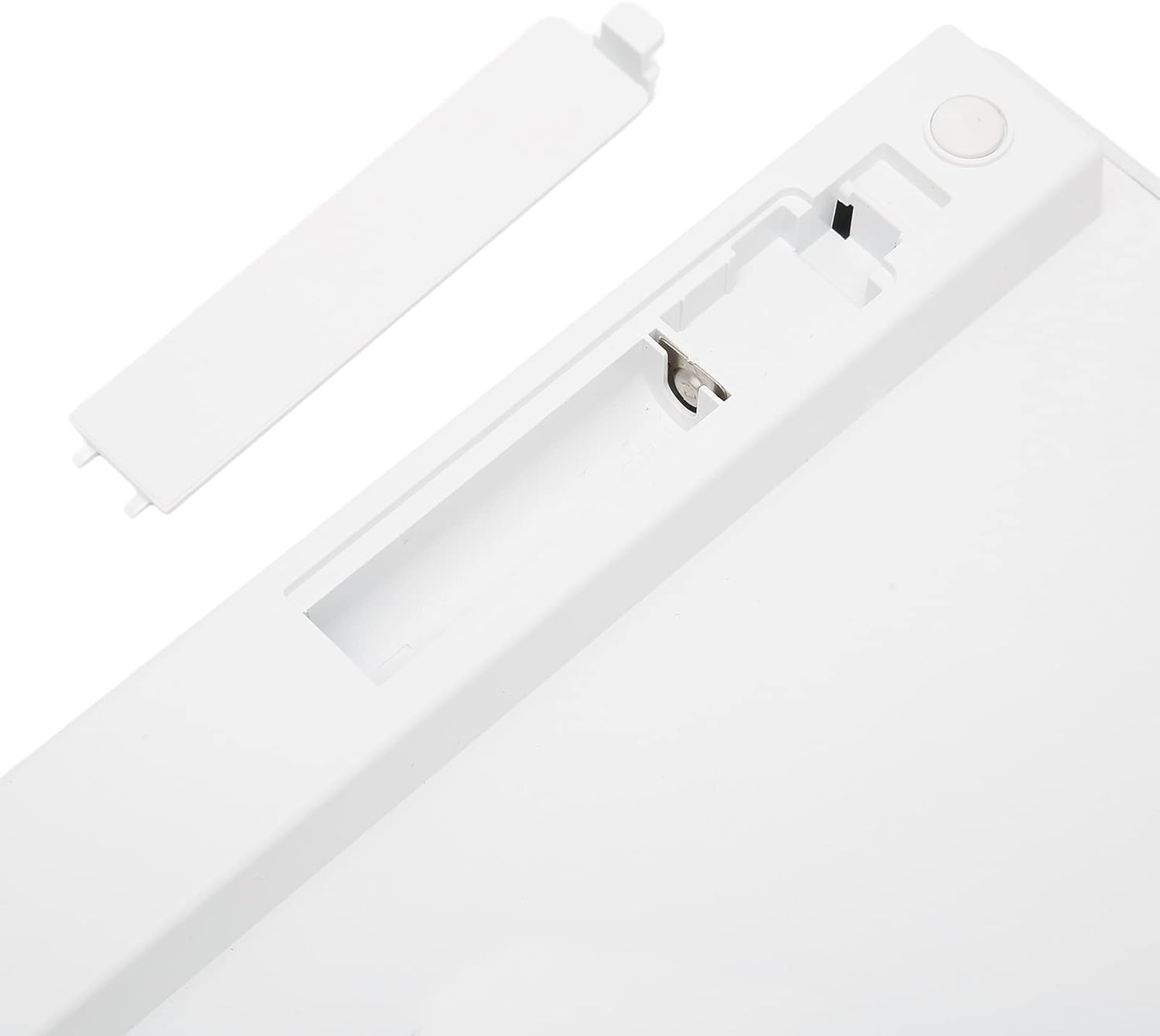
ചിത്രം: View of the keyboard's underside, showing the open battery compartment for battery insertion.
5.2. ബ്ലൂടൂത്ത് ജോടിയാക്കൽ
Follow these steps to connect your keyboard via Bluetooth:
- Ensure the keyboard has fresh batteries and is powered on (if it has a power switch).
- Activate Bluetooth on your device (tablet, phone, laptop).
- On your device, search for available Bluetooth devices. The keyboard should appear as "Bluetooth Keyboard" or a similar name.
- Select the keyboard from the list to initiate pairing.
- If prompted, enter the displayed pairing code on the PUSOKEI keyboard and press നൽകുക.
- Once paired, the keyboard will be ready for use.
6. പ്രവർത്തന നിർദ്ദേശങ്ങൾ
6.1. അടിസ്ഥാന ഉപയോഗം
After successful pairing, you can begin typing. The keyboard functions like a standard QWERTZ German layout keyboard.
6.2. ഫംഗ്ഷൻ കീകൾ
The top row of keys (F1-F12) often includes multimedia and system control functions. These functions are typically accessed by pressing the Fn ആവശ്യമുള്ള ഫംഗ്ഷൻ കീയ്ക്കൊപ്പം ഒരേസമയം കീ അമർത്തുക.
- എഫ്എൻ + എഫ്1-എഫ്12: Control brightness, volume, media playback, etc., depending on your device's operating system.
6.3 അനുയോജ്യത
The PUSOKEI Bluetooth Keyboard is broadly compatible with devices running:
- iOS (e.g., iPad, iPhone)
- Android (e.g., Android tablets, smartphones)
- Windows (e.g., Windows laptops, desktops)
7. പരിപാലനം
7.1. വൃത്തിയാക്കൽ
നിങ്ങളുടെ കീബോർഡ് വൃത്തിയാക്കാൻ:
- Ensure the keyboard is turned off and disconnected from any device.
- മൃദുവായ, ലിൻ്റ് രഹിത തുണി ഉപയോഗിക്കുകampവെള്ളം അല്ലെങ്കിൽ മൃദുവായ ക്ലീനിംഗ് ലായനി ഉപയോഗിച്ചാണ്.
- അമിതമായ ഈർപ്പം ഒഴിവാക്കുക, ക്ലീനറുകൾ നേരിട്ട് കീബോർഡിൽ തളിക്കരുത്.
- താക്കോലുകൾക്കിടയിൽ നിന്ന് പൊടിയും അവശിഷ്ടങ്ങളും നീക്കം ചെയ്യാൻ കംപ്രസ് ചെയ്ത വായു ഉപയോഗിക്കുക.
7.2. സംഭരണം
When not in use for extended periods, store the keyboard in a cool, dry place. Consider removing the batteries to prevent leakage.
8. പ്രശ്നപരിഹാരം
8.1. കീബോർഡ് കണക്റ്റുചെയ്യുന്നില്ല
- Ensure the keyboard has power (fresh batteries).
- നിങ്ങളുടെ ഉപകരണത്തിൽ ബ്ലൂടൂത്ത് പ്രവർത്തനക്ഷമമാക്കിയിട്ടുണ്ടെന്ന് ഉറപ്പാക്കുക.
- Make sure the keyboard is within the 10-meter operating range of your device.
- നിങ്ങളുടെ ഉപകരണവുമായി കീബോർഡ് ജോടി വിച്ഛേദിച്ച് വീണ്ടും ജോടിയാക്കാൻ ശ്രമിക്കുക.
- കീബോർഡും നിങ്ങളുടെ ഉപകരണവും പുനരാരംഭിക്കുക.
8.2. കീകൾ പ്രതികരിക്കുന്നില്ല.
- ബാറ്ററി ലെവലുകൾ പരിശോധിക്കുക.
- കീബോർഡ് ബ്ലൂടൂത്ത് വഴി ശരിയായി ബന്ധിപ്പിച്ചിട്ടുണ്ടെന്ന് ഉറപ്പാക്കുക.
- Clean any debris that might be stuck under the keys.
9 സ്പെസിഫിക്കേഷനുകൾ
| ഫീച്ചർ | സ്പെസിഫിക്കേഷൻ |
|---|---|
| മോഡലിൻ്റെ പേര് | PUSOKEIigp690fkrv1355 |
| ബ്രാൻഡ് | പുസൊകെയ് |
| കണക്റ്റിവിറ്റി ടെക്നോളജി | ബ്ലൂടൂത്ത് 3.0 |
| കീബോർഡ് വിവരണം | Portable, Slim, Silent, QWERTZ German Layout |
| അനുയോജ്യമായ ഉപകരണങ്ങൾ | Laptop, Tablet (iOS, Android, Windows) |
| മെറ്റീരിയൽ | അക്രിലോണിട്രൈൽ ബ്യൂട്ടാഡീൻ സ്റ്റൈറൈൻ (എബിഎസ്) |
| ഇനത്തിൻ്റെ ഭാരം | 11.7 ഔൺസ് |
| പാക്കേജ് അളവുകൾ | 11.54 x 5.08 x 0.94 ഇഞ്ച് |
10. വാറൻ്റിയും പിന്തുണയും
For warranty information or technical support, please refer to the contact details provided with your purchase or visit the official PUSOKEI webസൈറ്റ്. വാറന്റി ക്ലെയിമുകൾക്കായി നിങ്ങളുടെ വാങ്ങലിന്റെ തെളിവ് സൂക്ഷിക്കുക.