ഉൽപ്പന്നം കഴിഞ്ഞുview
The LINQ byELEMENTS LQ48022 8-in-1 8K Pro Studio SSD USB-C Multiport Hub is a compact and versatile connectivity solution designed to expand the capabilities of your MacBook or laptop. It delivers ultra-sharp 8K video and audio, provides high-speed data transfer, and offers a stable wired internet connection, along with integrated SSD storage options.

Image: The LINQ byELEMENTS LQ48022 8-in-1 8K Pro Studio SSD USB-C Multiport Hub, showcasing its compact design and multiple ports.
പ്രധാന സവിശേഷതകൾ
- 8K HDMI ഔട്ട്പുട്ട്: Supports 8K resolution at 30Hz or 4K resolution at 60Hz for crystal clear video and audio.
- SuperSpeed+ USB 3.2 Gen2 Ports: Includes USB-A and USB-C ports with data transfer speeds up to 10 Gbps.
- Multi-Gigabit Ethernet: Provides a wired network connection with speeds up to 2.5 Gbps for fast and stable internet.
- Power Delivery (PD) Charging: Supports up to 100W PD charging for your laptop.
- Integrated SSD Storage Option: Offers a convenient option for expanding storage.
- Peripheral USB-A Ports: Two USB-A ports for connecting essential peripherals like keyboards, mice, printers, and scanners.
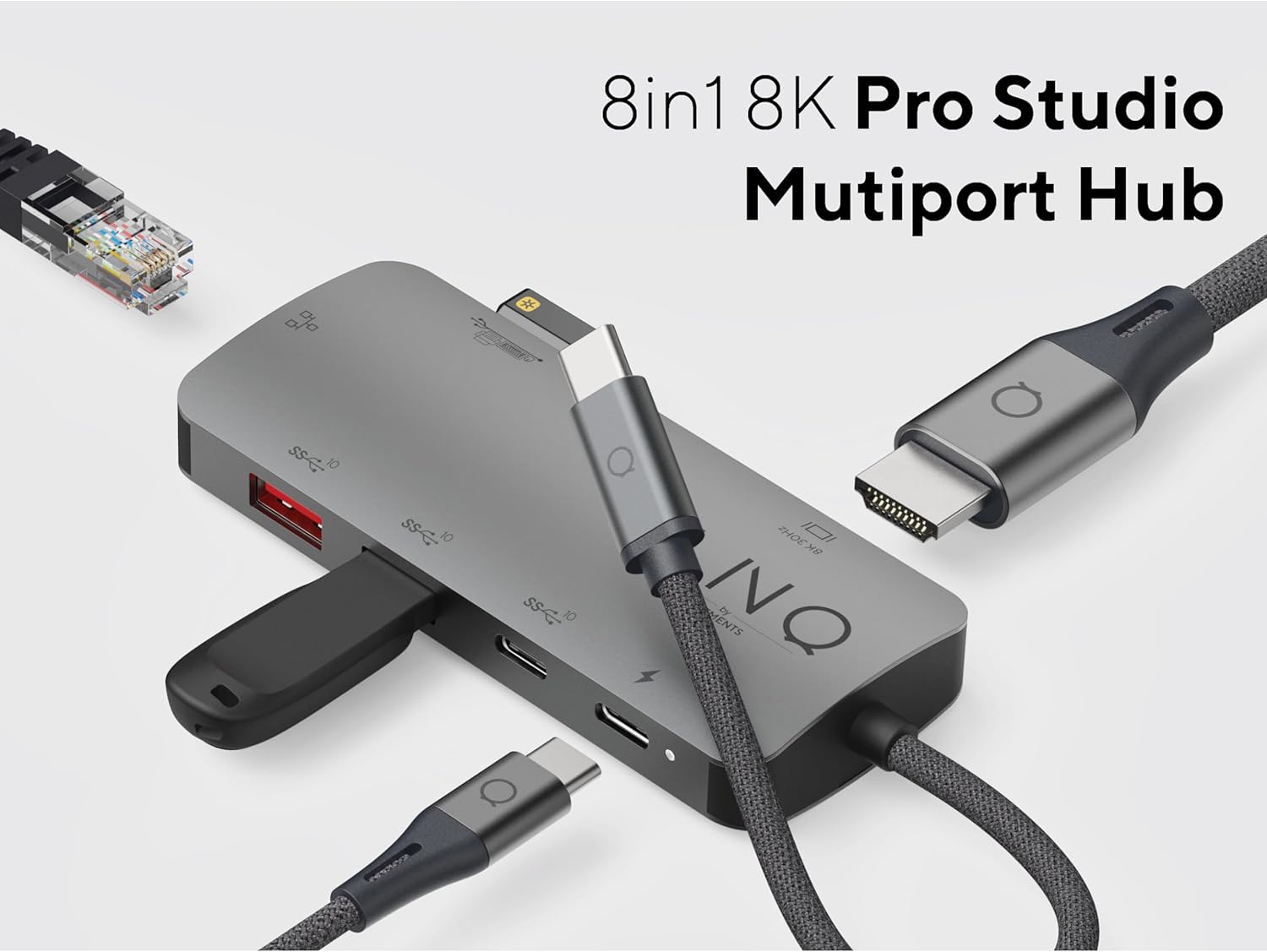
Image: The LINQ Multiport Hub connected to various devices, illustrating its 8-in-1 functionality and multiple port types.
സജ്ജീകരണ ഗൈഡ്
- ഹോസ്റ്റ് ഉപകരണത്തിലേക്ക് കണക്റ്റുചെയ്യുക: Plug the integrated USB-C cable of the LINQ Hub into an available USB-C port on your MacBook or laptop. Ensure the USB-C port on your host device supports DisplayPort Alternate Mode (Alt Mode) and Power Delivery for full functionality.
- പവർ കണക്ഷൻ (ഓപ്ഷണൽ എന്നാൽ ശുപാർശ ചെയ്യുന്നത്): For optimal performance and to charge your laptop, connect your laptop's USB-C power adapter (up to 100W) to the USB-C PD port on the hub.

Image: Close-up of the USB-C Power Delivery port on the LINQ Hub, indicating support for up to 100W charging.
- ഓപ്പറേറ്റിംഗ് സിസ്റ്റം അനുയോജ്യത: The hub is compatible with Mac OS 9 and Windows 10. No specific driver installation is typically required for basic functionality (plug-and-play).
പ്രവർത്തന നിർദ്ദേശങ്ങൾ
Connecting External Displays (HDMI)
Connect an HDMI cable from your external monitor or TV to the HDMI port on the LINQ Hub. Your host device should automatically detect the display. Adjust display settings (resolution, orientation) through your operating system's display preferences.
- പിന്തുണയ്ക്കുന്ന മിഴിവുകൾ:
- 30Hz-ൽ 8K (7680x4320) വരെ
- 60Hz-ൽ 4K (3840x2160) വരെ

Image: Close-up of the 8K HDMI port on the LINQ Hub, highlighting its high-definition video output capability.
Using USB Data Ports
The hub features multiple USB ports for connecting various devices:
- USB 3.2 Gen2 (10 Gbps) Ports: Use the SuperSpeed+ USB-A and USB-C data ports for high-speed data transfer with external SSDs, flash drives, or other compatible devices. These ports support speeds up to 10 Gbps.

Image: Close-up of the USB 3.2 Gen 2 ports on the LINQ Hub, illustrating their high-speed data transfer capabilities.
- Peripheral USB-A Ports: Connect your keyboard, mouse, printer, scanner, or other lower-speed USB peripherals to these dedicated ports.

Image: Close-up of the peripheral USB-A ports on the LINQ Hub, ideal for connecting standard input devices and printers.
Connecting to a Wired Network (Ethernet)
For a stable and secure internet connection, connect an Ethernet cable from your router or modem to the Multi-Gigabit Ethernet port on the hub. This port supports speeds up to 2.5 Gbps.

Image: Close-up of the Multi-Gigabit Ethernet port on the LINQ Hub, designed for ultra-fast and stable wired network connections.
മെയിൻ്റനൻസ്
- വൃത്തിയാക്കൽ: ഹബ്ബിന്റെ ഉപരിതലം വൃത്തിയാക്കാൻ മൃദുവായതും ഉണങ്ങിയതുമായ തുണി ഉപയോഗിക്കുക. ലിക്വിഡ് ക്ലീനറുകളോ എയറോസോളുകളോ ഉപയോഗിക്കുന്നത് ഒഴിവാക്കുക.
- സംഭരണം: ഉപയോഗത്തിലില്ലാത്തപ്പോൾ, നേരിട്ടുള്ള സൂര്യപ്രകാശത്തിൽ നിന്നും കടുത്ത താപനിലയിൽ നിന്നും മാറി തണുത്തതും വരണ്ടതുമായ സ്ഥലത്ത് ഹബ് സൂക്ഷിക്കുക.
- കൈകാര്യം ചെയ്യൽ: ഹബ് ശ്രദ്ധയോടെ കൈകാര്യം ചെയ്യുക. അത് താഴെയിടുകയോ ശക്തമായ ആഘാതങ്ങൾക്ക് വിധേയമാക്കുകയോ ചെയ്യരുത്.
- കേബിൾ മാനേജുമെന്റ്: Ensure cables connected to the hub are not excessively bent or strained to prevent damage to the ports or cables.
ട്രബിൾഷൂട്ടിംഗ്
- No display output via HDMI:
- നിങ്ങളുടെ ലാപ്ടോപ്പിന്റെ USB-C പോർട്ട് DisplayPort Alt മോഡിനെ പിന്തുണയ്ക്കുന്നുണ്ടെന്ന് ഉറപ്പാക്കുക.
- ഹബ്ബിലും മോണിറ്ററിലും HDMI കേബിൾ കണക്ഷൻ പരിശോധിക്കുക.
- Try a different HDMI cable or monitor to rule out faulty equipment.
- നിങ്ങളുടെ ലാപ്ടോപ്പ് പുനരാരംഭിക്കുക.
- Verify display settings in your operating system.
- USB devices not recognized or slow data transfer:
- Ensure the hub is properly connected to your laptop.
- If using high-power devices, ensure the hub is connected to a power source via the PD port.
- Try connecting the USB device directly to your laptop to confirm it functions.
- യുഎസ്ബി ഉപകരണം ഹബ്ബിലേക്ക് വിച്ഛേദിച്ച് വീണ്ടും ബന്ധിപ്പിക്കുക.
- Ethernet connection issues:
- ഹബ്ബിലും നിങ്ങളുടെ റൂട്ടറിലും/മോഡത്തിലും ഇതർനെറ്റ് കേബിൾ കണക്ഷൻ പരിശോധിക്കുക.
- നിങ്ങളുടെ റൂട്ടർ/മോഡം ശരിയായി പ്രവർത്തിക്കുന്നുണ്ടെന്ന് ഉറപ്പാക്കുക.
- Verify network settings on your laptop.
- മറ്റൊരു ഇതർനെറ്റ് കേബിൾ പരീക്ഷിക്കുക.
- Laptop not charging via PD port:
- നിങ്ങളുടെ ലാപ്ടോപ്പിന്റെ USB-C പോർട്ട് പവർ ഡെലിവറിയെ പിന്തുണയ്ക്കുന്നുണ്ടെന്ന് ഉറപ്പാക്കുക.
- Verify that your power adapter is connected to the hub's PD port and is functioning.
- വാട്ട് പരിശോധിക്കുകtage of your power adapter; it should be sufficient for your laptop's charging requirements (up to 100W supported by hub).
സ്പെസിഫിക്കേഷനുകൾ
| ഫീച്ചർ | വിശദാംശങ്ങൾ |
|---|---|
| മോഡൽ നമ്പർ | LQ48022 |
| ബ്രാൻഡ് | ലിങ്ക് |
| HDMI ഔട്ട്പുട്ട് | 8K@30Hz, 4K@60Hz |
| USB-C ഡാറ്റ പോർട്ട് | 1 x USB 3.2 Gen2 (10 Gbps) |
| USB-A ഡാറ്റ പോർട്ട് | 1 x USB 3.2 Gen2 (10 Gbps) |
| Peripheral USB-A Ports | 2 x USB-A (lower speed) |
| ഇഥർനെറ്റ് പോർട്ട് | Multi-Gigabit (up to 2.5 Gbps) |
| പവർ ഡെലിവറി (PD) | 100W വരെ |
| സംയോജിത സംഭരണം | SSD option |
| ഓപ്പറേറ്റിംഗ് സിസ്റ്റം അനുയോജ്യത | Mac OS 9, Windows 10 |
| അളവുകൾ (LxWxH) | 1.69 x 3.12 x 0.27 ഇഞ്ച് |
| ഭാരം | 2.43 ഔൺസ് |
| നിറം | ചാരനിറം |
വാറൻ്റിയും പിന്തുണയും
For warranty information and technical support, please refer to the official Linq byELEMENTS webസൈറ്റിൽ ബന്ധപ്പെടുകയോ അവരുടെ ഉപഭോക്തൃ സേവനവുമായി നേരിട്ട് ബന്ധപ്പെടുകയോ ചെയ്യുക. വാറന്റി ക്ലെയിമുകൾക്കുള്ള വാങ്ങലിന്റെ തെളിവായി നിങ്ങളുടെ വാങ്ങൽ രസീത് സൂക്ഷിക്കുക.
കുറിപ്പ്: പ്രദേശത്തെയും റീട്ടെയിലറെയും ആശ്രയിച്ച് നിർദ്ദിഷ്ട വാറന്റി നിബന്ധനകൾ വ്യത്യാസപ്പെടാം.


