ആമുഖം
This manual provides comprehensive instructions for the installation, operation, and maintenance of your 3M Privacy Filter for 23.8in Full Screen Monitor with COMPLY Magnetic Attach. This privacy filter is designed to provide world-class "black out" privacy from side views outside the 60-degree viewing angle, while maintaining a high-resolution viewing experience for the user directly in front of the screen. It is reversible, offering both a glossy side and a glare-reducing matte side to suit your preferences and environment.
Please read this manual thoroughly before using the product to ensure proper installation and optimal performance.
പ്രധാന സവിശേഷതകൾ
- Effective Privacy: Provides "black out" privacy from side views outside the 60-degree viewing ആംഗിൾ.
- COMPLY Magnetic Attach: Features ultra-strong magnets for quick and secure attachment, allowing easy switching between privacy and screen sharing.
- റിവേഴ്സിബിൾ ഡിസൈൻ: Can be used with either a glossy side for enhanced clarity or a glare-reducing matte side to minimize reflections and fingerprints.
- നീല വെളിച്ചം കുറയ്ക്കൽ: Helps reduce blue light emissions without distorting the natural color of your display.
- സ്ക്രീൻ പരിരക്ഷണം: Adds an extra layer of protection against everyday scratches and dust.
- നീണ്ടുനിൽക്കുന്ന നിർമ്മാണം: Designed to withstand hundreds of cleanings.
- ഉയർന്ന റെസല്യൂഷൻ Viewing: Advanced microlouver technology ensures an excellent, high-resolution viewing experience for the direct user.
സജ്ജീകരണവും ഇൻസ്റ്റാളേഷനും
The 3M Privacy Filter is designed for easy installation using its magnetic attachment system. Follow these steps for proper setup:
1. Prepare Your Monitor
- Ensure your monitor screen is clean and free of dust, smudges, or fingerprints. Use a soft, lint-free cloth specifically designed for electronics.
- Confirm your monitor is a 23.8-inch full screen model with a 16:9 aspect ratio for optimal fit.
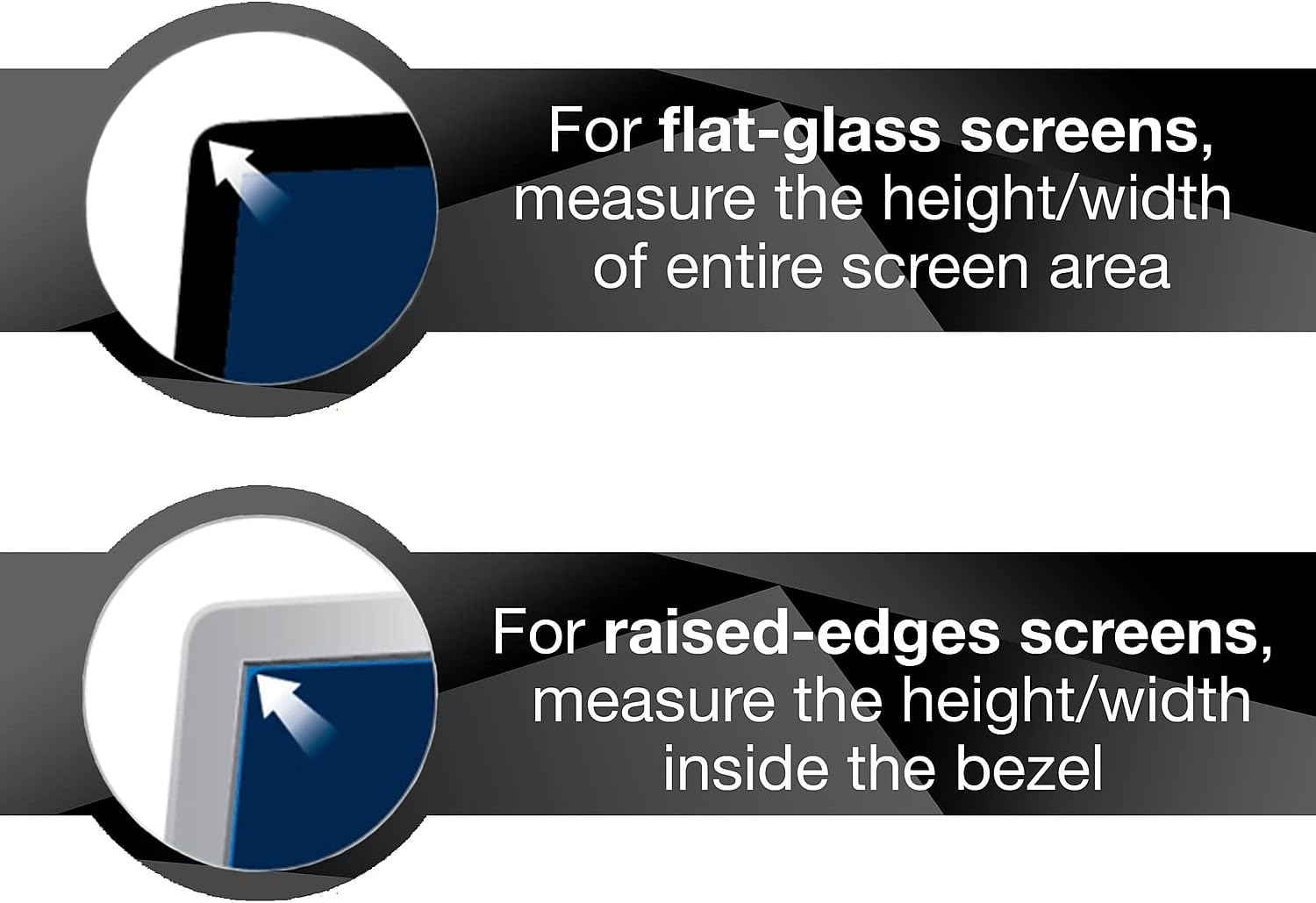
ചിത്രം: This diagram illustrates the correct way to measure your monitor screen for compatibility. For flat-glass screens, measure the height and width of the entire screen area. For screens with raised edges, measure the height and width inside the bezel.
2. Choose Your Viewing Side
The privacy filter is reversible, offering two distinct viewഅനുഭവങ്ങൾ:
- Glossy Side: Provides a clearer, more vibrant image, similar to your monitor's original display.
- Matte Side: Reduces glare and reflections, and helps hide fingerprints. This side is ideal for brightly lit environments.

ചിത്രം: A user working on a monitor equipped with the 3M Privacy Filter. The image highlights the filter's dual benefits of providing privacy and reducing glare, emphasizing its reversible glossy and matte sides.
3. Attach the Privacy Filter
The COMPLY Magnetic Attach system makes installation simple:
- Align the top edge of the privacy filter with the top edge of your monitor screen.
- The integrated magnets on the filter will automatically align and securely attach to the metal frame of your monitor. Ensure the filter is centered and flush with the screen.
- Gently press along the top edge to ensure a firm magnetic connection.

ചിത്രം: An illustration demonstrating the magnetic attachment of the 3M Privacy Filter to a monitor. The filter is shown aligning with the top of the screen, with a magnified inset showing the magnetic connection points.

ചിത്രം: This image displays various attachment methods for 3M privacy filters, including the magnetic attach system and options for adhesive strips, highlighting the ease of installation.
പ്രവർത്തന നിർദ്ദേശങ്ങൾ
Privacy Functionality
The 3M Privacy Filter is designed to restrict viewing angles to approximately 60 degrees directly in front of the screen. From side views outside this 60-degree angle, the screen will appear "blacked out," protecting your sensitive information from visual hacking.
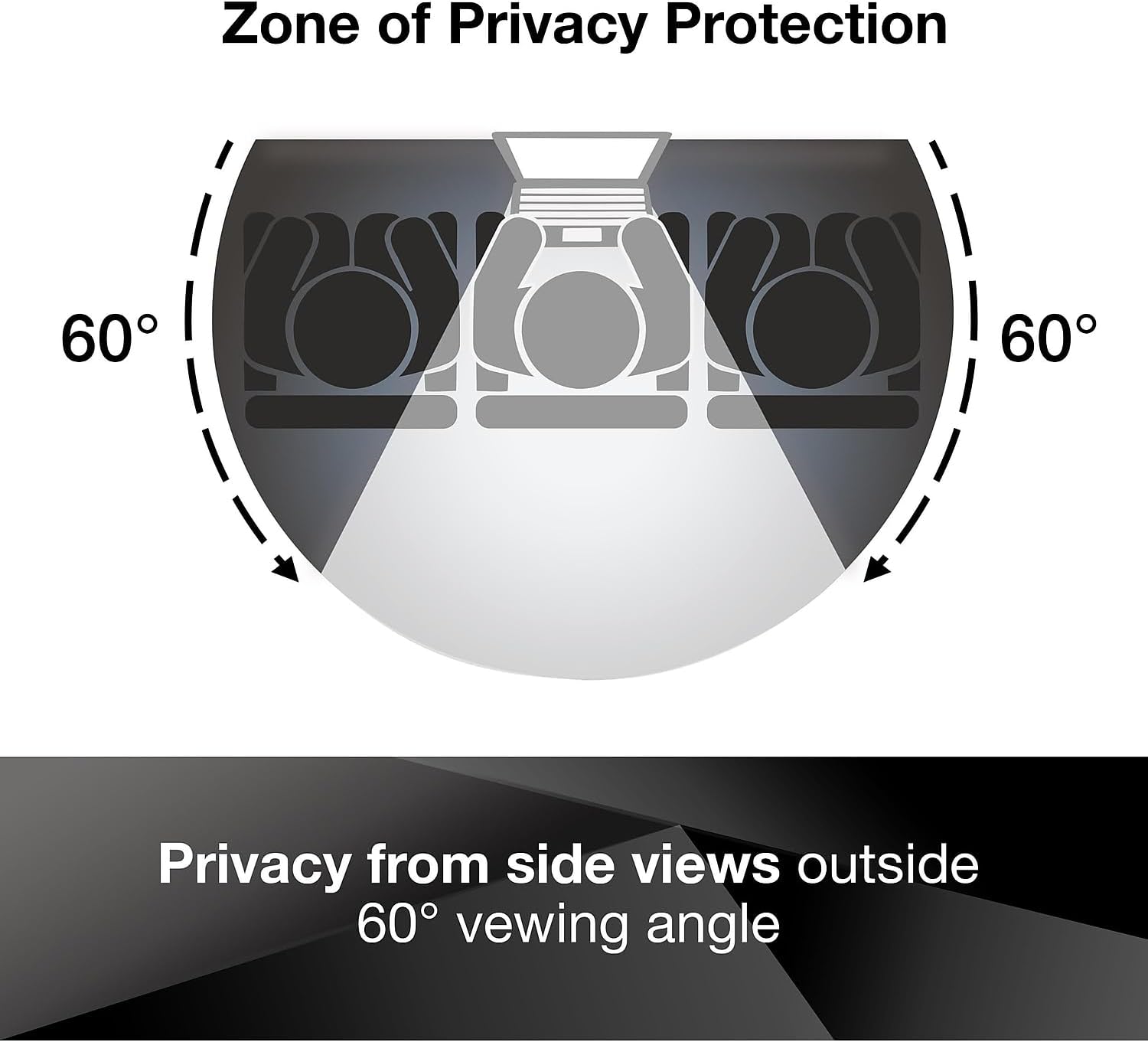
ചിത്രം: A visual representation of the 3M Privacy Filter's "Zone of Privacy Protection." It clearly shows that the screen content is visible only within a 60-degree viewing angle directly in front of the monitor, appearing blacked out from wider side angles.

ചിത്രം: This image demonstrates the privacy effect of the 3M filter. When viewed from an angle, the monitor screen appears completely black, effectively preventing unauthorized viewing of sensitive information.
Reversing the Filter
To switch between the glossy and matte sides:
- Gently pull the privacy filter away from the top of your monitor to detach it.
- Flip the filter over to expose the desired side (glossy or matte).
- Re-align and re-attach the filter to your monitor using the magnetic system.

ചിത്രം: This image compares two monitors, illustrating the effect of 3M's advanced microlouver technology. One monitor shows a clear display, while the other, equipped with the privacy filter, demonstrates how the technology creates a high-resolution viewing experience for the direct user while obscuring it from side views.
പരിചരണവും പരിപാലനവും
To ensure the longevity and optimal performance of your 3M Privacy Filter, follow these cleaning guidelines:
- ഫിൽട്ടർ വൃത്തിയാക്കൽ: Use a soft, lint-free cloth (e.g., microfiber) and a mild, non-abrasive screen cleaner or a solution of water and a small amount of mild soap.
- അപേക്ഷ: ലഘുവായി ഡിampen the cloth with the cleaning solution. Do not spray cleaner directly onto the filter.
- തുടയ്ക്കൽ: Gently wipe the surface of the filter. Avoid excessive pressure.
- ഉണക്കൽ: Allow the filter to air dry completely before re-attaching it to your monitor.
- ഒഴിവാക്കുക: Do not use harsh chemicals, abrasive materials, or paper towels, as these can scratch or damage the filter's surface.
The filter is designed to withstand hundreds of cleanings, maintaining its clarity and privacy features.
ട്രബിൾഷൂട്ടിംഗ്
| പ്രശ്നം | സാധ്യമായ കാരണം | പരിഹാരം |
|---|---|---|
| Filter does not attach securely. | Monitor frame is not metal or magnets are misaligned. | Ensure your monitor has a metal frame for magnetic attachment. Re-align the filter carefully to ensure magnets connect properly. |
| Privacy effect is not strong enough. | തെറ്റാണ് viewing angle or filter not properly installed. | നിങ്ങളാണെന്ന് ഉറപ്പാക്കുക viewing the screen directly. The privacy effect is designed for side views outside 60 degrees. Verify the filter is flush with the screen. |
| Excessive glare or reflections. | Glossy side is facing outwards in a brightly lit environment. | Flip the filter to use the matte side, which is designed to reduce glare and reflections. |
| Dust or smudges visible under the filter. | Screen or filter was not clean before installation. | Remove the filter, clean both your monitor screen and the filter thoroughly as per maintenance instructions, then re-attach. |
ഉൽപ്പന്ന സവിശേഷതകൾ
| ആട്രിബ്യൂട്ട് | വിശദാംശങ്ങൾ |
|---|---|
| ബ്രാൻഡ് | 3M |
| മോഡൽ നമ്പർ | 98-0443-0047-7 |
| സ്ക്രീൻ വലിപ്പം അനുയോജ്യത | 23.8 ഇഞ്ച് |
| വീക്ഷണാനുപാതം | 16:9 |
| ഉൽപ്പന്ന അളവുകൾ (LxWxH) | 11.85 x 21.1 x 0.5 ഇഞ്ച് |
| ഇനത്തിൻ്റെ ഭാരം | 8.4 ഔൺസ് |
| നിറം | കറുപ്പ് |
| പ്രത്യേക സവിശേഷതകൾ | Blue Light Block, Anti Glare, Privacy Filter, Scratch Resistant |
| ഫിനിഷ് തരം | Matte (Reversible to Glossy) |
| അറ്റാച്ച്മെൻ്റ് രീതി | COMPLY Magnetic Attach |
| മാതൃരാജ്യം | യുഎസ്എ |
വാറൻ്റി വിവരങ്ങൾ
Specific warranty details for the 3M Privacy Filter are typically provided with the product packaging or can be found on the official 3M website. Please refer to the documentation included with your purchase for the most accurate and up-to-date warranty terms and conditions. Generally, 3M products are manufactured to high standards and are backed by their commitment to quality.
For information regarding returns, please refer to the retailer's return policy where the product was purchased. For example, Amazon's return policy for this product is typically 30 days from receipt of shipment.
ഉപഭോക്തൃ പിന്തുണ
If you encounter any issues or have questions regarding your 3M Privacy Filter that are not covered in this manual, please contact 3M customer support or visit their official webകൂടുതൽ സഹായത്തിനുള്ള സൈറ്റ്.
- 3M Official Webസൈറ്റ്: www.3m.com
- ഉൽപ്പന്ന പിന്തുണ പേജ്: Look for "Privacy Filters" or "Monitor Accessories" on the 3M website for product-specific support.
When contacting support, please have your product model number (98-0443-0047-7) and purchase details ready.