1. ആമുഖം
This manual provides comprehensive instructions for the installation, operation, and maintenance of your Meross MTS200BHK Smart Wi-Fi Boiler Thermostat. Please read this guide thoroughly before installation and use to ensure proper function and safety. Keep this manual for future reference.

ചിത്രം 1.1: The Meross MTS200BHK Smart Wi-Fi Boiler Thermostat with its accompanying mobile application interface, displaying temperature settings and control options.
2. ഉൽപ്പന്നം കഴിഞ്ഞുview
The Meross MTS200BHK is an intelligent Wi-Fi thermostat designed for boiler and water-fed heating systems. It offers precise temperature control and smart home integration for enhanced comfort and energy efficiency.
പ്രധാന സവിശേഷതകൾ:
- Voice and Remote Control: Compatible with Apple HomeKit, Siri, Amazon Alexa, and Google Assistant. Control your heating remotely via the Meross app or Apple Home app.
- വിൻഡോ ഡിറ്റക്ഷൻ തുറക്കുക: Automatically pauses heating for 30 minutes when an open window is detected, preventing energy waste.
- ഉയർന്ന കൃത്യത: Temperature accuracy of 0.1°C with an adjustable range of 5-35°C.
- ഡ്യുവൽ സെൻസർ സിസ്റ്റം: Features an integrated air temperature sensor and an external floor temperature sensor (for floor heating protection).
- വൈഫൈ കണക്റ്റിവിറ്റി: Operates on 2.4GHz Wi-Fi, no hub required.
- സമ്മർ മോഡ്: Optimizes cooling for systems like air-source heat pumps during warmer months.
3. സജ്ജീകരണവും ഇൻസ്റ്റാളേഷനും
3.1 അനുയോജ്യതാ പരിശോധന
The Meross MTS200BHK thermostat is designed for boiler and water-fed heating systems. It is അനുയോജ്യമല്ല with electric floor heating systems. Please verify your heating system type before installation.

ചിത്രം 3.1: This diagram illustrates that the thermostat is compatible with boiler and water-fed heating systems, but not with electric heating mats.
For a detailed compatibility check, you can scan the QR code below or visit the provided link:

ചിത്രം 3.2: Scan this QR code to access the Meross compatibility checker for the MTS200BHK thermostat.
Compatibility Link: https://www.meross.com/compatibility-check/mts200-eu
3.2 വയറിംഗ് ആവശ്യകതകൾ
The thermostat requires both phase and neutral conductors for power and operation. It is designed for in-wall installation and does not operate on batteries. For boiler systems, a minimum of 4 wires are typically required. For underfloor heating, 3 wires are generally needed.
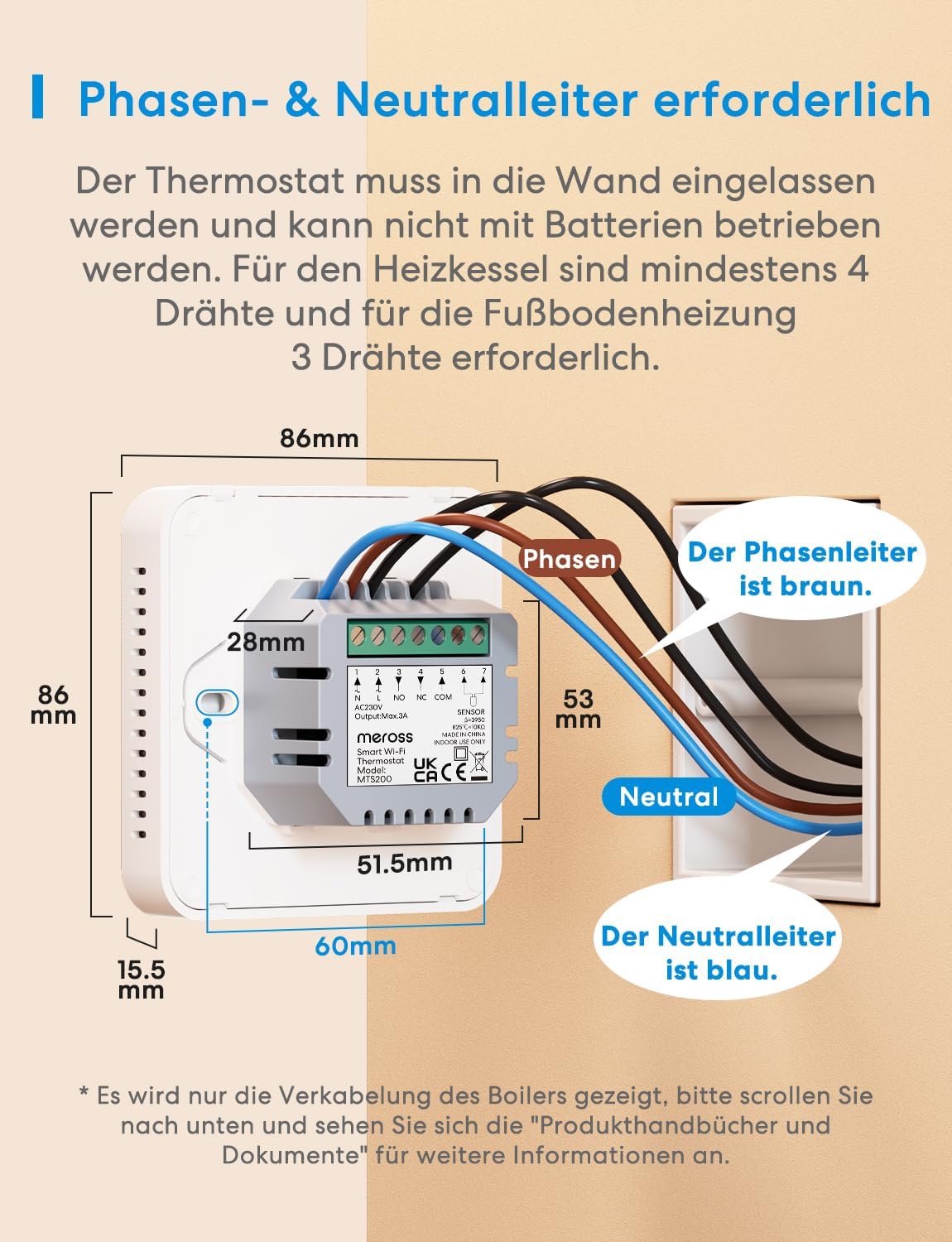
ചിത്രം 3.3: This diagram illustrates the wiring connections for the thermostat, indicating that both phase (brown wire) and neutral (blue wire) conductors are required. Dimensions are also shown.
പ്രധാനപ്പെട്ടത്: Electrical installation should be performed by a qualified professional. Ensure power is turned off at the circuit breaker before beginning any wiring work.
3.3 ആപ്പ് ഡൗൺലോഡും ജോടിയാക്കലും
- Download the Meross app from the Apple App Store or Google Play Store.
- Create a Meross account or log in if you already have one.
- Follow the in-app instructions to add your MTS200BHK thermostat. Ensure your smartphone is connected to a 2.4GHz Wi-Fi network during the pairing process.
4. പ്രവർത്തന നിർദ്ദേശങ്ങൾ
4.1 ആപ്പ് നിയന്ത്രണവും ഷെഡ്യൂളിംഗും
The Meross app allows you to control your thermostat from anywhere with an internet connection. You can adjust temperature, set schedules, and monitor heating status.

ചിത്രം 4.1: The Meross app interface displaying a weekly heating schedule, allowing users to program desired temperatures for different times of the day and week.
4.2 ശബ്ദ നിയന്ത്രണം
Integrate your thermostat with popular voice assistants for convenient hands-free control.
- Apple HomeKit/Siri: Use commands like "Hey Siri, set the temperature to 22 degrees."
- ആമസോൺ അലക്സ: Use commands like "Alexa, set the thermostat to 22 degrees."
- Google അസിസ്റ്റൻ്റ്: Use commands like "Hey Google, set the temperature to 22 degrees."

ചിത്രം 4.2: This image demonstrates the voice control capabilities of the Meross thermostat, showing example commands for Siri, Alexa, and Google Assistant to adjust temperature settings.
4.3 വിൻഡോ ഡിറ്റക്ഷൻ തുറക്കുക
To conserve energy, the thermostat automatically detects open windows. If a significant temperature drop is registered, the heating will temporarily turn off for 30 minutes. The app will also send notifications to alert you.
4.4 സമ്മർ മോഡ്
The Summer Mode feature is designed to optimize cooling for systems such as air-source heat pumps during warmer seasons. Activating this mode helps maintain an ideal room temperature by adjusting the thermostat's behavior for cooling operations.

ചിത്രം 4.3: The thermostat screen showing a snowflake icon, representing the activation of Summer Mode for cooling systems.
4.5 Tracking Heating Status
The Meross app allows you to track your heating system's status, view temperature history, monitor cumulative heating duration, and even estimate heating costs by inputting your energy tariff.

ചിത്രം 4.4: The Meross app displaying detailed heating statistics, including historical temperature graphs and estimated heating costs over various periods.
5. പരിപാലനം
- വൃത്തിയാക്കൽ: Gently wipe the thermostat screen and body with a soft, dry cloth. Avoid using abrasive cleaners or solvents.
- സോഫ്റ്റ്വെയർ അപ്ഡേറ്റുകൾ: Ensure your Meross app and thermostat firmware are up to date. Updates often include performance improvements and new features. Check the Meross app for available updates.
- പവർ സൈക്കിൾ: If the thermostat becomes unresponsive, try turning off the power at the circuit breaker for a few seconds, then turn it back on.
6. പ്രശ്നപരിഹാരം
പൊതുവായ പ്രശ്നങ്ങളും പരിഹാരങ്ങളും:
- തെർമോസ്റ്റാറ്റ് വൈഫൈയിലേക്ക് കണക്റ്റ് ചെയ്യുന്നില്ല:
- Ensure your Wi-Fi network is 2.4GHz. The thermostat does not support 5GHz Wi-Fi.
- Check that your Wi-Fi router is within range and functioning correctly.
- നിങ്ങളുടെ റൂട്ടറും തെർമോസ്റ്റാറ്റും പുനരാരംഭിക്കുക.
- മെറോസ് ആപ്പിൽ നിങ്ങളുടെ വൈഫൈ പാസ്വേഡ് ശരിയായി നൽകിയിട്ടുണ്ടെന്ന് ഉറപ്പാക്കുക.
- കൃത്യമല്ലാത്ത താപനില വായന:
- തെർമോസ്റ്റാറ്റിന് നേരിട്ടുള്ള സൂര്യപ്രകാശം, കാറ്റുകൾ, താപ സ്രോതസ്സുകൾ എന്നിവ ഏൽക്കുന്നില്ലെന്ന് ഉറപ്പാക്കുക, ഇത് അതിന്റെ ആന്തരിക സെൻസറിനെ ബാധിച്ചേക്കാം.
- If using an external sensor, ensure it is properly installed and positioned.
- The Meross app may allow for temperature calibration if a consistent offset is observed.
- ചൂടാക്കൽ ഓൺ/ഓഫ് ചെയ്യുന്നില്ല:
- Check the wiring connections to ensure they are secure and correct.
- Verify the thermostat is in the correct operating mode (e.g., not in Summer Mode if heating is desired).
- Confirm the schedule or manual setting is active and the target temperature is set appropriately.
- ശബ്ദ നിയന്ത്രണം പ്രവർത്തിക്കുന്നില്ല:
- Ensure the thermostat is properly linked to your Apple HomeKit, Alexa, or Google Assistant account.
- നിങ്ങളുടെ ഇൻ്റർനെറ്റ് കണക്ഷൻ പരിശോധിക്കുക.
- Use the exact commands specified by the voice assistant.
7 സ്പെസിഫിക്കേഷനുകൾ
| ഫീച്ചർ | സ്പെസിഫിക്കേഷൻ |
|---|---|
| ബ്രാൻഡ് | മെറോസ് |
| മോഡലിൻ്റെ പേര് | MTS200BHK(EU) |
| ഉൽപ്പന്ന അളവുകൾ | 8.6 x 8.6 x 4.2 സെ.മീ; 212 ഗ്രാം |
| വാല്യംtage | 230 വോൾട്ട് |
| മെറ്റീരിയൽ | ഗ്ലാസ് |
| കണക്റ്റിവിറ്റി ടെക്നോളജി | വൈഫൈ (2.4 GHz മാത്രം) |
| അനുയോജ്യമായ മോഡലുകൾ | Boiler/Water-fed heating systems. Works with Apple HomeKit, Amazon Alexa, Google Assistant, SmartThings. |
| പ്രത്യേക സവിശേഷതകൾ | Built-in display, Open Window Detection, Summer Mode |
| താപനില നിയന്ത്രണ തരം | ചൂടാക്കൽ |
| ഉൾപ്പെടുത്തിയ ഘടകങ്ങൾ | Smart Wi-Fi Boiler Thermostat |
8. വാറൻ്റിയും പിന്തുണയും
For warranty information, technical support, and frequently asked questions, please visit the official Meross website or contact their customer service directly. Details can typically be found in the product packaging or on the Meross support page.


