1. ആമുഖം
This manual provides essential information for the safe and effective operation, setup, and maintenance of your BLACK+DECKER BES701-QS 1500W Miter Saw. This powerful 216mm miter saw is designed for precise crosscutting and miter cutting of wood boards, skirting boards, and laminate flooring. It features a shadow line for accurate cuts without calibration, and robust supports for workpiece stability. Please read this manual thoroughly before use and retain it for future reference.
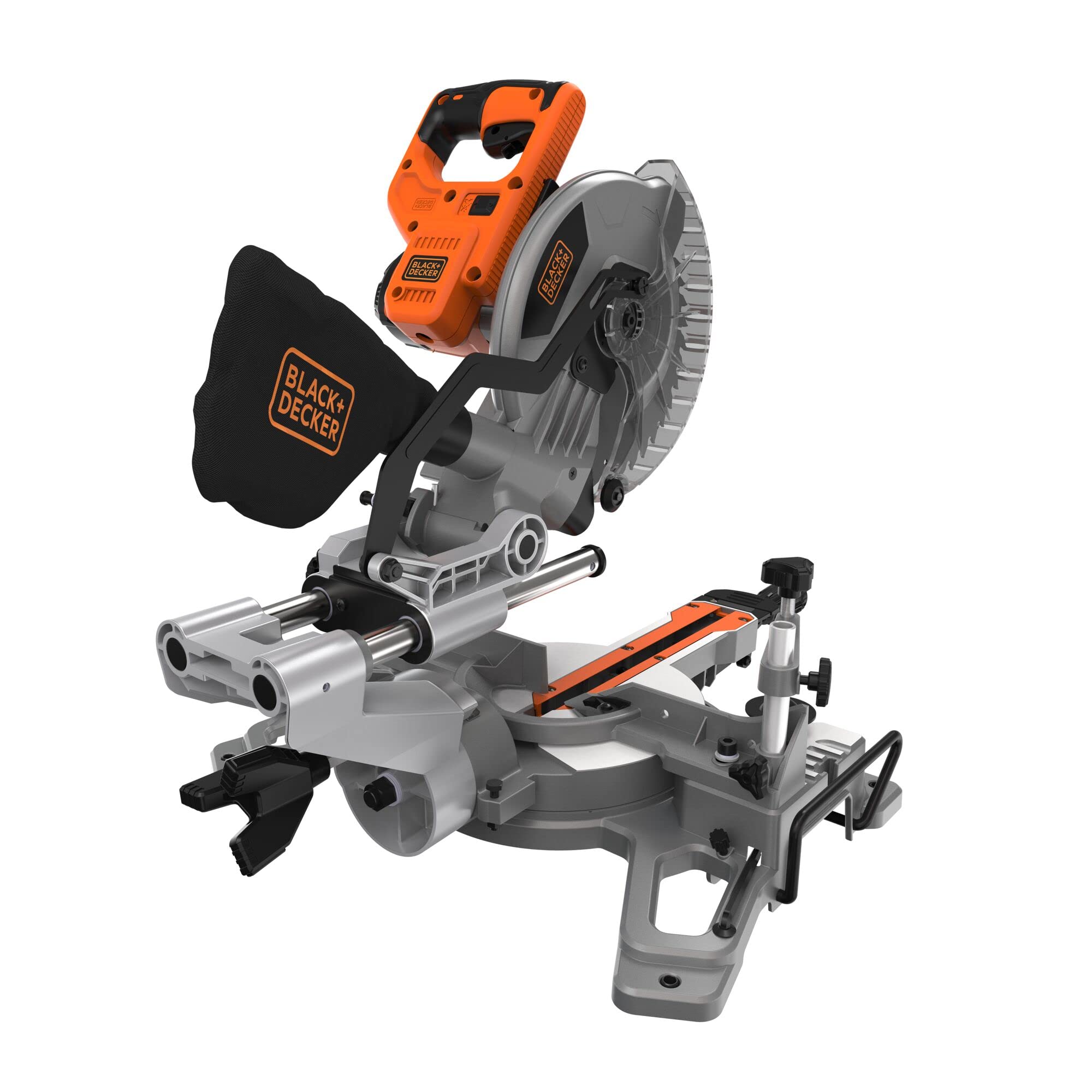
ചിത്രം 1: മുൻഭാഗം view of the BLACK+DECKER BES701-QS Miter Saw.
2 സുരക്ഷാ വിവരങ്ങൾ
തീപിടുത്തം, വൈദ്യുതാഘാതം, വ്യക്തിപരമായ പരിക്കുകൾ എന്നിവ കുറയ്ക്കുന്നതിന് എല്ലായ്പ്പോഴും അടിസ്ഥാന സുരക്ഷാ മുൻകരുതലുകൾ പാലിക്കുക. ഭാവിയിലെ റഫറൻസിനായി ഈ മാനുവൽ സൂക്ഷിക്കുക.
പൊതു പവർ ടൂൾ സുരക്ഷാ മുന്നറിയിപ്പുകൾ
- വർക്ക് ഏരിയ സുരക്ഷ: ജോലിസ്ഥലം വൃത്തിയുള്ളതും നല്ല വെളിച്ചമുള്ളതുമായി സൂക്ഷിക്കുക. കത്തുന്ന ദ്രാവകങ്ങൾ, വാതകങ്ങൾ അല്ലെങ്കിൽ പൊടി എന്നിവയുടെ സാന്നിധ്യം പോലുള്ള സ്ഫോടനാത്മകമായ അന്തരീക്ഷത്തിൽ പവർ ഉപകരണങ്ങൾ പ്രവർത്തിപ്പിക്കരുത്.
- ഇലക്ട്രിക്കൽ സുരക്ഷ: പവർ ടൂൾ പ്ലഗുകൾ ഔട്ട്ലെറ്റുമായി പൊരുത്തപ്പെടണം. പ്ലഗ് ഒരിക്കലും പരിഷ്ക്കരിക്കരുത്. മണ്ണിട്ടതോ നിലംപരിശായതോ ആയ പ്രതലങ്ങളുമായുള്ള ശരീര സമ്പർക്കം ഒഴിവാക്കുക. മഴയിലോ നനഞ്ഞ കാലാവസ്ഥയിലോ പവർ ടൂളുകൾ സ്ഥാപിക്കരുത്.
- വ്യക്തിഗത സുരക്ഷ: എപ്പോഴും കണ്ണിന് സംരക്ഷണം നൽകുന്ന ഗ്ലാസുകൾ അല്ലെങ്കിൽ കണ്ണടകൾ) കേൾവി സംരക്ഷണം നൽകുന്ന ഗ്ലാസുകൾ ധരിക്കുക. ശസ്ത്രക്രിയയ്ക്കിടെ പൊടിപടലങ്ങൾ ഉണ്ടാകുകയാണെങ്കിൽ ഒരു പൊടി മാസ്ക് ഉപയോഗിക്കുക. ശരിയായി വസ്ത്രം ധരിക്കുക; അയഞ്ഞ വസ്ത്രങ്ങളോ ആഭരണങ്ങളോ ഒഴിവാക്കുക. നീളമുള്ള മുടി സുരക്ഷിതമായി കെട്ടുക.
- ഉപകരണ ഉപയോഗവും പരിചരണവും: പവർ ടൂൾ നിർബന്ധിച്ച് ഉപയോഗിക്കരുത്. നിങ്ങളുടെ ആപ്ലിക്കേഷന് അനുയോജ്യമായ പവർ ടൂൾ ഉപയോഗിക്കുക. എന്തെങ്കിലും ക്രമീകരണങ്ങൾ നടത്തുന്നതിനോ, ആക്സസറികൾ മാറ്റുന്നതിനോ, പവർ ടൂളുകൾ സൂക്ഷിക്കുന്നതിനോ മുമ്പ് പവർ സ്രോതസ്സിൽ നിന്ന് പ്ലഗ് വിച്ഛേദിക്കുക.
- Miter Saw Specific Safety: Ensure the blade guard is always in place and functioning correctly. Keep hands clear of the blade path. Secure the workpiece firmly with clamps before cutting. Never attempt to free jammed material while the saw is running.

Figure 2: Always wear appropriate safety gear, including eye and hearing protection, when operating the miter saw.
3. ഘടകങ്ങൾ
Familiarize yourself with the main components of your miter saw:
- മോട്ടോർ ഹൗസിംഗ്: 1500W മോട്ടോർ അടങ്ങിയിരിക്കുന്നു.
- ബ്ലേഡ് ഗാർഡ്: Retractable guard for safety during operation.
- സോ ബ്ലേഡ്: 216mm, 24-tooth blade for wood cutting.
- Miter Table: Rotates for angle cuts.
- Miter Scale: Indicates the miter angle.
- Miter Lock Handle: Secures the miter table at the desired angle.
- Bevel Adjustment Knob: Adjusts the blade tilt for bevel cuts.
- വേലി: Supports the workpiece against the blade.
- വർക്ക്പീസ് Clamp: Secures the workpiece to the miter table.
- പൊടി ബാഗ്: Collects sawdust during operation.
- Handle with Trigger Switch: For operating the saw.

ചിത്രം 3: ഓവർview of the miter saw's main components.
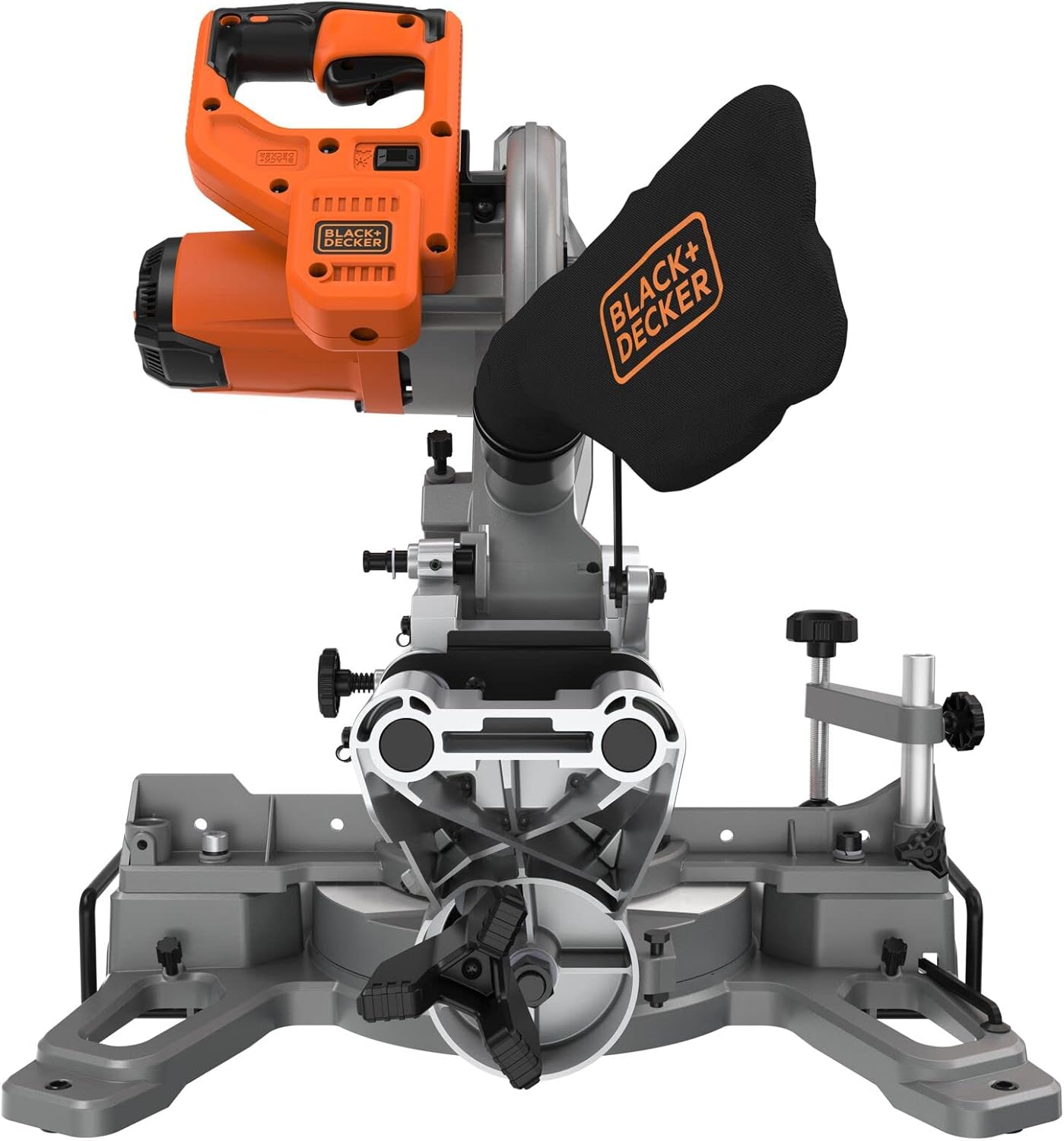
ചിത്രം 4: പിൻഭാഗം view showing the dust bag attachment point.
4. സജ്ജീകരണം
4.1 അൺപാക്കിംഗും പരിശോധനയും
Carefully remove the miter saw from its packaging. Inspect for any damage that may have occurred during shipping. Ensure all components listed in Section 3 are present.
4.2 സോ മൌണ്ട് ചെയ്യുന്നു
For stable operation, it is recommended to mount the miter saw to a workbench or a dedicated miter saw stand. Use appropriate bolts and nuts to secure the saw through the mounting holes in its base.
4.3 Blade Installation/Change
The saw comes with a 216mm, 24-tooth blade. If you need to change the blade:
- പവർ വിച്ഛേദിക്കുക: Always unplug the saw from the power source.
- ആക്സസ് ബ്ലേഡ്: Lift the blade guard and locate the spindle lock button.
- Lock Spindle: ബ്ലേഡ് കറങ്ങുന്നത് തടയാൻ സ്പിൻഡിൽ ലോക്ക് ബട്ടൺ അമർത്തിപ്പിടിക്കുക.
- ആർബർ നട്ട് അഴിക്കുക: Use the provided wrench to loosen the arbor nut. Note that the nut may have a left-hand thread (turn clockwise to loosen).
- ബ്ലേഡ് നീക്കം ചെയ്യുക: Carefully remove the outer flange and the old blade.
- പുതിയ ബ്ലേഡ് ഇൻസ്റ്റാൾ ചെയ്യുക: Place the new blade onto the arbor, ensuring the teeth are pointing in the correct direction (usually indicated by an arrow on the blade and saw). Replace the outer flange and arbor nut.
- Tighten Nut: Hold the spindle lock and tighten the arbor nut firmly.
4.4 Dust Bag Attachment
Attach the provided dust bag to the dust port at the rear of the saw. Ensure it is securely fastened to effectively collect sawdust during operation.
5. പ്രവർത്തന നിർദ്ദേശങ്ങൾ
5.1 പവർ കണക്ഷൻ
Connect the saw to a suitable 230V AC power outlet. Ensure the power cord is not in the path of the blade or workpiece.
5.2 മിറ്റർ ആംഗിൾ ക്രമീകരിക്കൽ
To make angle cuts:
- Unlock Miter Table: മിറ്റർ ലോക്ക് ഹാൻഡിൽ അഴിക്കുക.
- ആംഗിൾ സജ്ജമാക്കുക: Rotate the miter table to the desired angle, indicated on the miter scale. Common angles are often detented for quick setting.
- Lock Miter Table: Tighten the miter lock handle firmly to secure the table.

Figure 5: The miter scale allows for precise angle adjustments.

Figure 6: Loosening the miter lock handle to adjust the cutting angle.
5.3 ബെവൽ ആംഗിൾ ക്രമീകരിക്കൽ
For bevel cuts (tilting the blade):
- Unlock Bevel: Loosen the bevel adjustment knob, typically located at the rear of the saw.
- ആംഗിൾ സജ്ജമാക്കുക: Tilt the saw head to the desired bevel angle (up to 45°), guided by the bevel scale.
- Lock Bevel: Tighten the bevel adjustment knob securely.
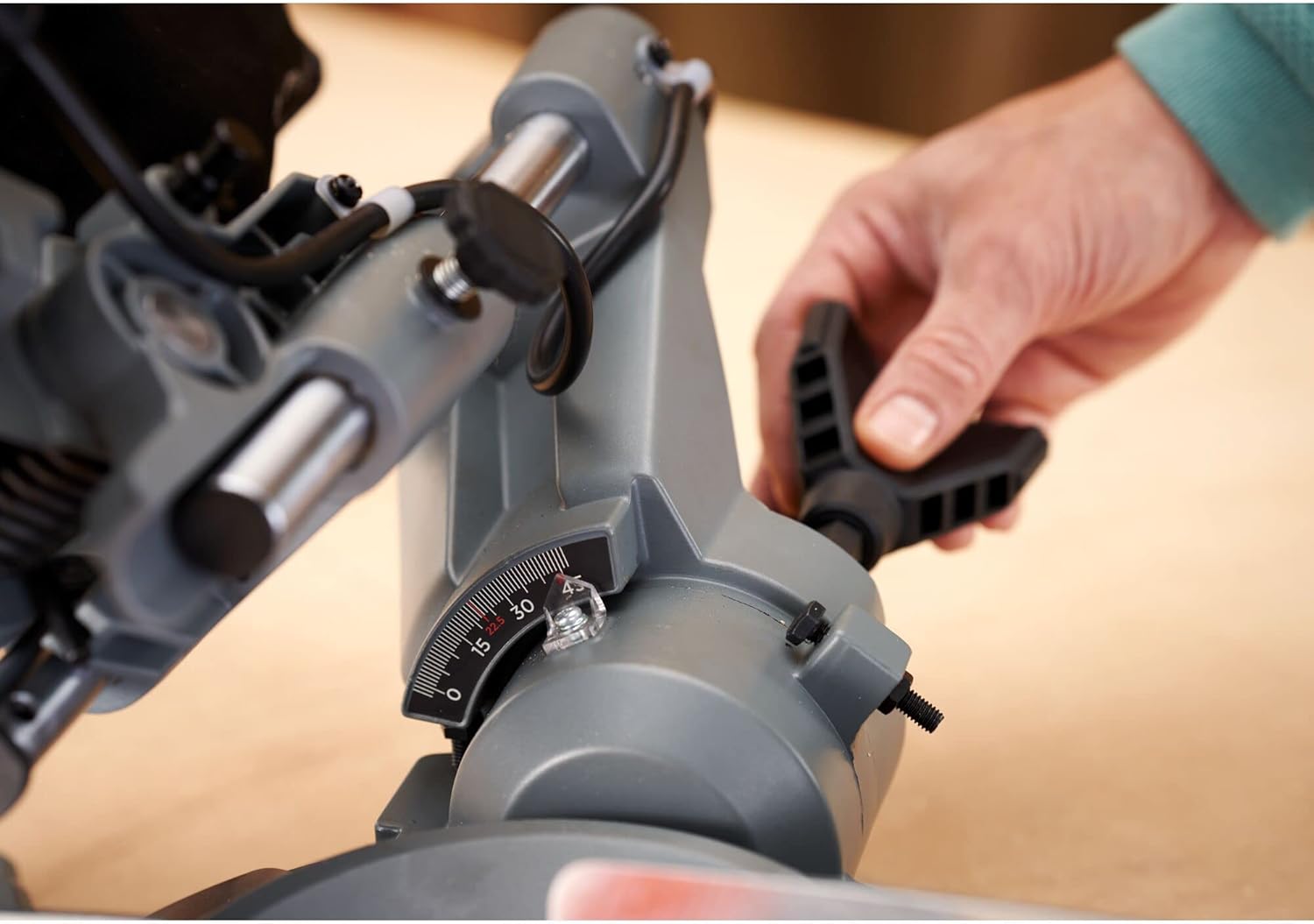
Figure 7: Adjusting the bevel angle for tilted cuts.
5.4 Securing Workpiece
Always secure the workpiece firmly before cutting:
- Place the workpiece against the fence and on the miter table.
- വർക്ക്പീസ് cl ഉപയോഗിക്കുകamp to hold the material securely against the fence and table. Ensure the clamp does not interfere with the blade path.

Figure 8: Securing the workpiece with the integrated clamp സ്ഥിരതയ്ക്കായി.
5.5 ഒരു കട്ട് ഉണ്ടാക്കൽ
Follow these steps for a safe and precise cut:
- Ensure the workpiece is properly secured and the desired angle is set.
- Lower the saw head slightly to align the blade with your cut line. The shadow line feature will project a clear line on the workpiece, indicating the exact cut path.
- Raise the saw head, then depress the trigger switch to start the motor. Allow the blade to reach full speed before cutting.
- Slowly and steadily lower the saw head through the workpiece. Do not force the cut.
- കട്ട് പൂർത്തിയായിക്കഴിഞ്ഞാൽ, ട്രിഗർ സ്വിച്ച് വിടുക, സോ ഹെഡ് ഉയർത്തുന്നതിന് മുമ്പ് ബ്ലേഡ് പൂർണ്ണമായും നിർത്താൻ അനുവദിക്കുക.
- മുറിച്ച ഭാഗവും മുറിച്ച ഭാഗങ്ങളും ജോലിസ്ഥലത്ത് നിന്ന് നീക്കം ചെയ്യുക.

Figure 9: The shadow line feature provides a precise guide for cutting.
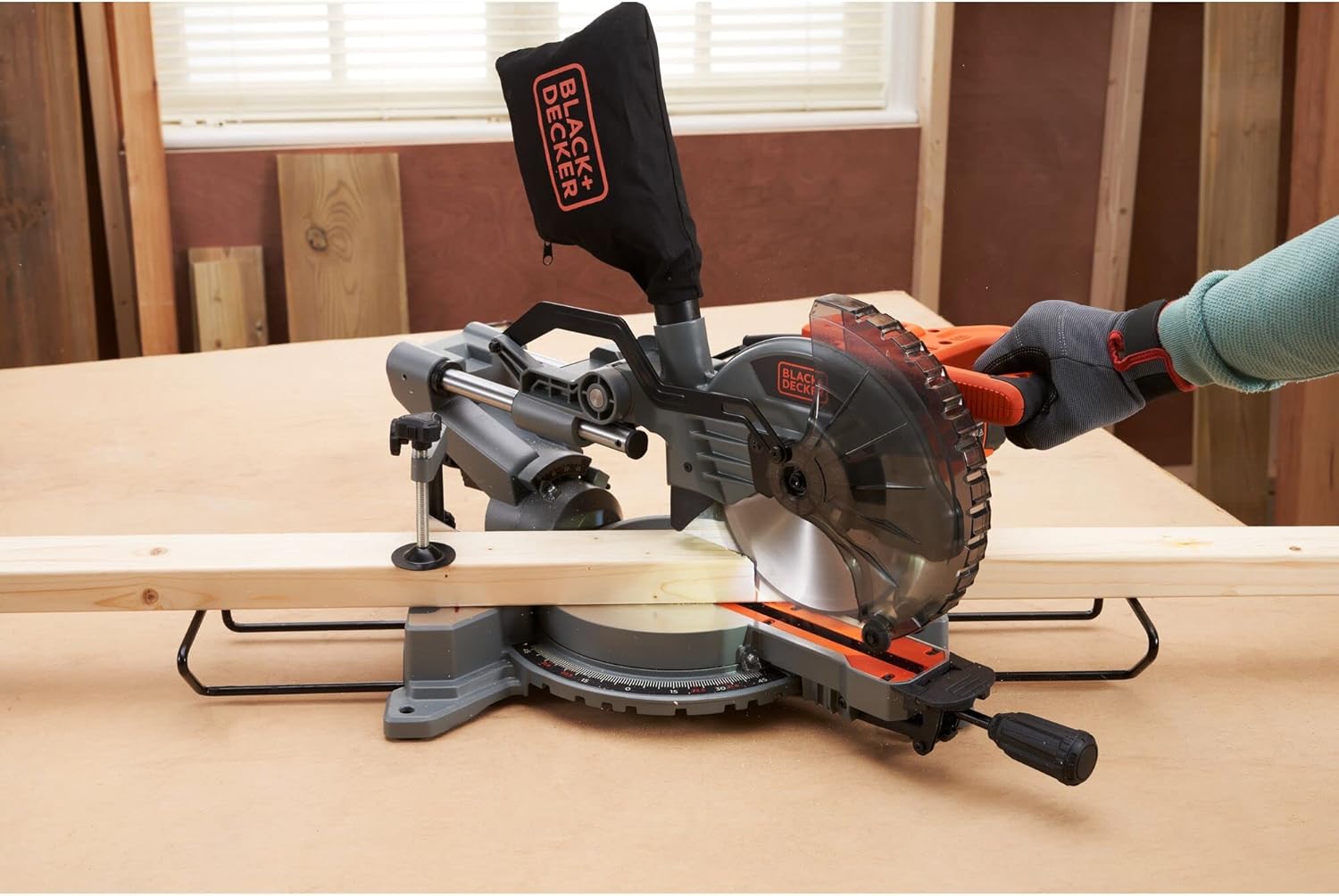
Figure 10: The miter saw in operation, demonstrating a typical cutting scenario.
6. പരിപാലനം
Regular maintenance ensures optimal performance and extends the life of your tool. Always disconnect the saw from the power supply before performing any maintenance.
6.1 വൃത്തിയാക്കൽ
- പൊടി ബാഗ്: Regularly empty the dust bag to maintain effective dust collection.

Figure 11: Emptying the dust bag is crucial for maintaining a clean workspace and efficient dust collection.
- പൊതുവായ ശുചീകരണം: Use a soft brush or compressed air to clean dust and debris from the motor vents, blade guard, and miter table. Do not use solvents or abrasive cleaners.
6.2 ബ്ലേഡ് പരിശോധനയും മാറ്റിസ്ഥാപിക്കലും
Inspect the saw blade regularly for sharpness, cracks, or missing teeth. A dull or damaged blade can cause kickback and reduce cutting efficiency. Replace damaged blades immediately following the procedure in Section 4.3.
6.3 പൊതു പരിശോധന
Check all screws and fasteners for tightness. Inspect the power cord for damage. Ensure all moving parts operate smoothly.
7. പ്രശ്നപരിഹാരം
നിങ്ങളുടെ മിറ്റർ സോ ഉപയോഗിച്ച് നിങ്ങൾ നേരിട്ടേക്കാവുന്ന പൊതുവായ പ്രശ്നങ്ങൾ ഈ വിഭാഗം അഭിസംബോധന ചെയ്യുന്നു.
| പ്രശ്നം | സാധ്യമായ കാരണം | പരിഹാരം |
|---|---|---|
| സോ ആരംഭിക്കുന്നില്ല | No power supply; Faulty switch; Motor overload | Check power connection and circuit breaker; Contact service center if switch is faulty; Allow motor to cool down. |
| കൃത്യമല്ലാത്ത മുറിവുകൾ | Miter/bevel angle not locked; Dull blade; Workpiece not secured | Ensure all locks are tightened; Replace blade; Secure workpiece firmly with clamp. |
| അമിതമായ പൊടി | Dust bag full or improperly attached; Clogged dust port | Empty and reattach dust bag; Clear any blockages from the dust port. |
| Blade binds in workpiece | Dull blade; Forcing the cut; Improper workpiece support | Replace blade; Reduce cutting speed; Ensure workpiece is fully supported and clamped. |
8 സ്പെസിഫിക്കേഷനുകൾ
Technical specifications for the BLACK+DECKER BES701-QS Miter Saw:
| ഫീച്ചർ | സ്പെസിഫിക്കേഷൻ |
|---|---|
| മോഡൽ നമ്പർ | BES701-QS |
| ശക്തി | 1500 Watts (1600 Watts listed in some specifications) |
| വാല്യംtage | 230 വോൾട്ട് (എസി) |
| ബ്ലേഡ് വ്യാസം | 216 മി.മീ |
| പരമാവധി കട്ടിംഗ് കപ്പാസിറ്റി | 220 മില്ലിമീറ്റർ വരെ |
| Bevel Cut Capacity | 45° വരെ |
| അളവുകൾ (L x W x H) | 58.6 x 45 x 37.1 സെ.മീ |
| ഭാരം | 13.48 കി.ഗ്രാം |
| മെറ്റീരിയൽ | Metal (body), Plastic (handle) |
| പവർ ഉറവിടം | കോർഡഡ് ഇലക്ട്രിക് |
| പ്രത്യേക ഫീച്ചർ | Depth Adjustment, Shadow Line |
| ഉൾപ്പെടുത്തിയ ഘടകങ്ങൾ | 1 x 216 mm 24-tooth Saw Blade, 1 x Dust Bag |
| സർട്ടിഫിക്കേഷൻ | CE |
9. വാറൻ്റിയും പിന്തുണയും
9.1 വാറൻ്റി വിവരങ്ങൾ
This BLACK+DECKER BES701-QS Miter Saw comes with a Limited Warranty. Please refer to the warranty card included with your product for specific terms, conditions, and duration of coverage. Retain your proof of purchase for warranty claims.
9.2 ഉപഭോക്തൃ പിന്തുണ
For technical assistance, spare parts, or service, please contact BLACK+DECKER customer support in your region. Contact information can typically be found on the BLACK+DECKER official webസൈറ്റ് അല്ലെങ്കിൽ ഉൽപ്പന്ന പാക്കേജിംഗിൽ.


