1. ആമുഖം
The AUTOPHIX OM126 is an enhanced OBDII/EOBD+CAN diagnostic scan tool designed to assist vehicle owners and technicians in quickly and efficiently diagnosing engine-related issues. This device reads and clears diagnostic trouble codes (DTCs), turns off the Malfunction Indicator Lamp (MIL), and performs various diagnostic tests to ensure vehicle compliance with emission standards. It supports all OBDII protocols, including CAN, J1850 PWM, J1850 VPW, ISO9141, and KWP2000.
2. ഉൽപ്പന്ന സവിശേഷതകൾ
The OM126 diagnostic tool offers a comprehensive set of features for effective vehicle diagnostics:
- Engine Fault Code Reading & Erasing: Reads and clears current, pending, and permanent Diagnostic Trouble Codes (DTCs) that cause emission problems, turning off the Malfunction Indicator Lamp (MIL).
- ഡിടിസി ലുക്കപ്പ് ലൈബ്രറി: Built-in library to provide definitions for retrieved trouble codes, aiding in diagnosis.
- വിശാലമായ വാഹന അനുയോജ്യത: Compatible with all OBDII and CAN compliant vehicles manufactured after 1996 (USA) and other imported vehicles.
- ബഹുഭാഷാ പിന്തുണ: ഇംഗ്ലീഷ്, ഫ്രഞ്ച്, സ്പാനിഷ്, ജർമ്മൻ, റഷ്യൻ, ഇറ്റാലിയൻ, ഫിന്നിഷ്, പോർച്ചുഗീസ്, പോളിഷ്, ഡച്ച് എന്നിവയുൾപ്പെടെ 10 ഭാഷകളെ പിന്തുണയ്ക്കുന്നു.
- Data Stream Display: Shows live sensor data in text and graph format, providing real-time vehicle performance information.
- ഫ്രീസ് ഫ്രെയിം ഡാറ്റ: Captures a snapshot of vehicle operating conditions at the time an emission-related fault occurred.
- ഐ/എം സന്നദ്ധത നില: Checks the state of emission-related monitors to determine if the vehicle is ready for an emissions test.
- ഓൺ-ബോർഡ് മോണിറ്ററിംഗ് ടെസ്റ്റ്: എമിഷനുമായി ബന്ധപ്പെട്ട പവർട്രെയിൻ ഘടകങ്ങൾക്കും സിസ്റ്റങ്ങൾക്കുമുള്ള ഫലങ്ങൾ വീണ്ടെടുക്കുന്നു.
- O2 സെൻസർ ടെസ്റ്റ്: വാഹനത്തിന്റെ ഓൺ-ബോർഡ് കമ്പ്യൂട്ടറിൽ നിന്ന് ഏറ്റവും പുതിയ പരിശോധനകൾക്കായുള്ള O2 സെൻസർ മോണിറ്റർ പരിശോധനാ ഫലങ്ങൾ വീണ്ടെടുക്കുന്നു.
- EVAP സിസ്റ്റം ടെസ്റ്റ്: Initiates a leak test for the vehicle's EVAP system, identifying issues related to fuel efficiency and emissions.
- വാഹന വിവരം: വാഹന തിരിച്ചറിയൽ നമ്പർ (VIN), കാലിബ്രേഷൻ ഐഡി (CALID), കാലിബ്രേഷൻ വെരിഫിക്കേഷൻ നമ്പർ (CVN) എന്നിവ വീണ്ടെടുക്കുന്നു.
- ഉപയോക്തൃ-സൗഹൃദ ഇൻ്റർഫേസ്: Features a 2.4'' TFT 262K true color LCD display and a silicone keypad for easy navigation.
3. ഡിവൈസ് ഓവർview
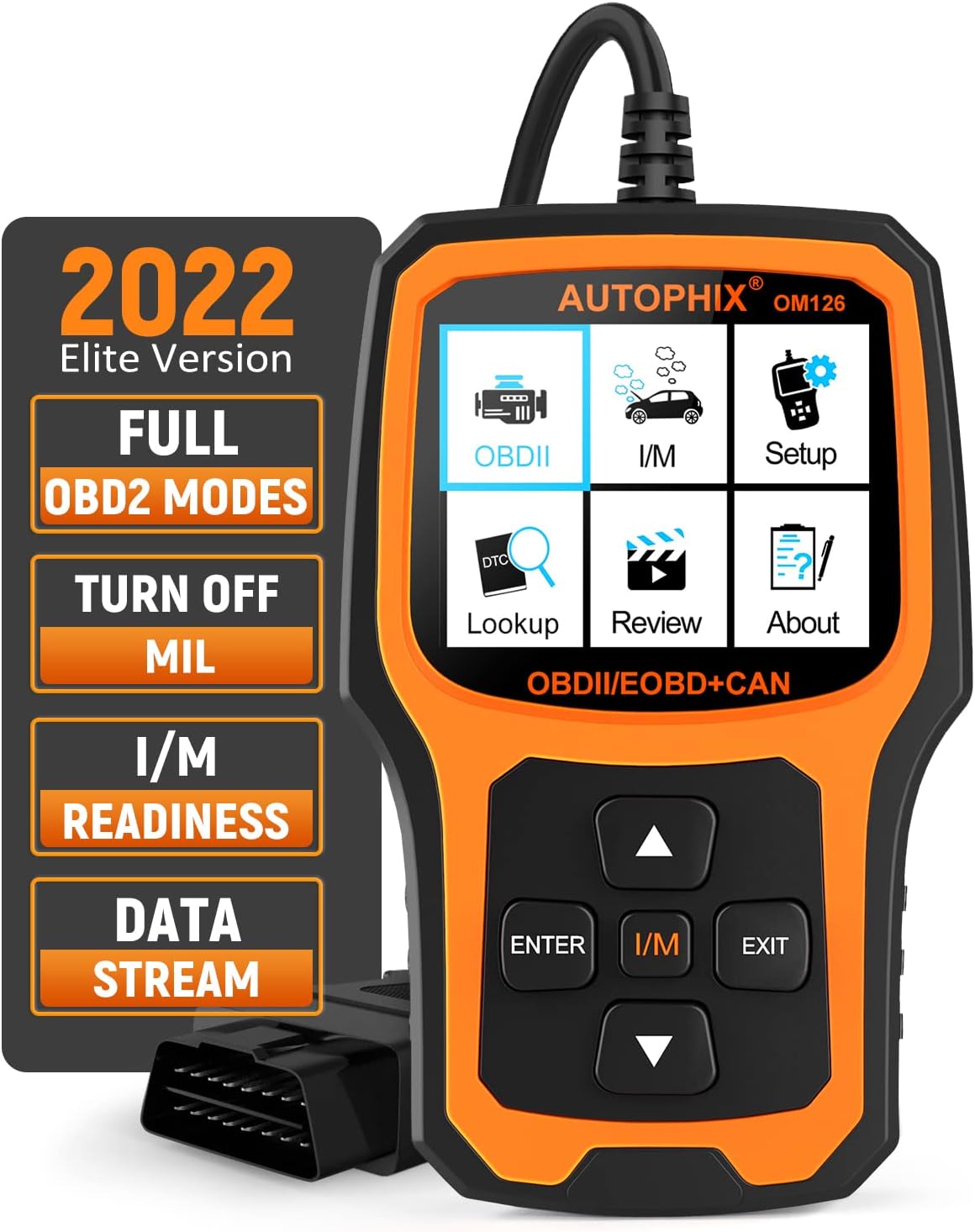
Figure 1: AUTOPHIX OM126 OBDII Scanner Front View പ്രധാന സവിശേഷതകളും.
This image displays the AUTOPHIX OM126 diagnostic tool. The main unit features a color LCD screen showing menu options such as OBDII, I/M, Setup, DTC Lookup, Review, and About. Below the screen are navigation buttons: Up, Down, ENTER, I/M, and EXIT. To the left, a panel highlights key functionalities: "2022 Elite Version", "FULL OBD2 MODES", "TURN OFF MIL", "I/M READINESS", and "DATA STREAM". An OBDII connector cable extends from the top of the device.
3.1 കീപാഡ് പ്രവർത്തനങ്ങൾ
- ▲ (Up) / ▼ (Down) Button: Moves cursor up or down for selection.
- എന്റർ ബട്ടൺ: ഒരു തിരഞ്ഞെടുപ്പ് സ്ഥിരീകരിക്കുന്നു അല്ലെങ്കിൽ ഒരു മെനുവിൽ പ്രവേശിക്കുന്നു.
- I/M ബട്ടൺ: I/M സന്നദ്ധത നിലയിലേക്കുള്ള ദ്രുത പ്രവേശനം.
- എക്സിറ്റ് ബട്ടൺ: Returns to the previous screen or exits a function.
4. സജ്ജീകരണവും കണക്ഷനും
- OBDII പോർട്ട് കണ്ടെത്തുക: The OBDII port is typically located under the dashboard on the driver's side of the vehicle. Refer to your vehicle's service manual for the exact location if needed.
- Turn Off Ignition: Ensure the vehicle's ignition is in the OFF position before connecting the scanner.
- സ്കാനർ ബന്ധിപ്പിക്കുക: Plug the OM126's OBDII connector cable firmly into the vehicle's OBDII port.
- ഇഗ്നിഷൻ ഓണാക്കുക: Turn the vehicle's ignition to the ON position (engine off). The scanner will power on automatically.
- Language Selection (First Use): If this is the first time using the device, you may be prompted to select your preferred language. Navigate using the Up/Down buttons and confirm with ENTER.
5. പ്രവർത്തന നിർദ്ദേശങ്ങൾ
After successful connection, the main menu will appear. Use the Up/Down buttons to navigate and ENTER to select an option.
5.1. OBDII/EOBD Diagnostics
Select "OBDII" from the main menu to access diagnostic functions.
- കോഡുകൾ വായിക്കുക: നിലവിലുള്ളതും, തീർപ്പുകൽപ്പിക്കാത്തതും, സ്ഥിരവുമായ ഡയഗ്നോസ്റ്റിക് ട്രബിൾ കോഡുകൾ (DTC-കൾ) പ്രദർശിപ്പിക്കുന്നു.
- മായ്ക്കൽ കോഡുകൾ: Clears all DTCs from the vehicle's computer and turns off the Malfunction Indicator Lamp (MIL). Note: Ensure the underlying issue is resolved before erasing codes, as they may reappear.
- I/M സന്നദ്ധത: Checks the status of emission-related monitors. A green light indicates readiness, while a red light or flashing light indicates incomplete tests.
- ഡാറ്റ സ്ട്രീം: Views live data parameters from the vehicle's sensors. This can be displayed in text or graph format.
- ഫ്രീസ് ഫ്രെയിം: Displays a snapshot of vehicle conditions when a fault code was set.
- O2 സെൻസർ ടെസ്റ്റ്: O2 സെൻസർ മോണിറ്ററിംഗ് പരിശോധനാ ഫലങ്ങൾ വീണ്ടെടുക്കുന്നു.
- ഓൺ-ബോർഡ് മോണിറ്റർ ടെസ്റ്റ്: Retrieves results for emission-related powertrain components.
- EVAP സിസ്റ്റം ടെസ്റ്റ്: Initiates a test for the evaporative emission control system.
- വാഹന വിവരം: Displays the vehicle's VIN, CALID, and CVN.
5.2. ഡിടിസി ലുക്ക്അപ്പ്
Select "DTC Lookup" from the main menu. Enter a DTC code using the keypad to view its definition. This feature helps understand the meaning of retrieved codes without external resources.
5.3. റീview
"Re" തിരഞ്ഞെടുക്കുകview" to view previously saved diagnostic data, such as stored codes or data streams. This is useful for comparing diagnostic results over time.
5.4. സജ്ജീകരണം
Select "Setup" to configure device settings, including language, unit of measure (Metric/Imperial), and display brightness.
5.5 കുറിച്ച്
Select "About" to view information about the device, such as software version and serial number.
6. പരിപാലനം
- വൃത്തിയാക്കൽ: ഉപകരണം വൃത്തിയാക്കാൻ മൃദുവായതും ഉണങ്ങിയതുമായ തുണി ഉപയോഗിക്കുക. അബ്രസീവ് ക്ലീനറുകളോ ലായകങ്ങളോ ഉപയോഗിക്കരുത്.
- സംഭരണം: Store the scanner in a clean, dry environment away from extreme temperatures and direct sunlight.
- കേബിൾ കെയർ: OBDII കേബിൾ അമിതമായി വളയ്ക്കുകയോ വളച്ചൊടിക്കുകയോ ചെയ്യുന്നത് ഒഴിവാക്കുക. കേടുപാടുകൾ സംഭവിക്കാതിരിക്കാൻ വൃത്തിയായി സൂക്ഷിക്കുക.
- സോഫ്റ്റ്വെയർ അപ്ഡേറ്റുകൾ: Regularly check the AUTOPHIX website for free software updates to ensure optimal performance and compatibility with newer vehicles. Connect the device to a computer (Windows 7/8/10 ONLY) via USB for updates.
7. പ്രശ്നപരിഹാരം
| പ്രശ്നം | സാധ്യമായ കാരണം | പരിഹാരം |
|---|---|---|
| സ്കാനർ പവർ ഓൺ ചെയ്യുന്നില്ല. |
|
|
| "LINK ERROR" message displayed. |
|
|
| കോഡുകൾ മായ്ക്കാൻ കഴിയില്ല. |
|
|
8 സ്പെസിഫിക്കേഷനുകൾ
| പരാമീറ്റർ | മൂല്യം |
|---|---|
| മോഡൽ | OM126 |
| പ്രദർശിപ്പിക്കുക | 2.4'' TFT 262K true color LCD |
| ഓപ്പറേറ്റിംഗ് വോളിയംtage | 9-18V DC (from vehicle OBDII port) |
| പിന്തുണയ്ക്കുന്ന പ്രോട്ടോക്കോളുകൾ | CAN, J1850 PWM, J1850 VPW, ISO9141, KWP2000 |
| പ്രവർത്തന താപനില | 0°C മുതൽ 60°C വരെ (32°F മുതൽ 140°F വരെ) |
| സംഭരണ താപനില | -10°C മുതൽ 70°C വരെ (14°F മുതൽ 158°F വരെ) |
| അളവുകൾ | ഏകദേശം 8.07 x 6.38 x 1.5 ഇഞ്ച് |
| ഭാരം | ഏകദേശം 12 ഔൺസ് |
| കണക്റ്റിവിറ്റി | OBDII cable, USB for updates |
| Supported OS for Updates | Windows 7/8/10 ONLY |
9. വാറൻ്റിയും പിന്തുണയും
The AUTOPHIX OM126 OBDII diagnostic scan tool comes with a one-year warranty from the date of purchase. This warranty covers manufacturing defects and ensures the product functions as described under normal use.
For technical support, warranty claims, or any questions regarding product compatibility, please contact AUTOPHIX customer service. You can also visit the official AUTOPHIX website for free software updates and to review/print diagnostic reports.
Website for Updates & Support: www.autophix.com


