1. ഉൽപ്പന്നം കഴിഞ്ഞുview
The JALL Digital Alarm Clock V1021 is designed to provide clear time, date, and temperature display with adjustable brightness and alarm features. It includes a USB charging port for convenience and a battery backup system to maintain settings during power outages.

ചിത്രം 1.1: മുൻഭാഗം view of the JALL Digital Alarm Clock with a smartphone connected for charging.
പ്രധാന സവിശേഷതകൾ:
- 5.5-inch Large LED Display for time, date, and temperature.
- 6-Level Adjustable Brightness (5% to 100%).
- Adjustable Alarm Volume (30-85 dB) with 8 selectable ringtones.
- Snooze Function (9 minutes).
- Multiple Alarm Settings (up to 3 alarms, daily/weekday/weekend options).
- Built-in USB Charging Port for external devices.
- Battery Backup (CR2032, not included) for time memory during power loss.
- 12-hour / 24-hour Time Format.
- Indoor Temperature Display.
2. സജ്ജീകരണ നിർദ്ദേശങ്ങൾ
2.1 പവർ കണക്ഷൻ
- Connect the provided power cable to the DC 5V input port on the back of the alarm clock.
- Plug the other end of the power cable into a standard wall outlet or a USB power adapter.
- ക്ലോക്ക് ഡിസ്പ്ലേ പ്രകാശിക്കും, ഇത് പവർ ഓൺ ആണെന്ന് സൂചിപ്പിക്കുന്നു.
കുറിപ്പ്: The clock requires continuous power via the power cable for operation. The backup battery only preserves time settings during power outages, it does not power the display.
2.2 ബാറ്ററി ബാക്കപ്പ് ഇൻസ്റ്റാളേഷൻ (ഓപ്ഷണൽ)
To ensure time and alarm settings are retained during a power interruption, install a CR2032 button cell battery (not included).
- ക്ലോക്കിന്റെ പിൻഭാഗത്ത് ബാറ്ററി കമ്പാർട്ട്മെന്റ് കണ്ടെത്തുക.
- ബാറ്ററി കമ്പാർട്ട്മെൻ്റ് കവർ തുറക്കുക.
- Insert one CR2032 button cell battery, observing the correct polarity (+/-).
- ബാറ്ററി കമ്പാർട്ട്മെൻ്റ് കവർ സുരക്ഷിതമായി അടയ്ക്കുക.
2.3 പ്രാരംഭ സമയ, തീയതി ക്രമീകരണം
Refer to the specific buttons on your device for setting time, date, and other parameters. Typically, there are dedicated buttons for 'SET', 'UP', 'DOWN', or a rotary dial.
- Press the 'SET' button (or equivalent) to enter time setting mode. The hour display will typically flash.
- Use the 'UP' and 'DOWN' buttons (or rotary dial) to adjust the hour.
- Press 'SET' again to confirm the hour and move to minute adjustment.
- മിനിറ്റ്, വർഷം, മാസം, ദിവസം എന്നിങ്ങനെ പ്രക്രിയ ആവർത്തിക്കുക.
- Press 'SET' one last time to exit the setting mode.
3. പ്രവർത്തന നിർദ്ദേശങ്ങൾ
3.1 ഡിസ്പ്ലേ സവിശേഷതകൾ
The clock features a large 5.5-inch LED display showing time, date (month-day), day of the week, and indoor temperature.

Image 3.1: The 5.5-inch display clearly shows all information.
3.2 തെളിച്ചം ക്രമീകരിക്കൽ
The display brightness can be adjusted to 6 levels (5% to 100%) to suit your preference and environment.
- Locate the brightness control button (often labeled 'DIMMER' or a sun icon).
- Press the button repeatedly to cycle through the 6 brightness levels.

Image 3.2: Visual representation of adjustable brightness and volume levels.
3.3 അലാറം ക്രമീകരണങ്ങൾ
The clock supports up to 3 independent alarms with adjustable volume and 8 distinct ringtones.
- ഒരു അലാറം സജ്ജീകരിക്കുന്നു:
a. Press the 'ALARM' button (or similar) to select Alarm 1, 2, or 3.
b. Press 'SET' to enter alarm time adjustment. The hour will flash.
c. Use 'UP'/'DOWN' to set the desired hour, then 'SET' for minutes.
d. After setting minutes, press 'SET' to choose the alarm mode (Daily, Weekday, Weekend).
e. Press 'SET' again to select a ringtone from the 8 available options.
f. Press 'SET' to confirm and exit alarm setting. - അലാറം വോളിയം ക്രമീകരിക്കുന്നു:
a. While in alarm setting mode or when an alarm is sounding, use the dedicated volume buttons or 'UP'/'DOWN' to adjust the volume from 30dB to 85dB. - സ്നൂസ് പ്രവർത്തനം:
a. When an alarm sounds, press the large 'SNOOZE' button on top of the clock.
b. The alarm will pause for 9 minutes and then sound again. This can be repeated. - Disabling an Alarm:
a. Press the 'ALARM' button to select the alarm you wish to disable.
b. Press the 'ON/OFF' or 'ALARM ON/OFF' button to toggle the alarm status. The alarm icon on the display will disappear when disabled.

Image 3.3: The clock supports multiple alarm settings including daily, weekday, and weekend modes.
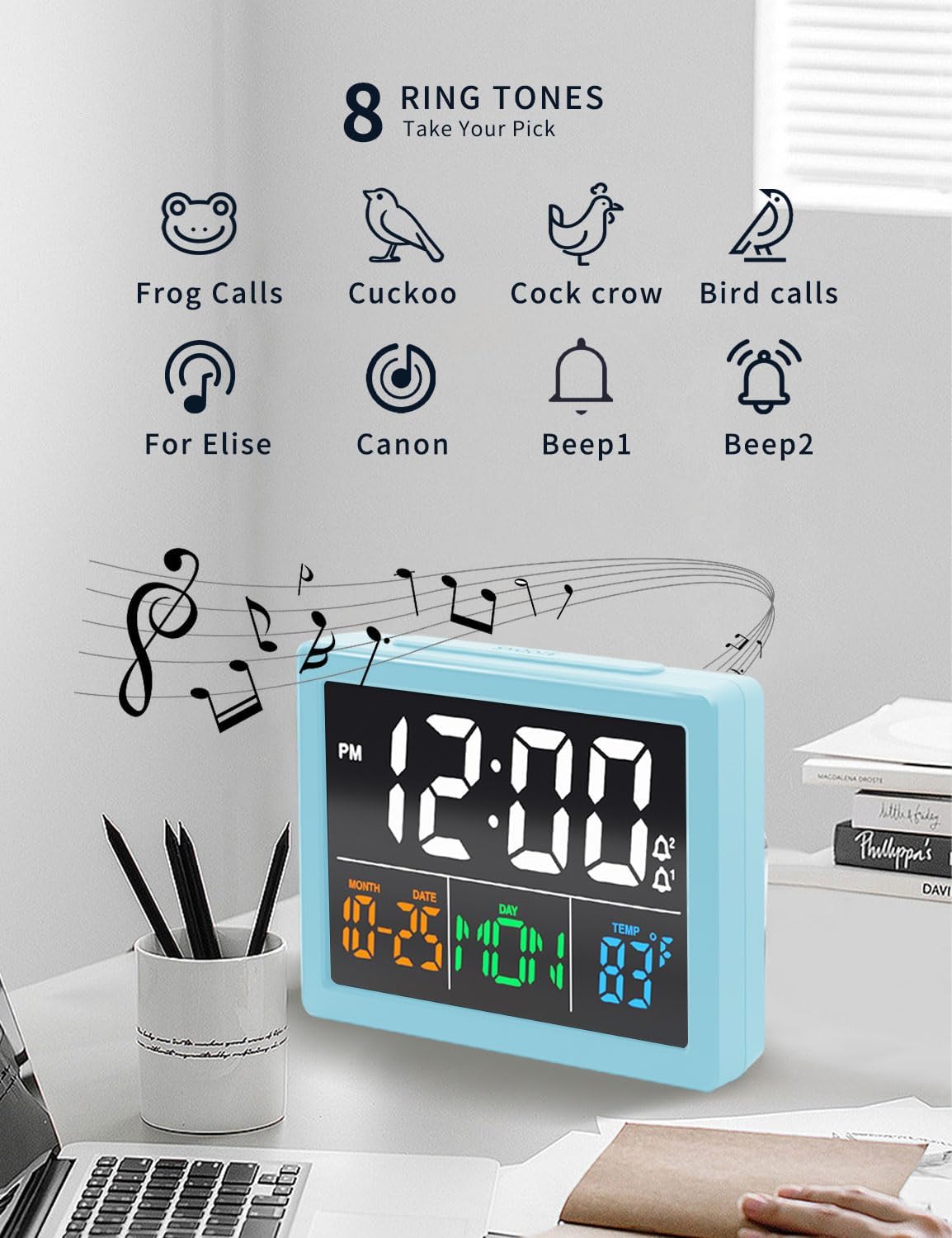
Image 3.4: Choose from 8 distinct ringtones for your alarm.
3.4 യുഎസ്ബി ചാർജിംഗ് പോർട്ട്
The clock features a built-in USB charging port (5V) to charge compatible electronic devices.
- Connect your device's USB charging cable to the USB output port on the back of the clock.
- Ensure the clock is powered via its main power cable.
- നിങ്ങളുടെ ഉപകരണം ചാർജ് ചെയ്യാൻ തുടങ്ങും.

Image 3.5: The clock provides two USB output ports for charging external devices.
4. പരിപാലനം
To ensure the longevity and proper functioning of your JALL Digital Alarm Clock, follow these maintenance guidelines:
- വൃത്തിയാക്കൽ: മൃദുവായതും ഉണങ്ങിയതുമായ തുണി ഉപയോഗിച്ച് ക്ലോക്ക് തുടയ്ക്കുക. അബ്രാസീവ് ക്ലീനറുകളോ, ലായകങ്ങളോ, കെമിക്കൽ സ്പ്രേകളോ ഉപയോഗിക്കരുത്, കാരണം ഇവ ഫിനിഷിനോ ആന്തരിക ഘടകങ്ങൾക്കോ കേടുവരുത്തും.
- പരിസ്ഥിതി: Keep the clock away from direct sunlight, extreme temperatures, and high humidity. Avoid placing it near strong magnetic fields.
- ശക്തി: Always use the provided power cable. If the clock will be stored for an extended period, remove the backup battery.
- കൈകാര്യം ചെയ്യൽ: Handle the clock with care. Avoid dropping it or subjecting it to strong impacts.
5. പ്രശ്നപരിഹാരം
If you encounter issues with your JALL Digital Alarm Clock, refer to the following common problems and solutions:
| പ്രശ്നം | സാധ്യമായ കാരണം | പരിഹാരം |
|---|---|---|
| Clock display is off or flickering. | No power, loose connection, faulty power adapter. | Ensure the power cable is securely connected to both the clock and the power outlet. Try a different USB power adapter or outlet. |
| അലാറം മുഴങ്ങുന്നില്ല. | Alarm not activated, volume too low, incorrect alarm time. | Verify the alarm is enabled (alarm icon visible). Check alarm volume settings. Confirm the alarm time is set correctly. |
| Time is inaccurate (gains or loses time). | Internal clock drift, unstable power supply. | Unplug the clock for a few minutes, then plug it back in and reset the time. Ensure a stable power source. If the issue persists, contact customer support. |
| യുഎസ്ബി ചാർജിംഗ് പോർട്ട് പ്രവർത്തിക്കുന്നില്ല. | Clock not powered, device cable faulty, device incompatible. | Ensure the clock is powered by its main cable. Try a different USB cable or device. The port is for charging only, not data transfer. |
| Snooze function not working. | Snooze button not pressed correctly. | Ensure the large 'SNOOZE' button on top is pressed firmly when the alarm is sounding. |
6 സ്പെസിഫിക്കേഷനുകൾ
| ഫീച്ചർ | വിശദാംശങ്ങൾ |
|---|---|
| ബ്രാൻഡ് | JALL |
| മോഡൽ നമ്പർ | V1021 |
| ഡിസ്പ്ലേ തരം | ഡിജിറ്റൽ LED |
| ഡിസ്പ്ലേ വലിപ്പം | 5.5 ഇഞ്ച് |
| ഉൽപ്പന്ന അളവുകൾ | 5.2"ആംശം x 3.2"ആംശം |
| പവർ ഉറവിടം | Corded Electric (USB), Battery Backup (CR2032) |
| മെറ്റീരിയൽ | അക്രിലോണിട്രൈൽ ബ്യൂട്ടാഡീൻ സ്റ്റൈറൈൻ (എബിഎസ്) |
| പ്രത്യേക സവിശേഷതകൾ | Alarm, Snooze, Temperature Display, USB Charging Port, Adjustable Brightness, Adjustable Volume |
| ഇനത്തിൻ്റെ ഭാരം | 8.8 ഔൺസ് (0.25 കിലോഗ്രാം) |
7. വാറൻ്റിയും പിന്തുണയും
7.1 വാറൻ്റി വിവരങ്ങൾ
JALL ഒരു നൽകുന്നു 365- ദിവസത്തെ വാറന്റി ആമസോണിൽ വിൽക്കുന്ന ഉൽപ്പന്നങ്ങളിൽ. വാറന്റി ക്ലെയിമുകൾക്കായി നിങ്ങളുടെ വാങ്ങിയതിന്റെ തെളിവ് സൂക്ഷിക്കുക.
7.2 ഉപഭോക്തൃ പിന്തുണ
For further assistance, troubleshooting not covered in this manual, or warranty inquiries, please contact JALL customer support through the Amazon platform or visit the official JALL store:
ആമസോണിലെ JALL സ്റ്റോർ സന്ദർശിക്കുക
വീഡിയോകളെക്കുറിച്ചുള്ള കുറിപ്പ്: ഔദ്യോഗിക ഉൽപ്പന്ന വീഡിയോ ഇല്ല. URLs were provided in the product data for embedding in this manual.


