ഉൽപ്പന്നം കഴിഞ്ഞുview
The SCULPFUN S6 Pro is a versatile laser engraving and cutting machine designed for both beginners and enthusiasts. It features a 5500mW diode spot compression laser, enabling high-precision engraving and efficient cutting on various materials.

The SCULPFUN S6 Pro Laser Engraver, showcasing its robust frame and examples of engraved and cut materials like wood, acrylic, and leather.
This machine is capable of cutting materials such as 10mm wood, 6mm black acrylic, and 6mm plywood. It can engrave on a wider range of materials including wood, leather, bamboo, painted glass, coated ceramic, and stainless steel (requires blackening the surface for stainless steel). The ultra-fine square 0.08mm laser focus ensures precise results.

The S6 Pro Laser Engraver in action, demonstrating its use with a honeycomb working table (not included) for efficient material processing.
സജ്ജീകരണവും അസംബ്ലിയും
The S6 Pro laser engraver is designed for straightforward assembly, typically taking 10-20 minutes by following the provided manual. Key features facilitate ease of use:
- വേഗത്തിലുള്ള ഫോക്കസിംഗ്: The fixed focus lens and sliding design allow for quick focusing by sliding the laser head and tightening a screw by hand. This eliminates the need for a screwdriver for focus adjustment.
- സ്ഥിരതയുള്ള ഘടന: Vertical scale lines on the X-axis and Y-axis assist in measuring target object sizes. An emergency power switch is located on the front X-axis for immediate shutdown.

വിശദമായി view of the S6 Pro's design features, including the laser filter cover, sliding focus adjuster, vertical scale lines for measurement, and the desk protection mat.
ഓപ്പറേറ്റിംഗ് സോഫ്റ്റ്വെയർ
The SCULPFUN S6 Pro is compatible with various operating software, supporting both Windows and MAC systems (MAC systems only support LightBurn). It supports PWM mode engraving.
ലേസർജിആർബിഎൽ
LaserGRBL is a free software suitable for beginners. You can upload pictures and set relevant parameters to start engraving. While easy to use, it has limited functions.
ലൈറ്റ് ബേൺ
LightBurn is a multifunctional, paid software (with a one-month free trial for new users) that combines engraving and cutting capabilities. It allows you to design, add, and edit graphics, images, and text. LightBurn also supports controlling various accessories like air-assisted pumps and laser cameras.
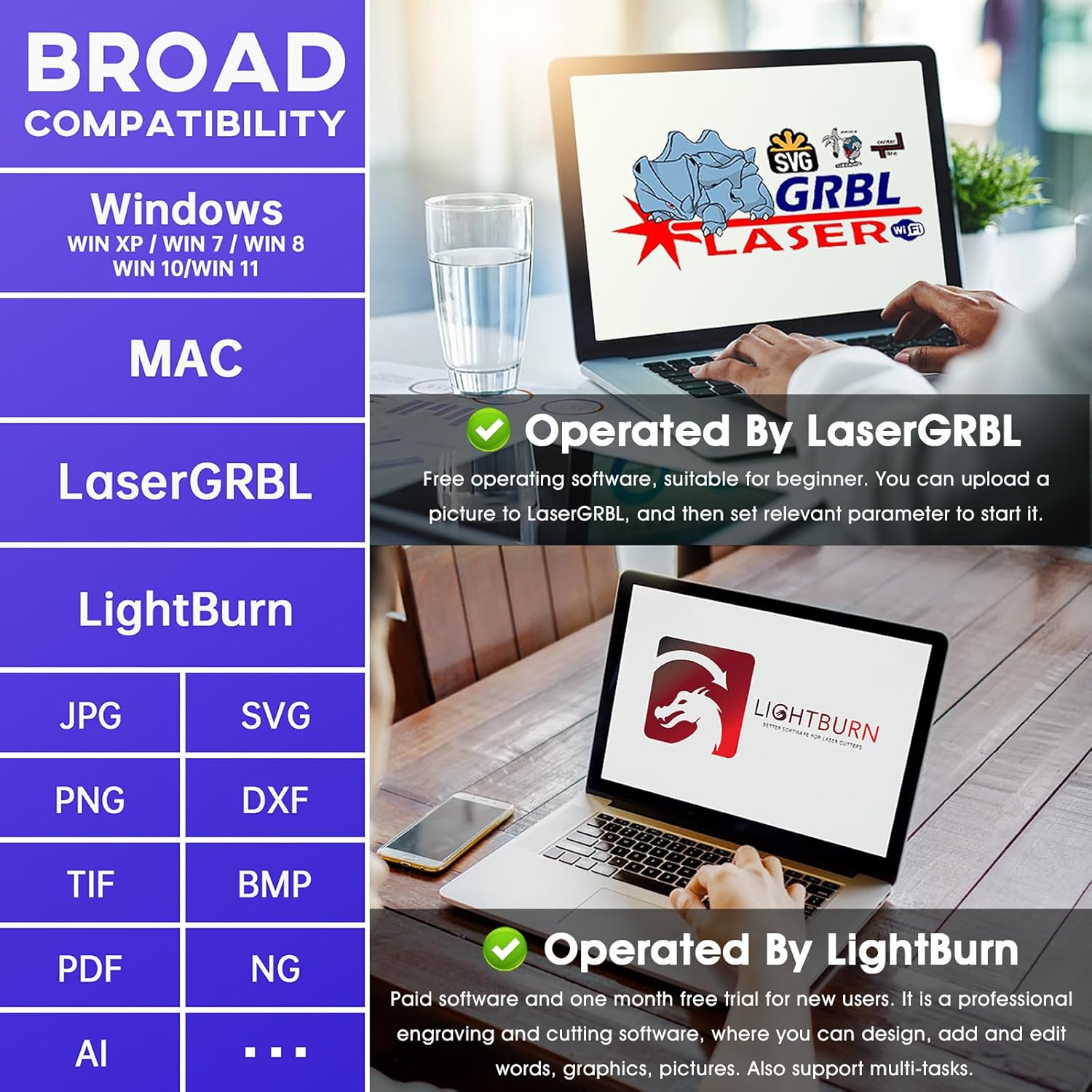
The S6 Pro's broad compatibility with operating systems and software, including LaserGRBL and LightBurn, and various image formats.
This video demonstrates how to use PC operating software, specifically LaserGRBL and LightBurn, with the SCULPFUN S6 Pro laser engraver. It covers connecting the device, loading designs, setting parameters, and initiating engraving and cutting tasks.
Material Compatibility and Performance
The S6 Pro utilizes 5500mW diode spot compression laser technology, providing both strong cutting and precise engraving capabilities.
- മുറിക്കൽ: Capable of cutting 10mm wood, 6mm black acrylic, and 6mm plywood.
- കൊത്തുപണി: Suitable for engraving wood, leather, bamboo, painted glass, coated ceramic, and stainless steel. For reflective materials like stainless steel, ceramic, metal, and glass, blacken the surface with a marker pen, transfer tape, or acrylic paint first to ensure clear engraving results.

A visual guide to the wide range of materials that can be engraved or cut with the S6 Pro, including various woods, plastics, metals, and fabrics.
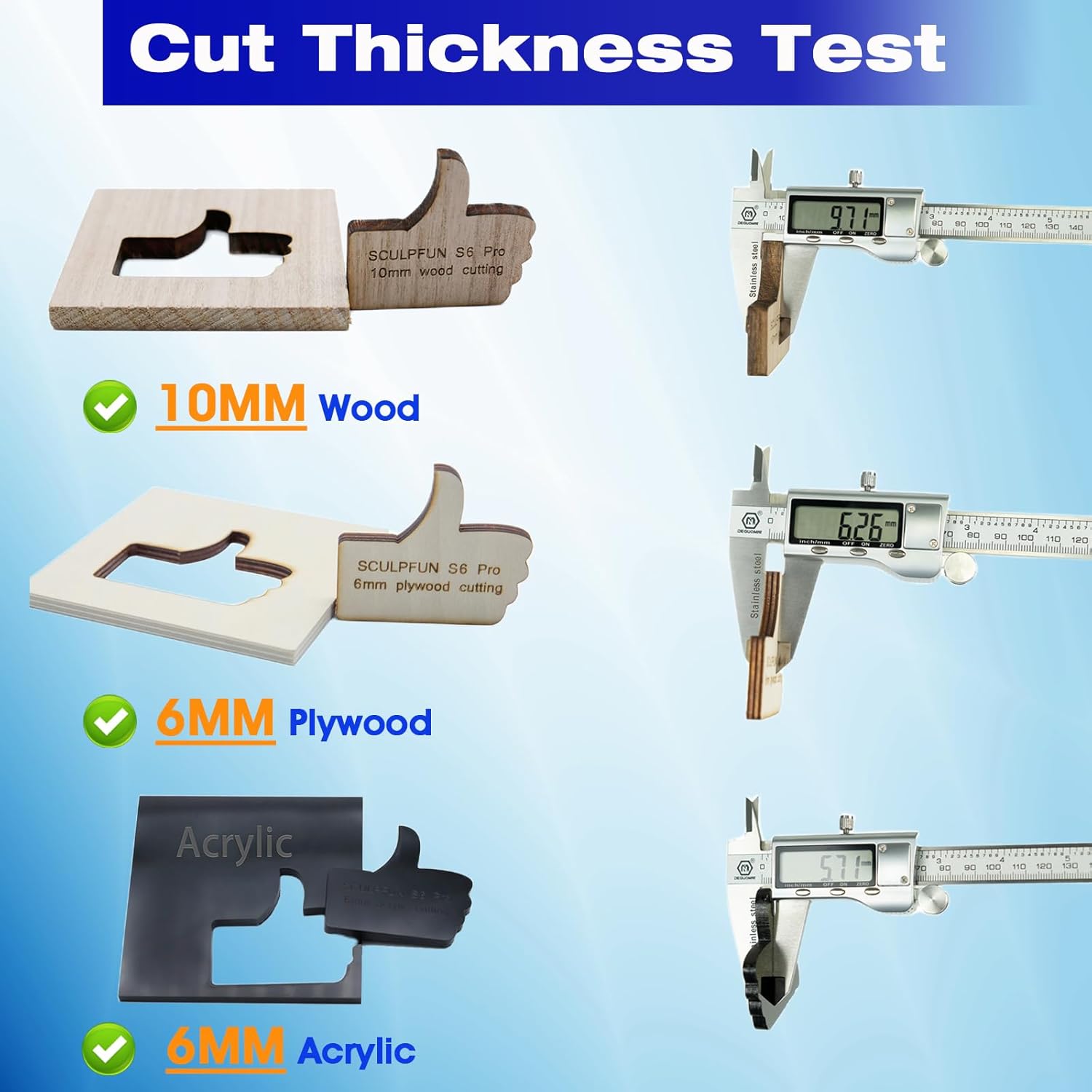
Demonstration of the S6 Pro's cutting capabilities on different material thicknesses, including 10mm wood, 6mm plywood, and 6mm acrylic.
സുരക്ഷാ വിവരങ്ങൾ
The SCULPFUN S6 Pro incorporates reinforced security protection features:
- Laser Filter Cover: The laser module includes a filter cover that blocks 98% of UV light. This allows users to observe the laser working without wearing goggles and helps prevent pets from interacting with the laser spot.
- Desk Protection Mat: An A4-sized steel pad is included in the package to protect your work surface from laser damage. For larger projects, a honeycomb working table can be purchased separately.

ഒരു ഓവർview of the S6 Pro's key advantages, including its powerful cutting and precise engraving capabilities, ease of operation, and important advice for material preparation.
സ്പെസിഫിക്കേഷനുകൾ
| ആട്രിബ്യൂട്ട് | മൂല്യം |
|---|---|
| ബ്രാൻഡ് | SCULPFUN |
| മെറ്റീരിയൽ | അലുമിനിയം |
| നിറം | S6 Pro Engraver |
| ഉൽപ്പന്ന അളവുകൾ | 24.21"L |
| ഇനത്തിൻ്റെ ഭാരം | 10.08 പൗണ്ട് |
| ഓപ്പറേഷൻ മോഡ് | ഓട്ടോമാറ്റിക് |
| വാട്ട്tage | 5500 മില്ലിവാട്ട് |
| പ്രത്യേക സവിശേഷതകൾ | Laser engraving and laser cutting |
മെയിൻ്റനൻസ്
Regular maintenance ensures the longevity and optimal performance of your SCULPFUN S6 Pro Laser Engraver. Always disconnect the power before performing any maintenance.
- ലെൻസ് വൃത്തിയാക്കൽ: Periodically clean the laser lens with a soft, lint-free cloth and a small amount of isopropyl alcohol to remove any dust or debris that may accumulate during operation.
- ലൂബ്രിക്കേഷൻ: Apply a small amount of machine oil to the guide rails and lead screws every few months to ensure smooth movement of the laser head.
- കണക്ഷനുകൾ പരിശോധിക്കുക: Regularly inspect all electrical connections and cables for any signs of wear or damage. Ensure they are securely plugged in.
- പൊടി നീക്കം: Use compressed air to clear dust and debris from the machine's components, especially around the laser module and fan, to prevent overheating and maintain performance.
ട്രബിൾഷൂട്ടിംഗ്
If you encounter issues with your SCULPFUN S6 Pro, refer to the following common troubleshooting steps:
- ലേസർ വെടിവയ്ക്കുന്നില്ല:
- Check if the power switch is on and the power adapter is securely connected.
- Ensure the USB cable is properly connected to both the engraver and your PC.
- Verify that the correct COM port is selected in your software (e.g., LaserGRBL, LightBurn).
- Check the laser module's connections and ensure it is properly seated.
- Engraving is Faint or Inconsistent:
- Adjust the focus of the laser. Use the fixed focus column to set the correct distance between the laser and the material.
- Increase the laser power or decrease the engraving speed in your software settings.
- Ensure the material surface is clean and, if reflective, properly prepared (e.g., blackened for stainless steel).
- Machine Not Moving Correctly:
- Check the tension of the belts on the X and Y axes. They should be taut but not overly tight.
- Ensure the guide rails are clean and lubricated.
- Verify that the software settings for speed and acceleration are appropriate for your machine.
- സോഫ്റ്റ്വെയർ കണക്ഷൻ പ്രശ്നങ്ങൾ:
- Restart both the engraver and your computer.
- Reinstall the software drivers if necessary.
- മറ്റൊരു USB പോർട്ട് അല്ലെങ്കിൽ കേബിൾ പരീക്ഷിക്കുക.
For persistent issues, consult the official SCULPFUN support resources or contact customer service.
വാറൻ്റിയും പിന്തുണയും
SCULPFUN products typically come with a manufacturer's warranty covering defects in materials and workmanship. The specific terms and duration of the warranty may vary, so please refer to the warranty card included with your product or visit the official SCULPFUN webവിശദമായ വിവരങ്ങൾക്ക് സൈറ്റ്.
For technical support, troubleshooting assistance, or warranty claims, please contact SCULPFUN customer service through their official channels. This may include email support, online chat, or a dedicated support portal.
It is recommended to keep your purchase receipt or proof of purchase as it may be required for warranty service.


