1. ആമുഖം
This manual provides detailed instructions for the installation, operation, and maintenance of your Mi-Heat Mi-300S RF Wireless Programmable Thermostat. Please read this manual carefully before installation and use to ensure proper function and safety. Keep this manual for future reference.
2 സുരക്ഷാ വിവരങ്ങൾ
- Installation should be performed by a qualified electrician or heating technician.
- Always disconnect power to the heating system before installing or servicing the receiver unit.
- Do not expose the thermostat or receiver to water or excessive humidity.
- Ensure correct battery polarity when inserting batteries into the transmitter unit.
- Do not attempt to repair or modify the device yourself. Contact qualified personnel for service.
3. പാക്കേജ് ഉള്ളടക്കം
The Mi-Heat Mi-300S RF Wireless Programmable Thermostat kit includes the following components:
- 1x Mi-300S RF Wireless Thermostat (Transmitter)
- 1x Wireless Receiver Unit
- 1x Table Stand for Thermostat
- Mounting Material (screws, wall plugs)
- ഉപയോക്തൃ മാനുവൽ

Image 1: Mi-Heat Mi-300S RF Wireless Programmable Thermostat (left) and Receiver (right).
4. ഉൽപ്പന്നം കഴിഞ്ഞുview
4.1. Thermostat (Transmitter) Features
- Large LCD display for clear temperature and time indication.
- Wireless communication at 433 MHz with a range of up to 20 meters.
- Daily and weekly programming with 4 adjustable switching times.
- Multiple operating modes: Comfort, Eco, and Holiday.
- Switchable between heating and cooling modes.
- മഞ്ഞ് സംരക്ഷണ പ്രവർത്തനം.
- Battery-powered (2x AAA batteries).

Image 2: Key features of the Mi-300S RF Thermostat.
4.2. Thermostat Button Functions
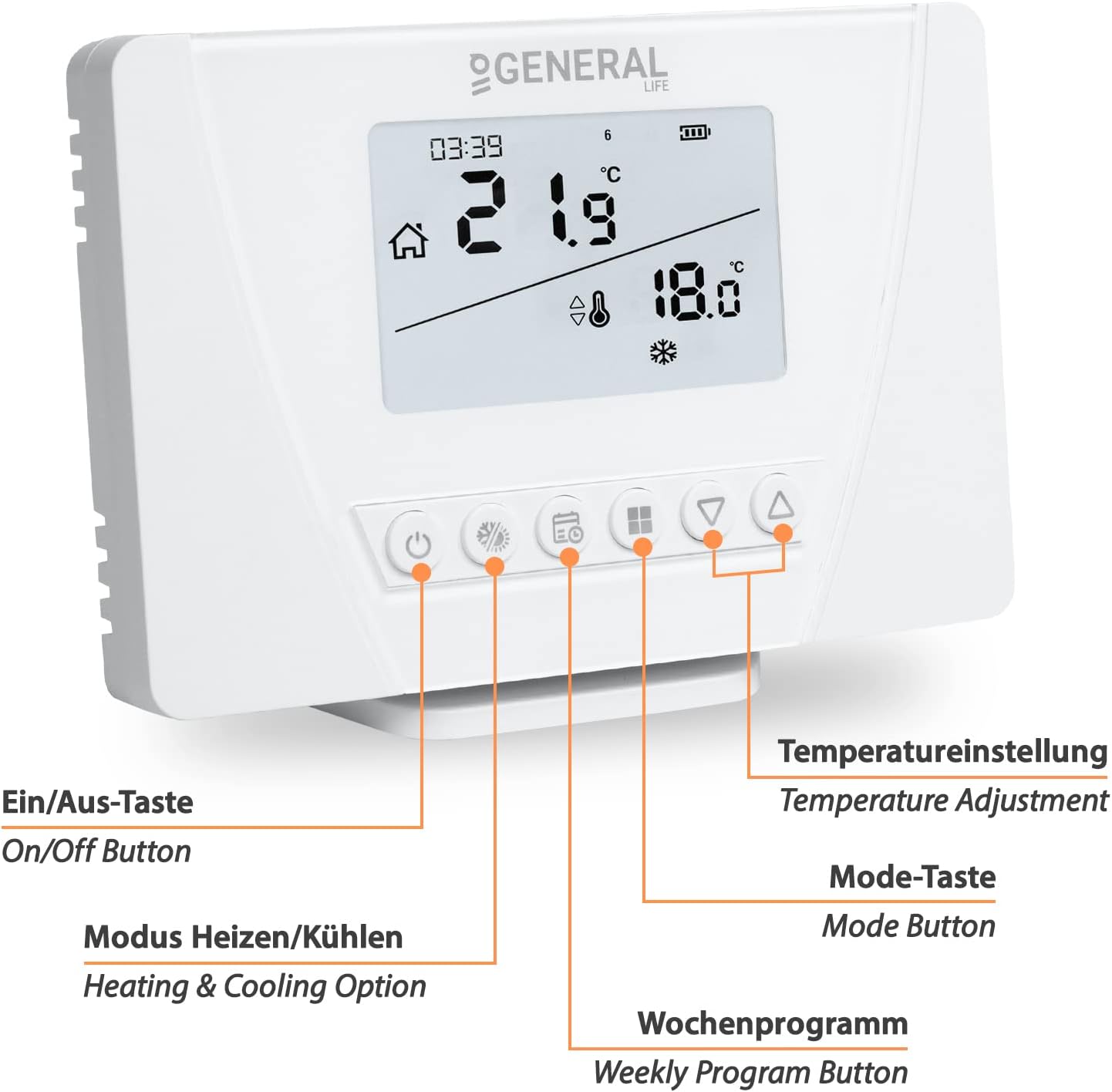
ചിത്രം 3: മുൻഭാഗം view of the thermostat with labeled buttons.
- ഓൺ/ഓഫ് ബട്ടൺ: Powers the thermostat on or off.
- Heating & Cooling Option Button: Toggles between heating and cooling modes.
- പ്രതിവാര പ്രോഗ്രാം ബട്ടൺ: Accesses and sets weekly programming schedules.
- മോഡ് ബട്ടൺ: Cycles through Comfort, Eco, and Holiday modes.
- താപനില ക്രമീകരണ ബട്ടണുകൾ (മുകളിലേക്ക്/താഴേക്ക്): സെറ്റ് താപനില ക്രമീകരിക്കുന്നു.
4.3. Receiver Unit Features
- Receives wireless signals from the thermostat.
- Potential-free switching contact with a maximum switching capacity of 7A.
- Mains-powered (230V/50Hz).
- Manual operation button for temporary control.
- Pairing button for establishing wireless connection.
- LED indicator for operational status.

Image 4: Receiver unit with labeled connections and buttons.
5. സജ്ജീകരണം
5.1. Thermostat Battery Installation
- തെർമോസ്റ്റാറ്റിന്റെ പിൻഭാഗത്തുള്ള ബാറ്ററി കമ്പാർട്ട്മെന്റ് തുറക്കുക.
- ശരിയായ പോളാരിറ്റി (+/-) ഉറപ്പാക്കിക്കൊണ്ട് 2x AAA ബാറ്ററികൾ ഇടുക.
- Close the battery compartment. The thermostat display should power on.
5.2. Receiver Wiring
മുന്നറിയിപ്പ്: Disconnect main power supply before performing any wiring. Incorrect wiring can cause damage to the device or heating system and poses an electrical hazard.
The receiver unit connects to your heating system. The wiring configuration depends on your specific heating application (e.g., underfloor heating, boiler, electric heating).

ചിത്രം 5: ഉദാample wiring diagrams for various heating systems.
- വൈദ്യുതി വിതരണം: Connect the receiver to a 230V/50Hz mains power supply. Use the "Receiver Power Cable Input" terminals (L and N).
- Heating System Connection: Connect your heating device (e.g., boiler, actuator, electric heater) to the "Heating/Cooling Unit Connection Cable Input" terminals. This is a potential-free switching contact.
Consult a qualified electrician if you are unsure about the wiring process for your specific heating system.
5.3. തെർമോസ്റ്റാറ്റും റിസീവറും ജോടിയാക്കൽ
The thermostat and receiver are typically pre-paired from the factory. If they are not communicating or if you are setting up a new unit, follow these steps:
- Ensure both the thermostat (with batteries) and the receiver (powered) are on.
- On the receiver unit, press and hold the ജോടിയാക്കൽ ബട്ടൺ (often marked with a link icon) until the LED indicator starts flashing.
- On the thermostat, access the pairing menu (refer to the specific instructions in your full manual for the exact button sequence, usually involving holding a mode or program button).
- Once pairing is successful, the receiver's LED will stop flashing and remain solid, or turn off, indicating a successful connection.
- Test the connection by adjusting the temperature on the thermostat and observing if the receiver activates the heating system.

Image 6: Wireless communication between the thermostat and receiver.
5.4 മൗണ്ടിംഗ് ഓപ്ഷനുകൾ
The thermostat can be mounted in two ways:
- മതിൽ മൗണ്ടിംഗ്: Use the provided mounting material (screws and wall plugs) to secure the thermostat to a wall at an appropriate height, away from direct sunlight or drafts.
- ടേബിൾ സ്റ്റാൻഡ്: Place the thermostat on a flat surface using the included table stand. This allows for flexible placement within the wireless range.

Image 7: Illustration of the thermostat's wireless range and flexible placement.
6. പ്രവർത്തന നിർദ്ദേശങ്ങൾ
6.1. അടിസ്ഥാന പ്രവർത്തനം
- പവർ ഓൺ/ഓഫ്: Press the On/Off button to turn the thermostat on or off.
- താപനില ക്രമീകരണം: Use the Up/Down arrow buttons to manually set the desired temperature. The display will show the current room temperature and the set temperature.
6.2. മോഡ് തിരഞ്ഞെടുക്കൽ
അമർത്തുക മോഡ് ബട്ടൺ ലഭ്യമായ ഓപ്പറേറ്റിംഗ് മോഡുകളിലൂടെ സൈക്കിൾ ചെയ്യാൻ:
- കംഫർട്ട് മോഡ്: ഉയർന്നതും സുഖകരവുമായ താപനില നിലനിർത്തുന്നു.
- ഇക്കോ മോഡ്: കുറഞ്ഞ ഊർജ്ജ സംരക്ഷണ താപനില നിലനിർത്തുന്നു.
- അവധിക്കാല മോഡ്: Sets a constant, usually lower, temperature for an extended period, overriding programmed schedules.
അമർത്തുക Heating & Cooling Option Button to switch between heating and cooling functions, if your system supports both.
6.3. പ്രതിവാര ഷെഡ്യൂളുകൾ പ്രോഗ്രാമിംഗ് ചെയ്യുക
The Mi-300S RF allows for daily and weekly programming with up to 4 switching times per day. This feature helps optimize energy consumption by adjusting temperatures based on your schedule.
- അമർത്തുക പ്രതിവാര പ്രോഗ്രാം ബട്ടൺ പ്രോഗ്രാമിംഗ് മോഡിൽ പ്രവേശിക്കാൻ.
- Use the Up/Down buttons to navigate through days (Monday-Sunday) and time slots (e.g., P1, P2, P3, P4).
- For each time slot, set the desired start time and target temperature using the adjustment buttons.
- Confirm each setting to move to the next.
- Exit programming mode by pressing the Weekly Program Button again or waiting for a timeout.
Refer to the detailed programming section in the complete user manual for specific steps and advanced options.
6.4. ഫ്രോസ്റ്റ് സംരക്ഷണം
The thermostat includes a frost protection feature. When activated, the thermostat will automatically turn on the heating if the room temperature drops below a pre-set minimum (typically around 5-7°C) to prevent pipes from freezing. This function is usually active in all modes, especially Holiday mode.
7. പരിപാലനം
- വൃത്തിയാക്കൽ: Wipe the thermostat and receiver with a soft, dry cloth. Do not use abrasive cleaners or solvents.
- ബാറ്ററി മാറ്റിസ്ഥാപിക്കൽ: When the low battery indicator appears on the thermostat display, replace the 2x AAA batteries promptly to ensure continuous operation.
- ഫേംവെയർ അപ്ഡേറ്റുകൾ: There are no user-serviceable firmware updates for this device.
8. പ്രശ്നപരിഹാരം
| പ്രശ്നം | സാധ്യമായ കാരണം | പരിഹാരം |
|---|---|---|
| തെർമോസ്റ്റാറ്റ് ഡിസ്പ്ലേ ശൂന്യമാണ്. | ഡെഡ് ബാറ്ററികൾ. | Replace the 2x AAA batteries. |
| ഹീറ്റിംഗ് സിസ്റ്റം തെർമോസ്റ്റാറ്റിനോട് പ്രതികരിക്കുന്നില്ല. | No power to receiver; Receiver not paired; Out of wireless range; Wiring issue. | Check receiver power; Re-pair thermostat and receiver; Move thermostat closer to receiver; Verify wiring connections. |
| താപനില റീഡിംഗുകൾ തെറ്റാണെന്ന് തോന്നുന്നു. | Thermostat placed in direct sunlight or near a heat source/draft. | Relocate the thermostat to a more central location, away from external influences. |
| Cannot set weekly program. | Incorrect button sequence; Thermostat in a different mode. | Refer to the "Programming Weekly Schedules" section or the full manual for detailed steps. Ensure the thermostat is in the correct mode for programming. |
9 സ്പെസിഫിക്കേഷനുകൾ
| ഫീച്ചർ | വിശദാംശങ്ങൾ |
|---|---|
| ബ്രാൻഡ് | Mi-Heat |
| മോഡൽ നമ്പർ | 1510-004 |
| ഉൽപ്പന്ന അളവുകൾ (തെർമോസ്റ്റാറ്റ്) | 12.5 x 8.5 x 2 സെ.മീ (L x W x H) |
| ഉൽപ്പന്ന അളവുകൾ (സ്വീകർത്താവ്) | 9 x 9 x 2.5 സെ.മീ (L x W x H) |
| തെർമോസ്റ്റാറ്റ് പവർ ഉറവിടം | 2x AAA Batteries (3V) |
| റിസീവർ പവർ ഉറവിടം | 230V / 50Hz (Mains Powered) |
| കണക്റ്റിവിറ്റി ടെക്നോളജി | RF (റേഡിയോ ഫ്രീക്വൻസി) |
| RF ഫ്രീക്വൻസി | 433 MHz |
| വയർലെസ് ശ്രേണി | 20 മീറ്റർ വരെ (തടസ്സമില്ലാതെ) |
| Switching Capacity (Receiver) | Max. 7A (Potential-free contact) |
| പ്രത്യേക സവിശേഷതകൾ | Frost Protection, Weekly Programming, Heating/Cooling Mode |
| മെറ്റീരിയൽ | പ്ലാസ്റ്റിക് |
| ഇനത്തിൻ്റെ ഭാരം | 400 grams (total kit) |

Image 8: Dimensions of the Mi-300S RF Thermostat.

Image 9: Dimensions of the Mi-300S RF Receiver.
10. വാറൻ്റിയും പിന്തുണയും
This product comes with a standard manufacturer's warranty. For specific warranty terms and conditions, please refer to the documentation included with your purchase or contact Mi-Heat customer support.
For technical assistance, troubleshooting, or spare parts inquiries, please contact Mi-Heat customer service through their official channels. Information regarding spare parts availability is currently not provided.


