1. ഉൽപ്പന്നം കഴിഞ്ഞുview
The PERLESMITH PSLF10 Full Motion TV Wall Mount is designed to provide optimal viewing flexibility for televisions ranging from 37 to 75 inches. Its robust dual-arm design supports TVs weighing up to 100 lbs and is compatible with VESA mounting patterns from 200x100mm to 600x400mm. This mount allows for smooth swivel, tilt, and extension adjustments, ensuring a comfortable viewവ്യത്യസ്ത കോണുകളിൽ നിന്നുള്ള അനുഭവങ്ങൾ.

Image: The PERLESMITH PSLF10 mount features a sturdy dual-arm design, capable of holding up to 100 lbs. Dimensions shown are 17.06 inches in width and 5.74 inches in height for the wall plate.
2. Compatibility and Safety
Before installation, ensure your TV meets the following criteria:
- ടിവി വലുപ്പം: Fits most 37-75 inch flat and curved TVs.
- ഭാരം ശേഷി: Supports up to 100 lbs (45.3 kg). Do not exceed this weight limit.
- VESA അനുയോജ്യത: Compatible with VESA mounting patterns from Min 200x100mm to Max 600x400mm.
- ചുമർ തരം: Suitable for installation on 8"/12"/16" wood studs, concrete walls, and brick walls. ഡ്രൈവ്വാളിൽ മാത്രം ഇൻസ്റ്റാൾ ചെയ്യരുത്.
- TV Ports: Verify that the mount will not block any necessary TV ports or connections.

Image: A visual guide to confirm TV compatibility, including screen size (37"-75"), weight (up to 110 lbs, note: product title states 100 lbs, adhere to lower limit), VESA patterns (Min 200x100mm, Max 600x400mm), and suitable wall types (wood studs, concrete, brick walls).
3. സജ്ജീകരണവും ഇൻസ്റ്റാളേഷനും
Follow these general steps for installation. Always refer to the detailed instruction manual included with your product for specific safety and installation guidelines.
3.1 Prepare the Wall
- സ്റ്റഡുകൾ കണ്ടെത്തുക: Use a stud finder to locate the center of your wood studs. Mark the stud locations.
- സ്ഥാന ടെംപ്ലേറ്റ്: Use the provided drilling template to mark pilot hole locations on the wall. Ensure the template is level using a spirit level.
- ഡ്രിൽ പൈലറ്റ് ദ്വാരങ്ങൾ: അടയാളപ്പെടുത്തിയ സ്ഥലങ്ങളിൽ പൈലറ്റ് ദ്വാരങ്ങൾ തുരത്തുക.
3.2 Attach Wall Plate to Wall
- ഡ്രിൽ ചെയ്ത പൈലറ്റ് ദ്വാരങ്ങൾ ഉപയോഗിച്ച് വാൾ പ്ലേറ്റ് വിന്യസിക്കുക.
- Secure the wall plate to the wall using the appropriate lag bolts and washers for your wall type. Tighten securely.
3.3 Attach TV Brackets to TV
- പോറലുകൾ ഉണ്ടാകാതിരിക്കാൻ നിങ്ങളുടെ ടിവി മുഖം മൃദുവായതും വൃത്തിയുള്ളതുമായ ഒരു പ്രതലത്തിൽ വയ്ക്കുക.
- Identify the correct screws and spacers for your TV's VESA pattern.
- Attach the TV brackets to the back of your TV using the selected screws and spacers. Ensure they are securely fastened.
3.4 Hang TV on Wall Mount
- Carefully lift the TV and hook the TV brackets onto the wall plate.
- Engage the security locks on the TV brackets to prevent accidental dislodgement.

Image: A visual representation of the easy 3-step installation process: 1) Attach brackets to your TV, 2) Mount arm assembly on wall, and 3) Hang TV on the arm assembly.
Video: This video demonstrates the installation process for the PERLESMITH PSLF10 full motion TV wall mount, showing how to attach the mount to the wall and then secure the TV.
4. പ്രവർത്തന നിർദ്ദേശങ്ങൾ
The PERLESMITH PSLF10 mount offers versatile adjustments for optimal viewing.
- വിപുലീകരണം: Pull the TV gently away from the wall to extend it up to 16 inches for better viewing angles or access to cables.
- പിൻവലിക്കൽ: Push the TV gently back towards the wall for a low-profile look, retracting to 2.9 inches.
- സ്വിവൽ: Swivel the TV up to ±45° left or right to adjust the viewവ്യത്യസ്ത ഇരിപ്പിട സ്ഥാനങ്ങൾക്കുള്ള ആംഗിൾ.
- ടിൽറ്റ്: Tilt the TV up 5° or down 15° to reduce glare and achieve the perfect viewing ആംഗിൾ.
- ലെവലിംഗ്: After installation, you can adjust the two leveling bolts to ensure your TV is perfectly horizontal (±3°).

Image: The TV mount extends up to 16 inches from the wall for closer viewing and retracts to a low-profile 2.9 inches when not in use.
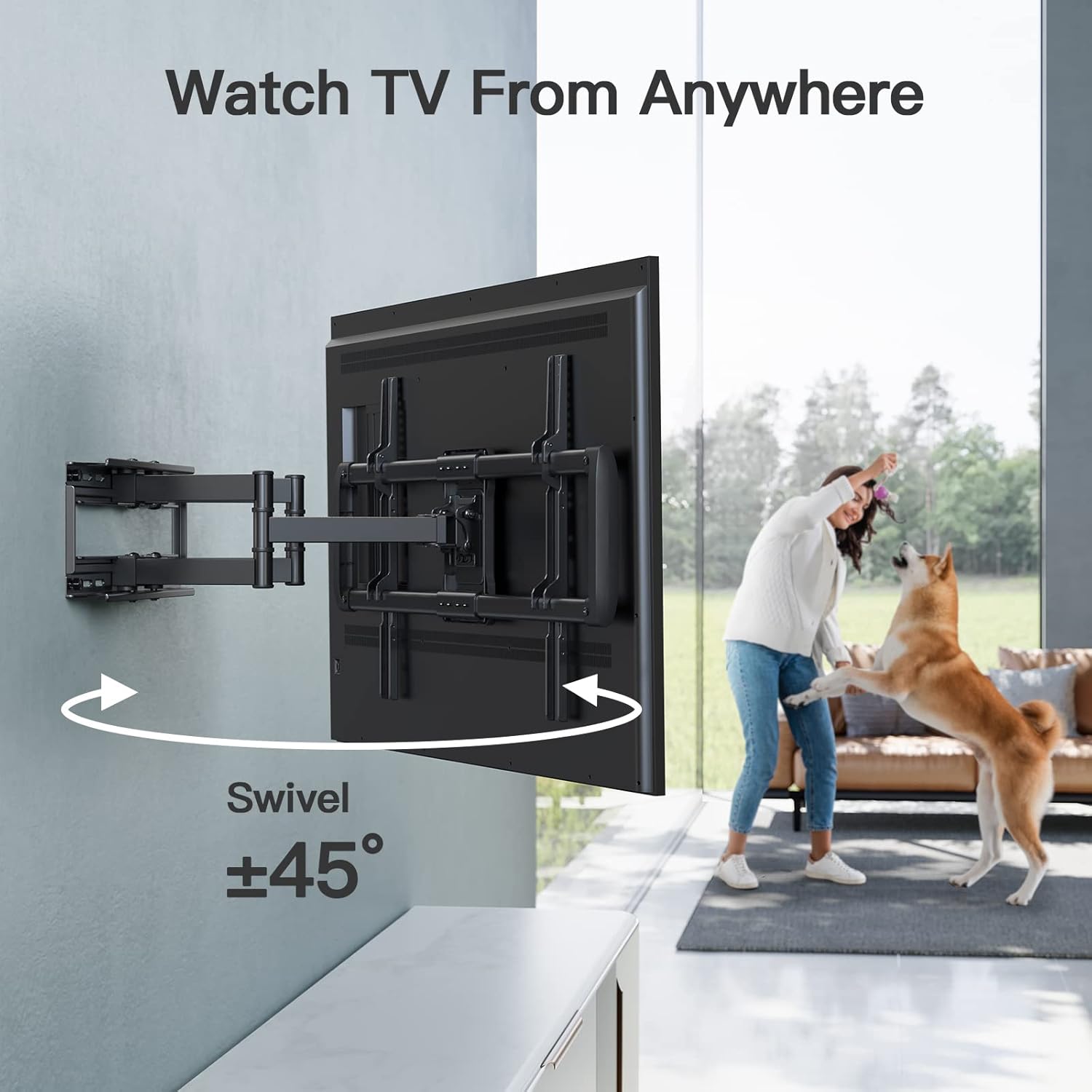
Image: The mount allows for a swivel of ±45°, enabling flexible viewing from various positions in a room.

Image: The TV can be tilted up 5° and down 15° to reduce glare and optimize the viewing ആംഗിൾ.

Image: The mount allows for easy post-installation leveling of ±3° by adjusting two specific bolts.
5. പരിപാലനം
- പതിവ് പരിശോധനകൾ: എല്ലാ സ്ക്രൂകളും കണക്ഷനുകളും ഇറുകിയതും സുരക്ഷിതവുമാണെന്ന് ഉറപ്പാക്കാൻ ഇടയ്ക്കിടെ പരിശോധിക്കുക.
- വൃത്തിയാക്കൽ: മൃദുവായതും ഉണങ്ങിയതുമായ തുണി ഉപയോഗിച്ച് മൗണ്ട് വൃത്തിയാക്കുക. ഫിനിഷിന് കേടുവരുത്തുന്ന അബ്രസിവ് ക്ലീനറുകളോ ലായകങ്ങളോ ഉപയോഗിക്കരുത്.
- ലൂബ്രിക്കേഷൻ: If movement becomes stiff, apply a small amount of silicone-based lubricant to the articulating joints.
6. പ്രശ്നപരിഹാരം
- ടിവി നിലവാരമില്ലാത്തത്: Use the leveling bolts on the TV brackets to make fine adjustments.
- മൗണ്ട് ലൂസ് ആയി തോന്നുന്നു: Re-tighten all lag bolts securing the wall plate to the wall studs. Ensure proper stud engagement.
- ടിവി നീക്കുന്നതിൽ ബുദ്ധിമുട്ട്: Check for any obstructions. Apply lubricant to moving parts if necessary.
- Cables Interfering: Use the provided cable ties to manage and secure cables, preventing interference with mount movement.
7 സ്പെസിഫിക്കേഷനുകൾ
| ഫീച്ചർ | വിശദാംശങ്ങൾ |
|---|---|
| ബ്രാൻഡ് | പെർലെസ്മിത്ത് |
| മോഡൽ നമ്പർ | പിഎസ്എൽഎഫ്10 |
| മൗണ്ടിംഗ് തരം | മതിൽ മൗണ്ട് |
| ചലന തരം | ആർട്ടിക്കുലേറ്റിംഗ്, സ്വിവൽ, ടിൽറ്റ് |
| മെറ്റീരിയൽ | അലോയ് സ്റ്റീൽ |
| നിറം | കറുപ്പ് |
| അനുയോജ്യമായ ടിവി വലുപ്പങ്ങൾ | 37 - 75 ഇഞ്ച് |
| ഭാരം ശേഷി | 100 പൗണ്ട് വരെ (45.3 കി.ഗ്രാം) |
| VESA അനുയോജ്യത | കുറഞ്ഞത് 200x100mm മുതൽ പരമാവധി 600x400mm വരെ |
| വാൾ സ്റ്റഡ് സ്പെയ്സിംഗ് | 8"/12"/16" Wood Studs |
| ടിൽറ്റ് റേഞ്ച് | Up 5°, Down 15° |
| സ്വിവൽ റേഞ്ച് | ±45° |
| ചുമരിൽ നിന്നുള്ള വിപുലീകരണം | 16 ഇഞ്ച് വരെ |
| Retraction to Wall | 2.9 ഇഞ്ച് |
| പോസ്റ്റ്-ഇൻസ്റ്റലേഷൻ ലെവലിംഗ് | ±3° |
| ഉൽപ്പന്ന അളവുകൾ | 17.32 x 9.57 x 3.15 ഇഞ്ച് (പാക്കേജുചെയ്തത്) |
| ഇനത്തിൻ്റെ ഭാരം | 12.76 പൗണ്ട് |
8. വാറൻ്റിയും പിന്തുണയും
PERLESMITH products are designed for durability and ease of use. For any questions regarding installation, missing parts, or product functionality, please contact PERLESMITH customer support. Keep your purchase receipt for warranty claims.
For further assistance, please visit the official PERLESMITH webസൈറ്റ് അല്ലെങ്കിൽ അവരുടെ ഉപഭോക്തൃ സേവനവുമായി നേരിട്ട് ബന്ധപ്പെടുക.


