1. ആമുഖം
Thank you for choosing the Oakcastle CD100 Portable Bluetooth CD Player. This manual provides essential information for setting up, operating, and maintaining your device. Please read it thoroughly before use and keep it for future reference.
സുരക്ഷാ വിവരങ്ങൾ
- മഴ, ഈർപ്പം, അല്ലെങ്കിൽ തീവ്രമായ താപനില എന്നിവയിൽ ഉപകരണം തുറന്നുകാട്ടരുത്.
- ശക്തമായ ആഘാതങ്ങൾക്ക് ഉപകരണം ഇടുകയോ ഇടുകയോ ചെയ്യുന്നത് ഒഴിവാക്കുക.
- യൂണിറ്റ് ഡിസ്അസംബ്ലിംഗ് ചെയ്യരുത്. എല്ലാ സേവനങ്ങളും യോഗ്യതയുള്ള ഉദ്യോഗസ്ഥരെ ഏൽപ്പിക്കുക.
- ശക്തമായ കാന്തിക മണ്ഡലങ്ങളിൽ നിന്ന് ഉപകരണം അകറ്റി നിർത്തുക.
- നിർദ്ദിഷ്ട ചാർജിംഗ് കേബിൾ മാത്രം ഉപയോഗിക്കുക.
2. ബോക്സിൽ എന്താണുള്ളത്?
Carefully unpack your Oakcastle CD100 and ensure all items are present:
- 1x Oakcastle CD100 Portable CD Player
- 1x Wired Headphones
- 1x മൈക്രോ യുഎസ്ബി ചാർജിംഗ് കേബിൾ
- 1x 3.5mm to 3.5mm AUX Cable
- 1x ഉപയോക്തൃ മാനുവൽ (ഈ പ്രമാണം)
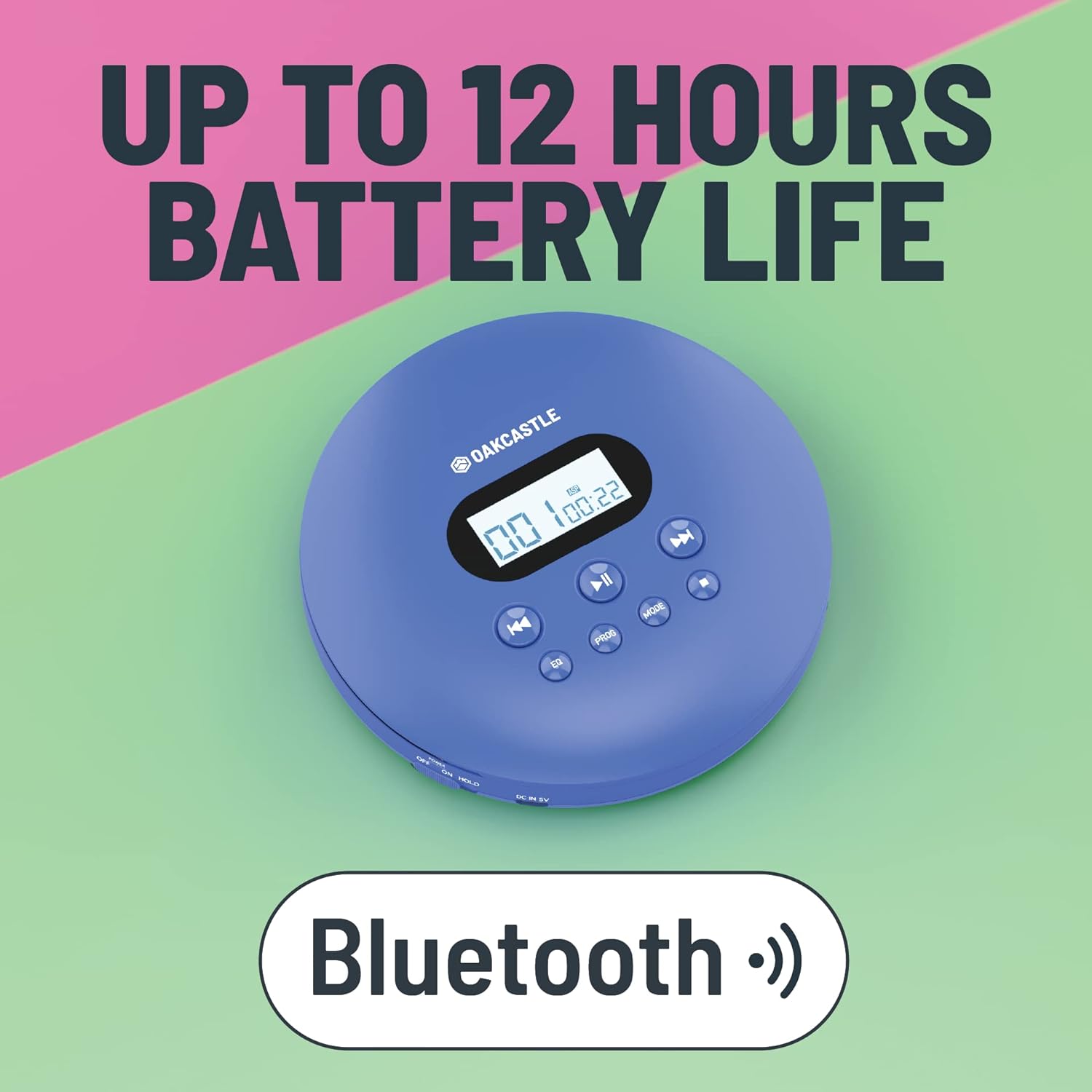
3. ഉൽപ്പന്നം കഴിഞ്ഞുview
Familiarize yourself with the controls and ports of your Oakcastle CD100:

നിയന്ത്രണങ്ങളും തുറമുഖങ്ങളും:
- ഡിസ്പ്ലേ സ്ക്രീൻ: Shows track number, time, and mode.
- Play/Pause (►►): സിഡി പ്ലേബാക്ക് ആരംഭിക്കുകയോ താൽക്കാലികമായി നിർത്തുകയോ ചെയ്യുന്നു.
- നിർത്തുക (■): സിഡി പ്ലേബാക്ക് നിർത്തുന്നു.
- Previous/Rewind (◀◀): Skips to the previous track or rewinds the current track.
- Next/Fast Forward (►►): Skips to the next track or fast forwards the current track.
- EQ: Cycles through equalizer presets (e.g., Bass, Pop, Jazz, Rock, Classic).
- പ്രോഗ്രാം: Enters program mode to create a custom playlist.
- വഴികൾ: പ്ലേബാക്ക് മോഡുകളിലൂടെയുള്ള സൈക്കിൾസ് (ഉദാ: ഒന്ന് ആവർത്തിക്കുക, എല്ലാം ആവർത്തിക്കുക, ക്രമരഹിതം).
- DC IN 5V (Charge Port): Micro USB input for charging.
- ഹെഡ്ഫോൺ ജാക്ക് (3.5 മിമി): വയർഡ് ഹെഡ്ഫോണുകൾ ബന്ധിപ്പിക്കുന്നതിന്.
- AUX Out (3.5mm): ബാഹ്യ സ്പീക്കറുകളിലേക്കോ കാർ ഓഡിയോ സിസ്റ്റങ്ങളിലേക്കോ ബന്ധിപ്പിക്കുന്നതിന്.
- OPEN Slider: Slides to open the CD compartment.
- സ്വിച്ച് ഹോൾഡ് ചെയ്യുക: Locks buttons to prevent accidental presses.
4. സജ്ജീകരണം
4.1 ഉപകരണം ചാർജ് ചെയ്യുന്നു
The Oakcastle CD100 has a built-in rechargeable battery. Before first use, fully charge the device.
- Connect the Micro USB charging cable to the 'DC IN 5V' port on the CD player.
- USB കേബിളിന്റെ മറ്റേ അറ്റം ഒരു USB പവർ അഡാപ്റ്ററുമായി (ഉൾപ്പെടുത്തിയിട്ടില്ല) അല്ലെങ്കിൽ ഒരു കമ്പ്യൂട്ടറിന്റെ USB പോർട്ടുമായി ബന്ധിപ്പിക്കുക.
- ചാർജിംഗ് ഇൻഡിക്കേറ്റർ ലൈറ്റ് പ്രകാശിക്കും. പൂർണ്ണമായി ചാർജ് ചെയ്യുമ്പോൾ അത് ഓഫാകും അല്ലെങ്കിൽ നിറം മാറും.
A full charge provides up to 12 hours of playback time.

4.2 പ്രാരംഭ പവർ ഓൺ
After charging, slide the 'HOLD' switch to the 'OFF' position (if it's on 'HOLD'). Press and hold the Play/Pause button to power on the device.
5. പ്രവർത്തന നിർദ്ദേശങ്ങൾ
5.1 ഒരു സിഡി പ്ലേ ചെയ്യുന്നു
- സിഡി കമ്പാർട്ട്മെന്റ് ലിഡ് തുറക്കാൻ 'ഓപ്പൺ' സ്വിച്ച് സ്ലൈഡ് ചെയ്യുക.
- Carefully place a CD onto the spindle, label side up, and gently press down until it clicks into place.
- Close the CD compartment lid firmly.
- Press the Play/Pause (►►) button to start playback. The display will show the track number and elapsed time.
- Use the Previous/Rewind (◀◀) and Next/Fast Forward (►►) buttons to navigate tracks. Press and hold to fast forward or rewind.
- പ്ലേബാക്ക് നിർത്താൻ നിർത്തുക (■) ബട്ടൺ അമർത്തുക.
The CD100 features anti-skip technology to ensure smooth playback even during movement.
5.2 ബ്ലൂടൂത്ത് കണക്ഷൻ
The CD100 can connect wirelessly to Bluetooth headphones or speakers.
- Ensure the CD player is powered on.
- Activate Bluetooth pairing mode on your external Bluetooth device (headphones/speaker).
- The CD100 will automatically enter Bluetooth pairing mode when a CD is playing and no wired headphones are connected. The Bluetooth icon on the display will flash.
- Once connected, the Bluetooth icon will become solid.
5.3 ഓക്സ് കണക്ഷൻ
Connect your CD100 to external audio systems like car stereos or home speakers using the included 3.5mm AUX cable.
- Connect one end of the 3.5mm AUX cable to the 'AUX Out' port on the CD player.
- Connect the other end to the 'AUX In' port on your external audio system.
- Ensure your external audio system is set to the AUX input.

5.4 EQ ക്രമീകരണങ്ങൾ
Press the 'EQ' button repeatedly to cycle through different equalizer presets (e.g., Bass, Pop, Jazz, Rock, Classic, Off) to customize your audio experience.
5.5 പ്രോഗ്രാം പ്ലേബാക്ക്
To create a custom playback order:
- While the CD is stopped, press the 'PROG' button.
- Use the Previous/Next buttons to select the desired track number.
- Press 'PROG' again to add the track to the program list.
- Repeat steps 2-3 for up to 20 tracks.
- Press Play/Pause to start programmed playback.
5.6 മോഡ് ബട്ടൺ
Press the 'MODE' button to cycle through playback modes such as Repeat One (repeats current track), Repeat All (repeats all tracks on the CD), and Random (plays tracks in a random order).
6. പരിപാലനം
6.1 ഉപകരണം വൃത്തിയാക്കുന്നു
- മൃദുവായതും ഉണങ്ങിയതുമായ തുണി ഉപയോഗിച്ച് പ്ലെയറിന്റെ പുറംഭാഗം തുടയ്ക്കുക.
- For the optical lens, use a specialized CD lens cleaning kit. Do not touch the lens directly.
- ഉരച്ചിലുകളുള്ള ക്ലീനറുകളോ ലായകങ്ങളോ ഉപയോഗിക്കരുത്.
6.2 ബാറ്ററി കെയർ
- ബാറ്ററി ലൈഫ് വർദ്ധിപ്പിക്കാൻ, ബാറ്ററി ഇടയ്ക്കിടെ പൂർണ്ണമായും ഡിസ്ചാർജ് ചെയ്യുന്നത് ഒഴിവാക്കുക.
- ദീർഘനേരം ഉപയോഗത്തിലില്ലെങ്കിലും ഉപകരണം പതിവായി ചാർജ് ചെയ്യുക.
- ഉപകരണം തണുത്തതും വരണ്ടതുമായ സ്ഥലത്ത് സൂക്ഷിക്കുക.
7. പ്രശ്നപരിഹാരം
നിങ്ങളുടെ Oakcastle CD100-ൽ പ്രശ്നങ്ങൾ നേരിടുകയാണെങ്കിൽ, ഇനിപ്പറയുന്ന പൊതുവായ പ്രശ്നങ്ങളും പരിഹാരങ്ങളും പരിശോധിക്കുക:
| പ്രശ്നം | സാധ്യമായ കാരണം | പരിഹാരം |
|---|---|---|
| ഉപകരണം പവർ ഓണാക്കുന്നില്ല. | Low battery; HOLD switch is on. | Charge the device; Slide HOLD switch to OFF. |
| സിഡി പ്ലേ ചെയ്യുന്നില്ല. | CD inserted incorrectly; CD is dirty/scratched; Lid not closed properly. | Reinsert CD correctly; Clean or try another CD; Ensure lid is fully closed. |
| ഹെഡ്ഫോണുകളിൽ നിന്നും/സ്പീക്കറുകളിൽ നിന്നും ശബ്ദമില്ല. | Headphones/AUX cable not fully plugged in; Volume too low; Incorrect input selected on external device. | Check connections; Increase volume; Select correct AUX input on external device. |
| ബ്ലൂടൂത്ത് കണക്റ്റ് ചെയ്യുന്നില്ല. | External device not in pairing mode; Too far from device. | Ensure external device is in pairing mode; Move closer to the CD player. |
8 സ്പെസിഫിക്കേഷനുകൾ
- ബ്രാൻഡ്: ഓക്ക്കാസിൽ
- മോഡൽ: CD100
- നിറം: നീല
- കണക്റ്റിവിറ്റി ടെക്നോളജി: ഓക്സിലറി, ബ്ലൂടൂത്ത്
- പ്രത്യേക സവിശേഷതകൾ: Portable, Rechargeable, Anti-skip
- അനുയോജ്യമായ ഉപകരണങ്ങൾ: Speakers, Headphones, Car Audio Systems
- റീചാർജ് ചെയ്യാവുന്ന ബാറ്ററി: അതെ
- ഓഡിയോ ഫോർമാറ്റ് പിന്തുണയ്ക്കുന്നു: WMA (and standard CD audio)
- ഡിസ്കുകളുടെ എണ്ണം: 1
- ചാനലുകളുടെ എണ്ണം: 2
- ഉൽപ്പന്ന അളവുകൾ: 14.2L x 14.2W x 3H സെൻ്റീമീറ്റർ
- കണക്റ്റർ തരം: 3.5 എംഎം ജാക്ക്
9. വാറൻ്റിയും പിന്തുണയും
Your Oakcastle CD100 comes with a standard manufacturer's warranty. Please refer to the warranty card included in your packaging for specific terms and conditions.
For technical support, troubleshooting, or warranty claims, please contact Oakcastle customer service through their official webനിങ്ങൾ ഉൽപ്പന്നം വാങ്ങിയ സൈറ്റ് അല്ലെങ്കിൽ റീട്ടെയിലർ.
വാറന്റി ആവശ്യങ്ങൾക്കായി നിങ്ങളുടെ വാങ്ങിയതിന്റെ തെളിവ് സൂക്ഷിക്കുക.


