1. ആമുഖം
This manual provides detailed instructions for the setup, operation, and maintenance of your ORIA Digital Alarm Clock (Model OUS-HY-WA109B). Please read this manual thoroughly before using the product to ensure proper function and safety.
1.1 പാക്കേജ് ഉള്ളടക്കം
- ORIA Digital Alarm Clock (Model OUS-HY-WA109B)
- യുഎസ്ബി പവർ കേബിൾ
- ഉപയോക്തൃ മാനുവൽ

Figure 1: Package contents including the ORIA Digital Alarm Clock, USB cable, and user manual.
2 സുരക്ഷാ വിവരങ്ങൾ
- ഉപകരണത്തെ തീവ്രമായ താപനിലയിലോ, നേരിട്ടുള്ള സൂര്യപ്രകാശത്തിലോ, ഉയർന്ന ആർദ്രതയിലോ തുറന്നുകാട്ടരുത്.
- ഉപകരണം വെള്ളത്തിൽ നിന്നോ മറ്റ് ദ്രാവകങ്ങളിൽ നിന്നോ സൂക്ഷിക്കുക.
- Use only the provided USB cable or a certified equivalent for power.
- ഉപകരണം സ്വയം ഡിസ്അസംബ്ലിംഗ് ചെയ്യാനോ നന്നാക്കാനോ ശ്രമിക്കരുത്. സഹായത്തിന് ഉപഭോക്തൃ പിന്തുണയുമായി ബന്ധപ്പെടുക.
- പ്രാദേശിക നിയന്ത്രണങ്ങൾ അനുസരിച്ച് ബാറ്ററികൾ നീക്കം ചെയ്യുക.
3. സജ്ജീകരണം
3.1 ഉപകരണം പവർ ചെയ്യുന്നു
The ORIA Digital Alarm Clock offers dual power options:
- DC Cable Power (Recommended): Connect the provided USB power cable to the DC 5V port on the back of the clock and plug the other end into a USB power adapter (not included) or a USB port. The display will remain continuously on.
- Battery Power (Backup/Power Saving Mode): Insert 3 AAA batteries (not included) into the battery compartment on the back of the clock. In battery mode, the screen will automatically turn off after 8 seconds to conserve power. Touch the top button to wake up the screen for 8 seconds.
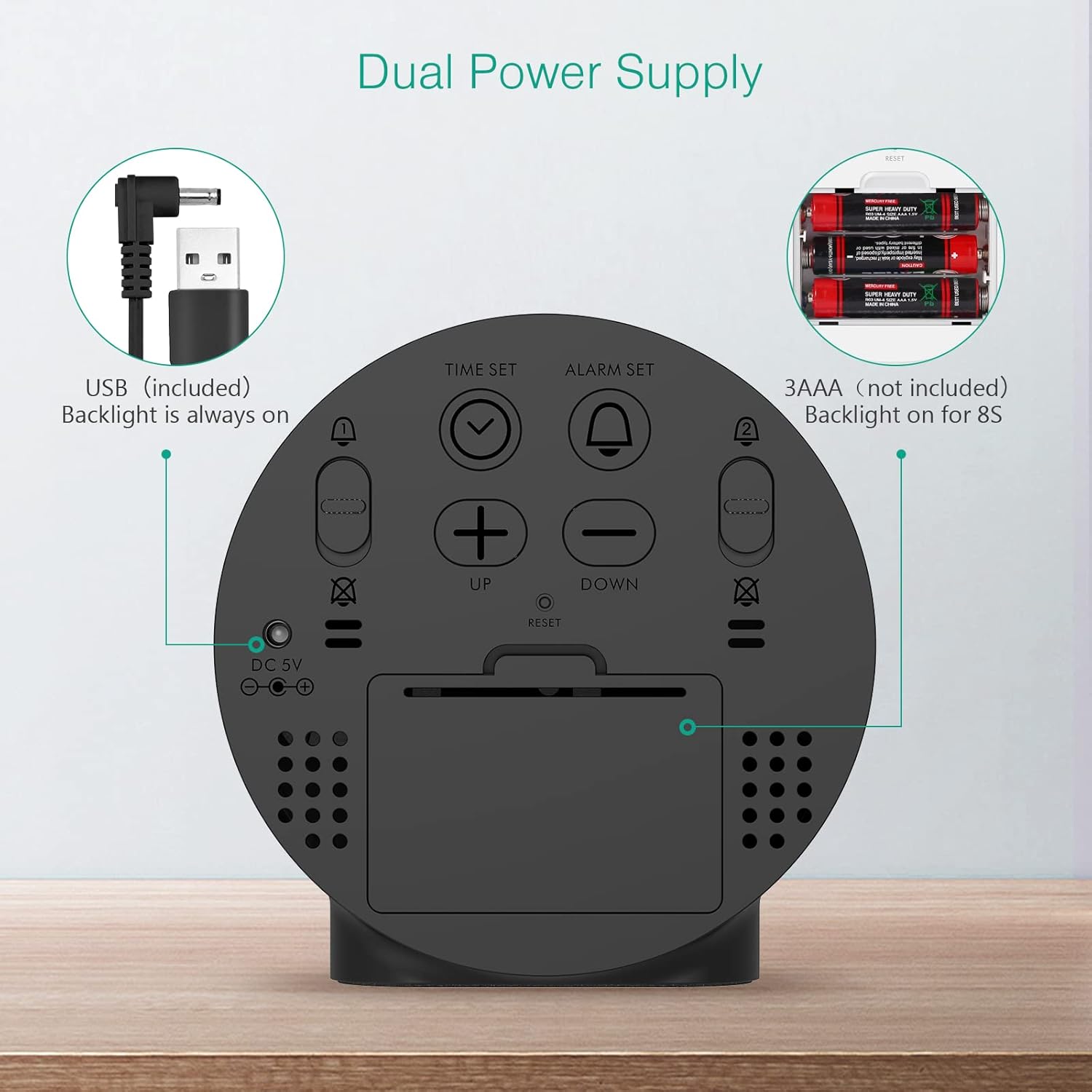
Figure 2: Back panel illustrating the USB power input and battery compartment for dual power supply.
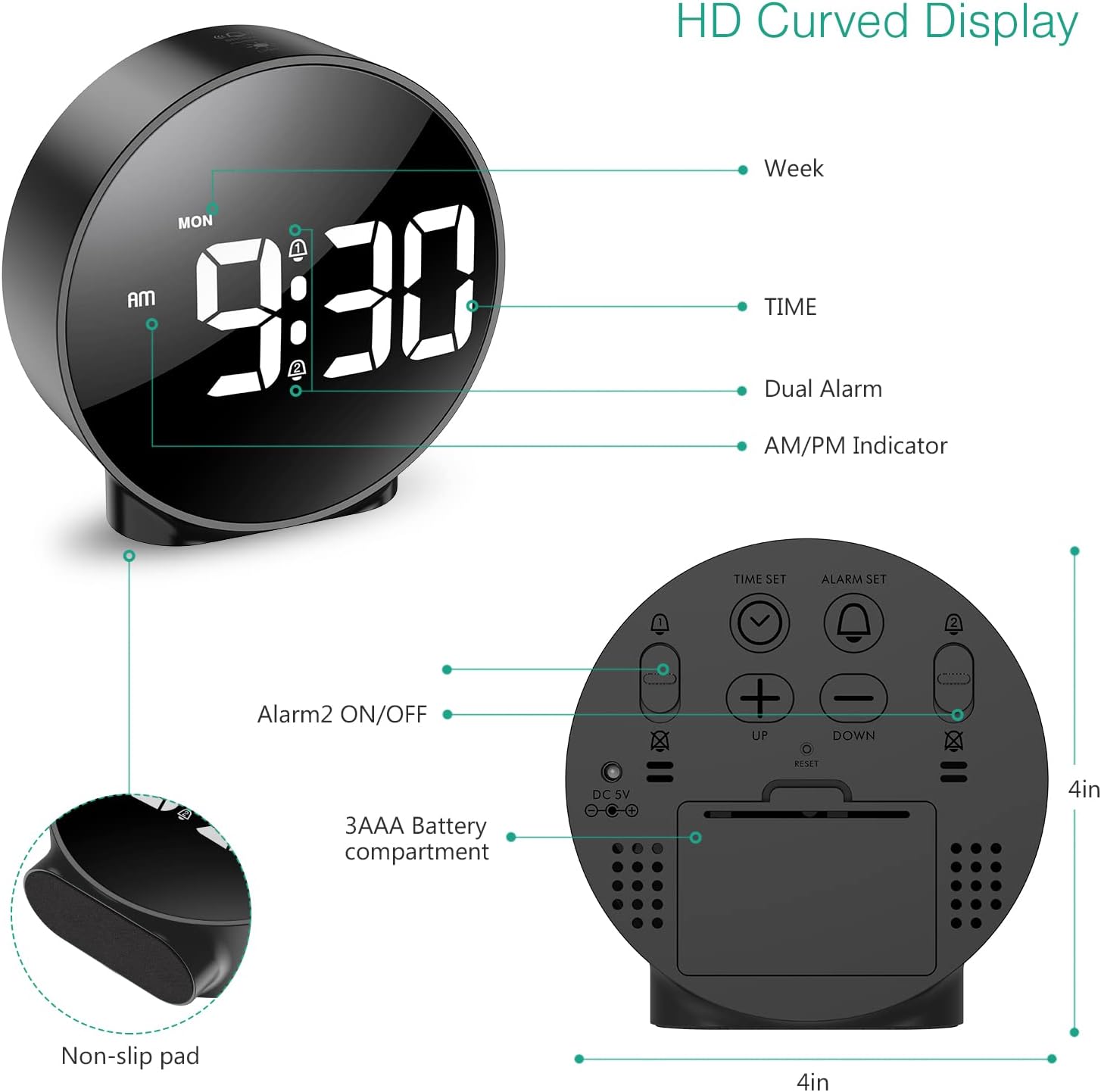
ചിത്രം 3: വിശദമായി view of the clock's back panel, highlighting the DC 5V input, battery compartment, and control buttons.
4. പ്രവർത്തന നിർദ്ദേശങ്ങൾ
4.1 Setting the Time (12/24Hr Format)
- അമർത്തിപ്പിടിക്കുക ടൈം സെറ്റ് button on the back of the clock for 3 seconds to enter time setting mode. The hour digits will start flashing.
- ഉപയോഗിക്കുക UP or താഴേക്ക് മണിക്കൂർ ക്രമീകരിക്കാനുള്ള ബട്ടണുകൾ.
- അമർത്തുക ടൈം സെറ്റ് മണിക്കൂർ സ്ഥിരീകരിച്ച് മിനിറ്റ് ക്രമീകരണത്തിലേക്ക് നീങ്ങാൻ വീണ്ടും അമർത്തുക. മിനിറ്റ് അക്കങ്ങൾ മിന്നിമറയും.
- ഉപയോഗിക്കുക UP or താഴേക്ക് മിനിറ്റ് ക്രമീകരിക്കാനുള്ള ബട്ടണുകൾ.
- അമർത്തുക ടൈം സെറ്റ് again to confirm the minute and exit time setting mode.
- 12 മണിക്കൂർ, 24 മണിക്കൂർ ഫോർമാറ്റുകൾക്കിടയിൽ മാറാൻ, അമർത്തുക 12/24HR ബട്ടൺ.
4.2 അലാറങ്ങൾ സജ്ജീകരിക്കൽ (ഡ്യുവൽ അലാറങ്ങൾ)
The clock supports two independent alarms (Alarm 1 and Alarm 2) with 5 alarm modes.
- അമർത്തിപ്പിടിക്കുക അലാറം സെറ്റ് ബട്ടൺ (അലാറം 1-ന്) അല്ലെങ്കിൽ അലാറം 2 ഓൺ/ഓഫ് button (for Alarm 2) for 3 seconds to enter alarm setting mode. The hour digits will flash.
- ഉപയോഗിക്കുക UP or താഴേക്ക് അലാറം സമയം ക്രമീകരിക്കാനുള്ള ബട്ടണുകൾ.
- ബന്ധപ്പെട്ടത് അമർത്തുക അലാറം സെറ്റ് or അലാറം 2 ഓൺ/ഓഫ് മണിക്കൂർ സ്ഥിരീകരിക്കുന്നതിനും മിനിറ്റ് ക്രമീകരണത്തിലേക്ക് നീങ്ങുന്നതിനും വീണ്ടും ബട്ടൺ അമർത്തുക. മിനിറ്റ് അക്കങ്ങൾ മിന്നിമറയും.
- ഉപയോഗിക്കുക UP or താഴേക്ക് അലാറം മിനിറ്റ് ക്രമീകരിക്കാനുള്ള ബട്ടണുകൾ.
- ബന്ധപ്പെട്ടത് അമർത്തുക അലാറം സെറ്റ് or അലാറം 2 ഓൺ/ഓഫ് button again to confirm the minute and select the alarm mode. The display will show the current mode (e.g., "1-1" for one day).
- ഉപയോഗിക്കുക UP or താഴേക്ക് buttons to cycle through the 5 alarm modes:
- 1-1: ഒരിക്കൽ അലാറം മുഴങ്ങുന്നു.
- 1-5: തിങ്കൾ മുതൽ വെള്ളി വരെ അലാറം മുഴങ്ങുന്നു.
- 1-6: തിങ്കൾ മുതൽ ശനി വരെ അലാറം മുഴങ്ങുന്നു.
- 1-7: Alarm sounds Monday to Sunday.
- 6-7: Alarm sounds Saturday to Sunday.
- ബന്ധപ്പെട്ടത് അമർത്തുക അലാറം സെറ്റ് or അലാറം 2 ഓൺ/ഓഫ് button one last time to confirm the alarm mode and exit alarm setting.
- To turn an alarm ON or OFF, short press the respective അലാറം സെറ്റ് or അലാറം 2 ഓൺ/ഓഫ് button. An alarm icon will appear on the display when activated.
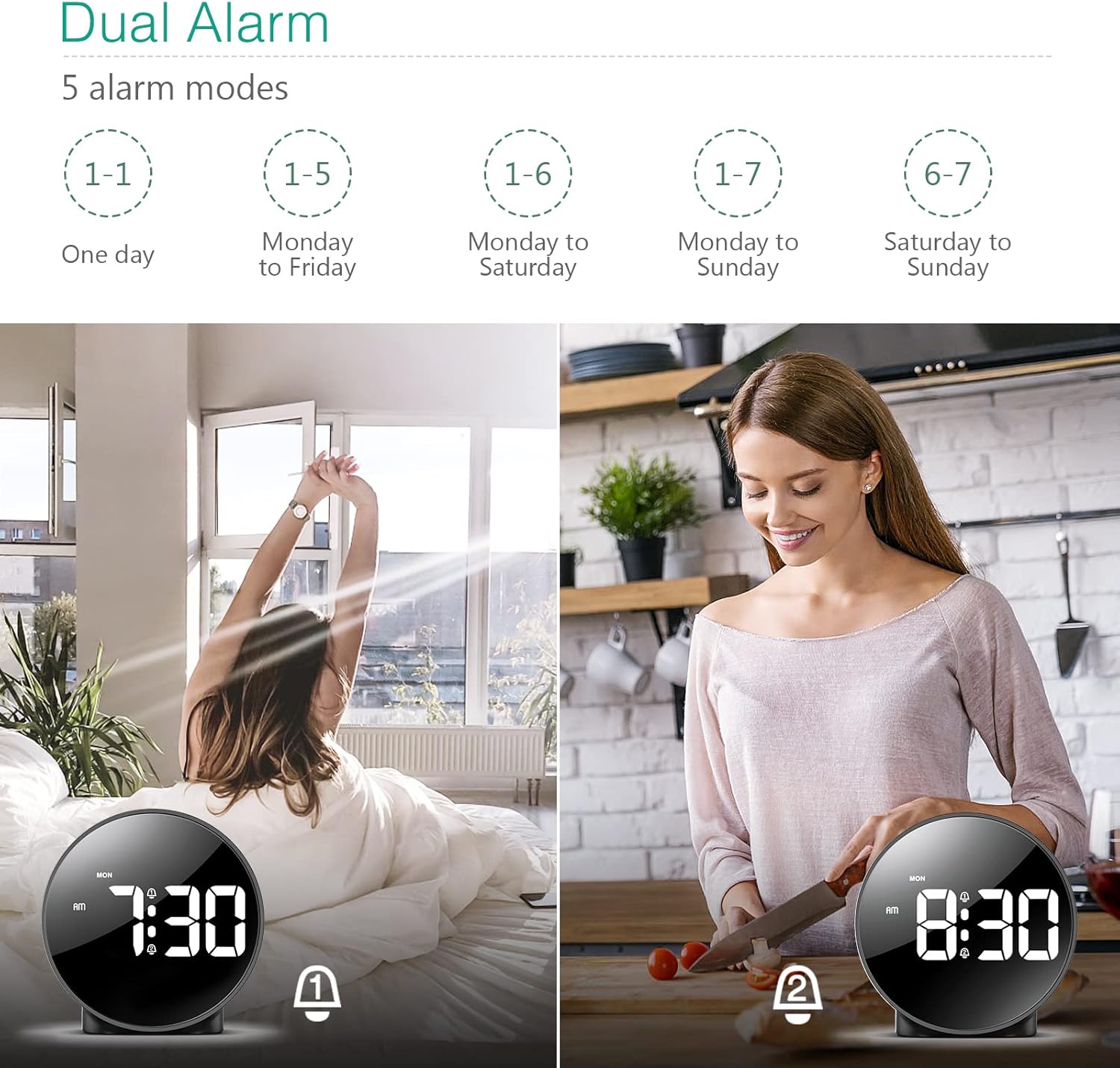
Figure 4: Illustration of the dual alarm functionality with various scheduling modes.
4.3 സ്നൂസ് ഫംഗ്ഷൻ
അലാറം മുഴങ്ങുമ്പോൾ, വലിയ ബട്ടൺ അമർത്തുക സ്നൂസ് / ലൈറ്റ് button on the top of the clock to activate the snooze function. The alarm will pause for 5 minutes and then sound again. You can repeat this process multiple times.

Figure 5: Activating the snooze function by touching the top of the clock.
4.4 തെളിച്ചം ക്രമീകരിക്കുന്നു
The clock features 4 levels of adjustable brightness. Short press the സ്നൂസ് / ലൈറ്റ് button on the top of the clock to cycle through the brightness levels (100%, 80%, 60%, and 0% (off)).

Figure 6: Visual representation of the four adjustable brightness levels of the clock display.
4.5 പകൽ വെളിച്ച ലാഭിക്കൽ സമയം (DST)
The clock supports Daylight Saving Time adjustment. Refer to the included mini-manual for specific instructions on how to activate or deactivate DST.
5. സവിശേഷതകൾ
- HD LED ഡിസ്പ്ലേ: Large, high-definition curved display for clear time reading.
- Dual Alarms with 5 Modes: Set two independent alarms with flexible scheduling options (one-day, weekdays, weekends, or every day).
- ക്രമീകരിക്കാവുന്ന തെളിച്ചം: Four levels of display brightness, including an off mode, to suit various environments and preferences.
- സ്നൂസ് പ്രവർത്തനം: Provides an additional 5 minutes of sleep with a simple touch.
- 12/24 മണിക്കൂർ ഫോർമാറ്റ്: Easily switch between standard and military time displays.
- ഇരട്ട പവർ സപ്ലൈ: Operates via USB cable for continuous display or AAA batteries for power-saving mode (display turns off after 8 seconds).
- കോംപാക്റ്റ് ഡിസൈൻ: Suitable for various locations such as bedrooms, living rooms, offices, or for travel.
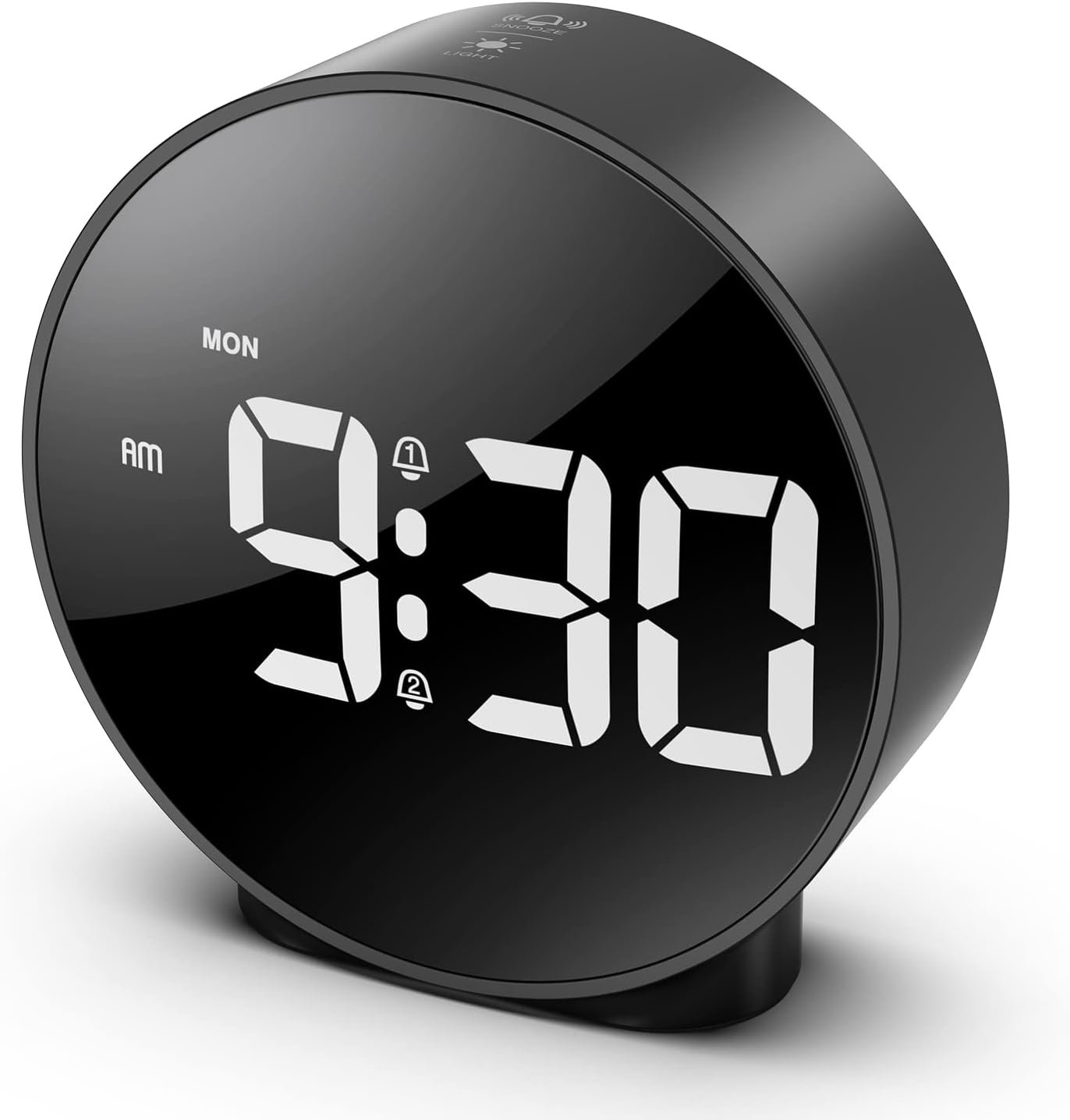
Figure 7: The ORIA Digital Alarm Clock showcasing its clear HD LED display.
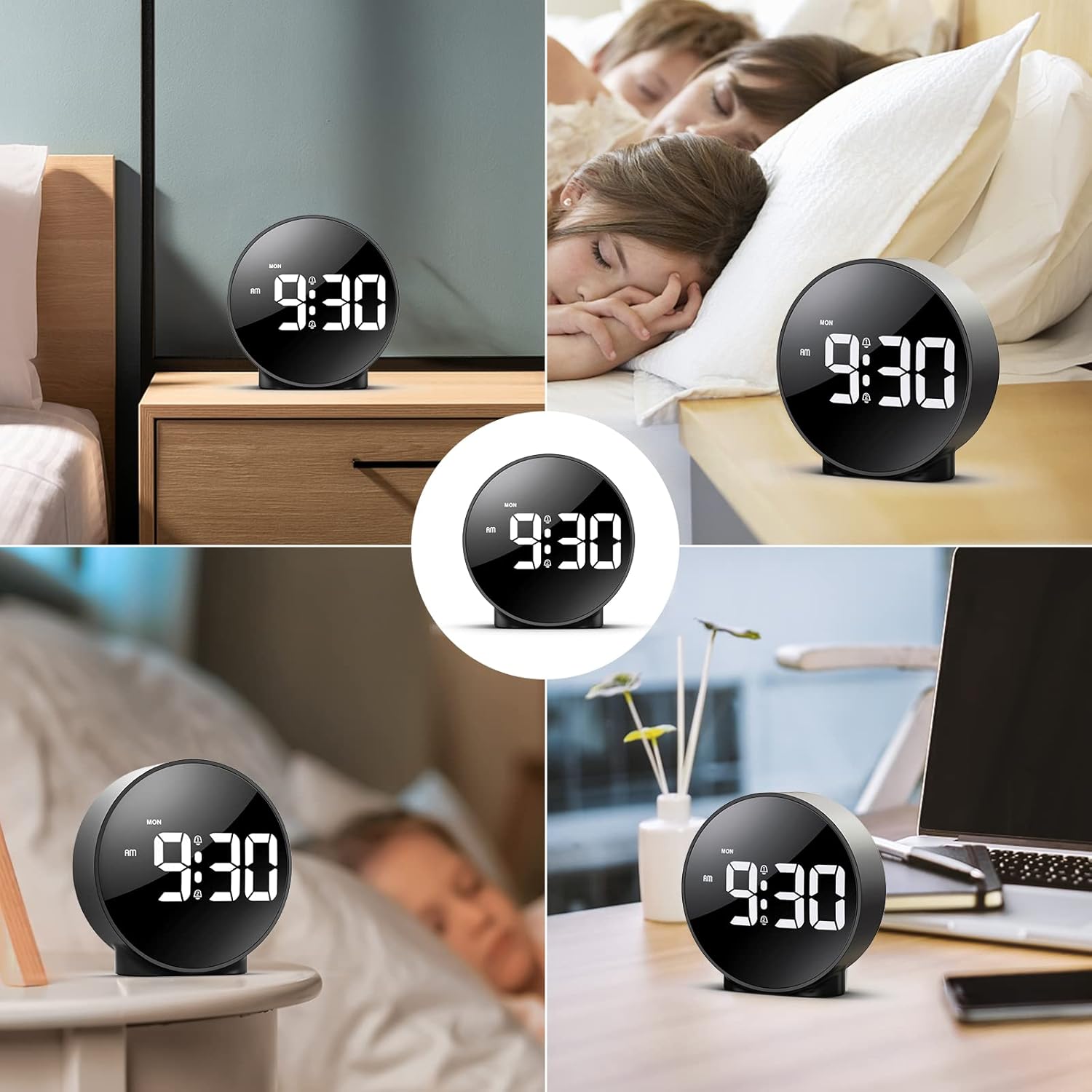
Figure 8: The versatile ORIA Digital Alarm Clock integrated into different environments like a bedroom, office, and living room.
6. പരിപാലനം
- മൃദുവായതും ഉണങ്ങിയതുമായ തുണി ഉപയോഗിച്ച് ക്ലോക്ക് വൃത്തിയാക്കുക. അബ്രസീവ് ക്ലീനറുകളോ ലായകങ്ങളോ ഉപയോഗിക്കരുത്.
- ദീർഘനേരം ഉപയോഗത്തിലില്ലെങ്കിൽ, ചോർച്ച തടയാൻ ബാറ്ററികൾ നീക്കം ചെയ്യുക.
7. പ്രശ്നപരിഹാരം
- Display is off in battery mode: This is normal for power saving. Touch the top button to activate the display for 8 seconds. For continuous display, use the USB power cable.
- ബട്ടണുകൾ പ്രതികരിക്കുന്നില്ല: Try resetting the clock by pressing the small പുനഃസജ്ജമാക്കുക button located on the back panel using a thin object (e.g., a paperclip).
- അലാറം മുഴങ്ങുന്നില്ല: Ensure the alarm is activated (alarm icon visible on display) and the volume is not set to zero.
- തെറ്റായ സമയം/തീയതി: Re-enter time setting mode and adjust the time and date as per Section 4.1.
8 സ്പെസിഫിക്കേഷനുകൾ
| ബ്രാൻഡ് | ഓറിയ |
| മോഡൽ നമ്പർ | OUS-HY-WA109B |
| നിറം | Black Case & White Digit |
| ഡിസ്പ്ലേ തരം | ഡിജിറ്റൽ LED |
| ഉൽപ്പന്ന അളവുകൾ | 4.29"ആംശം x 4.8"ആംശം |
| ഇനത്തിൻ്റെ ഭാരം | 5.9 ഔൺസ് (0.17 കിലോഗ്രാം) |
| പവർ ഉറവിടം | Corded Electric & Battery Powered (3x AAA, not included) |
| മെറ്റീരിയൽ | പ്ലാസ്റ്റിക് |
| പ്രത്യേക സവിശേഷതകൾ | Alarm, LED Display, Adjustable Brightness, Dual Alarms, Snooze |
9. വാറൻ്റിയും പിന്തുണയും
- 1 വർഷത്തെ വാറൻ്റി: ഉൽപ്പന്നം 1 വർഷത്തെ പരിമിത വാറൻ്റിയിൽ ഉൾപ്പെടുന്നു.
- 90-Day Free Replacements: Enjoy free replacements for eligible issues within 90 days of purchase.
- 30 ദിവസത്തെ സൗജന്യ റിട്ടേണുകൾ: Returns are accepted within 30 days of purchase.
- 24/7 ഉപഭോക്തൃ പിന്തുണ: For any inquiries or assistance, please contact ORIA customer support.
- ആജീവനാന്ത സാങ്കേതിക പിന്തുണ: Benefit from lifetime technical support for your product.
കൂടുതൽ സഹായത്തിന്, ദയവായി സന്ദർശിക്കുക ORIA Store on Amazon.


