ആമുഖം
This manual provides instructions for the Gmatrix Replacement Voice Remote Control, designed for use with various Samsung Smart TVs. It covers setup, operation, compatibility, and troubleshooting to ensure optimal performance of your new remote.

Figure 1: Gmatrix Replacement Voice Remote Control. This image displays the sleek, black remote control with its various buttons, including the prominent voice control microphone icon at the top.
Important Note: This remote is NOT compatible with IR (Infrared) technology. Voice control functionality is supported only for Samsung TV models with Bixby/Alexa built-in.
സജ്ജമാക്കുക
1. ബാറ്ററി ഇൻസ്റ്റാളേഷൻ
റിമോട്ട് കൺട്രോളിന് രണ്ട് (2) AAA ബാറ്ററികൾ ആവശ്യമാണ് (ഉൾപ്പെടുത്തിയിട്ടില്ല). അവ ഇൻസ്റ്റാൾ ചെയ്യാൻ ഈ ഘട്ടങ്ങൾ പാലിക്കുക:
- റിമോട്ട് കൺട്രോളിൻ്റെ പിൻഭാഗത്ത് ബാറ്ററി കമ്പാർട്ട്മെൻ്റ് കവർ കണ്ടെത്തുക.
- കമ്പാർട്ട്മെന്റ് തുറക്കാൻ കവർ താഴേക്ക് സ്ലൈഡ് ചെയ്യുക അല്ലെങ്കിൽ ലാച്ച് (ഉണ്ടെങ്കിൽ) അമർത്തുക.
- കമ്പാർട്ടുമെന്റിനുള്ളിലെ അടയാളപ്പെടുത്തലുകളുമായി പോസിറ്റീവ് (+), നെഗറ്റീവ് (-) ടെർമിനലുകൾ ശരിയായി വിന്യസിക്കുന്നുണ്ടെന്ന് ഉറപ്പാക്കാൻ രണ്ട് AAA ബാറ്ററികൾ ഇടുക.
- ബാറ്ററി കമ്പാർട്ട്മെന്റ് കവർ സുരക്ഷിതമായി സ്ഥലത്ത് ക്ലിക്ക് ചെയ്യുന്നതുവരെ മാറ്റിസ്ഥാപിക്കുക.

Figure 2: Battery compartment of the Gmatrix remote. This image shows the back of the remote with the battery cover removed, illustrating where to insert two AAA batteries.
2. Pairing the Remote with Your TV
To enable full functionality, including voice control, you must pair the remote with your Samsung Smart TV. This process establishes a wireless connection between the remote and the television.
- നിങ്ങളുടെ ടിവി ഓണാക്കിയിട്ടുണ്ടെന്ന് ഉറപ്പാക്കുക.
- Point the remote control towards your TV.
- Simultaneously press and hold the "മടങ്ങുക" button and the "പ്ലേ/താൽക്കാലികമായി നിർത്തുക" button for approximately 5 seconds.
- Release the buttons when a pairing confirmation message appears on your TV screen. The message typically indicates that the remote is connected or paired.

Figure 3: Voice Control feature on the Gmatrix remote. This image highlights the microphone button and illustrates the concept of voice commands, which are enabled after successful pairing.
പ്രവർത്തന നിർദ്ദേശങ്ങൾ
Voice Control Functionality
Once paired, the remote's voice control feature allows for hands-free navigation and command execution. This feature is available for Samsung TV models equipped with Bixby or Alexa built-in.
- അമർത്തിപ്പിടിക്കുക മൈക്രോഫോൺ button (usually located near the top of the remote).
- Speak your command clearly into the remote. Examples ഉൾപ്പെടുന്നു:
- "Decrease TV Brightness"
- "Turn Up the Volume"
- "Open movie channel"
- "Fast forward to 28'26''"
- "Show me sports channels"
- Release the Microphone button after speaking your command.

Figure 4: A user demonstrating voice command functionality. This image shows a person speaking into the remote, with example commands displayed on the screen, illustrating how voice control simplifies interaction with the TV.
കുറുക്കുവഴി ബട്ടണുകൾ
The remote features dedicated shortcut buttons for quick access to popular streaming services and functions:
- നെറ്റ്ഫ്ലിക്സ്: Direct access to Netflix.
- പ്രധാന വീഡിയോ: Direct access to Amazon Prime Video.
- സാംസങ് ടിവി പ്ലസ്: Direct access to Samsung's free streaming service.
- ഹുലു: Direct access to Hulu.
- WWW: ഇതിലേക്കുള്ള പ്രവേശനം web ബ്രൗസർ.
- രാകുട്ടൻ ടിവി: Direct access to Rakuten TV.

Figure 5: The Gmatrix remote highlighting its shortcut buttons. This image clearly labels the dedicated buttons for Netflix, Prime Video, Samsung TV Plus, Hulu, WWW, and Rakuten TV, providing quick access to these services.
പൊതുവായ ഉപയോഗം
The remote is designed for ease of use and offers a reliable connection up to 15 meters (50 feet) from your television, thanks to its upgraded chip design.

Figure 6: A user holding the Gmatrix remote, demonstrating its effective operating range. The image shows the remote being used comfortably from a distance, with the TV screen visible in the background.
അനുയോജ്യത
This Gmatrix replacement remote is compatible with a wide range of Samsung Smart TVs, including LED, QLED, OLED, and 4K UHD models. It is also compatible with several original Samsung remote control models.
Compatible Samsung TV Models:
The remote supports various Samsung TV series from 2021 and 2022, including but not limited to:
- 2022 പരമ്പര: QN82Q70RAFXZA, QN82Q70R, QN49LS03RAFXZA, QN49LS03R, QN75Q70RAFXZA, QN75Q70R, QN55Q60RAFXZA, QN55Q60R, QN65Q70RAFXZA, QN65Q70R, QN55Q70RAFXZA, QN55Q70R, QN55LS03RAFXZA, QN55LS03R, QN65LS03RAFXZA, QN65LS03R, QN49Q70RAFXZA, QN49Q70R, QN82Q60RAFXZA, QN82Q60R, QN43Q60RAFXZA, QN43Q60R, QN75Q60RAFXZA, QN75Q60R, QN43LS03RAFXZA, QN43LS03R, QN65Q60RAFXZA, QN65Q60R, QN55LS01RAFXZA, QN49Q60RAFXZA, QN49Q60R
- 2021 പരമ്പര:
- Q60A: QN50Q60AAFXZA, QN55Q60AAFXZA, QN60Q60AAFXZA, QN65Q60AAFXZA, QN70Q60AAFXZA, QN75Q60AAFXZA, QN85Q60AAFXZA
- Q70A: QN55Q70AAFXZA, QN65Q70AAFXZA, QN75Q70AAFXZA, QN85Q70AAFXZA
- Q80A: QN50Q80AAFXZA, QN55Q80AAFXZA, QN65Q80AAFXZA, QN75Q80AAFXZA, QN85Q80AAFXZA
- QN85A: QN55QN85AAFXZA, QN65QN85AAFXZA, QN75QN85AAFXZA, QN85QN85AAFXZA
- QN90A: QN43QN90AAFXZA, QN50QN90AAFXZA, QN55QN90AAFXZA, QN65QN90AAFXZA, QN75QN90AAFXZA, QN85QN90AAFXZA, QN98QN90AAFXZA
- QN800A: QN65QN800AFXZA, QN75QN800AFXZA, QN85QN800AFXZA
- QN900A: QN65QN900AFXZA, QN75QN900AFXZA, QN85QN900AFXZA
- AU8000: UN43AU8000FXZA, UN50AU8000FXZA, UN55AU8000FXZA, UN65AU8000FXZA, UN75AU8000FXZA, UN85AU8000FXZA
- TU9010: UN86TU9010FXZA
- Other Compatible Series: QN800B, QN90B, QN95B, QN85B, Q900TS, AU8000, M5, TU9010, Q60T Series, etc.
Compatible Samsung Remote Models:
- BN68-13897A
- BN59-01363A
- BN59-01330A
- BN59-01329A
- BN59-01330N
- BN68-11568A
- BN59-01330H
- BN59-01357A, BN59-01357F, BN59-01357L, BN59-01363A, BN59-01363C, BN59-01363L, BN59-01380A, BN59-01385A, BN59-01385B, BN59-01385D, BN59-01386D, BN59-01391A, etc.
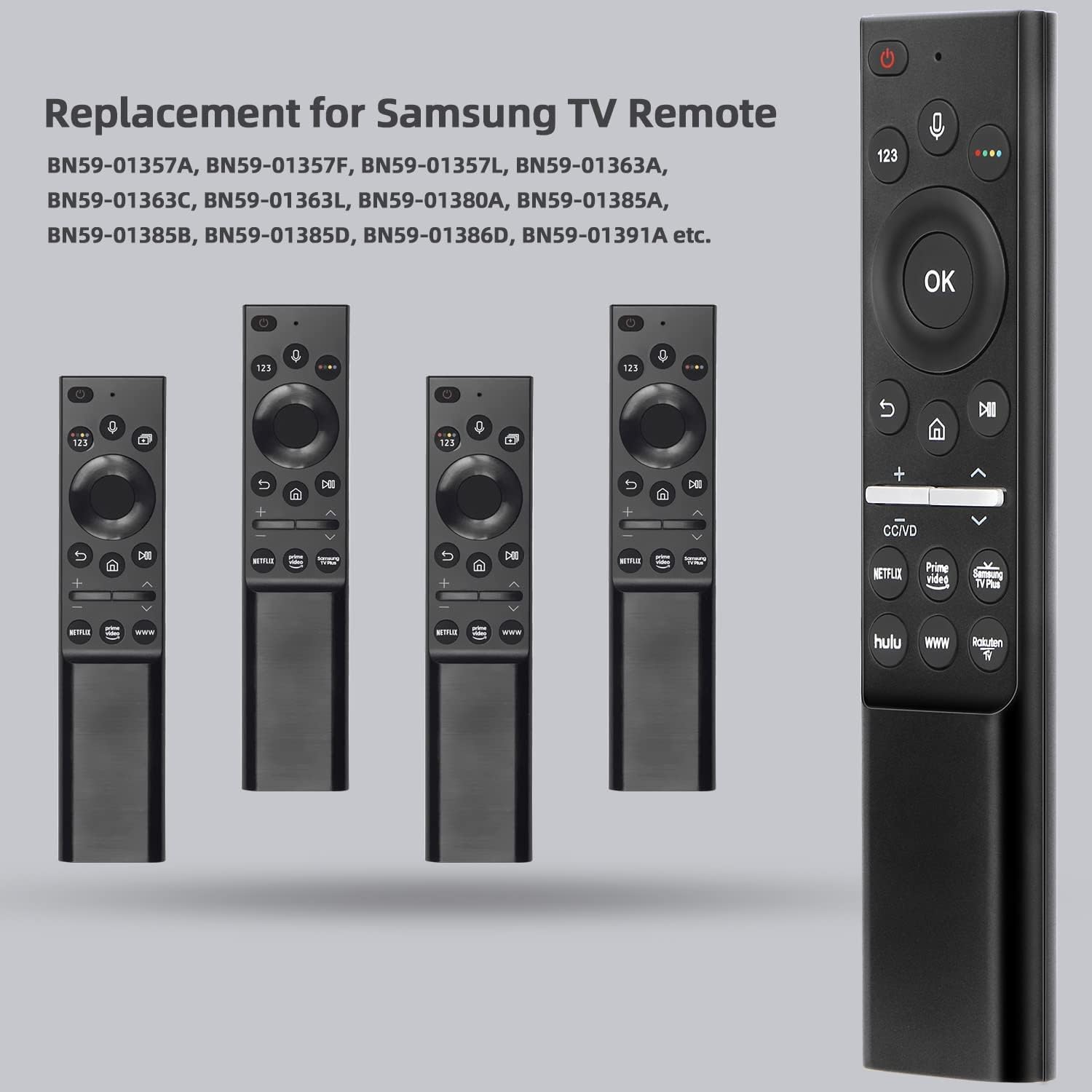
Figure 7: The Gmatrix remote positioned next to several original Samsung remote models it is designed to replace. This image visually confirms its role as a compatible replacement.

Figure 8: The Gmatrix remote displayed alongside two different Samsung Smart TVs, illustrating its broad compatibility with various Samsung LED, QLED, OLED, and 4K UHD models.
സ്പെസിഫിക്കേഷനുകൾ
| ഫീച്ചർ | വിശദാംശങ്ങൾ |
|---|---|
| ഉൽപ്പന്ന അളവുകൾ | 0.7 x 1 x 3 ഇഞ്ച് |
| ഇനത്തിൻ്റെ ഭാരം | 2.18 ഔൺസ് |
| ബ്രാൻഡ് | ജിമാട്രിക്സ് |
| പ്രത്യേക ഫീച്ചർ | Ergonomic design, Voice Control |
| പിന്തുണയ്ക്കുന്ന ഉപകരണങ്ങളുടെ പരമാവധി എണ്ണം | 1 (one TV) |
| അനുയോജ്യമായ ഉപകരണങ്ങൾ | Samsung Smart Televisions |
| കണക്റ്റിവിറ്റി ടെക്നോളജി | Wireless (not Infrared) |
| പവർ ഉറവിടം | 2 x AAA ബാറ്ററികൾ (ഉൾപ്പെടുത്തിയിട്ടില്ല) |
ട്രബിൾഷൂട്ടിംഗ്
If you encounter issues with your Gmatrix Replacement Voice Remote Control, please refer to the following common solutions:
- Remote is unresponsive or not working:
- Check battery installation: Ensure batteries are inserted correctly with proper polarity (+/-).
- Replace batteries: If batteries are low or depleted, replace them with fresh AAA batteries.
- Re-pair the remote: Follow the "Pairing the Remote with Your TV" steps in the Setup section to re-establish the connection.
- Ensure line of sight: While wireless, obstructions can sometimes interfere. Try using the remote closer to the TV.
- Voice control is not working:
- Confirm pairing: Voice control requires the remote to be successfully paired with the TV. Refer to the pairing instructions.
- Check TV compatibility: Voice control is only supported on Samsung Smart TV models that have Bixby or Alexa built-in. Verify your TV model's specifications.
- Speak clearly: Ensure you are speaking clearly and directly into the remote's microphone.
- Hold the microphone button: The microphone button must be pressed and held while speaking your command.
- ബട്ടണുകൾ ഒട്ടിപ്പിടിക്കുന്നതോ പ്രതികരിക്കാത്തതോ ആണ്:
- Clean the remote: Dust or debris might be affecting button performance. Refer to the Maintenance section for cleaning instructions.
- Re-pair the remote: Sometimes a fresh connection can resolve minor communication glitches.
- Remote does not control TV functions (e.g., volume, channels):
- റിമോട്ട് ശരിയായി ജോടിയാക്കിയിട്ടുണ്ടെന്ന് ഉറപ്പാക്കുക.
- Confirm your TV model is listed in the Compatibility section. This remote is specifically designed for Samsung Smart TVs and is not an IR remote.
മെയിൻ്റനൻസ്
ശരിയായ പരിചരണവും പരിപാലനവും നിങ്ങളുടെ റിമോട്ട് കൺട്രോളിന്റെ ആയുസ്സ് വർദ്ധിപ്പിക്കും.
- വൃത്തിയാക്കൽ: Use a soft, dry cloth to wipe the remote. For stubborn dirt, slightly dampവെള്ളം അല്ലെങ്കിൽ നേരിയതും ഉരച്ചിലുകൾ ഇല്ലാത്തതുമായ ഒരു ക്ലീനർ ഉപയോഗിച്ച് തുണി തുടയ്ക്കുക. അമിതമായ ഈർപ്പവും കഠിനമായ രാസവസ്തുക്കളും ഒഴിവാക്കുക.
- ബാറ്ററി മാറ്റിസ്ഥാപിക്കൽ: Replace batteries promptly when the remote's performance degrades. Always use new AAA batteries and dispose of old batteries responsibly according to local regulations.
- സംഭരണം: നേരിട്ടുള്ള സൂര്യപ്രകാശത്തിൽ നിന്നും കടുത്ത താപനിലയിൽ നിന്നും അകന്ന് തണുത്തതും വരണ്ടതുമായ സ്ഥലത്ത് റിമോട്ട് സൂക്ഷിക്കുക. കൂടുതൽ നേരം സൂക്ഷിക്കുകയാണെങ്കിൽ, ചോർച്ച തടയാൻ ബാറ്ററികൾ നീക്കം ചെയ്യുക.
വാറൻ്റിയും പിന്തുണയും
Gmatrix provides a 30-day warranty for this product, offering a no-condition refund or replacement. If you believe you have received a wrong type or experience any issues within this period, please contact customer support for assistance.
For further support or inquiries, please refer to the seller's contact information on the product's purchase page or through your order history.


