1. ആമുഖം
This manual provides instructions for the VINABTY RC-912R RC-913R replacement remote control. This remote is designed to operate various Integra Network Audio/Video AV Stereo Receivers. It offers a direct replacement for your original remote, providing full functionality without the need for complex programming.
Compatible Integra AV Receiver Models:
- DRX-2, DRX-3, DRX-2.1, DRX-3.2
- DRX-4, DRX-5, DRX-7
- DRX-R1.1, DRC-R1.1, DRX-7.1, DRX-R1
- DRX-4.2, DRX-5.2, RC-911R
2. സജ്ജീകരണം
2.1 ബാറ്ററി ഇൻസ്റ്റാളേഷൻ
റിമോട്ട് കൺട്രോളിന് പ്രവർത്തിക്കാൻ രണ്ട് AAA ബാറ്ററികൾ (ഉൾപ്പെടുത്തിയിട്ടില്ല) ആവശ്യമാണ്. ബാറ്ററികൾ ഇൻസ്റ്റാൾ ചെയ്യാൻ ഈ ഘട്ടങ്ങൾ പാലിക്കുക:
- റിമോട്ട് കൺട്രോളിന്റെ പിൻഭാഗത്ത് ബാറ്ററി കമ്പാർട്ട്മെന്റ് കണ്ടെത്തുക.
- ബാറ്ററി കമ്പാർട്ട്മെന്റ് കവർ തുറക്കാൻ താഴേക്ക് സ്ലൈഡ് ചെയ്യുക.
- കമ്പാർട്ടുമെന്റിനുള്ളിലെ അടയാളപ്പെടുത്തലുകളുമായി പോസിറ്റീവ് (+), നെഗറ്റീവ് (-) ടെർമിനലുകൾ ശരിയായി വിന്യസിക്കുന്നുണ്ടെന്ന് ഉറപ്പാക്കാൻ രണ്ട് AAA ബാറ്ററികൾ ഇടുക.
- സുരക്ഷിതമായി ക്ലിക്ക് ചെയ്യുന്നതുവരെ ബാറ്ററി കമ്പാർട്ട്മെന്റ് കവർ തിരികെ സ്ഥലത്തേക്ക് സ്ലൈഡ് ചെയ്യുക.
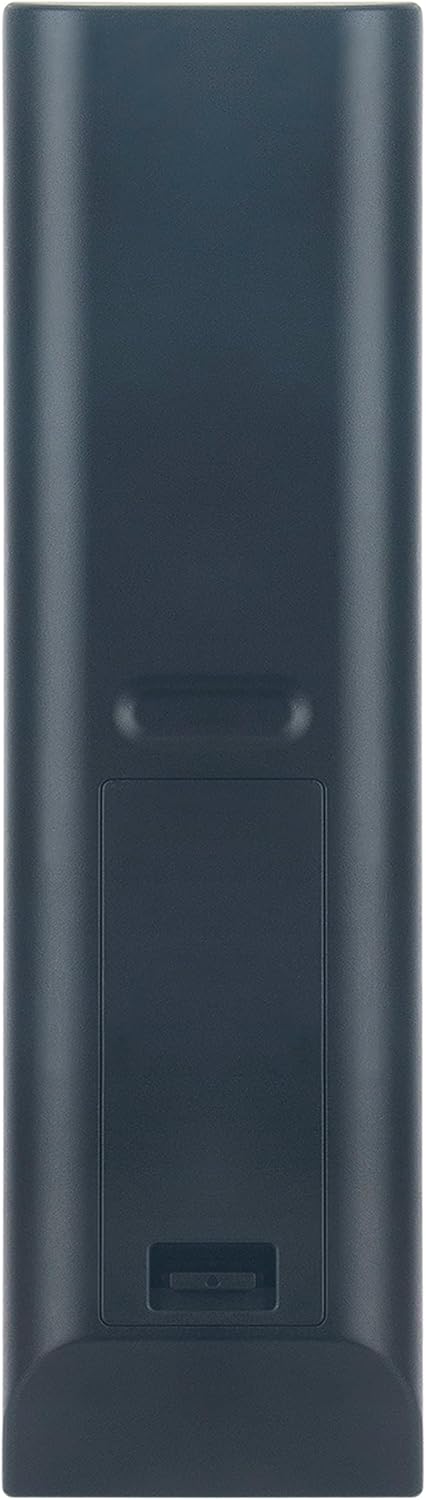
ചിത്രം 1: പിന്നിലേക്ക് view ബാറ്ററി കമ്പാർട്ടുമെന്റുള്ള റിമോട്ട് കൺട്രോളിന്റെ.
2.2 പ്രാരംഭ ഉപയോഗം
This remote control is a basic infrared (IR) replacement remote. No programming is required. Once batteries are installed, it is ready for immediate use with your compatible Integra AV Receiver.
3. പ്രവർത്തന നിർദ്ദേശങ്ങൾ
Point the remote control directly towards your Integra AV Receiver. Ensure there are no obstructions between the remote and the receiver's IR sensor.
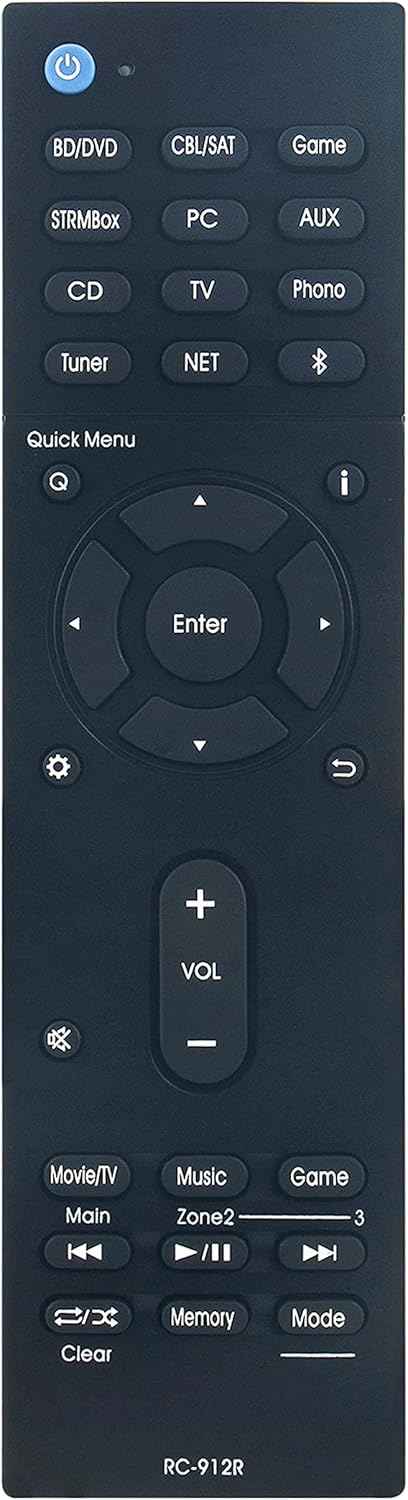
ചിത്രം 2: മുൻഭാഗം view ബട്ടൺ ലേഔട്ടുള്ള റിമോട്ട് കൺട്രോളിന്റെ.
3.1 അടിസ്ഥാന പ്രവർത്തനങ്ങൾ
- പവർ ബട്ടൺ (U): Turns the receiver on or off.
- Input Selectors (BD/DVD, CBL/SAT, Game, STRMBox, PC, AUX, CD, TV, Phono, Tuner, NET, Bluetooth): Selects the desired audio/video input source.
- Volume Control (VOL +, VOL -): മാസ്റ്റർ വോളിയം ലെവൽ ക്രമീകരിക്കുന്നു.
- നിശബ്ദ ബട്ടൺ (🔇): ഓഡിയോ ഔട്ട്പുട്ട് മ്യൂട്ട് ചെയ്യുകയോ അൺമ്യൂട്ട് ചെയ്യുകയോ ചെയ്യുന്നു.
- Navigation Buttons (Up, Down, Left, Right, Enter): Used to navigate menus and confirm selections on your receiver's display.
- Quick Menu (Q): Accesses the quick menu for common settings.
- Return Button (↶ под): മുമ്പത്തെ മെനുവിലേക്കോ സ്ക്രീനിലേക്കോ മടങ്ങുന്നു.
- Playback Controls (Movie/TV, Main, Music, Zone2, Game, Clear, Memory, Mode): Controls playback functions for connected devices and zone selection.
Refer to your Integra AV Receiver's user manual for detailed information on specific functions and menu navigation.
4. പരിപാലനം
4.1 ബാറ്ററി മാറ്റിസ്ഥാപിക്കൽ
Replace the batteries when the remote control becomes unresponsive or its range decreases significantly. Always replace both AAA batteries at the same time with new ones. Do not mix old and new batteries, or different types of batteries.
4.2 വൃത്തിയാക്കൽ
To clean the remote control, wipe it gently with a soft, dry cloth. Do not use liquid cleaners, abrasive pads, or chemical solvents, as these can damage the remote's surface or internal components.
4.3 സംഭരണം
റിമോട്ട് കൺട്രോൾ ദീർഘനേരം ഉപയോഗിക്കുന്നില്ലെങ്കിൽ, ചോർച്ചയും ഉപകരണത്തിന് കേടുപാടുകൾ സംഭവിക്കാനുള്ള സാധ്യതയും തടയാൻ ബാറ്ററികൾ നീക്കം ചെയ്യുക.
5. പ്രശ്നപരിഹാരം
- റിമോട്ട് പ്രതികരിക്കുന്നില്ല:
- ബാറ്ററികൾ ശരിയായ പോളാരിറ്റിയോടെ ശരിയായി ഇൻസ്റ്റാൾ ചെയ്തിട്ടുണ്ടോയെന്ന് പരിശോധിക്കുക.
- പുതിയ AAA ബാറ്ററികൾ ഉപയോഗിച്ച് ബാറ്ററികൾ മാറ്റിസ്ഥാപിക്കുക.
- Ensure there is a clear line of sight between the remote control and the IR sensor on your Integra AV Receiver. Remove any obstructions.
- Confirm that the remote is pointed directly at the receiver.
- പ്രവർത്തിക്കാത്ത പ്രത്യേക ബട്ടണുകൾ:
- Clean the remote control surface, especially around the unresponsive buttons, to remove any dirt or debris that might be interfering.
- If only certain functions are not working, verify that your Integra AV Receiver is in the correct operating mode (e.g., TV input selected for TV controls).
6 സ്പെസിഫിക്കേഷനുകൾ
| മോഡൽ നമ്പർ | RC-912R RC-913R |
| അളവുകൾ (L x W x H) | 6.9 x 2 x 0.7 ഇഞ്ച് (17.5 x 5.1 x 1.8 സെ.മീ) |
| ഇനത്തിൻ്റെ ഭാരം | 2.89 ഔൺസ് (81.9 ഗ്രാം) |
| ബാറ്ററി തരം | 2 x AAA (ഉൾപ്പെടുത്തിയിട്ടില്ല) |
| അനുയോജ്യമായ ഉപകരണങ്ങൾ | Integra Network Audio/Video AV Stereo Receivers |

Figure 3: Remote control dimensions.
7. വാറൻ്റിയും പിന്തുണയും
Specific warranty information for this product is not provided in this manual. Please refer to the seller or your purchase documentation for details regarding warranty coverage and customer support. For technical assistance or further inquiries, contact the product vendor directly.


