1. ആമുഖം
This user manual provides detailed instructions for the installation, operation, and maintenance of your LEDLUX LL0253B Wi-Fi Smart Thermostat. This programmable thermostat is designed for gas boilers and water radiator heating systems, offering smart control via Wi-Fi applications and compatibility with Amazon Alexa and Google Home. Please read this manual thoroughly before installation and use to ensure proper function and safety.
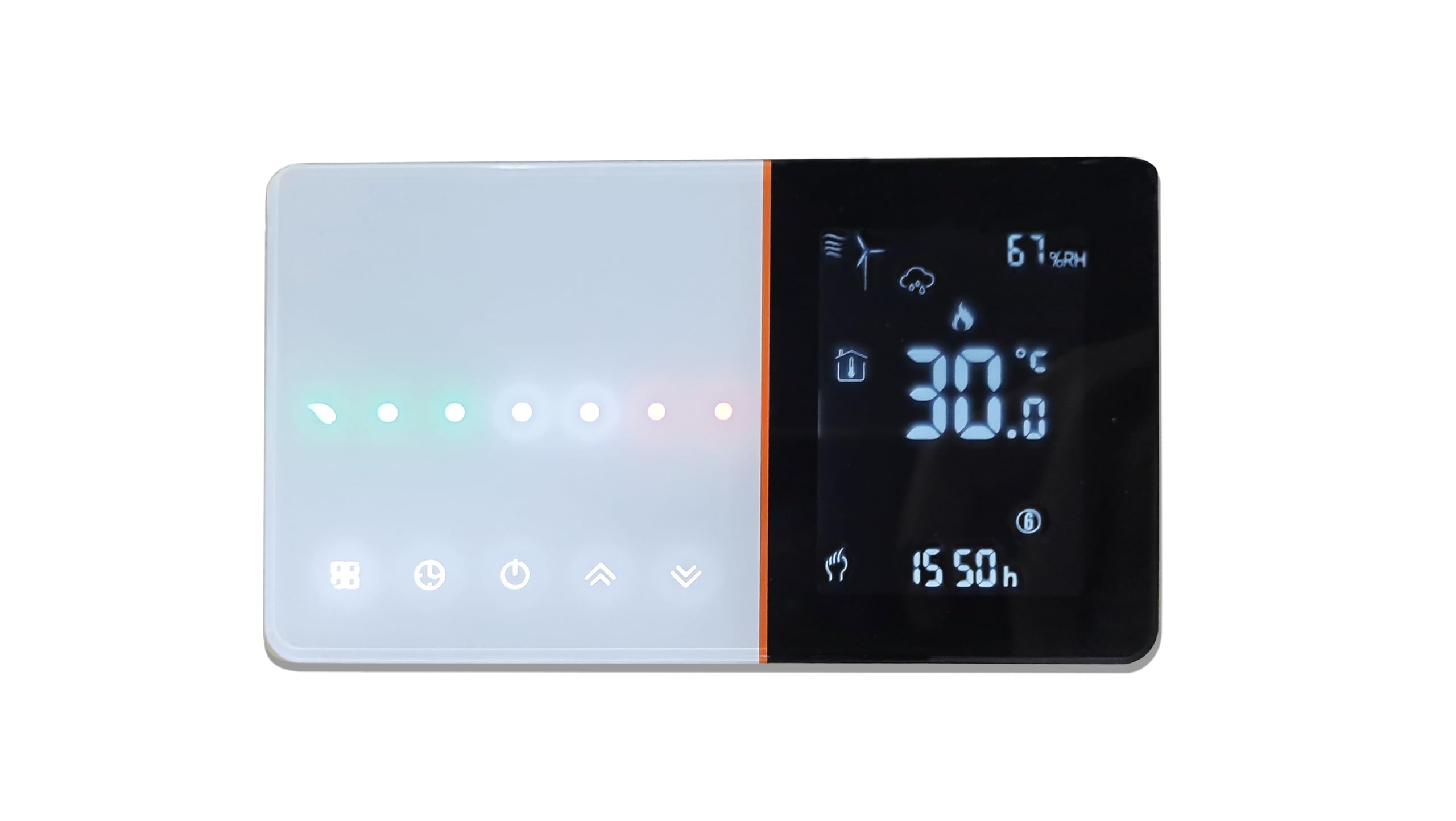
Figure 1: LEDLUX LL0253B Wi-Fi Smart Thermostat system overview.
2 സുരക്ഷാ വിവരങ്ങൾ
മുന്നറിയിപ്പ്: Electrical installation should only be performed by a qualified electrician. Always disconnect power at the main circuit breaker before installing or servicing the thermostat to prevent electrical shock.
- Ensure the power supply is 220V AC.
- തെർമോസ്റ്റാറ്റ് വെള്ളത്തിലോ അമിതമായ ഈർപ്പത്തിലോ തുറന്നുകാട്ടരുത്.
- യൂണിറ്റ് സ്വയം വേർപെടുത്താനോ നന്നാക്കാനോ ശ്രമിക്കരുത്. സേവനത്തിനായി യോഗ്യതയുള്ള ഉദ്യോഗസ്ഥരെ ബന്ധപ്പെടുക.
- കുട്ടികൾക്ക് ലഭ്യമാകാതെ സൂക്ഷിക്കുക.
3. പാക്കേജ് ഉള്ളടക്കം
നിങ്ങളുടെ പാക്കേജിൽ എല്ലാ ഇനങ്ങളും ഉണ്ടെന്ന് ഉറപ്പാക്കുക:
- LEDLUX LL0253B Wi-Fi Smart Thermostat Unit
- മൗണ്ടിംഗ് സ്ക്രൂകൾ (സാധാരണയായി ഉൾപ്പെടുത്തിയിട്ടുണ്ട്)
- ഉപയോക്തൃ മാനുവൽ (ഈ പ്രമാണം)
4. ഉൽപ്പന്നം കഴിഞ്ഞുview
The LEDLUX LL0253B features an LCD touch screen for easy interaction and a sleek design. It supports various heating modes and programmable schedules.

Figure 2: Thermostat display elements and dimensions (131mm x 75mm x 23.9mm).

Figure 3: LCD display and soft touch interface.
5. സജ്ജീകരണവും ഇൻസ്റ്റാളേഷനും
The thermostat is designed for installation in a standard European 503 flush-mounted box.
5.1 ഡിസ്അസംബ്ലിംഗ്
- പവർ വിച്ഛേദിക്കുക: Before starting, ensure the main electrical power to the heating system is turned off at the circuit breaker.
- Separate Front Panel: Locate the two small slots on the lower part of the thermostat, just below the screen. Carefully insert a flat screwdriver into these slots and gently pry to separate the front panel from the back mounting plate.
5.2 മൗണ്ടിംഗ്
- Prepare Mounting Box: If replacing an existing thermostat, remove it and its mounting plate. The LEDLUX LL0253B is compatible with standard 503 flush-mounted boxes.
- റൂട്ട് കേബിളുകൾ: Pass the electrical cables through the central opening of the thermostat's back mounting plate.
- സുരക്ഷിത മൗണ്ടിംഗ് പ്ലേറ്റ്: Attach the back mounting plate to the 503 box using the provided screws.
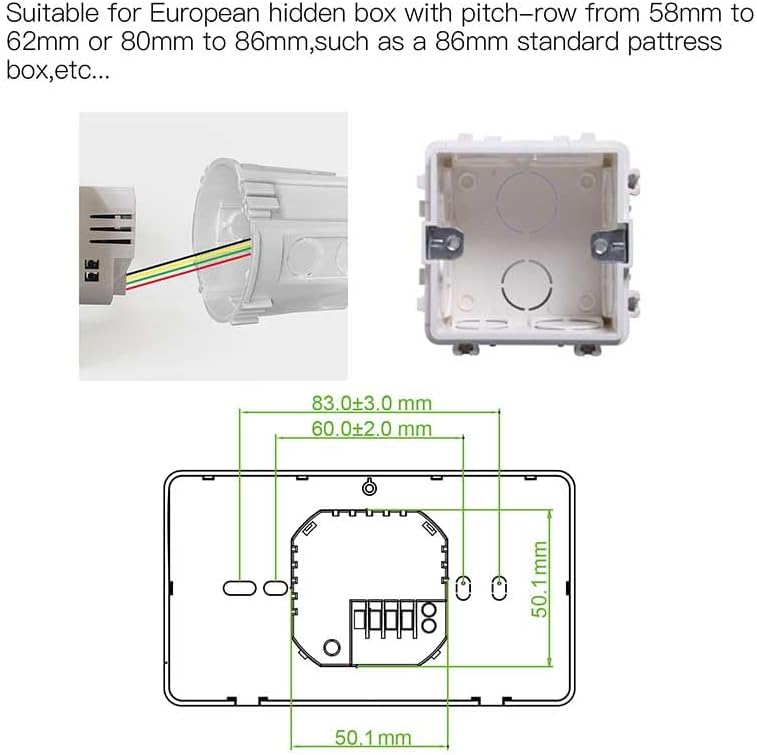
Figure 4: Thermostat back plate and compatible 503 box.
5.3 വയറിംഗ്
Connect the electrical cables to the terminal block on the back mounting plate as follows. Ensure power is still disconnected.
- എൽ (ലൈവ്): Connect the phase cable (typically brown or black).
- എൻ (ന്യൂട്രൽ): Connect the neutral cable (typically blue).
- COM (പൊതുവായത്): Connect one of the two boiler control cables (often red).
- NO (Normally Open) / NC (Normally Closed): Connect the remaining boiler control cable to either NO or NC, depending on your boiler system. For most gas boilers, ഇല്ല is the correct terminal. Consult your boiler's manual if unsure.

Figure 5: Wiring terminals on the thermostat back plate.
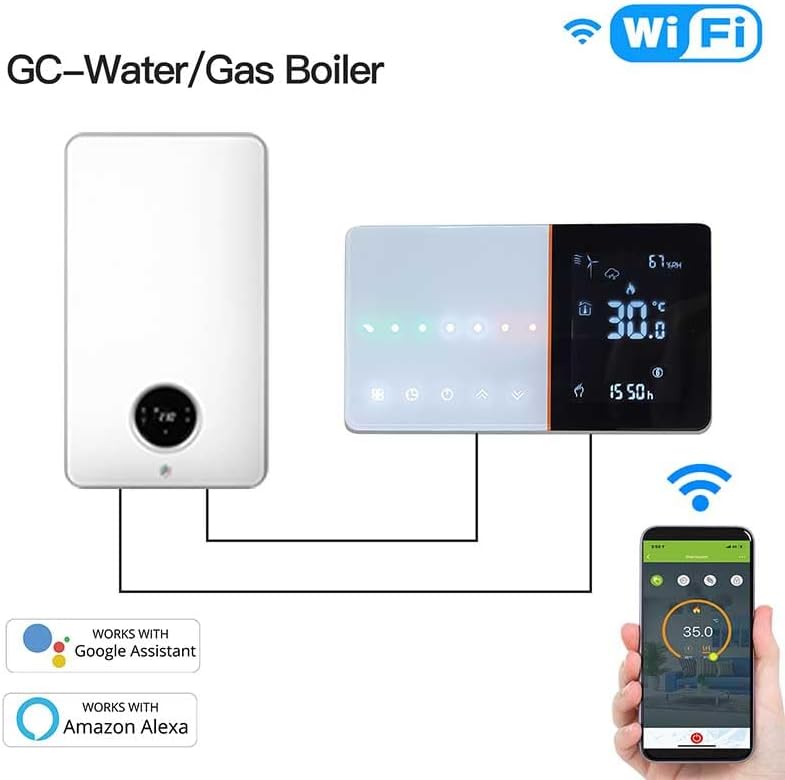
Figure 6: Connection diagram for gas boiler.
5.4 Reassembly & Power On
- മുൻവശത്തെ പാനൽ ഘടിപ്പിക്കുക: Align the top tabs of the front panel with the slots on the mounting plate, then gently press the lower part until it clicks into place.
- പവർ പുന ore സ്ഥാപിക്കുക: Turn the main electrical power back on at the circuit breaker. The thermostat should power on and be ready for operation.
6. പ്രവർത്തന നിർദ്ദേശങ്ങൾ
6.1 അടിസ്ഥാന പ്രവർത്തനം
- പവർ ഓൺ/ഓഫ്: Touch the power button (typically the third button from the left) to turn the thermostat completely on or off.
- സമയം സജ്ജമാക്കുക: Press and hold the clock button to adjust the current time.
- താപനില ക്രമീകരണം: Use the up and down arrow buttons to manually adjust the desired temperature.
- മോഡ് തിരഞ്ഞെടുക്കൽ: Briefly touch the second button (with the 9-square matrix icon) to switch between manual mode (indicated by a hand icon) and programmed automatic mode.
6.2 ആഴ്ചതോറുമുള്ള പ്രോഗ്രാമിംഗ്
The thermostat supports 5+1+1 day programming with up to 6 distinct periods per day, allowing for flexible temperature control to maximize comfort and energy savings. To modify the programming, press and hold the second button (9-square matrix icon).

ചിത്രം 7: ഉദാample of weekly programmable schedule via app.
6.3 Wi-Fi Connection (Tuya / Smart Life App)
To control your thermostat remotely, connect it to your home Wi-Fi network using the Tuya or Smart Life application.
- അപ്ലിക്കേഷൻ ഡൗൺലോഡുചെയ്യുക: Download and install the 'Tuya Smart' or 'Smart Life' app from your smartphone's app store.
- രജിസ്റ്റർ ചെയ്യുക/ലോഗിൻ ചെയ്യുക: ഒരു അക്കൗണ്ട് സൃഷ്ടിക്കുക അല്ലെങ്കിൽ നിങ്ങളുടെ നിലവിലുള്ള അക്കൗണ്ടിലേക്ക് ലോഗിൻ ചെയ്യുക.
- ഉപകരണം ചേർക്കുക: In the app, tap the '+' icon in the upper right corner to add a new device.
- ഉപകരണ തരം തിരഞ്ഞെടുക്കുക: Choose 'Small Appliance' then scroll to find 'WIFI Thermostat'.
- ആപ്പ് നിർദ്ദേശങ്ങൾ പാലിക്കുക: The app will guide you through the connection process. When prompted about a flashing LED, proceed as if it is flashing quickly. The thermostat is ready for Wi-Fi connection as soon as it is powered on.
- വൈഫൈ ആവശ്യകത: The thermostat requires a 2.4GHz വൈഫൈ നെറ്റ്വർക്ക്. It is not compatible with 5GHz networks.

Figure 8: Clear app interface display for thermostat control.
6.4 Smart Home Integration (Amazon Alexa / Google Home)
After successfully connecting your thermostat to the Tuya Smart or Smart Life app, you can integrate it with Amazon Alexa or Google Home for voice control.
- കഴിവ് പ്രവർത്തനക്ഷമമാക്കുക: Open your Amazon Alexa or Google Home app. Go to the 'Skills & Games' (Alexa) or 'Works with Google' (Google Home) section and enable the 'Tuya Smart' or 'Smart Life' skill.
- അക്കൗണ്ടുകൾ ലിങ്ക് ചെയ്യുക: Follow the prompts to link your Tuya/Smart Life account with your Alexa/Google Home account.
- ഉപകരണങ്ങൾ കണ്ടെത്തുക: Ask Alexa or Google Home to discover new devices, or initiate device discovery within their respective apps.
- വോയ്സ് കമാൻഡുകൾ: Once discovered, you can use voice commands such as:
- "Alexa, turn on [Thermostat Name]"
- "Google, set [Thermostat Name] to 21 degrees"
- "Alexa, what is the temperature of [Thermostat Name]?"
7. പരിപാലനം
- വൃത്തിയാക്കൽ: Wipe the thermostat's screen and body with a soft, dry cloth. Do not use abrasive cleaners or solvents.
- ഉപയോക്തൃ-സേവനയോഗ്യമായ ഭാഗങ്ങൾ ഇല്ല: The thermostat contains no user-serviceable parts. Do not attempt to open the unit.
8. പ്രശ്നപരിഹാരം
- Thermostat does not power on: Ensure the 220V power supply is connected correctly and the circuit breaker is on. Recheck wiring connections (L, N).
- തപീകരണ സംവിധാനം പ്രതികരിക്കുന്നില്ല: Verify wiring to COM and NO/NC terminals. Ensure the thermostat is in heating mode and the set temperature is above the current room temperature.
- വൈഫൈ കണക്ഷൻ പരാജയപ്പെടുന്നു: Ensure your router is broadcasting a 2.4GHz Wi-Fi signal. The thermostat is not compatible with 5GHz networks. If using a Vodafone modem, you may need to open specific ports on your router for connectivity.
- ആപ്പ് നിയന്ത്രണം പ്രവർത്തിക്കുന്നില്ല: Check your Wi-Fi connection. Ensure the thermostat is online in the Tuya/Smart Life app.
- Alexa/Google Home not responding: Confirm that the Tuya/Smart Life skill is enabled and accounts are linked correctly in the Alexa/Google Home app. Ensure device discovery has been run.
- Settings not saving after power cut: The thermostat is designed to retain personalized settings in case of power failure. If settings are lost, ensure the unit is receiving stable power and contact support if the issue persists.
9 സ്പെസിഫിക്കേഷനുകൾ
| ഫീച്ചർ | സ്പെസിഫിക്കേഷൻ |
|---|---|
| ബ്രാൻഡ് | LEDLUX |
| മോഡൽ നമ്പർ | LL0253B |
| നിറം | കറുപ്പ് |
| അളവുകൾ (L x W x H) | 12.9 x 8.9 x 2.4 സെ.മീ |
| വാല്യംtage | 220 വോൾട്ട് |
| മെറ്റീരിയൽ | അക്രിലോണിട്രൈൽ ബ്യൂട്ടാഡീൻ സ്റ്റൈറൈൻ (എബിഎസ്) |
| കണക്റ്റിവിറ്റി ടെക്നോളജി | വൈഫൈ (2.4GHz മാത്രം) |
| താപനില നിയന്ത്രണ തരം | പ്രോഗ്രാമബിൾ |
| കൺട്രോളർ തരം | Google അസിസ്റ്റന്റ്, ആമസോൺ അലക്സ |
| പവർ ഉറവിടം | വയർഡ് ഇലക്ട്രിക് |
10. വാറണ്ടിയും പിന്തുണയും
വാറന്റി വിവരങ്ങൾക്കും സാങ്കേതിക പിന്തുണയ്ക്കും, ദയവായി ഉൽപ്പന്ന പാക്കേജിംഗ് പരിശോധിക്കുകയോ നിങ്ങളുടെ റീട്ടെയിലറെ ബന്ധപ്പെടുകയോ ചെയ്യുക. വാങ്ങിയതിന്റെ തെളിവായി നിങ്ങളുടെ വാങ്ങൽ രസീത് സൂക്ഷിക്കുക.


