ആമുഖം
Thank you for choosing the Baseus Hub USB-C 12in1 Metal Gleam Series. This versatile docking station expands the connectivity of your USB-C enabled device, providing a wide range of ports for various peripherals and functions. This manual provides detailed instructions for setup, operation, maintenance, and troubleshooting to ensure optimal performance and longevity of your device.
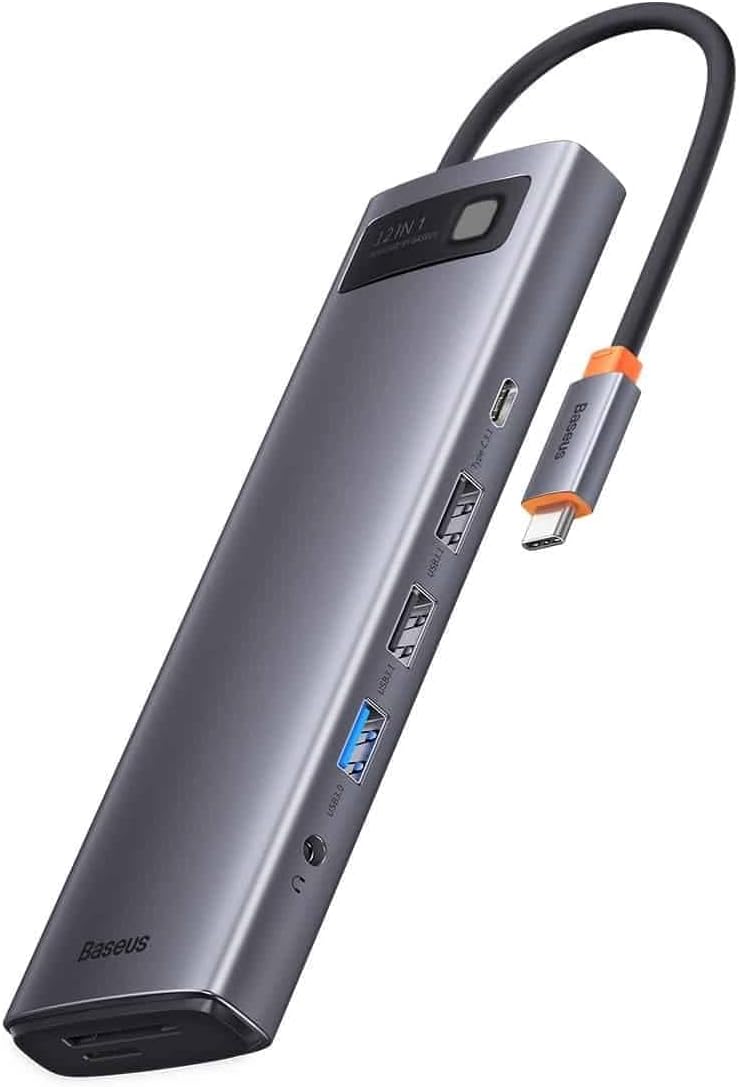
Image: The Baseus Hub USB-C 12in1 Metal Gleam Series, showcasing its sleek design and multiple ports.
ഉൽപ്പന്നം കഴിഞ്ഞുview
The Baseus 12in1 Hub is designed to streamline your workspace by offering extensive connectivity options through a single USB-C port. It features a durable metal gleam finish and compact design.
പ്രധാന സവിശേഷതകൾ:
- Multiple USB ports (USB 3.0, USB 2.0, USB Type-C) for data transfer and peripheral connection.
- HDMI output for high-definition video display.
- Ethernet port for stable wired network connection.
- SD and Micro SD card readers for memory expansion.
- Audio jack for headphones or speakers.
- Power Delivery (PD) port for charging your host device.

ചിത്രം: വശം view of the Baseus Hub, illustrating the arrangement of its various ports.
സജ്ജീകരണ നിർദ്ദേശങ്ങൾ
- Connect the Hub to your Device: Plug the integrated USB-C cable of the Baseus Hub into the USB-C port of your laptop, tablet, or smartphone. Ensure the connection is secure.
- പവർ കണക്ഷൻ (ഓപ്ഷണൽ എന്നാൽ ശുപാർശ ചെയ്യുന്നത്): If your host device requires charging or if you are connecting power-intensive peripherals, connect a USB-C power adapter (not included) to the Power Delivery (PD) port on the hub. This will charge your host device and provide stable power to connected accessories.
- പെരിഫറലുകൾ ബന്ധിപ്പിക്കുക:
- USB ഉപകരണങ്ങൾ: Connect USB flash drives, external hard drives, keyboards, mice, or other USB peripherals to the available USB 3.0 or USB 2.0 ports.
- ഡിസ്പ്ലേ: Connect an HDMI cable from the hub's HDMI port to your monitor or TV for video output.
- നെറ്റ്വർക്ക്: വയർഡ് ഇന്റർനെറ്റ് കണക്ഷനായി ഒരു ഇതർനെറ്റ് കേബിൾ RJ45 പോർട്ടിലേക്ക് ബന്ധിപ്പിക്കുക.
- മെമ്മറി കാർഡുകൾ: Insert SD or Micro SD cards into the respective slots.
- ഓഡിയോ: നിങ്ങളുടെ ഹെഡ്ഫോണുകളോ സ്പീക്കറുകളോ 3.5mm ഓഡിയോ ജാക്കിലേക്ക് പ്ലഗ് ചെയ്യുക.
- ഡ്രൈവർ ഇൻസ്റ്റാളേഷൻ: The Baseus Hub is typically plug-and-play and does not require additional drivers for most operating systems. If prompted, follow on-screen instructions for any necessary driver installations.
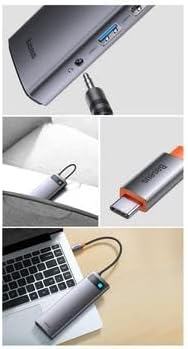
Image: The Baseus Hub connected to a laptop, demonstrating a typical setup.
പ്രവർത്തന നിർദ്ദേശങ്ങൾ
USB പോർട്ടുകൾ ഉപയോഗിക്കുന്നത്:
Connect your USB devices to the available USB 3.0 (blue interior) or USB 2.0 ports. USB 3.0 ports offer higher data transfer speeds (up to 5Gbps) and are backward compatible with USB 2.0 devices. USB 2.0 ports are suitable for keyboards, mice, and other standard peripherals.
HDMI വീഡിയോ ഔട്ട്പുട്ട്:
The HDMI port supports video output to an external display. Connect an HDMI cable from the hub to your monitor or TV. Your operating system should automatically detect the external display. You can configure display settings (mirror, extend, primary display) through your device's display settings.
ഇഥർനെറ്റ് കണക്ഷൻ:
For a stable and fast internet connection, plug an Ethernet cable into the RJ45 port on the hub. Your device will typically recognize the wired connection automatically. Check your network settings if a connection is not established.
SD/Micro SD കാർഡ് റീഡറുകൾ:
Insert your SD or Micro SD card into the corresponding slot. The card will appear as a removable drive on your computer, allowing you to access and transfer files. Do not force cards into the slots; ensure correct orientation.
ഓഡിയോ ഔട്ട്പുട്ട്:
Connect your 3.5mm headphones or speakers to the audio jack. Your device's audio output should automatically switch to the connected device. You may need to select the hub as the audio output device in your system's sound settings.
USB-C പവർ ഡെലിവറി (PD):
The USB-C PD port allows you to charge your host device (laptop, tablet) while using the hub. Connect your original USB-C power adapter to this port. The hub will pass through power to your device and power its own functions and connected peripherals.
മെയിൻ്റനൻസ്
- വൃത്തിയാക്കൽ: Use a soft, dry cloth to clean the surface of the hub. Avoid using liquid cleaners, aerosols, or harsh chemicals, as they may damage the finish or internal components.
- സംഭരണം: ഉപയോഗത്തിലില്ലാത്തപ്പോൾ, നേരിട്ടുള്ള സൂര്യപ്രകാശത്തിൽ നിന്നും കടുത്ത താപനിലയിൽ നിന്നും മാറി തണുത്തതും വരണ്ടതുമായ സ്ഥലത്ത് ഹബ് സൂക്ഷിക്കുക.
- കൈകാര്യം ചെയ്യൽ: ഹബ് താഴെയിടുകയോ ശക്തമായ ആഘാതങ്ങൾക്ക് വിധേയമാക്കുകയോ ചെയ്യുന്നത് ഒഴിവാക്കുക. സംയോജിത USB-C കേബിൾ അമിതമായി വളയ്ക്കുകയോ വളച്ചൊടിക്കുകയോ ചെയ്യരുത്.
- വെൻ്റിലേഷൻ: Ensure the hub has adequate ventilation during operation to prevent overheating. Do not cover it with cloths or place it in enclosed spaces.
ട്രബിൾഷൂട്ടിംഗ്
- No display output via HDMI:
- Ensure the HDMI cable is securely connected to both the hub and the display. Check your device's display settings to confirm the external monitor is detected and configured correctly. Try a different HDMI cable or monitor if possible.
- USB devices are not recognized:
- Ensure the hub is securely connected to your host device. Try connecting the USB device to a different port on the hub. If using a high-power USB device (e.g., external hard drive), ensure the hub is connected to a power source via its PD port. Restart your host device.
- കുറഞ്ഞ ഡാറ്റാ കൈമാറ്റ വേഗത:
- Ensure you are using a USB 3.0 port for USB 3.0 devices. Some older USB-C ports on host devices may not support full USB 3.0 speeds. Ensure no other high-bandwidth operations are running simultaneously.
- Hub or connected devices are overheating:
- Disconnect all devices and the power source. Allow the hub to cool down. Ensure proper ventilation around the hub. If the issue persists, reduce the number of connected power-intensive devices.
- No internet connection via Ethernet:
- Verify the Ethernet cable is properly connected to both the hub and your router/modem. Check your device's network settings to ensure the wired connection is enabled and configured correctly. Try a different Ethernet cable.
സ്പെസിഫിക്കേഷനുകൾ
| ബ്രാൻഡ് | ബേസിയസ് |
| മോഡൽ നമ്പർ | WKWG020213 |
| മൊത്തം USB പോർട്ടുകൾ | 12 (വിവിധ തരം) |
| ഹാർഡ്വെയർ ഇന്റർഫേസ് | HDMI, USB, USB 3.0, USB Type C, Ethernet, SD/Micro SD, Audio Jack |
| അനുയോജ്യമായ ഉപകരണങ്ങൾ | USB-C enabled laptops, tablets, smartphones, USB drives, monitors, etc. |
| ഡാറ്റ കൈമാറ്റ നിരക്ക് | Up to 48 Gigabits per second (aggregate) |
വാറൻ്റി വിവരങ്ങൾ
Baseus products are manufactured to high-quality standards. This product is covered by a limited warranty against defects in materials and workmanship. The specific terms and duration of the warranty may vary by region and retailer. Please retain your proof of purchase for warranty claims. For detailed warranty information, refer to the official Baseus webസൈറ്റ് ചെയ്യുക അല്ലെങ്കിൽ നിങ്ങളുടെ പ്രാദേശിക റീട്ടെയിലറെ ബന്ധപ്പെടുക.
പിന്തുണ
If you encounter any issues or have questions regarding your Baseus Hub USB-C 12in1 Metal Gleam Series, please refer to the troubleshooting section of this manual. For further assistance, you can:
- ഔദ്യോഗിക ബേസിയസ് സന്ദർശിക്കുക webപതിവുചോദ്യങ്ങൾക്കും പിന്തുണാ ഉറവിടങ്ങൾക്കുമുള്ള സൈറ്റ്.
- Contact Baseus customer service through their official channels.
- Reach out to the retailer from whom you purchased the product.


