1. ഉൽപ്പന്നം കഴിഞ്ഞുview
The Baseus Heyo Hidden Camera Detector is a compact and portable device designed to help protect your privacy by detecting hidden cameras. It utilizes infrared scanning and a specialized color filter to reveal the reflections of camera lenses, making them easy to spot.
പ്രധാന സവിശേഷതകൾ:
- Accurate infrared hidden camera detection.
- എളുപ്പത്തിൽ കൊണ്ടുപോകുന്നതിനായി ഒതുക്കമുള്ളതും കൊണ്ടുനടക്കാവുന്നതുമായ ഡിസൈൻ.
- Quick detection with continuous operation mode and flash mode.
- ദീർഘനേരം ഉപയോഗിക്കുന്നതിന് ദീർഘമായ ബാറ്ററി ലൈഫ്.
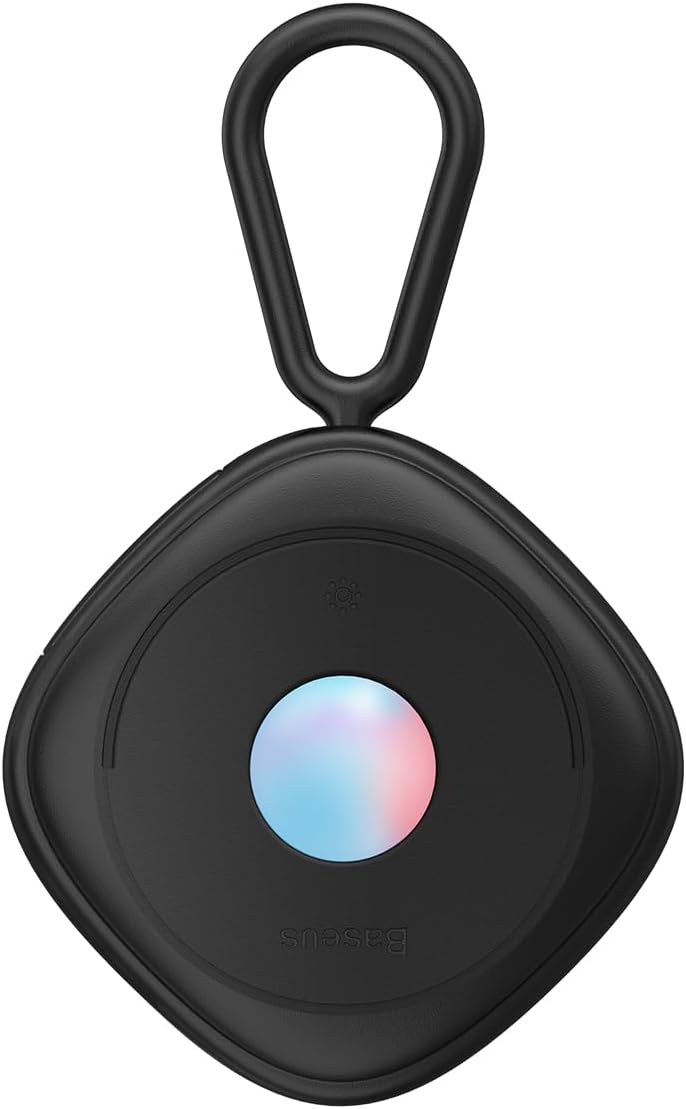
ചിത്രം 1: മുൻഭാഗം view of the Baseus Heyo Hidden Camera Detector.
2. പാക്കേജ് ഉള്ളടക്കം
അൺബോക്സിംഗ് ചെയ്യുമ്പോൾ പാക്കേജ് ഉള്ളടക്കങ്ങൾ പരിശോധിക്കുക:
- 1 x Baseus Heyo Hidden Camera Detector (Black)
- 1 x Charging Cable (USB-C, typically)
- 1 x ഉപയോക്തൃ മാനുവൽ (ഈ പ്രമാണം)
3. സജ്ജീകരണം
3.1 ഉപകരണം ചാർജ് ചെയ്യുന്നു
The device comes with a built-in Lithium-ion battery. Before first use, it is recommended to fully charge the detector.
- Locate the charging port on the device (usually USB-C).
- Connect the provided charging cable to the detector and a compatible USB power source (e.g., computer USB port, wall adapter).
- The indicator light will show charging status (e.g., red for charging, green/off for fully charged).
- പൂർണ്ണമായി ചാർജ് ചെയ്യാൻ സാധാരണയായി 1-2 മണിക്കൂർ എടുക്കും.

Figure 2: The detector connected to a charging cable, illustrating its long battery life.
3.2 പവർ ഓൺ/ഓഫ്
Press and hold the power button (refer to device diagram for location) for a few seconds to turn the device on or off.
4. പ്രവർത്തന നിർദ്ദേശങ്ങൾ
The Baseus Heyo Hidden Camera Detector offers two primary detection modes: Continuous Operation and Flash Mode.
4.1 Understanding Hidden Camera Detection
Hidden cameras often use lenses that reflect infrared light. The detector emits infrared light, and when you look through its special filter, these reflections appear as bright red dots, indicating a potential hidden camera.

Figure 3: Illustration of how the detector reveals hidden cameras by showing red reflections.
4.2 തുടർച്ചയായ പ്രവർത്തന രീതി
This mode provides a steady infrared light emission for a thorough scan.
- ഉപകരണം ഓണാക്കുക.
- Select the continuous operation mode (refer to button layout).
- Hold the detector at eye level and look through the red filter.
- Slowly scan the room, paying close attention to common hiding spots for cameras such as smoke detectors, air vents, power outlets, shower heads, books, and decorative items.
- Any hidden camera lenses will appear as bright red, reflective dots.
4.3 Flash Mode
Flash mode emits infrared light in pulses, which can make reflections more noticeable due to the blinking effect.
- ഉപകരണം ഓണാക്കുക.
- Select the flash mode (refer to button layout).
- Hold the detector at eye level and look through the red filter.
- Scan the room slowly, observing for blinking red dots. This mode can be particularly effective for quickly identifying reflections.

Figure 4: The detector has a 5-meter detection radius, allowing for effective room scanning.
4.4 Effective Scanning Tips
- Scan from different angles and heights.
- Pay attention to objects that seem out of place or have small holes.
- Common hiding spots include: smoke alarms, air conditioner vents, power outlets, light fixtures, shower heads, clocks, picture frames, and soft furnishings like pillows.

Figure 5: The detector is effective against various types of hidden cameras found in common objects.
5. പരിപാലനം
5.1 വൃത്തിയാക്കൽ
To ensure optimal performance and longevity of your detector:
- മൃദുവായ, ഉണങ്ങിയ തുണി ഉപയോഗിച്ച് ഉപകരണം തുടയ്ക്കുക.
- ഉരച്ചിലുകളുള്ള ക്ലീനറുകളോ ലായകങ്ങളോ ഉപയോഗിക്കരുത്.
- Keep the infrared lens and viewing filter clean and free of dust or smudges.
5.2 സംഭരണം
Store the detector in a cool, dry place away from direct sunlight and extreme temperatures. Keep it away from liquids and corrosive materials.
5.3 ബാറ്ററി കെയർ
ബാറ്ററി ലൈഫ് വർദ്ധിപ്പിക്കാൻ:
- ബാറ്ററി ഇടയ്ക്കിടെ പൂർണ്ണമായും ഡിസ്ചാർജ് ചെയ്യുന്നത് ഒഴിവാക്കുക.
- ബാറ്ററിയുടെ ആരോഗ്യം നിലനിർത്താൻ, പതിവായി ഉപയോഗിക്കുന്നില്ലെങ്കിലും, ഉപകരണം പതിവായി ചാർജ് ചെയ്യുക.
6. പ്രശ്നപരിഹാരം
| പ്രശ്നം | സാധ്യമായ കാരണം | പരിഹാരം |
|---|---|---|
| ഉപകരണം ഓണാക്കില്ല. | കുറഞ്ഞ ബാറ്ററി. | ഉപകരണം പൂർണ്ണമായും ചാർജ് ചെയ്യുക. |
| Cannot detect hidden cameras. | Incorrect usage; lens/filter dirty; camera not present. | Ensure you are looking through the red filter. Clean the lens and filter. Scan slowly and thoroughly. Try both continuous and flash modes. |
| ചെറിയ ബാറ്ററി ലൈഫ്. | ബാറ്ററി പൂർണ്ണമായും ചാർജ് ചെയ്തിട്ടില്ല; കാലഹരണപ്പെട്ട ബാറ്ററി. | Ensure full charge before use. If battery life significantly degrades, contact customer support. |
7 സ്പെസിഫിക്കേഷനുകൾ
| ഫീച്ചർ | വിശദാംശങ്ങൾ |
|---|---|
| ബ്രാൻഡ് | ബേസിയസ് |
| മോഡലിൻ്റെ പേര് | ബേസിയസ് ഹേയോ |
| ഇനം മോഡൽ നമ്പർ | എഫ്എംഎച്ച്വൈ000001 |
| പ്രകാശ സ്രോതസ്സ് തരം | ഇൻഫ്രാറെഡ് |
| ശക്തി | 1W |
| ഇനത്തിന്റെ അളവുകൾ (L x W x H) | 10 x 4 x 5 സെ.മീ |
| ഇനത്തിൻ്റെ ഭാരം | 210 ഗ്രാം |
| ബാറ്ററി തരം | 1 ലിഥിയം അയോൺ ബാറ്ററി (ഉൾപ്പെടുത്തിയിരിക്കുന്നു) |
| ശുപാർശ ചെയ്യുന്ന ഉപയോഗങ്ങൾ | Anti-spy detection |
| നിറം | കറുപ്പ് |
| ഉൾപ്പെടുത്തിയ ഘടകങ്ങൾ | 1 x Baseus Heyo Hidden Camera Detector, Black |
8. വാറൻ്റിയും പിന്തുണയും
വാറന്റി വിവരങ്ങൾക്കും ഉപഭോക്തൃ പിന്തുണയ്ക്കും, ദയവായി നിങ്ങളുടെ ഉൽപ്പന്നത്തിനൊപ്പം ഉൾപ്പെടുത്തിയിരിക്കുന്ന വാറന്റി കാർഡ് പരിശോധിക്കുക അല്ലെങ്കിൽ ഔദ്യോഗിക ബേസിയസ് സന്ദർശിക്കുക. webസൈറ്റ്. വാറന്റി ക്ലെയിമുകൾക്കായി നിങ്ങളുടെ വാങ്ങലിന്റെ തെളിവ് സൂക്ഷിക്കുക.
കുറിപ്പ്: നിർദ്ദിഷ്ട വാറന്റി നിബന്ധനകളും വ്യവസ്ഥകളും പ്രദേശത്തിനനുസരിച്ച് വ്യത്യാസപ്പെടാം.


