ആമുഖം
വാങ്ങിയതിന് നന്ദി.asing the GRAUGEAR M.2 NVMe/SATA SSD Docking Station. This device is designed to provide a high-speed, tool-free solution for accessing M.2 NVMe and SATA SSDs. Featuring a built-in cooling fan and USB 3.2 Gen 2 (10Gbps) connectivity, it ensures stable and efficient data transfer while maintaining optimal operating temperatures for your SSDs. This manual provides detailed instructions for setup, operation, maintenance, and troubleshooting.

Figure 1: GRAUGEAR M.2 NVMe/SATA SSD Docking Station and accessories.
സുരക്ഷാ വിവരങ്ങൾ
- ഉപകരണം വെള്ളം, തീ, ഉയർന്ന താപനില എന്നിവയിൽ നിന്ന് അകറ്റി നിർത്തുക.
- ഉപകരണം ഡിസ്അസംബ്ലിംഗ് ചെയ്യാനോ പരിഷ്ക്കരിക്കാനോ ശ്രമിക്കരുത്.
- പ്രവർത്തന സമയത്ത് ഉപകരണത്തിന് ചുറ്റും ശരിയായ വായുസഞ്ചാരം ഉറപ്പാക്കുക.
- നൽകിയിരിക്കുന്ന കേബിളുകളും അനുബന്ധ ഉപകരണങ്ങളും മാത്രം ഉപയോഗിക്കുക.
- ശക്തമായ ആഘാതങ്ങൾക്ക് ഉപകരണം ഇടുകയോ ഇടുകയോ ചെയ്യുന്നത് ഒഴിവാക്കുക.
- Unplug the device from the power source when not in use or during cleaning.
പാക്കേജ് ഉള്ളടക്കം
എല്ലാ ഇനങ്ങളും ഉണ്ടെന്ന് ഉറപ്പാക്കാൻ പാക്കേജ് ഉള്ളടക്കങ്ങൾ പരിശോധിക്കുക:
- GRAUGEAR M.2 SSD Docking Station
- USB Type-A to Type-C Cable (x1)
- യുഎസ്ബി ടൈപ്പ്-സി മുതൽ ടൈപ്പ്-സി കേബിൾ വരെ (x1)
- Thermal Pad (x1)
- Aluminum Heatsink (x1)
- SSD Fixing Rubber Pins (x2)
- ഉപയോക്തൃ മാനുവൽ
- ഗ്യാരണ്ടി കാർഡ്
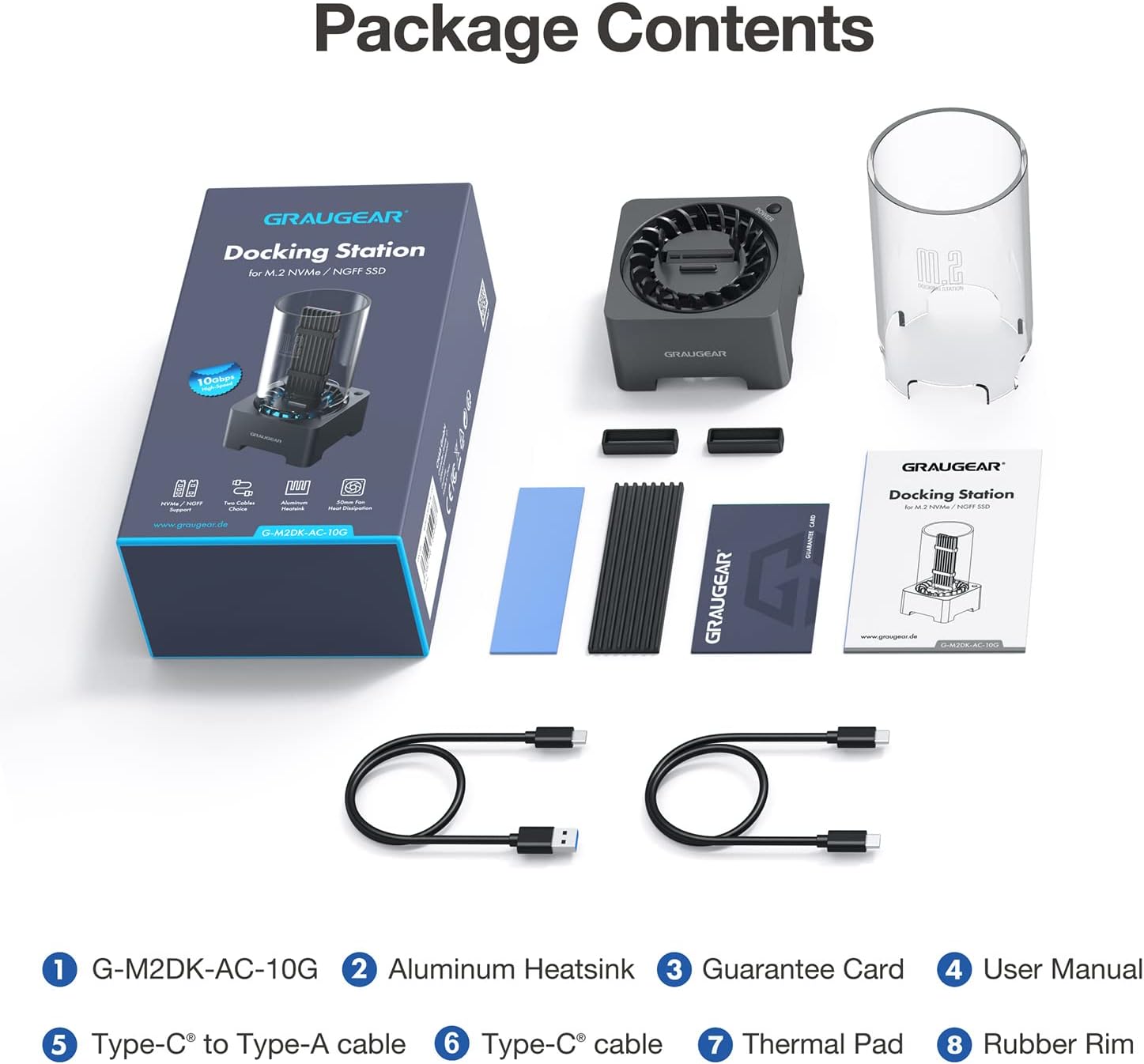
ചിത്രം 2: ഉൽപ്പന്ന പാക്കേജിൽ ഉൾപ്പെടുത്തിയിരിക്കുന്ന എല്ലാ ഇനങ്ങളും.
സജ്ജമാക്കുക
1. SSD Compatibility
This docking station supports both M.2 NVMe and M.2 SATA SSDs. It is compatible with various M.2 SSD sizes: 2230, 2242, 2260, 2280, and 22110. It also accommodates M.2 SSDs with pre-installed heatsinks.
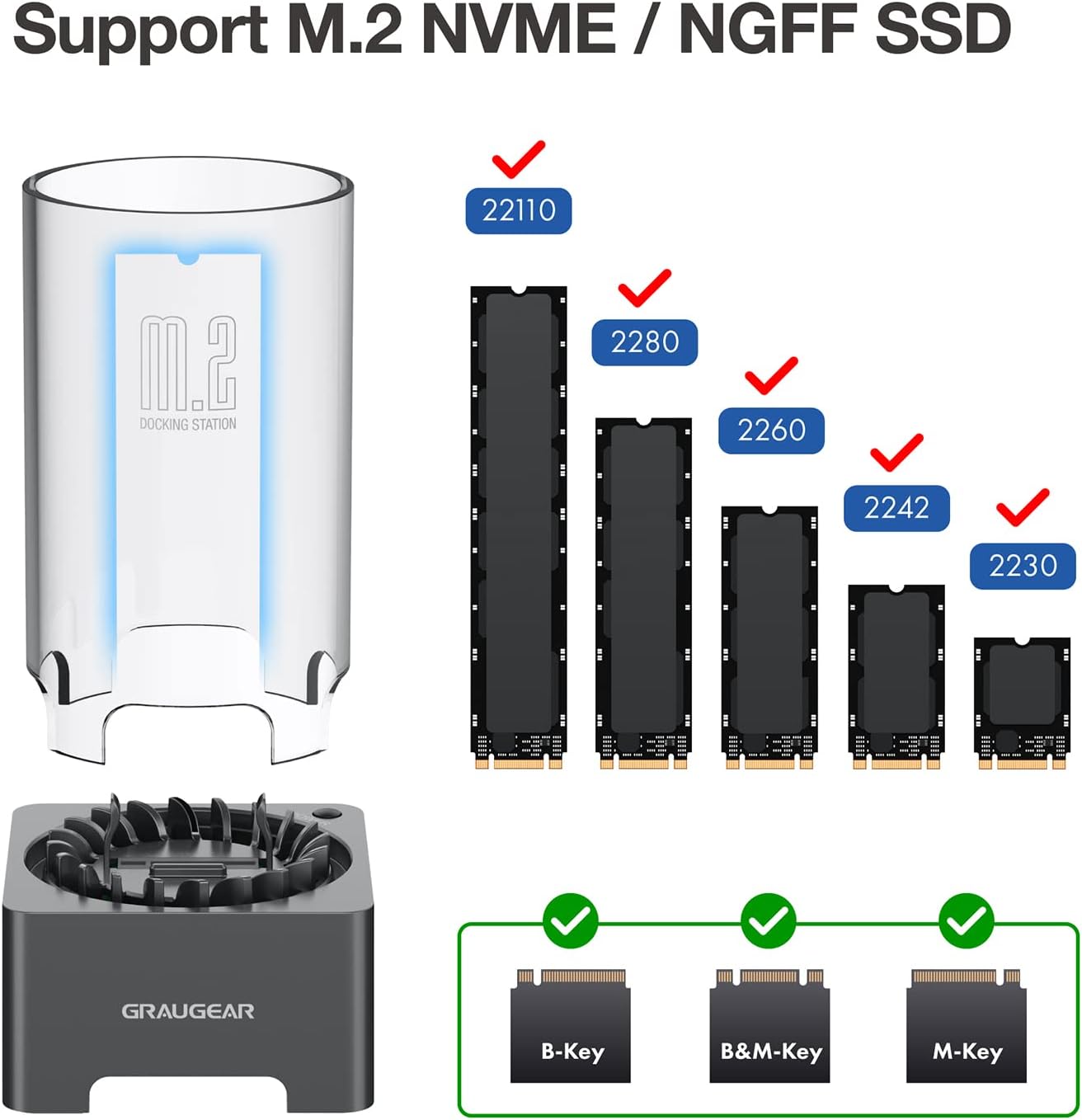
Figure 3: Supported M.2 SSD form factors and key types.

Figure 4: The docking station is designed to accommodate M.2 SSDs with various integrated heatsinks.
2. SSD Installation (Tool-Free)
The GRAUGEAR docking station features a tool-free design for easy SSD installation.
- If your M.2 SSD does not have a heatsink, you may install the provided thermal pad and aluminum heatsink onto your M.2 SSD.
- Insert the M.2 SSD into the slot on the docking station. Ensure the SSD is fully seated and secured by the internal fixing bracket. The SSD fixing rubber pins help stabilize the SSD.
- Place the transparent protective tube over the SSD and onto the docking station base.
- Connect the docking station to your computer using one of the provided USB cables (Type-A to Type-C or Type-C to Type-C).
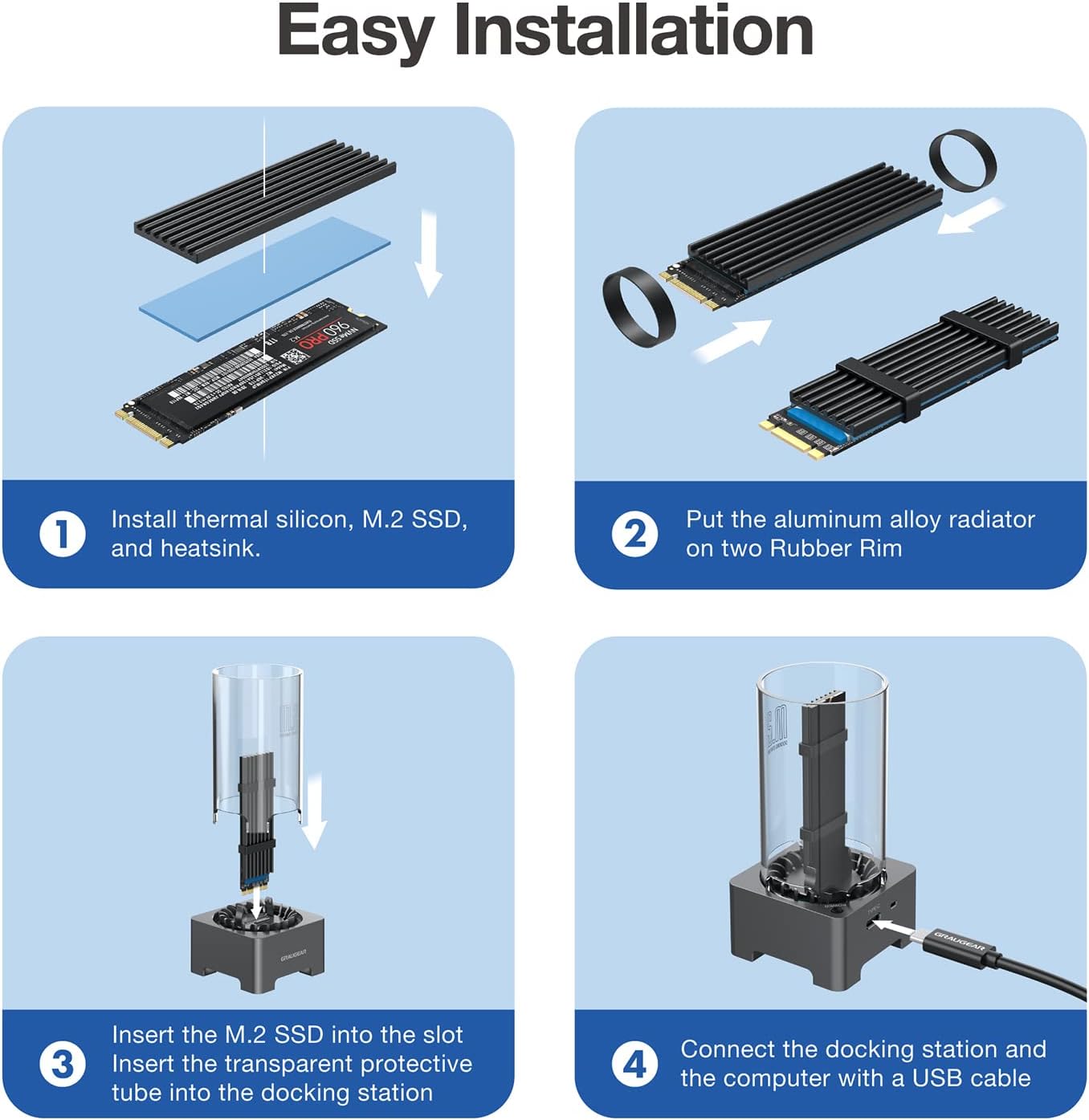
Figure 5: Easy installation steps for the M.2 SSD.
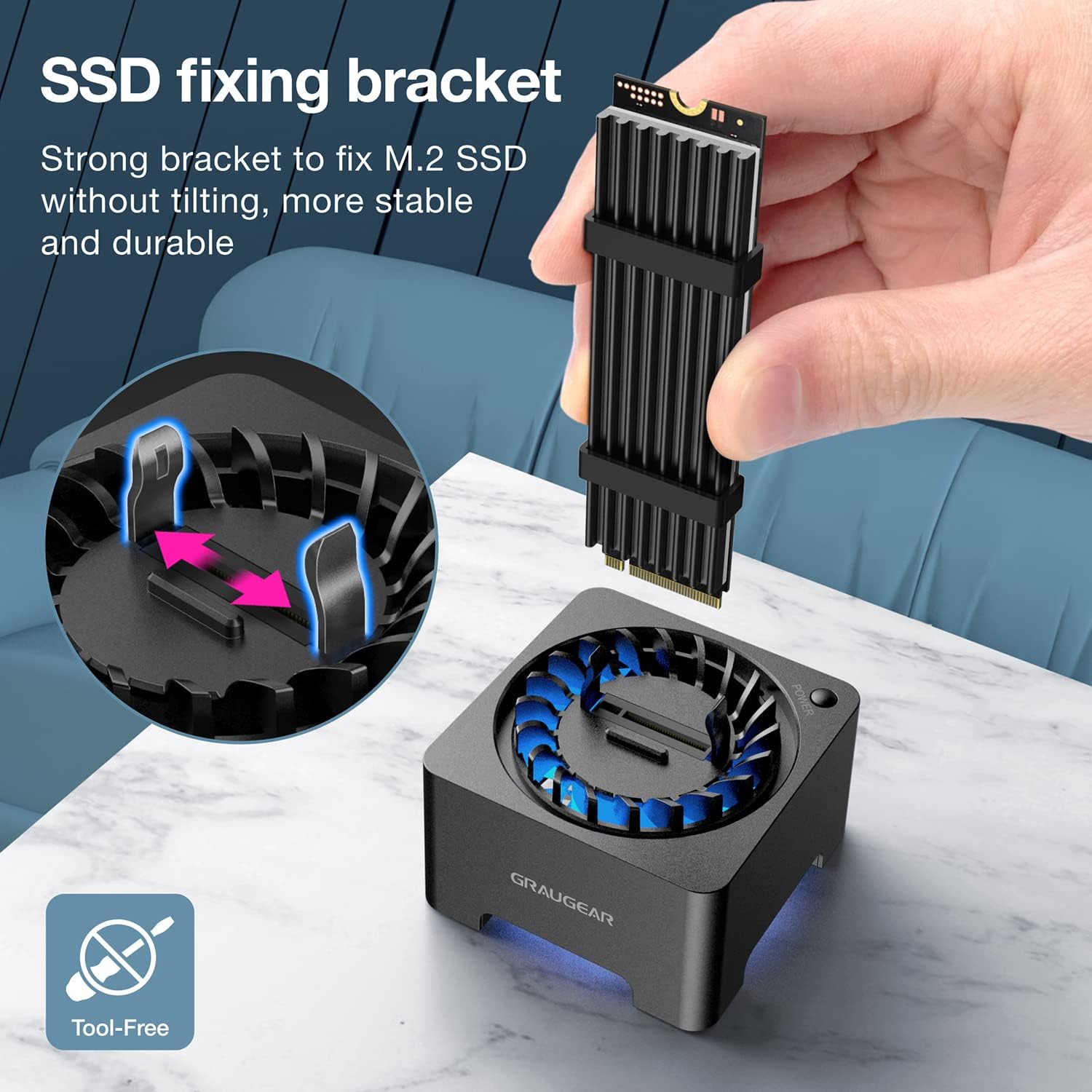
Figure 6: The internal SSD fixing bracket ensures stability.
കുറിപ്പ്: If you are using a brand new SSD, it may need to be initialized and partitioned before it can be recognized by your operating system. Please refer to your operating system's documentation for instructions on disk management.
പ്രവർത്തന നിർദ്ദേശങ്ങൾ
1. പവർ ഓൺ/ഓഫ്
The docking station features a manual power switch. Press the power button located on the side of the unit to turn it on. The blue LED indicator will illuminate, and the cooling fan will activate. To turn off the device, press the power button again.
2. ഡാറ്റ കൈമാറ്റം
The docking station supports USB 3.2 Gen 2, offering data transfer speeds of up to 10Gbps. For optimal performance, connect the device to a USB 3.2 Gen 2 compatible port on your computer. When using a SATA protocol SSD, the maximum theoretical transfer speed is 6Gbps.

ചിത്രം 7: അതിവേഗ ഡാറ്റാ കൈമാറ്റ ശേഷികൾ.
3. കൂളിംഗ് ഫാൻ പ്രവർത്തനം
The built-in 50mm cooling fan automatically adjusts its speed to optimize cooling performance and minimize noise. This active cooling system helps reduce SSD temperatures by up to 60%, preventing thermal throttling and extending the lifespan of your M.2 SSD.

Figure 8: The integrated cooling fan actively dissipates heat from the SSD.
മെയിൻ്റനൻസ്
- To clean the device, gently wipe the exterior with a soft, dry cloth.
- ലിക്വിഡ് ക്ലീനറുകളോ ഉരച്ചിലുകളുള്ള വസ്തുക്കളോ ഉപയോഗിക്കുന്നത് ഒഴിവാക്കുക.
- Periodically check the fan area for dust accumulation and clean it carefully with compressed air if necessary to maintain optimal cooling performance.
- Ensure the transparent protective tube is free of dust to allow for proper airflow and visibility.
ട്രബിൾഷൂട്ടിംഗ്
| പ്രശ്നം | സാധ്യമായ കാരണം | പരിഹാരം |
|---|---|---|
| SSD not recognized by computer. |
|
|
| മന്ദഗതിയിലുള്ള ഡാറ്റ കൈമാറ്റ വേഗത. |
|
|
| Cooling fan not spinning or making unusual noise. |
|
|
| "USB surge" or power error messages. |
|
|
സ്പെസിഫിക്കേഷനുകൾ
| ഫീച്ചർ | വിവരണം |
|---|---|
| മോഡൽ നമ്പർ | G-M2DK-AC-10G |
| ബ്രാൻഡ് | ഗ്രൗഗെയർ |
| അനുയോജ്യമായ ഉപകരണങ്ങൾ | M.2 NVMe/SATA SSD (B-Key, B+M Key, M-Key) |
| പിന്തുണയ്ക്കുന്ന SSD വലുപ്പങ്ങൾ | 2230, 2242, 2260, 2280, 22110 |
| പരമാവധി സംഭരണ ശേഷി | 8 TB വരെ |
| ഡാറ്റ കൈമാറ്റ നിരക്ക് | 10Gbps വരെ (USB 3.2 Gen 2) |
| ചിപ്സെറ്റ് | Realtek RTL9210B |
| തണുപ്പിക്കൽ സംവിധാനം | Built-in 50mm automatic speed control fan |
| ഇൻ്റർഫേസ് | യുഎസ്ബി ടൈപ്പ്-സി |
| മെറ്റീരിയൽ | പ്ലാസ്റ്റിക് |
| ഉൽപ്പന്ന അളവുകൾ | 5.7 x 5.7 x 11.3 സെ.മീ (2.2 x 2.2 x 4.5 ഇഞ്ച്) |
| ഉൽപ്പന്ന ഭാരം | 10 ഗ്രാം (0.35 ഔൺസ്) |
| പിന്തുണയ്ക്കുന്ന OS | Windows, macOS, Linux, Android |
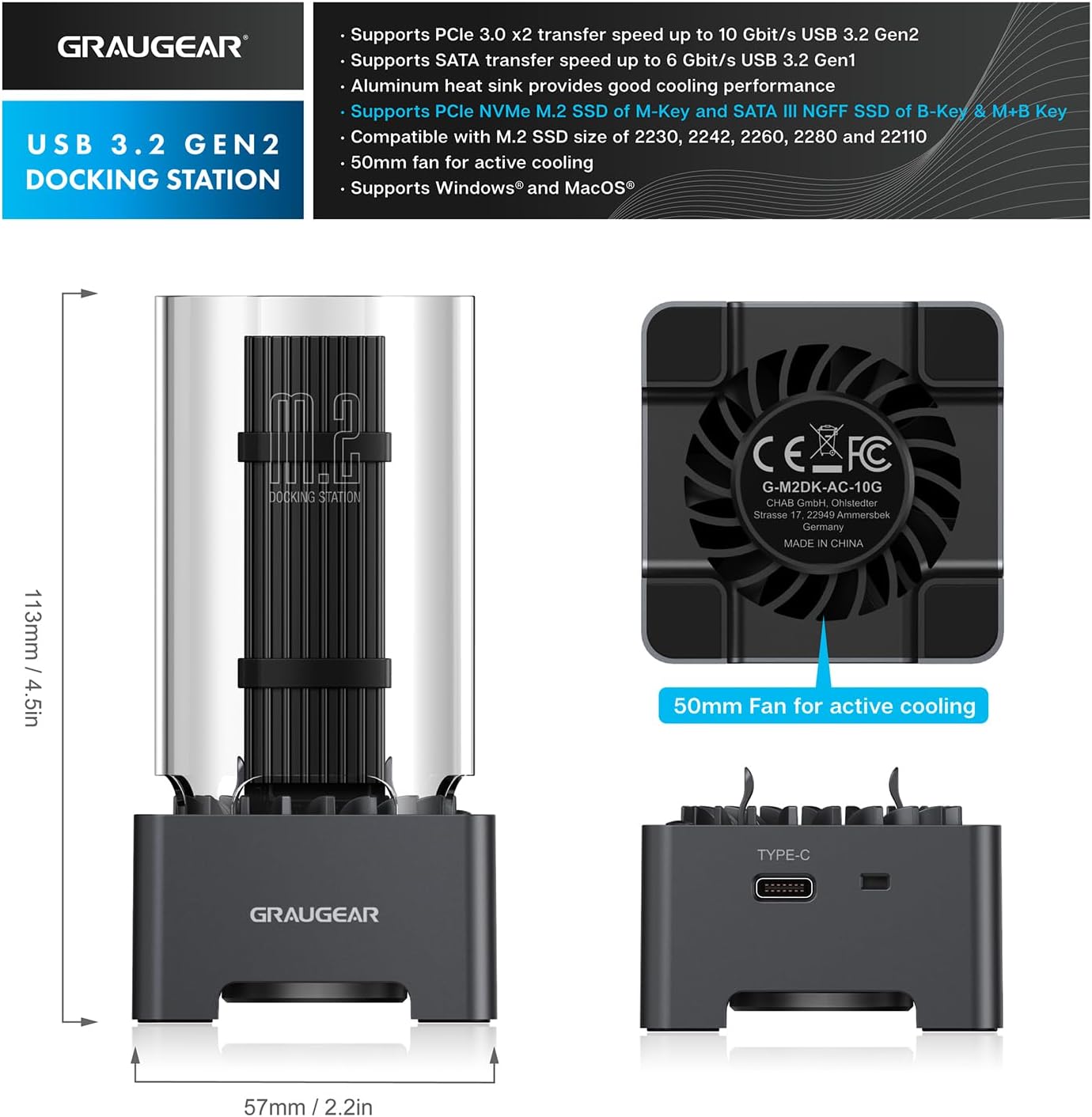
ചിത്രം 9: ഉൽപ്പന്ന അളവുകളും പ്രധാന സവിശേഷതകളും.
വാറൻ്റിയും പിന്തുണയും
GRAUGEAR products come with a standard warranty. Please refer to the included Guarantee Card for specific warranty terms and conditions.
ഉപഭോക്തൃ പിന്തുണ
If you encounter any issues or have questions regarding your GRAUGEAR M.2 SSD Docking Station, please contact our customer support team.
- For the fastest support, please visit the official GRAUGEAR webപതിവുചോദ്യങ്ങൾക്കും ബന്ധപ്പെടാനുള്ള വിവരങ്ങൾക്കുമുള്ള സൈറ്റ്.
- When contacting support, please have your product model number (G-M2DK-AC-10G) and purchase details ready.