1. ആമുഖം
This manual provides detailed instructions for the proper use and maintenance of your Obbug Bluetooth Headset, Model YYK-530. Please read this manual thoroughly before using the product to ensure optimal performance and longevity.
2. പാക്കേജ് ഉള്ളടക്കം
നിങ്ങളുടെ പാക്കേജിൽ എല്ലാ ഇനങ്ങളും ഉണ്ടെന്ന് ഉറപ്പാക്കുക:
- 1 x Obbug Bluetooth Headset
- 1 x ചാർജിംഗ് കേസ്
- 1 x യുഎസ്ബി ടൈപ്പ്-സി ചാർജിംഗ് കേബിൾ
- 1 x Ear Hat (replacement ear tip)
- 1 x ഉപയോക്തൃ മാനുവൽ
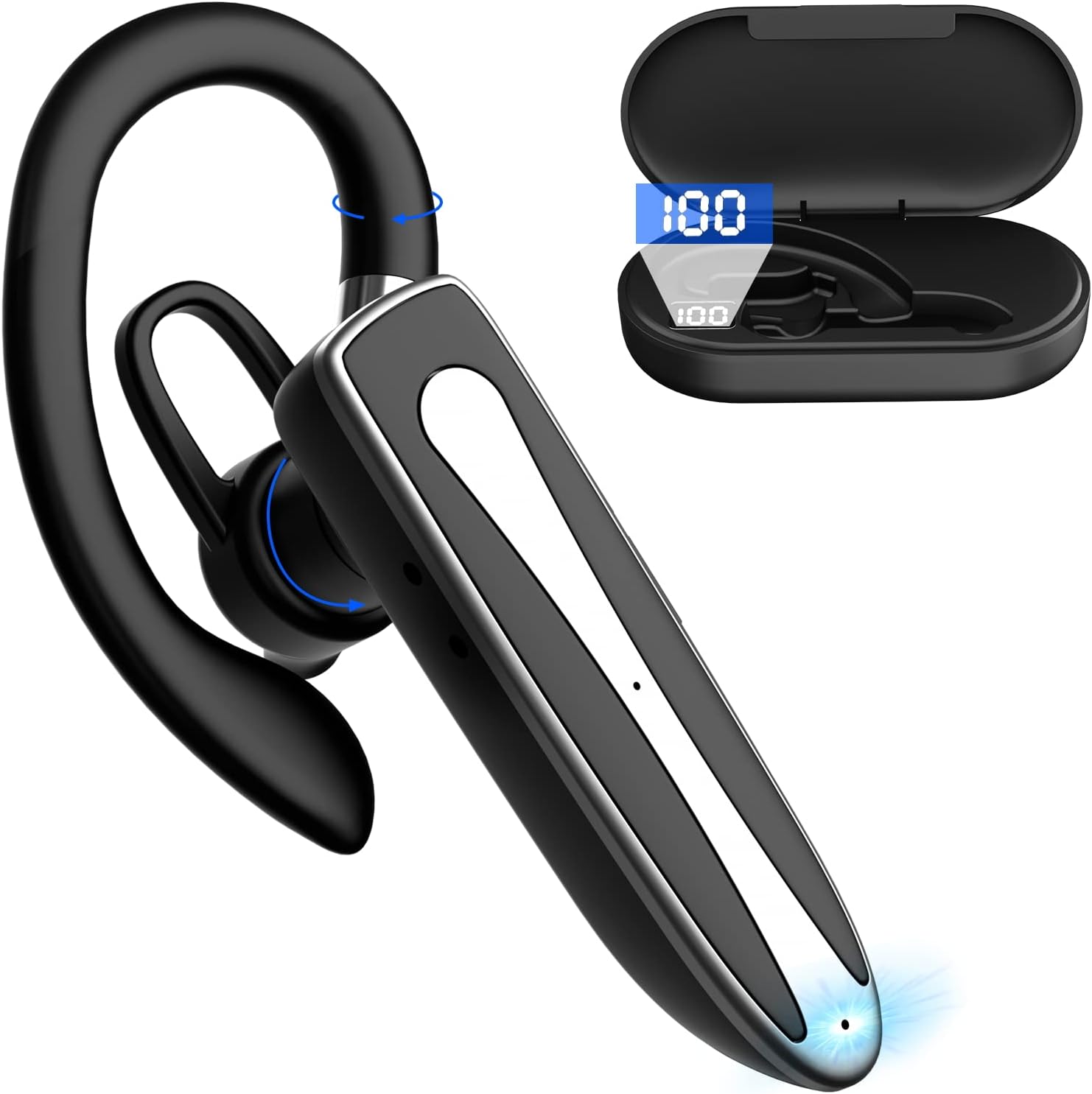
Image 2.1: Obbug Bluetooth Headset YYK-530 and its charging case.
3. ഉൽപ്പന്ന സവിശേഷതകൾ
- ബ്ലൂടൂത്ത് 5.1 സാങ്കേതികവിദ്യ: Provides stable connection and clear audio.
- വിപുലീകരിച്ച ബാറ്ററി ലൈഫ്: Up to 80 hours of continuous use with the charging case.
- സൗകര്യപ്രദവും ക്രമീകരിക്കാവുന്നതുമായ ഡിസൈൻ: Flexible earhook and rotatable boom mic for left or right ear wear.
- CVC8.0 Noise Reduction: പശ്ചാത്തല ശബ്ദം കുറച്ചുകൊണ്ട് കോൾ വ്യക്തത വർദ്ധിപ്പിക്കുന്നു.
- വിശാലമായ അനുയോജ്യത: Connects with most Bluetooth-enabled devices including smartphones, tablets, and computers.
- ഹാൻഡ്സ് ഫ്രീ കോളിംഗ്: Integrated microphone for convenient communication.

Image 3.1: Illustration of CVC8.0 Noise Reduction for clear audio.
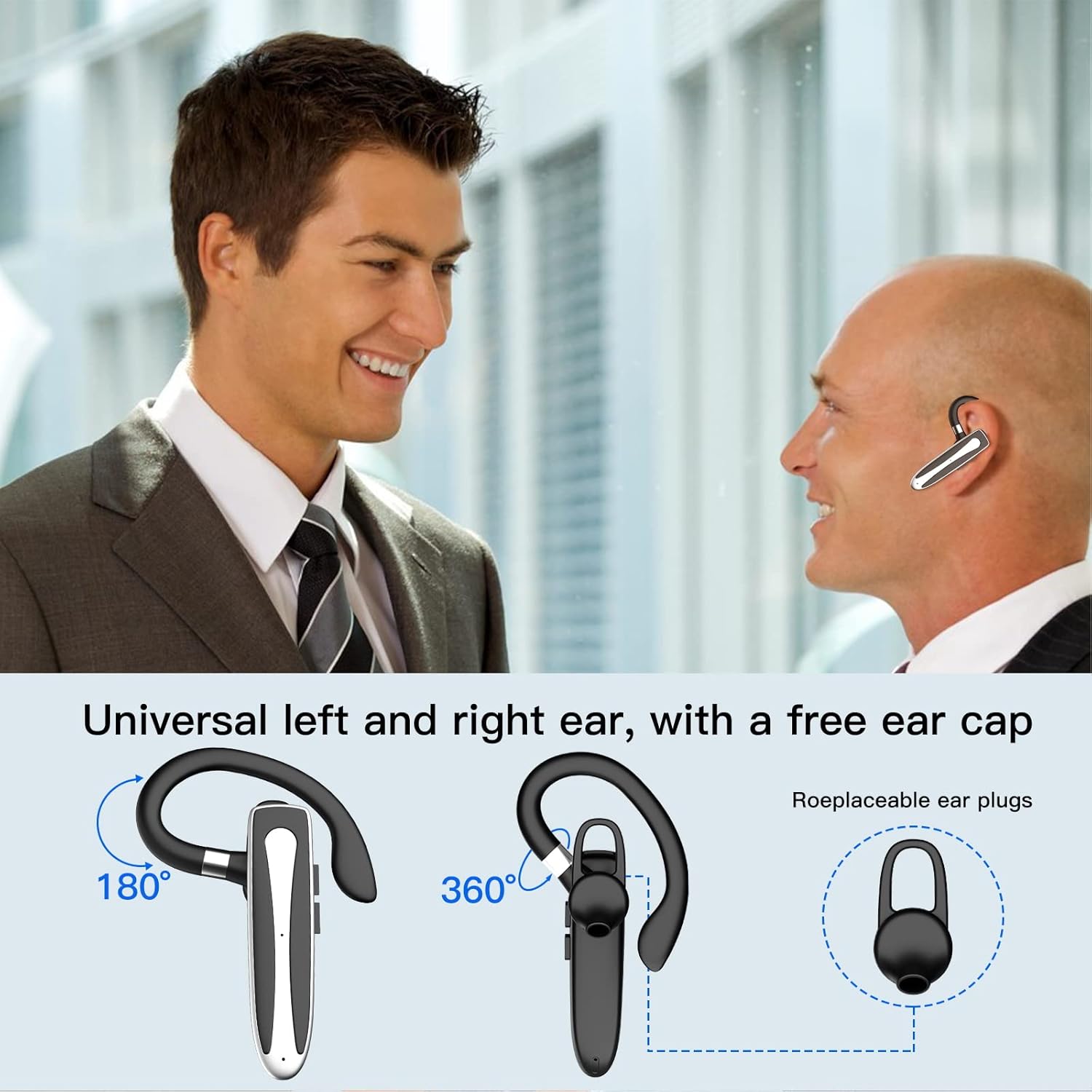
Image 3.2: Diagram illustrating the dual microphone noise reduction processing.
4. സജ്ജീകരണം
4.1 ഹെഡ്സെറ്റും കേസും ചാർജ് ചെയ്യുന്നു
ആദ്യമായി ഉപയോഗിക്കുന്നതിന് മുമ്പ്, ഹെഡ്സെറ്റും അതിന്റെ ചാർജിംഗ് കേസും പൂർണ്ണമായും ചാർജ് ചെയ്യുക.
- Place the headset into the charging case.
- യുഎസ്ബി ടൈപ്പ്-സി കേബിൾ കേസിലെ ചാർജിംഗ് പോർട്ടിലേക്കും ഒരു പവർ സ്രോതസ്സിലേക്കും (ഉദാ: യുഎസ്ബി വാൾ അഡാപ്റ്റർ, കമ്പ്യൂട്ടർ യുഎസ്ബി പോർട്ട്) ബന്ധിപ്പിക്കുക.
- The charging indicator on the case will show charging status. A full charge typically takes 1.5 hours.

Image 4.1: The Type-C charging port on the charging case.

Image 4.2: Battery life and charging time information for the headset and case.
4.2 ഒരു ഉപകരണവുമായി ജോടിയാക്കൽ
The headset uses Bluetooth 5.1 for wireless connection.
- പവർ ഓൺ: Take the headset out of the charging case, or press and hold the Multi-function Button until the indicator light flashes blue and red, indicating pairing mode.
- ബ്ലൂടൂത്ത് സജീവമാക്കുക: നിങ്ങളുടെ ഉപകരണത്തിൽ (സ്മാർട്ട്ഫോൺ, ടാബ്ലെറ്റ് മുതലായവ), ബ്ലൂടൂത്ത് ക്രമീകരണങ്ങളിലേക്ക് പോയി ബ്ലൂടൂത്ത് ഓണാക്കുക.
- ഉപകരണം തിരഞ്ഞെടുക്കുക: In the list of available devices, select "YYK-530".
- കണക്ഷൻ സ്ഥിരീകരിക്കുക: Once connected, the headset indicator light will flash blue slowly, and your device will show "Connected".

Image 4.3: Illustration of optimal Bluetooth connection distance (within 10 meters).
4.3 Connecting to Two Devices Simultaneously
The headset supports connecting to two Bluetooth devices at the same time.
- Connect the headset to the first device (e.g., Phone A) as described in Section 4.2.
- ആദ്യത്തെ ഉപകരണത്തിൽ Bluetooth ഓഫാക്കുക. ഹെഡ്സെറ്റ് വീണ്ടും ജോടിയാക്കൽ മോഡിലേക്ക് പ്രവേശിക്കും.
- Connect the headset to the second device (e.g., Phone B) as described in Section 4.2.
- Turn on Bluetooth on the first device. The headset should automatically reconnect to both devices.
You can now answer calls or play music from either connected device.

Image 4.4: Step-by-step guide for connecting the headset to two devices.
4.4 ഹെഡ്സെറ്റ് ധരിക്കൽ
The headset is designed for comfortable wear on either the left or right ear.
- The earhook can rotate 360° vertically and 360° horizontally to fit your preferred angle.
- The retractable earhook can be adjusted to fit the shape of your ear.

Image 4.5: The headset's adjustable design for left or right ear wearing.
5. പ്രവർത്തന നിർദ്ദേശങ്ങൾ
5.1 പവർ ഓൺ/ഓഫ്
- പവർ ഓൺ: Take the headset out of the charging case, or press and hold the Multi-function Button for approximately 3 seconds until the indicator light flashes blue.
- പവർ ഓഫ്: Place the headset back into the charging case, or press and hold the Multi-function Button for approximately 5 seconds until the indicator light flashes red and then turns off.
5.2 കോൾ മാനേജ്മെന്റ്
- ഉത്തരം/അവസാന കോൾ: മൾട്ടി-ഫംഗ്ഷൻ ബട്ടൺ ഒരിക്കൽ അമർത്തുക.
- കോൾ നിരസിക്കുക: മൾട്ടി-ഫംഗ്ഷൻ ബട്ടൺ ഏകദേശം 2 സെക്കൻഡ് അമർത്തിപ്പിടിക്കുക.
- അവസാന നമ്പർ വീണ്ടും ഡയൽ ചെയ്യുക: മൾട്ടി-ഫംഗ്ഷൻ ബട്ടൺ രണ്ടുതവണ അമർത്തുക.
5.3 മ്യൂസിക് പ്ലേബാക്ക്
- പ്ലേ/താൽക്കാലികമായി നിർത്തുക: മൾട്ടി-ഫംഗ്ഷൻ ബട്ടൺ ഒരിക്കൽ അമർത്തുക.
- അടുത്ത ട്രാക്ക്: വോളിയം അപ്പ് ബട്ടൺ അമർത്തിപ്പിടിക്കുക.
- മുമ്പത്തെ ട്രാക്ക്: വോളിയം ഡൗൺ ബട്ടൺ അമർത്തിപ്പിടിക്കുക.
5.4 വോളിയം നിയന്ത്രണം
- വോളിയം വർദ്ധിപ്പിക്കുക: വോളിയം അപ്പ് ബട്ടൺ അമർത്തുക.
- വോളിയം കുറയ്ക്കുക: വോളിയം ഡൗൺ ബട്ടൺ അമർത്തുക.
5.5 വോയ്സ് അസിസ്റ്റന്റ് ആക്ടിവേഷൻ
Activate your device's voice assistant (Siri, Google Assistant) directly from the headset.
- വോയ്സ് അസിസ്റ്റന്റിനെ സജീവമാക്കുക: മൾട്ടി-ഫംഗ്ഷൻ ബട്ടൺ മൂന്ന് തവണ അമർത്തുക.

Image 5.1: The headset supports activation of Siri and Google Assistant.
6. പരിപാലനം
- Clean the headset and charging case regularly with a soft, dry cloth.
- ഉപകരണത്തെ തീവ്രമായ താപനില, ഈർപ്പം അല്ലെങ്കിൽ നശിപ്പിക്കുന്ന വസ്തുക്കൾ എന്നിവയ്ക്ക് വിധേയമാക്കുന്നത് ഒഴിവാക്കുക.
- Store the headset in its charging case when not in use to protect it and keep it charged.
- ഉപകരണം സ്വയം ഡിസ്അസംബ്ലിംഗ് ചെയ്യാനോ നന്നാക്കാനോ ശ്രമിക്കരുത്. സഹായത്തിന് ഉപഭോക്തൃ സേവനവുമായി ബന്ധപ്പെടുക.
7. പ്രശ്നപരിഹാരം
7.1 ഹെഡ്സെറ്റ് ഓണാക്കുന്നില്ല
- Ensure the headset is fully charged. Place it in the charging case and connect the case to a power source.
- Press and hold the Multi-function Button for 3-5 seconds to power on.
7.2 ഉപകരണവുമായി ജോടിയാക്കാൻ കഴിയില്ല
- Ensure the headset is in pairing mode (indicator flashes blue and red).
- നിങ്ങളുടെ ഉപകരണത്തിലെ ബ്ലൂടൂത്ത് ഓഫാക്കി വീണ്ടും ഓണാക്കുക.
- Ensure the headset is within 10 meters of your device and there are no significant obstacles.
- നിങ്ങളുടെ ഉപകരണത്തിലെ ബ്ലൂടൂത്ത് ജോടിയാക്കൽ ലിസ്റ്റ് മായ്ച്ച് വീണ്ടും ജോടിയാക്കാൻ ശ്രമിക്കുക.
7.3 ശബ്ദമില്ല അല്ലെങ്കിൽ മോശം ശബ്ദ നിലവാരം
- ഹെഡ്സെറ്റിലും കണക്റ്റുചെയ്ത ഉപകരണത്തിലും ശബ്ദം ക്രമീകരിക്കുക.
- ഹെഡ്സെറ്റ് നിങ്ങളുടെ ഉപകരണവുമായി ശരിയായി ബന്ധിപ്പിച്ചിട്ടുണ്ടെന്ന് ഉറപ്പാക്കുക.
- നിങ്ങൾ ബ്ലൂടൂത്ത് പരിധിയിലാണെന്ന് ഉറപ്പാക്കാൻ നിങ്ങളുടെ ഉപകരണത്തിന് അടുത്തേക്ക് നീങ്ങുക.
- മറ്റ് വയർലെസ് ഉപകരണങ്ങളിൽ നിന്നുള്ള എന്തെങ്കിലും ഇടപെടലുകൾക്കായി പരിശോധിക്കുക.
8 സ്പെസിഫിക്കേഷനുകൾ
| ഫീച്ചർ | സ്പെസിഫിക്കേഷൻ |
|---|---|
| മോഡലിൻ്റെ പേര് | YYK-530 |
| ബ്രാൻഡ് | ഒബ്ബഗ് |
| കണക്റ്റിവിറ്റി ടെക്നോളജി | വയർലെസ് (ബ്ലൂടൂത്ത്) |
| ബ്ലൂടൂത്ത് പതിപ്പ് | 5.1 |
| ബ്ലൂടൂത്ത് ശ്രേണി | 33 അടി (10 മീറ്റർ) വരെ |
| ശബ്ദ നിയന്ത്രണം | Sound Isolation (CVC8.0 Noise Reduction) |
| ഇയർപീസ് ആകൃതി | ഇയർ ഹുക്ക് |
| ബാറ്ററി ലൈഫ് (ഹെഡ്സെറ്റ്) | 5 മണിക്കൂർ (ഏകദേശം) |
| ബാറ്ററി ലൈഫ് (ചാർജിംഗ് കെയ്സിനൊപ്പം) | Up to 80 Hours (approx.) |
| ചാർജിംഗ് സമയം | 1.5 മണിക്കൂർ |
| ചാർജിംഗ് പോർട്ട് | യുഎസ്ബി ടൈപ്പ്-സി |
| ജല പ്രതിരോധ നില | വാട്ടർപ്രൂഫ് |
| ഇനത്തിൻ്റെ ഭാരം | 4.9 ഔൺസ് (0.14 കിലോഗ്രാം) |
| ഫ്രീക്വൻസി റേഞ്ച് | 20Hz - 20,000Hz |
| അനുയോജ്യമായ ഉപകരണങ്ങൾ | Cellphones, Desktops, Laptops, Telephones |

Image 8.1: The headset is compatible with a wide range of Bluetooth-enabled devices.
9. വാറണ്ടിയും ഉപഭോക്തൃ പിന്തുണയും
The Obbug Bluetooth Headset comes with a 1-month replacement warranty.
For any questions, issues, or support needs, please contact our customer service. We offer 24-hour customer service to assist you.
നിർദ്ദിഷ്ട കോൺടാക്റ്റ് വിശദാംശങ്ങൾക്ക് നിങ്ങളുടെ വാങ്ങൽ ഡോക്യുമെന്റേഷൻ പരിശോധിക്കുക.


