SSK SC211

SSK SC211 11-in-1 USB-C Laptop Docking Station User Manual

Model: SC211 | Brand: SSK

1. ആമുഖം

The SSK SC211 11-in-1 USB-C Laptop Docking Station is a versatile multiport adapter designed to expand the connectivity of your USB-C enabled laptop, tablet, or smartphone. It integrates multiple essential ports into a single compact device, enhancing productivity and simplifying your workspace.

2. ഉൽപ്പന്ന സവിശേഷതകൾ

This docking station provides 11 ports for comprehensive connectivity:

SSK 11-in-1 USB C Hub with all ports labeled

ചിത്രം 1: ഓവർview of the SSK SC211 11-in-1 USB-C Docking Station with all ports clearly labeled, including PD 3.0, USB 2.0, HDMI1 (4K@60Hz), HDMI2 (4K@30Hz), RJ45 Ethernet, SD/TF Card, 2x USB 3.0, 3.5mm Audio, and VGA (1080P@60Hz).

3. സജ്ജീകരണ ഗൈഡ്

  1. ഹോസ്റ്റ് ഉപകരണത്തിലേക്ക് കണക്റ്റുചെയ്യുക: Plug the integrated USB-C cable from the docking station into the USB-C port of your laptop, tablet, or smartphone. Ensure your device's USB-C port supports "Display Port Alternate Mode" for video output functionality.
  2. പവർ കണക്ഷൻ (ഓപ്ഷണൽ എന്നാൽ ശുപാർശ ചെയ്യുന്നത്): For stable performance and charging, connect your device's original power adapter or a compatible USB-C PD charger (up to 100W) to the docking station's USB-C PD port.
  3. ബാഹ്യ ഡിസ്പ്ലേകൾ ബന്ധിപ്പിക്കുക:
    • For HDMI displays, connect HDMI cables from your monitors to the HDMI1 and/or HDMI2 ports on the docking station.
    • VGA ഡിസ്പ്ലേകൾക്ക്, നിങ്ങളുടെ മോണിറ്ററിൽ നിന്ന് ഒരു VGA കേബിൾ ഡോക്കിംഗ് സ്റ്റേഷനിലെ VGA പോർട്ടിലേക്ക് ബന്ധിപ്പിക്കുക.
  4. പെരിഫറലുകൾ ബന്ധിപ്പിക്കുക:
    • Plug USB devices (e.g., external hard drives, flash drives) into the USB 3.0 ports.
    • Connect wireless mouse/keyboard receivers to the USB 2.0 port.
    • Insert SD or TF cards into the respective card reader slots.
    • For wired internet, connect an Ethernet cable to the RJ-45 port.
    • 3.5mm ഓഡിയോ പോർട്ടിലേക്ക് ഹെഡ്‌ഫോണുകളോ സ്പീക്കറുകളോ ബന്ധിപ്പിക്കുക.
  5. Driver Installation (Mac OS Specific): For Mac OS, due to its MST (Multi-Stream Transport) display limitations, installing DisplayLink drivers may be required to achieve extended display functionality across multiple distinct displays. Refer to the DisplayLink website for the latest drivers and installation instructions. For Windows, it is generally plug-and-play.

Video 1: A demonstration of connecting a docking station to a laptop and external monitors, showcasing its multi-display capabilities and various port connections.

4. പ്രവർത്തന നിർദ്ദേശങ്ങൾ

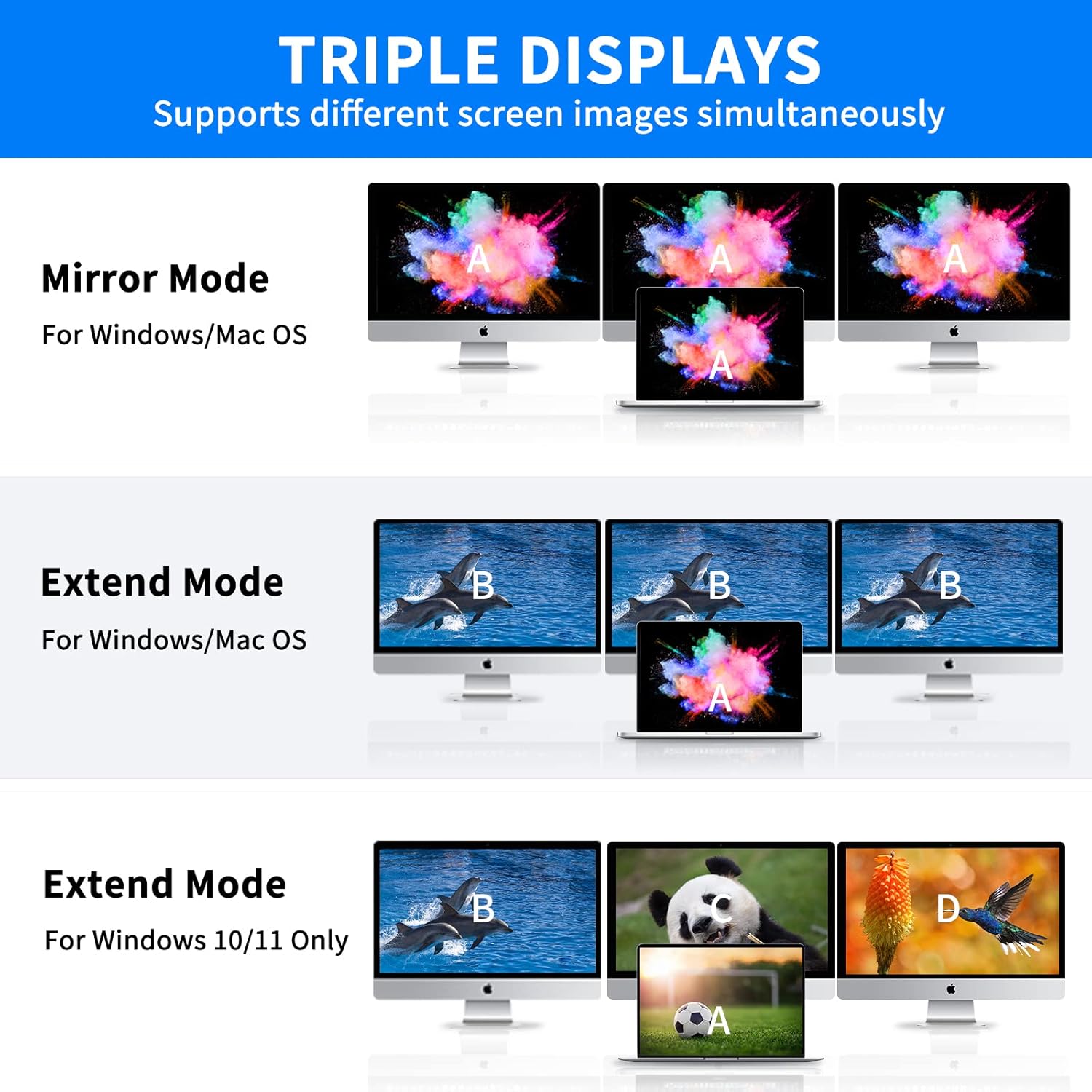
4.1 ഡിസ്പ്ലേ മോഡുകൾ

നിങ്ങളുടെ ഓപ്പറേറ്റിംഗ് സിസ്റ്റത്തെ ആശ്രയിച്ച് ഡോക്കിംഗ് സ്റ്റേഷൻ വിവിധ ഡിസ്പ്ലേ കോൺഫിഗറേഷനുകളെ പിന്തുണയ്ക്കുന്നു:

Note on VGA: When the VGA port is connected, the maximum resolution for each monitor will be limited to 1920x1080@60Hz.

Diagram showing triple display modes for Windows and Mac OS

Figure 2: Visual representation of Mirror Mode and Extend Mode for both Windows and Mac OS, illustrating how screens are duplicated or extended.

4.2 ഡാറ്റ കൈമാറ്റം

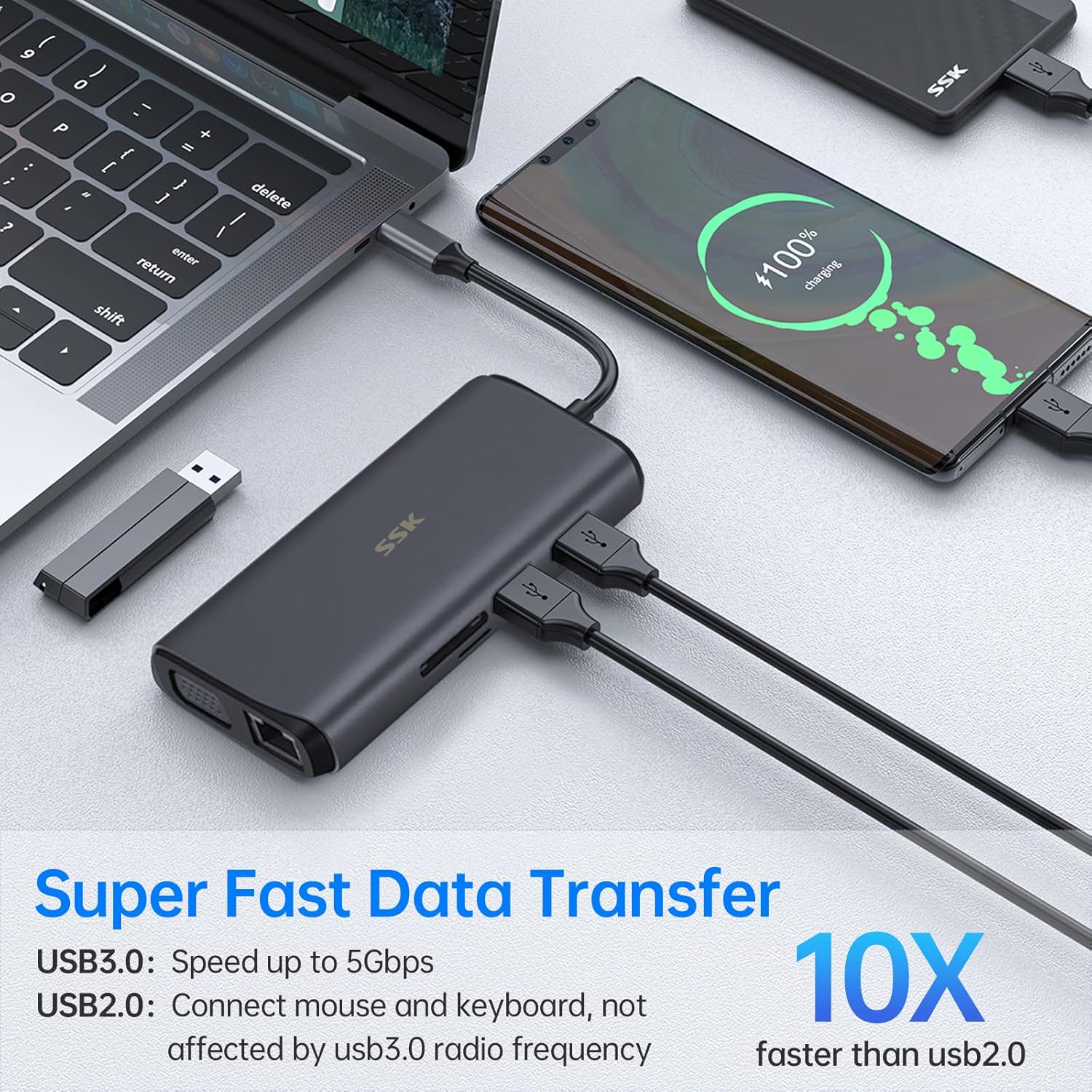
Utilize the USB 3.0 ports for rapid data transfer with compatible devices. The SD and TF card readers also offer fast data access for memory cards.

Laptop connected to docking station with USB drives and SD card for data transfer

Figure 3: Illustration of the docking station facilitating super-fast data transfer via USB 3.0 ports and SD/TF card readers, connected to a laptop.

4.3 പവർ ഡെലിവറി

The 100W PD3.0 port allows you to charge your Type-C laptop or other compatible devices while using the docking station. This port is for power input only and does not support data transfer.

Laptop charging via docking station's PD3.0 port

Figure 4: The docking station connected to a laptop and a power adapter, demonstrating its PD3.0 Power Delivery feature for fast charging.

5 അനുയോജ്യത

The SSK SC211 docking station is compatible with a wide range of devices and operating systems that feature a USB-C port supporting "Display Port Alternate Mode" for video output. This includes, but is not limited to:

പ്രധാനപ്പെട്ടത്: To enable HDMI and VGA functions, your laptop or phone's USB-C port must support "Display Port Alternate Mode" video output.

Docking station with various OS logos indicating compatibility

Figure 5: The SSK SC211 docking station shown with logos of compatible operating systems, highlighting its broad compatibility.

6 സാങ്കേതിക സവിശേഷതകൾ

ഫീച്ചർസ്പെസിഫിക്കേഷൻ
മോഡൽ നമ്പർSC211
അളവുകൾ5 x 3 x 1 ഇഞ്ച്
ഭാരം5.1 ഔൺസ്
HDMI 1 ഔട്ട്പുട്ട്4K@60Hz വരെ
HDMI 2 ഔട്ട്പുട്ട്4K@30Hz വരെ
വി‌ജി‌എ put ട്ട്‌പുട്ട്Up to 1920x1080@60Hz
USB 3.0 പോർട്ടുകൾ2 ports, 5Gbps data transfer
USB 2.0 പോർട്ട്1 port, for low-bandwidth peripherals
USB-C PD പോർട്ട്100W വരെ പവർ ഡെലിവറി (ഇൻപുട്ട് മാത്രം)
ഇഥർനെറ്റ് പോർട്ട്1000Mbps Gigabit RJ-45
കാർഡ് റീഡറുകൾSD and TF (Micro SD), up to 80MB/s, simultaneous use
ഓഡിയോ പോർട്ട്3.5mm (Mic and Audio)
മെറ്റീരിയൽഅലുമിനിയം അലോയ് സിasing

7. പ്രശ്‌നപരിഹാരം

8. പരിചരണവും പരിപാലനവും

9. വാറൻ്റിയും പിന്തുണയും

SSK products come with a standard manufacturer's warranty. For detailed warranty information, technical support, or service inquiries, please refer to the official SSK webസൈറ്റിൽ ബന്ധപ്പെടുകയോ അവരുടെ ഉപഭോക്തൃ സേവന വിഭാഗവുമായി ബന്ധപ്പെടുകയോ ചെയ്യുക. വാറന്റി ക്ലെയിമുകൾക്കായി നിങ്ങളുടെ വാങ്ങിയതിന്റെ തെളിവ് സൂക്ഷിക്കുക.

അനുബന്ധ രേഖകൾ - SC211

പ്രീview SSK SC211 ടൈപ്പ്-സി ഓൾ-ഇൻ-വൺ അഡാപ്റ്റർ ഉൽപ്പന്ന മാനുവൽ
SSK SC211 ടൈപ്പ്-സി ഓൾ-ഇൻ-വൺ അഡാപ്റ്ററിനായുള്ള സമഗ്രമായ ഉപയോക്തൃ മാനുവൽ, അതിന്റെ സവിശേഷതകൾ, ഇന്റർഫേസുകൾ, കണക്ഷൻ ഡയഗ്രമുകൾ, പതിവായി ചോദിക്കുന്ന ചോദ്യങ്ങൾ എന്നിവ വിശദമാക്കുന്നു. ലാപ്‌ടോപ്പുകൾക്കും മറ്റ് ടൈപ്പ്-സി ഉപകരണങ്ങൾക്കുമുള്ള കണക്റ്റിവിറ്റി ഈ അഡാപ്റ്റർ വികസിപ്പിക്കുന്നു.
പ്രീview SSK SC302 ടൈപ്പ്-സി മൾട്ടിഫങ്ഷണൽ ഡോക്കിംഗ് സ്റ്റേഷൻ യൂസർ മാനുവൽ
SSK SC302 ടൈപ്പ്-സി മൾട്ടിഫങ്ഷണൽ ഡോക്കിംഗ് സ്റ്റേഷനായുള്ള ഉപയോക്തൃ മാനുവൽ. ഉൽപ്പന്ന വിവരണം, കണക്ഷൻ ഡയഗ്രമുകൾ, സാങ്കേതിക സവിശേഷതകൾ, പതിവായി ചോദിക്കുന്ന ചോദ്യങ്ങൾ എന്നിവയെക്കുറിച്ചുള്ള വിശദമായ വിവരങ്ങൾ ഈ ഗൈഡ് നൽകുന്നു. HDMI വഴി 4K/60Hz റെസല്യൂഷനും 100W പവർ ഡെലിവറി (PD) ഫാസ്റ്റ് ചാർജിംഗും അഡാപ്റ്റർ പിന്തുണയ്ക്കുന്നു, വിൻഡോസ്, മാകോസ്, ആൻഡ്രോയിഡ്, ലിനക്സ് എന്നിവയുൾപ്പെടെ വിവിധ സിസ്റ്റങ്ങളുമായി പൊരുത്തപ്പെടുന്നു.
പ്രീview SSK-DK100 ഡ്യുവൽ ബേ HDD ഡോക്കിംഗ് സ്റ്റേഷൻ ഉപയോക്തൃ മാനുവൽ
SSK-DK100 ഡ്യുവൽ ബേ ഹാർഡ് ഡ്രൈവ് ഡോക്കിംഗ് സ്റ്റേഷന്റെ ഉപയോക്തൃ മാനുവൽ, അതിന്റെ സവിശേഷതകൾ, സ്പെസിഫിക്കേഷനുകൾ, ഇൻസ്റ്റാളേഷൻ, മൊബൈൽ ഹാർഡ് ഡ്രൈവ് മോഡ്, ഓഫ്‌ലൈൻ ക്ലോണിംഗ് കഴിവുകൾ എന്നിവ വിശദമാക്കുന്നു.
പ്രീview SSK DK108 ഡ്യുവൽ ബേ HDD ഡോക്കിംഗ് സ്റ്റേഷൻ ഉപയോക്തൃ മാനുവൽ
SSK DK108 ഡ്യുവൽ ബേ HDD ഡോക്കിംഗ് സ്റ്റേഷനായുള്ള ഉപയോക്തൃ മാനുവൽ. അതിന്റെ സവിശേഷതകളെക്കുറിച്ചും മൊബൈൽ ഹാർഡ് ഡിസ്ക്, HUB മോഡുകളിൽ ഇത് എങ്ങനെ ഉപയോഗിക്കാമെന്നതിനെക്കുറിച്ചും സാധാരണ പ്രശ്നങ്ങൾക്കുള്ള പരിഹാരങ്ങൾ കണ്ടെത്തുന്നതിനെക്കുറിച്ചും അറിയുക. USB 3.0 കണക്റ്റിവിറ്റിയുള്ള 2.5/3.5 ഇഞ്ച് SATA HDD-കൾ/SSD-കൾ പിന്തുണയ്ക്കുന്നു.
പ്രീview SSK Portable SSD: Usage Tips, Performance, and Compatibility Guide
Get the most out of your SSK Portable SSD with this comprehensive FAQ and usage guide. Learn about capacity differences, speed factors, heat management, safe disconnection, iPhone 15 compatibility, encryption, and Thunderbolt performance.
പ്രീview SSK SD450 Portable Solid State Drive User Manual
Comprehensive user manual for the SSK SD450 Portable Solid State Drive. This guide provides detailed instructions for connecting, using, and safely disconnecting the external SSD with Windows, macOS, iPhone, iPad, and Android devices. Learn about file management and optimal performance for your SSK SD450.