ആമുഖം
Thank you for choosing the Aresrora Retro Bluetooth Speaker. This portable speaker combines vintage aesthetics with modern technology, offering crystal clear sound and versatile playback options. This manual provides detailed instructions to help you get the most out of your device.
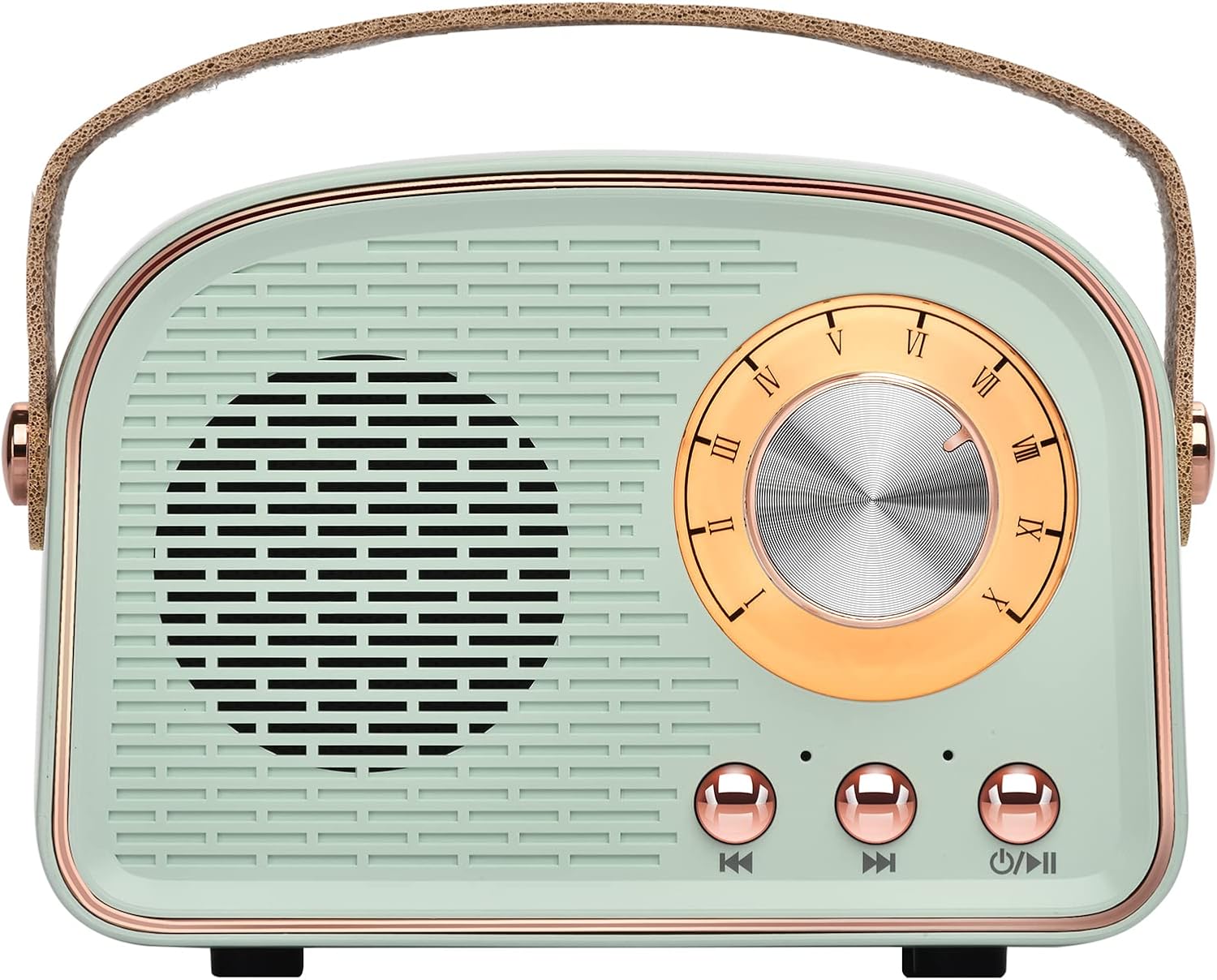
ചിത്രം: മുൻഭാഗം view of the Aresrora Retro Bluetooth Speaker in Cyan, showcasinജി ഇറ്റ്സ് വിൻtage design and controls.
ബോക്സിൽ എന്താണുള്ളത്
- 1 x Aresrora Retro Bluetooth Speaker
- 1 x ടൈപ്പ്-സി ചാർജിംഗ് കേബിൾ
- 1 x AUX ലൈൻ
- 1 x ഇൻസ്ട്രക്ഷൻ മാനുവൽ
സജ്ജമാക്കുക
സ്പീക്കറെ കുറ്റപ്പെടുത്തുന്നു
Before first use, fully charge the speaker. Connect the provided Type-C charging cable to the speaker's Type-C port and the other end to a compatible USB power adapter (not included). The speaker has a built-in 500mAh rechargeable battery and takes approximately 1.5 hours to fully recharge.

Image: Illustration showing the speaker with a battery icon, indicating its internal rechargeable battery.
പവർ ഓൺ/ഓഫ്
To power on the speaker, press and hold the power button (usually marked with a power symbol or play/pause icon) located on the front panel. You will hear an audible prompt indicating it's powered on. To power off, press and hold the same button until you hear the power off prompt.
ബ്ലൂടൂത്ത് ജോടിയാക്കൽ
- Ensure the speaker is powered on and in Bluetooth mode. An audible prompt will confirm "Bluetooth mode".
- നിങ്ങളുടെ ഉപകരണത്തിൽ (സ്മാർട്ട്ഫോൺ, ടാബ്ലെറ്റ്, ലാപ്ടോപ്പ്), ബ്ലൂടൂത്ത് ക്രമീകരണങ്ങളിലേക്ക് പോയി ബ്ലൂടൂത്ത് പ്രവർത്തനക്ഷമമാക്കുക.
- ഇതിനായി തിരയുക available devices. The speaker will appear as "DW21".
- Select "DW21" to connect. An audible prompt will confirm "Connected" once pairing is successful.

Image: The speaker shown with various compatible Bluetooth devices like phones, tablets, and laptops.
ടിഡബ്ല്യുഎസ് (ട്രൂ വയർലെസ് സ്റ്റീരിയോ) ജോടിയാക്കൽ
For true stereo sound, you can pair two Aresrora Retro Bluetooth Speakers together:
- രണ്ട് സ്പീക്കറുകളും ഓണാണെന്നും ബ്ലൂടൂത്ത് മോഡിൽ ആണെന്നും ഉറപ്പാക്കുക.
- On one speaker, double-press the power/play/pause button. It will enter TWS pairing mode.
- The two speakers will automatically connect to each other. An audible prompt will confirm the TWS connection.
- TWS പെയർ ചെയ്തുകഴിഞ്ഞാൽ, മുകളിൽ വിവരിച്ചതുപോലെ ബ്ലൂടൂത്ത് വഴി നിങ്ങളുടെ ഉപകരണം സ്പീക്കറുകളിൽ ഒന്നിലേക്ക് ബന്ധിപ്പിക്കുക. രണ്ട് സ്പീക്കറുകളും ഇപ്പോൾ സ്റ്റീരിയോയിൽ ഓഡിയോ പ്ലേ ചെയ്യും.

Image: Two speakers positioned on either side of a laptop, illustrating the TWS stereo sound feature.
സ്പീക്കർ പ്രവർത്തിപ്പിക്കുന്നു
വോളിയം നിയന്ത്രണം
The large dial on the front of the speaker controls the volume. Rotate the dial clockwise to increase volume and counter-clockwise to decrease volume.

Image: A hand turning the vintage-style volume dial on the speaker.
പ്ലേബാക്ക് മോഡുകൾ
The speaker supports multiple playback modes:
- ബ്ലൂടൂത്ത് മോഡ്: Connect wirelessly to your Bluetooth-enabled devices.
- ടിഎഫ് കാർഡ് മോഡ്: Insert a TF (MicroSD) card into the TF card slot on the back of the speaker to play audio fileനേരിട്ട്.
- USB പ്ലേബാക്ക് മോഡ്: Insert a USB flash drive into the USB port on the back of the speaker to play audio files.
- ഓക്സ് മോഡ്: Use the provided 3.5mm AUX cable to connect to devices without Bluetooth, such as desktop computers or older audio players.

ചിത്രം: വിശദമായത് view of the speaker's rear panel, highlighting the Type-C charging, TF card, USB, and AUX ports.
Music Navigation
Use the buttons on the front panel for music control:
- പ്ലേ/താൽക്കാലികമായി നിർത്തുക: Short press the power button to play or pause the current track.
- അടുത്ത ഗാനം: Short press the "Next Song" button (usually marked with a forward arrow).
- മുൻ ഗാനം: Short press the "Previous Song" button (usually marked with a backward arrow).

Image: A diagram labeling the volume dial, power/play/pause, next song, and previous song buttons on the speaker.
ബിൽറ്റ്-ഇൻ മൈക്രോഫോൺ
The speaker features a built-in microphone, allowing you to answer calls when connected via Bluetooth to your smartphone. Press the play/pause button to answer or end a call.
മെയിൻ്റനൻസ്
- Keep the speaker dry. It is വാട്ടർപ്രൂഫ് അല്ല.
- മൃദുവായതും ഉണങ്ങിയതുമായ തുണി ഉപയോഗിച്ച് സ്പീക്കർ വൃത്തിയാക്കുക. കഠിനമായ രാസവസ്തുക്കളോ ഉരച്ചിലുകളുള്ള ക്ലീനറുകളോ ഉപയോഗിക്കരുത്.
- സ്പീക്കറിനെ തീവ്രമായ താപനിലയിലോ നേരിട്ടുള്ള സൂര്യപ്രകാശത്തിലോ ദീർഘനേരം തുറന്നുകാട്ടുന്നത് ഒഴിവാക്കുക.
- ഉപയോഗിക്കാത്തപ്പോൾ തണുത്തതും വരണ്ടതുമായ സ്ഥലത്ത് സ്പീക്കർ സൂക്ഷിക്കുക.
ട്രബിൾഷൂട്ടിംഗ്
| പ്രശ്നം | സാധ്യമായ കാരണം | പരിഹാരം |
|---|---|---|
| സ്പീക്കർ പവർ ഓൺ ചെയ്യുന്നില്ല. | ബാറ്ററി ചാർജ് കുറവാണ്; പവർ ബട്ടൺ ശരിയായി അമർത്തിയിട്ടില്ല. | Charge the speaker fully. Ensure the power button is pressed and held until an audible prompt is heard. |
| ബ്ലൂടൂത്ത് വഴി ജോടിയാക്കാൻ കഴിയില്ല. | സ്പീക്കർ ജോടിയാക്കൽ മോഡിൽ ഇല്ല; ഉപകരണ ബ്ലൂടൂത്ത് ഓഫാണ്; സ്പീക്കർ ഉപകരണത്തിൽ നിന്ന് വളരെ അകലെയാണ്. | Ensure speaker is in Bluetooth mode. Turn off and on your device's Bluetooth. Move speaker closer to your device (within 10 meters). |
| ശബ്ദമില്ല അല്ലെങ്കിൽ കുറഞ്ഞ ശബ്ദമില്ല. | സ്പീക്കറിലോ ഉപകരണത്തിലോ ശബ്ദം വളരെ കുറവാണ്; തെറ്റായ മോഡ് തിരഞ്ഞെടുത്തു. | Increase volume on both the speaker and your connected device. Ensure the correct playback mode (Bluetooth, AUX, TF Card, USB) is selected. |
| ശബ്ദ നിലവാരം മോശമാണ്. | Interference; Speaker too far from device; Low quality audio file. | Move speaker away from other electronic devices. Ensure speaker is within Bluetooth range. Try a different audio file അല്ലെങ്കിൽ ഉറവിടം. |
സ്പെസിഫിക്കേഷനുകൾ
| ഫീച്ചർ | വിശദാംശങ്ങൾ |
|---|---|
| മോഡലിൻ്റെ പേര് | DW21 |
| ബ്രാൻഡ് | അരെസ്രോറ |
| മെറ്റീരിയൽ | പ്ലാസ്റ്റിക് |
| നിറം | സിയാൻ |
| ഉൽപ്പന്ന അളവുകൾ | 2.5"D x 4.1"W x 3"H |
| ഇനത്തിൻ്റെ ഭാരം | 8 ഔൺസ് |
| കണക്റ്റിവിറ്റി ടെക്നോളജി | Bluetooth, USB, AUX, TF Card |
| വയർലെസ് കമ്മ്യൂണിക്കേഷൻ ടെക്നോളജി | ബ്ലൂടൂത്ത് 5.0 |
| ബ്ലൂടൂത്ത് ശ്രേണി | 10 മീറ്റർ (33 അടി) |
| ബാറ്ററി ശേഷി | 500 മില്ലിamp മണിക്കൂറുകൾ |
| ചാർജിംഗ് സമയം | 1.5 മണിക്കൂർ |
| സ്പീക്കർ പരമാവധി ഔട്ട്പുട്ട് പവർ | 3 വാട്ട്സ് |
| സിഗ്നൽ-ടു-നോയിസ് അനുപാതം | 75 ഡി.ബി |
| വാട്ടർപ്രൂഫ് ആണ് | തെറ്റ് (വെള്ള പ്രതിരോധശേഷിയുള്ളതല്ല) |
| ഉൾപ്പെടുത്തിയ ഘടകങ്ങൾ | Speaker, Type-C charging cable, AUX line, Instruction manual |

Image: An illustration representing the advanced Bluetooth 5.0 technology integrated into the speaker.
ഉൽപ്പന്നം കഴിഞ്ഞുview വീഡിയോ
വീഡിയോ: വിശദമായ ഒരു അവലോകനംview of the Aresrora Retro Bluetooth Speaker, demonstrating its features and design.
വാറൻ്റിയും പിന്തുണയും
ഈ ഉൽപ്പന്നം എ വിൽപ്പനക്കാരന്റെ വാറന്റി. For any issues, questions, or support needs, please contact the seller directly through your purchase platform. Please have your order details and product model number (DW21) ready when contacting support.
