ആമുഖം
Thank you for choosing the AUSDOM Wireless Headset A2302. This manual provides detailed instructions for setting up, operating, maintaining, and troubleshooting your new headset. Please read this manual thoroughly before use to ensure optimal performance and longevity of your device.
പാക്കേജ് ഉള്ളടക്കം

Image showing all items included in the AUSDOM A2302 headset package: the mono wireless headset, charging station, USB receiver dongle, Type-C charging cable, and a USB-A to USB-C converter.
- 1 x Mono Wireless Headset
- 1 x ചാർജിംഗ് സ്റ്റേഷൻ
- 1 x USB Receiver Dongle
- 1 x ടൈപ്പ് സി ചാർജിംഗ് കേബിൾ
- 1 x USB-A to USB-C Converter
ഉൽപ്പന്നം കഴിഞ്ഞുview
ഹെഡ്സെറ്റ് ഘടകങ്ങൾ
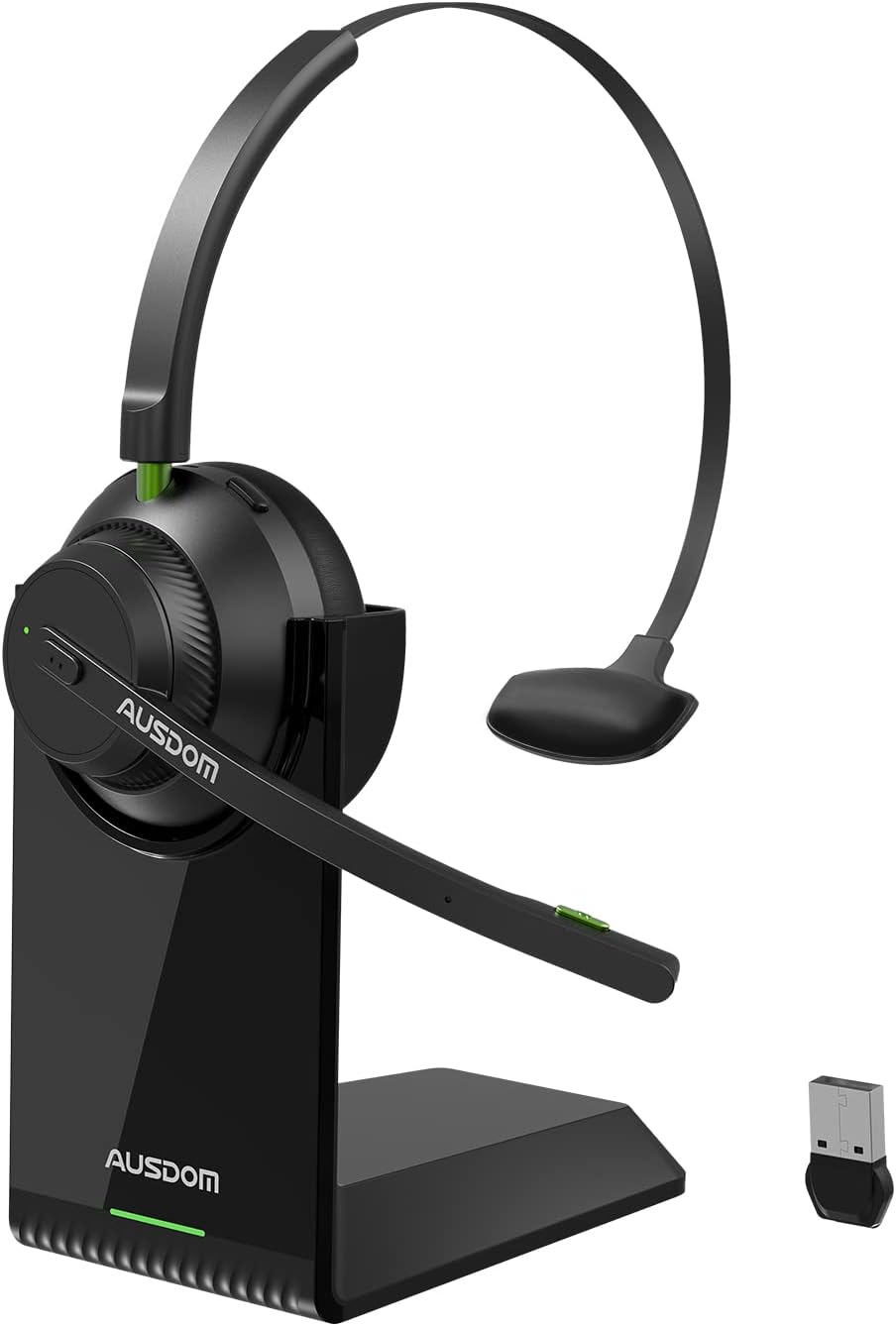
എ വിശദമായി view of the AUSDOM A2302 wireless headset, showcasing its mono earcup, adjustable headband, boom microphone, charging stand, and the compact USB dongle.
The AUSDOM A2302 headset features a single earcup design for comfort and situational awareness, an adjustable headband, and a flexible boom microphone. The included charging stand provides a convenient docking solution, and the USB dongle enables wireless connectivity with devices lacking built-in Bluetooth.
പ്രധാന സവിശേഷതകൾ
- AI-Powered Noise Cancelling Microphone: Detects and eliminates up to 99% of ambient background noise for clear calls.
- Bluetooth 5.1 & USB Dongle Connection: Offers stable, low-latency wireless connectivity via Bluetooth 5.1 or the included USB dongle for broader compatibility.
- Long Battery Life & Charging Base: Provides over 32 hours of talk time and 50 hours of music playtime, with a convenient magnetic charging base.
- Compact Lightweight & All-Day Comfort: Weighs only 2.65oz (75g) with soft protein memory-foam padding and an ergonomic design for extended wear.
- മൾട്ടിപോയിന്റ് കണക്റ്റിവിറ്റി: Connects to two Bluetooth devices simultaneously, allowing seamless switching between them.
സജ്ജമാക്കുക
ഹെഡ്സെറ്റ് ചാർജ് ചെയ്യുന്നു
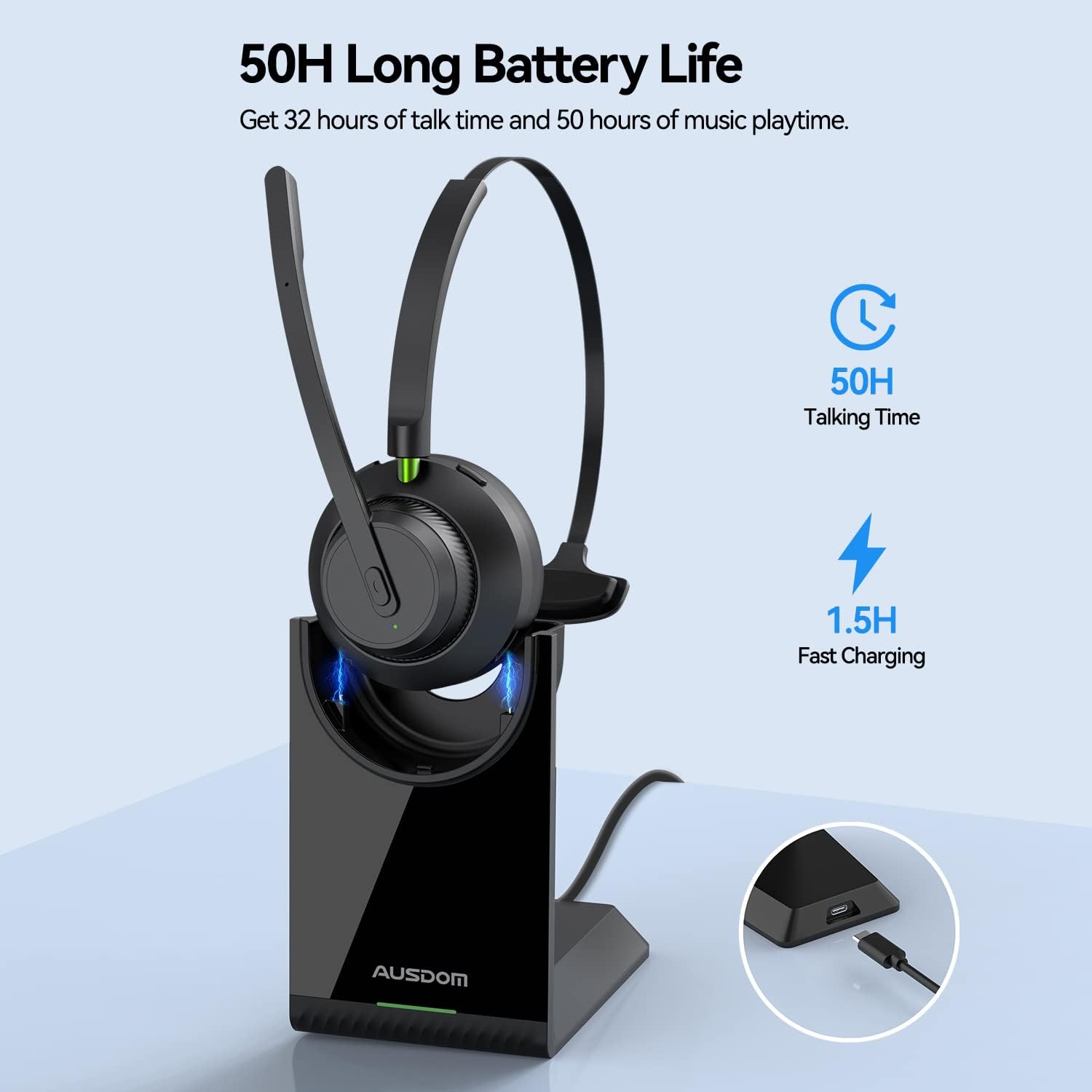
The AUSDOM A2302 headset docked on its charging stand, illustrating the USB-C charging port location. The image also highlights the 50 hours of music playtime and 1.5 hours fast charging capability.
- Connect the Type-C charging cable to the charging station and a power source (e.g., computer USB port, USB wall adapter).
- Place the headset onto the charging station. The headset will magnetically align and begin charging.
- The LED indicator on the headset will show charging status (e.g., red for charging, blue for fully charged). A full charge takes approximately 1.5 hours.
ഉപകരണങ്ങളിലേക്ക് കണക്റ്റുചെയ്യുന്നു
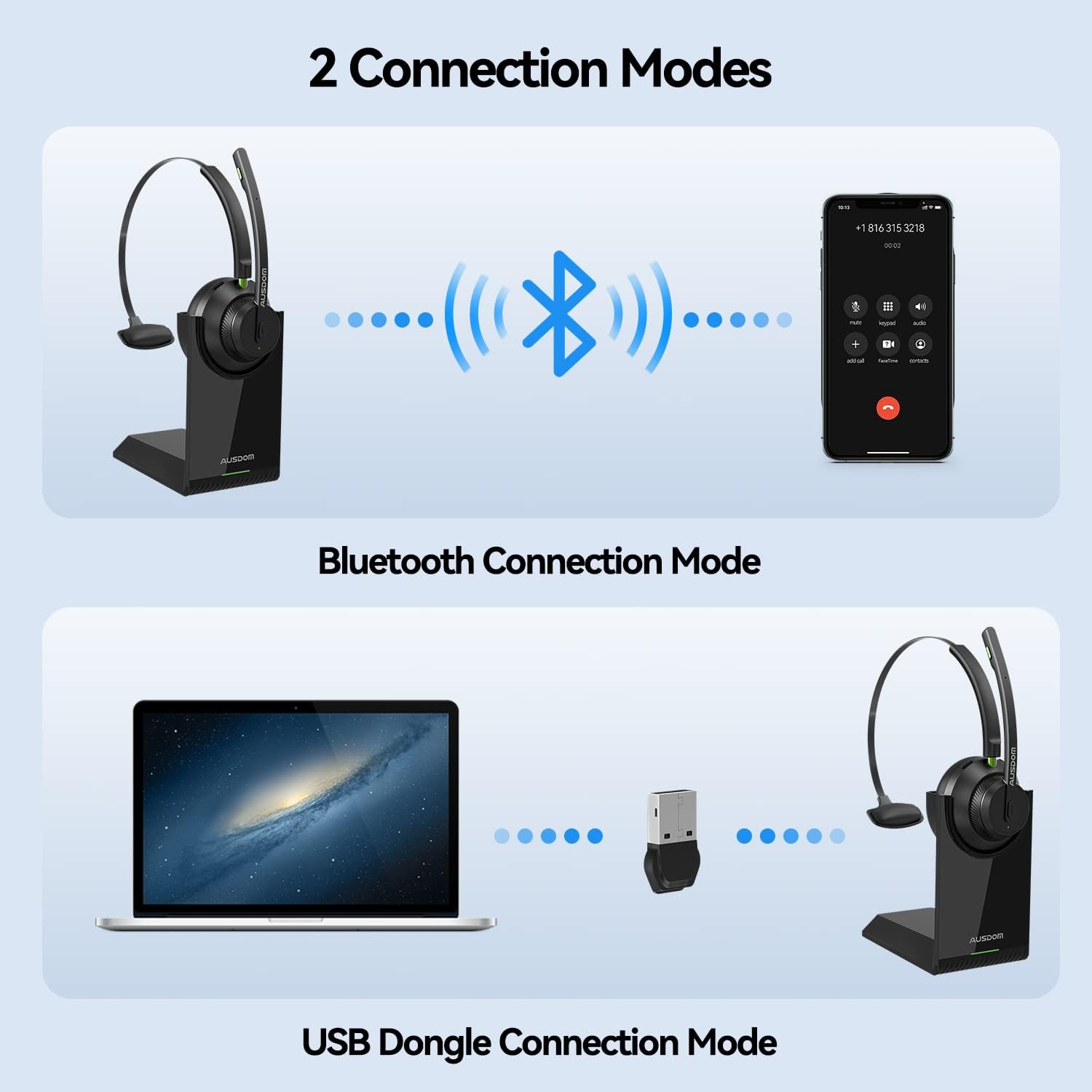
An illustration demonstrating the two primary connection methods for the AUSDOM A2302 headset: direct Bluetooth connection to a smartphone and USB dongle connection to a laptop, highlighting the versatility of the headset.
ബ്ലൂടൂത്ത് കണക്ഷൻ മോഡ്
- ഹെഡ്സെറ്റ് ചാർജ് ചെയ്തിട്ടുണ്ടെന്നും ഓൺ ചെയ്തിട്ടുണ്ടെന്നും ഉറപ്പാക്കുക.
- നിങ്ങളുടെ ഉപകരണത്തിൽ (സ്മാർട്ട്ഫോൺ, ടാബ്ലെറ്റ്, ലാപ്ടോപ്പ്) ബ്ലൂടൂത്ത് സജീവമാക്കുക.
- Put the headset into pairing mode (refer to the headset's specific button combination for pairing, usually holding the power button until the LED flashes blue/red).
- On your device, search for Bluetooth devices and select "AUSDOM A2302" from the list.
- Once connected, the headset's LED will typically show a solid blue light.
USB Dongle Connection Mode
- Plug the USB Receiver Dongle into an available USB port on your computer (PC or Mac).
- The dongle is plug-and-play and should automatically install necessary drivers.
- Ensure the headset is powered on. It will automatically attempt to connect to the dongle.
- Once connected, the LED indicator on both the headset and the dongle will show a stable light, indicating a successful connection.
മൾട്ടിപോയിന്റ് കണക്റ്റിവിറ്റി
The headset supports connecting to two Bluetooth devices simultaneously. After connecting to the first device, put the headset back into pairing mode and connect to the second device. The headset will intelligently manage audio from both connected devices, allowing you to switch between them seamlessly.
പ്രവർത്തന നിർദ്ദേശങ്ങൾ
പവർ ഓൺ/ഓഫ്
- പവർ ഓൺ: LED ഇൻഡിക്കേറ്റർ പ്രകാശിക്കുന്നത് വരെ ഏകദേശം 3 സെക്കൻഡ് നേരത്തേക്ക് പവർ ബട്ടൺ അമർത്തിപ്പിടിക്കുക.
- പവർ ഓഫ്: LED ഇൻഡിക്കേറ്റർ ഓഫാകുന്നതുവരെ ഏകദേശം 5 സെക്കൻഡ് നേരത്തേക്ക് പവർ ബട്ടൺ അമർത്തിപ്പിടിക്കുക.
കോൾ മാനേജുമെന്റ്
- ഉത്തരം/അവസാന കോൾ: മൾട്ടി-ഫംഗ്ഷൻ ബട്ടൺ ഒരിക്കൽ അമർത്തുക.
- കോൾ നിരസിക്കുക: മൾട്ടി-ഫംഗ്ഷൻ ബട്ടൺ 2 സെക്കൻഡ് അമർത്തിപ്പിടിക്കുക.
- മൈക്രോഫോൺ നിശബ്ദമാക്കുക/അൺമ്യൂട്ടുചെയ്യുക: മൈക്രോഫോൺ ബൂമിലെ ഡെഡിക്കേറ്റഡ് മ്യൂട്ട് ബട്ടൺ അമർത്തുക.
ഓഡിയോ പ്ലേബാക്ക്
- പ്ലേ/താൽക്കാലികമായി നിർത്തുക: മൾട്ടി-ഫംഗ്ഷൻ ബട്ടൺ ഒരിക്കൽ അമർത്തുക.
- വോളിയം കൂട്ടുക: വോളിയം അപ്പ് ബട്ടൺ അമർത്തുക.
- വോളിയം താഴേക്ക്: വോളിയം ഡൗൺ ബട്ടൺ അമർത്തുക.
- അടുത്ത ട്രാക്ക്: വോളിയം അപ്പ് ബട്ടൺ അമർത്തിപ്പിടിക്കുക.
- മുമ്പത്തെ ട്രാക്ക്: വോളിയം ഡൗൺ ബട്ടൺ അമർത്തിപ്പിടിക്കുക.
മൈക്രോഫോൺ ഉപയോഗം

The AUSDOM A2302 headset demonstrating its 270-degree rotatable microphone, allowing it to be worn on either the left or right ear for user preference and comfort.
The boom microphone features AI-powered noise cancellation to ensure your voice is clear even in noisy environments. The microphone boom is 270° rotatable, allowing you to wear the headset on either your left or right ear. Adjust the microphone position so it is close to your mouth for optimal voice pickup.

A user wearing the AUSDOM A2302 headset in a home office setting, illustrating the effectiveness of the AI Noise Cancellation Technology in reducing background noise for clear communication.
മെയിൻ്റനൻസ്
വൃത്തിയാക്കൽ
- Use a soft, dry cloth to clean the headset and charging station.
- അബ്രാസീവ് ക്ലീനറുകളോ, ലായകങ്ങളോ, ശക്തമായ രാസവസ്തുക്കളോ ഉപയോഗിക്കരുത്.
- ഏതെങ്കിലും ദ്വാരങ്ങളിൽ ഈർപ്പം കയറുന്നത് ഒഴിവാക്കുക.
സംഭരണം
- ഹെഡ്സെറ്റ് നേരിട്ട് സൂര്യപ്രകാശം ഏൽക്കാത്തതും ഉയർന്ന താപനില ഏൽക്കാത്തതുമായ ഒരു തണുത്ത വരണ്ട സ്ഥലത്ത് സൂക്ഷിക്കുക.
- When not in use for extended periods, store the headset on its charging station or in a protective case.
ട്രബിൾഷൂട്ടിംഗ്
പൊതുവായ പ്രശ്നങ്ങളും പരിഹാരങ്ങളും
| പ്രശ്നം | പരിഹാരം |
|---|---|
| ഹെഡ്സെറ്റ് ഓണാക്കുന്നില്ല. | Ensure the headset is fully charged. Connect it to the charging station and check the LED indicator. |
| ബ്ലൂടൂത്ത് വഴി ബന്ധിപ്പിക്കാൻ കഴിയില്ല. | Ensure the headset is in pairing mode. Turn off and on Bluetooth on your device. Forget the device from your Bluetooth list and try pairing again. Ensure no other devices are connected. |
| USB dongle not connecting. | Try plugging the dongle into a different USB port. Ensure the headset is powered on. Restart your computer. |
| ഓഡിയോ ഇല്ല അല്ലെങ്കിൽ മോശം ഓഡിയോ നിലവാരം. | Check volume levels on both the headset and your connected device. Ensure the headset is selected as the default audio output device in your system settings. Move closer to the connected device to avoid interference. |
| Microphone not working or unclear. | Ensure the microphone is not muted. Check that the headset is selected as the default input device in your system settings. Adjust the microphone boom closer to your mouth. |
സ്പെസിഫിക്കേഷനുകൾ
സാങ്കേതിക സവിശേഷതകൾ
| ഫീച്ചർ | വിശദാംശങ്ങൾ |
|---|---|
| മോഡലിൻ്റെ പേര് | AUSDOM Voipfocus Connect UC |
| മോഡൽ നമ്പർ | A2302 |
| കണക്റ്റിവിറ്റി ടെക്നോളജി | വയർലെസ്സ് (ബ്ലൂടൂത്ത് 5.1) |
| വയർലെസ് കമ്മ്യൂണിക്കേഷൻ ടെക്നോളജി | ബ്ലൂടൂത്ത് |
| മൈക്രോഫോൺ | AI-Powered Noise Cancelling Boom Mic |
| ബാറ്ററി ലൈഫ് (സംവാദ സമയം) | 32+ മണിക്കൂർ |
| ബാറ്ററി ലൈഫ് (സംഗീത പ്ലേടൈം) | 50 മണിക്കൂർ |
| ചാർജിംഗ് സമയം | 1.5 മണിക്കൂർ |
| ചാർജിംഗ് പോർട്ട് | USB-C (on charging station) |
| ഭാരം | 2.65 ഔൺസ് (75 ഗ്രാം) |
| നിയന്ത്രണ തരം | കോൾ കൺട്രോൾ, ടച്ച് |
| ഫോം ഫാക്ടർ | On Ear (Mono) |
| ഉൾപ്പെടുത്തിയ ഘടകങ്ങൾ | Headset, Charging Station, USB Dongle, Type C Cable, USB-A to USB-C Converter |
വാറൻ്റിയും പിന്തുണയും
വാറൻ്റി വിവരങ്ങൾ
AUSDOM products typically come with a limited warranty. Please refer to the warranty card included in your product packaging or visit the official AUSDOM webനിങ്ങളുടെ പ്രദേശത്തിനും വാങ്ങൽ തീയതിക്കും പ്രത്യേകമായുള്ള വിശദമായ വാറന്റി നിബന്ധനകൾക്കും വ്യവസ്ഥകൾക്കും സൈറ്റ് സന്ദർശിക്കുക.
ഉപഭോക്തൃ പിന്തുണ
For technical assistance, troubleshooting, or any inquiries regarding your AUSDOM A2302 Wireless Headset, please contact AUSDOM customer support. Contact information can usually be found on the official AUSDOM webസൈറ്റ് അല്ലെങ്കിൽ നിങ്ങളുടെ ഉൽപ്പന്ന ഡോക്യുമെന്റേഷനിൽ.


