1. ആമുഖം
This manual provides essential information for setting up, operating, and maintaining your realme C30 smartphone. Please read it carefully to ensure optimal performance and longevity of your device.

Image: realme C30 smartphone in Lake Blue, showcasing its rear design and camera.
2. ബോക്സിൽ എന്താണുള്ളത്?
പാക്കേജിൽ എല്ലാ ഇനങ്ങളും ഉണ്ടെന്ന് ഉറപ്പാക്കുക:
- realme C30 സ്മാർട്ട്ഫോൺ
- അഡാപ്റ്റർ
- USB കേബിൾ
- സിം ട്രേ എജക്ടർ
- ഫാസ്റ്റ് കാർ ചാർജർ
3. ഡിവൈസ് ഓവർview
ശാരീരിക സവിശേഷതകൾ
- അളവുകൾ: 1.97 x 3.31 x 6.65 ഇഞ്ച്
- ഇനത്തിൻ്റെ ഭാരം: 6 ഔൺസ്
- നിറം: ലേക്ക് ബ്ലൂ
പ്രധാന സവിശേഷതകൾ
- ഡിസ്പ്ലേ: 6.5" HD+ Fullscreen with 88.7% Screen-to-body Ratio, 120Hz Touch Sampling Rate, 16.7M Screen Colors
- പ്രോസസ്സർ: Unisoc T612 Octa-core, 12nm, up to 1.82GHz, ARM Mali-G57 GPU
- റാം: 2 GB (Note: Some variants may have 4GB RAM)
- സംഭരണം: 32 ജിബി
- പിൻ ക്യാമറ: 8MP AI Camera with f/2.0 aperture, 4P lens
- മുൻ ക്യാമറ: 5എംപി
- ബാറ്ററി: 5000mAh (Typical) Massive Battery, 4890mAh (Minimum)
- ഓപ്പറേറ്റിംഗ് സിസ്റ്റം: realme UI R Edition Based on Android 11
ഉപകരണ ലേഔട്ട്
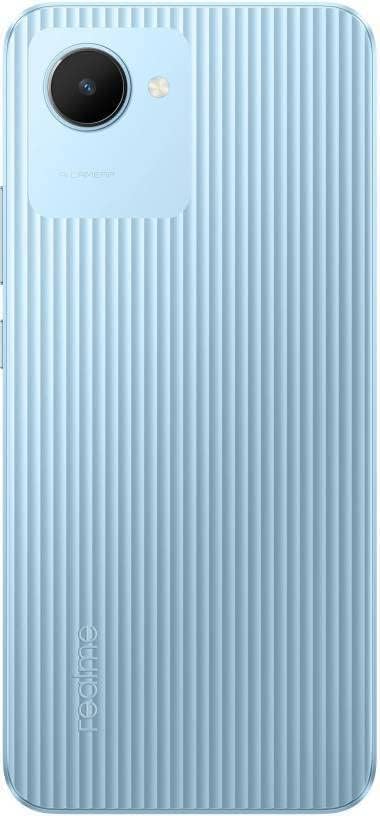
ചിത്രം: പിൻഭാഗം view of the realme C30, highlighting the single camera and textured back panel.

Image: Top and bottom edges of the realme C30, showing the 3.5mm headset jack, Micro USB port, and speaker grille.

ചിത്രം: വശം views of the realme C30, illustrating the power button, volume rockers, and SIM tray slot.
4. സജ്ജീകരണം
4.1. സിം കാർഡും മൈക്രോ എസ്ഡിയും ഇൻസ്റ്റാൾ ചെയ്യൽ
- Locate the SIM tray slot on the side of your device.
- ട്രേയുടെ അടുത്തുള്ള ചെറിയ ദ്വാരത്തിലേക്ക് സിം ട്രേ എജക്റ്റർ ഉപകരണം തിരുകുക.
- ട്രേ പുറത്തുവരുന്നതുവരെ സൌമ്യമായി തള്ളുക.
- Place your Nano SIM cards (supports Dual SIM) and Micro SD card into the designated slots on the tray.
- ഉപകരണത്തിലേക്ക് ട്രേ ശ്രദ്ധാപൂർവ്വം വീണ്ടും ചേർക്കുക.
4.2. പ്രാരംഭ പവർ ഓണും കോൺഫിഗറേഷനും
- Press and hold the Power button until the realme logo appears.
- നിങ്ങളുടെ ഇഷ്ടപ്പെട്ട ഭാഷയും പ്രദേശവും തിരഞ്ഞെടുക്കാൻ ഓൺ-സ്ക്രീൻ നിർദ്ദേശങ്ങൾ പാലിക്കുക.
- സജ്ജീകരണവുമായി മുന്നോട്ട് പോകാനും ആവശ്യമായ അപ്ഡേറ്റുകൾ ഡൗൺലോഡ് ചെയ്യാനും ഒരു Wi-Fi നെറ്റ്വർക്കിലേക്ക് കണക്റ്റുചെയ്യുക.
- Review അന്തിമ ഉപയോക്തൃ ലൈസൻസ് കരാറും സ്വകാര്യതാ നയവും അംഗീകരിക്കുക.
- നിങ്ങളുടെ Google അക്കൗണ്ട് ഉപയോഗിച്ച് സൈൻ ഇൻ ചെയ്യുക അല്ലെങ്കിൽ പുതിയൊരെണ്ണം സൃഷ്ടിക്കുക.
- Set up your preferred screen lock method (PIN, Password, Pattern, Face recognition, or Fingerprints).
- Choose your display mode (Light or Dark).
- Complete the remaining setup steps to access your device's home screen.
5. നിങ്ങളുടെ ഉപകരണം പ്രവർത്തിപ്പിക്കുന്നു
5.1. അടിസ്ഥാന നാവിഗേഷൻ
Navigate your device using intuitive touch gestures. Swipe up, down, left, or right to move between screens and menus. Tap to select items, and long-press for additional options.
5.2. ബാറ്ററി മാനേജ്മെന്റ്
Your realme C30 is equipped with a 5000mAh massive battery for extended usage. To optimize battery life:
- പ്രവർത്തനക്ഷമമാക്കുക Ultra Saving Mode from the Quick Settings panel for prolonged standby time at low power levels.
- Adjust screen brightness and screen timeout settings.
- ഉപയോഗത്തിലില്ലാത്തപ്പോൾ പശ്ചാത്തല ആപ്ലിക്കേഷനുകൾ അടയ്ക്കുക.
5.3. ക്യാമറ ഉപയോഗം
Launch the Camera app to capture photos and videos. The 8MP AI rear camera and 5MP front camera offer various modes and features.
- ഒരു ഫോട്ടോ എടുക്കാൻ ഷട്ടർ ബട്ടൺ ടാപ്പ് ചെയ്യുക.
- ഫോട്ടോ, വീഡിയോ മോഡുകൾക്കിടയിൽ മാറുക.
- മെച്ചപ്പെട്ട ഇമേജ് നിലവാരത്തിനായി AI സവിശേഷതകൾ ഉപയോഗിക്കുക.
5.4. കണക്റ്റിവിറ്റി
നിങ്ങളുടെ ഉപകരണം വിവിധ കണക്റ്റിവിറ്റി ഓപ്ഷനുകളെ പിന്തുണയ്ക്കുന്നു:
- 4G LTE: Enjoy fast mobile data speeds. (Note: Not for USA Market. Supports Latin Europe bands.)
- വൈഫൈ: ഇന്റർനെറ്റ് ആക്സസ്സിനായി വയർലെസ് നെറ്റ്വർക്കുകളിലേക്ക് കണക്റ്റുചെയ്യുക.
- ബ്ലൂടൂത്ത്: Pair with compatible accessories like headphones or speakers.
- GPS/GLONASS/GALILEO: For accurate location services.
- മൈക്രോ USB: ചാർജിംഗിനും ഡാറ്റ കൈമാറ്റത്തിനും.
- 3.5എംഎം ഹെഡ്സെറ്റ് ജാക്ക്: വയേർഡ് ഓഡിയോ ആക്സസറികൾക്ക്.
6. പരിപാലനം
6.1. ചാർജിംഗ്
Use the provided 10W charging adapter and USB cable to charge your device. Connect the Micro USB end to your phone and the adapter to a power outlet.
6.2. സോഫ്റ്റ്വെയർ അപ്ഡേറ്റുകൾ
മികച്ച പ്രകടനവും സുരക്ഷയും ഉറപ്പാക്കാൻ നിങ്ങളുടെ ഉപകരണത്തിന്റെ സോഫ്റ്റ്വെയർ കാലികമായി നിലനിർത്തുക. പോകുക Settings > About phone > realme UI version അപ്ഡേറ്റുകൾ പരിശോധിച്ച് ഇൻസ്റ്റാൾ ചെയ്യാൻ.
6.3. വൃത്തിയാക്കൽ
Gently wipe your device with a soft, lint-free cloth. Avoid using harsh chemicals or abrasive materials that could damage the screen or body.
7. പ്രശ്നപരിഹാരം
7.1. ഉപകരണം ഓണാക്കുന്നില്ല
- ബാറ്ററി ചാർജ്ജ് ചെയ്തിട്ടുണ്ടെന്ന് ഉറപ്പാക്കുക. പവർ ഓൺ ചെയ്യാൻ ശ്രമിക്കുന്നതിന് മുമ്പ് കുറഞ്ഞത് 15 മിനിറ്റെങ്കിലും ഉപകരണം ചാർജറുമായി ബന്ധിപ്പിക്കുക.
- നിർബന്ധിതമായി റീബൂട്ട് ചെയ്യാൻ പവർ ബട്ടൺ 10-15 സെക്കൻഡ് അമർത്തിപ്പിടിക്കുക.
7.2. Apps Freezing or Crashing
- പ്രശ്നമുള്ള ആപ്പ് അടച്ച് വീണ്ടും തുറക്കുക.
- ആപ്പിന്റെ കാഷെയും ഡാറ്റയും മായ്ക്കുക വഴി ക്രമീകരണങ്ങൾ > ആപ്പുകൾ > [ആപ്പ് നാമം] > സംഭരണം.
- Ensure your device's software and all apps are updated to their latest versions.
7.3. മോശം ബാറ്ററി ലൈഫ്
- സ്ക്രീൻ തെളിച്ചം കുറച്ച് കുറഞ്ഞ സ്ക്രീൻ ടൈംഔട്ട് സജ്ജമാക്കുക.
- ഉപയോഗത്തിലില്ലാത്തപ്പോൾ വൈഫൈ, ബ്ലൂടൂത്ത്, ജിപിഎസ് എന്നിവ ഓഫാക്കുക.
- Identify and close power-consuming background apps.
- Enable Ultra Saving Mode for critical situations.
8 സ്പെസിഫിക്കേഷനുകൾ
| ഫീച്ചർ | സ്പെസിഫിക്കേഷൻ |
|---|---|
| മോഡലിൻ്റെ പേര് | RMX3511 |
| ഉൽപ്പന്ന അളവുകൾ | 1.97 x 3.31 x 6.65 ഇഞ്ച് |
| ഇനത്തിൻ്റെ ഭാരം | 6 ഔൺസ് |
| ഓപ്പറേറ്റിംഗ് സിസ്റ്റം | realme UI R Edition Based on Android 11 |
| സിപിയു വേഗത | 1820 MHz (1.82GHz) |
| റാം | 2 GB (Note: Some variants may have 4GB) |
| മെമ്മറി സ്റ്റോറേജ് കപ്പാസിറ്റി | 32 ജിബി |
| സ്ക്രീൻ വലിപ്പം | 6.5 ഇഞ്ച് |
| റെസലൂഷൻ | 1280 x 720 (എച്ച്ഡി+) |
| ബാറ്ററി ശേഷി | 5000 മില്ലിampമണിക്കൂർ (mAh) |
| ഫോൺ ടോക്ക് ടൈം | 45.3 മണിക്കൂർ |
| പിൻ ക്യാമറ | 8MP AI ക്യാമറ |
| മുൻ ക്യാമറ | 5എംപി |
| പ്രത്യേക സവിശേഷതകൾ | 4K Video Recording, Dual SIM, Fast Charging Support |
| കണക്റ്റിവിറ്റി ടെക്നോളജികൾ | USB, Cellular (LTE) |
| ഓഡിയോ ജാക്ക് | 3.5 മി.മീ |
9. വാറൻ്റിയും പിന്തുണയും
For warranty information and customer support, please refer to the documentation included with your product or visit the official realme webസൈറ്റ്. നിങ്ങൾക്ക് സന്ദർശിക്കാനും കഴിയും ആമസോണിലെ റിയൽമി സ്റ്റോർ കൂടുതൽ ഉൽപ്പന്ന വിശദാംശങ്ങൾക്കും പിന്തുണാ ഉറവിടങ്ങൾക്കും.


