1. ആമുഖം
The ORICO 4-Port USB 3.0 Hub (Model: PW4U-U3-015-BK) is designed to expand a single USB 3.0 port into four USB 3.0 ports, allowing for the connection of multiple USB-A devices to your computer or compatible device. This hub supports high-speed data transfer and is compatible with various operating systems.
2. ഉൽപ്പന്ന സവിശേഷതകൾ
- ഹൈ-സ്പീഡ് ഡാറ്റ ട്രാൻസ്ഫർ: Supports data transfer speeds up to 5Gbps, which is 10 times faster than USB 2.0 (480 Mbps).
- 4-Port Expansion: Converts one USB 3.0 port into four USB 3.0 ports for connecting multiple peripherals.
- പ്ലഗ് & പ്ലേ: No additional drivers are required for installation. Supports hot-plugging.
- വിശാലമായ അനുയോജ്യത: Compatible with Windows, Mac OS 10.X and above, Linux, Android, and other systems.
- OTG പിന്തുണ: Enables connection of USB devices (mouse, keyboard, USB stick) to compatible USB-C phones or tablets (requires mobile phone OTG support).
- കോംപാക്റ്റ് ഡിസൈൻ: Slim and lightweight, designed for portability and efficient use of space.
- LED സൂചകം: Features a blue LED indicator to confirm connection status.
3. പാക്കേജ് ഉള്ളടക്കം
- ORICO 4-Port USB 3.0 Hub (Model: PW4U-U3-015-BK)
4. സജ്ജീകരണ നിർദ്ദേശങ്ങൾ
- ഹബ് ബന്ധിപ്പിക്കുക: Plug the USB-A connector of the ORICO 4-Port USB 3.0 Hub into an available USB 3.0 port on your laptop, desktop computer, or compatible device.
- കണക്ഷൻ സ്ഥിരീകരിക്കുക: The blue LED indicator on the hub will illuminate, confirming that the hub is powered and connected.
- പെരിഫറലുകൾ ബന്ധിപ്പിക്കുക: Insert your USB-A devices (e.g., USB flash drives, mouse, keyboard, external hard drives) into the available USB 3.0 ports on the hub.
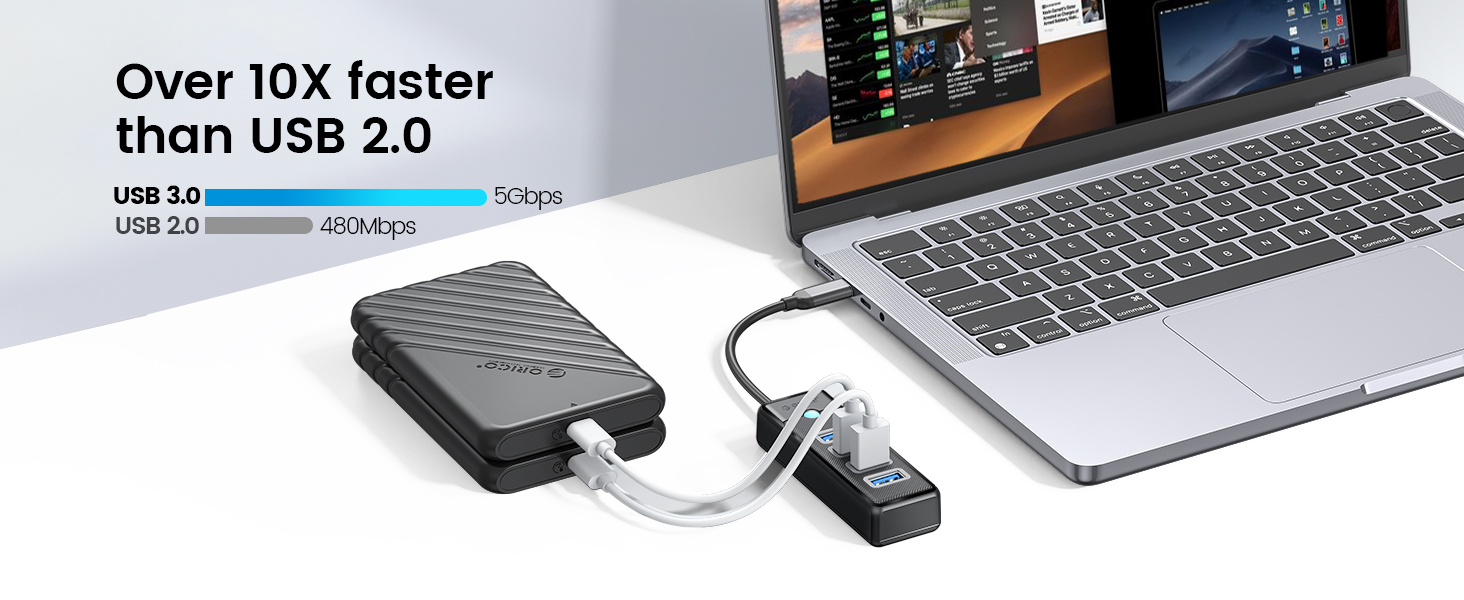
Image: The ORICO 4-Port USB 3.0 Hub connected to a laptop, illustrating connections for a printer, USB disk, keyboard, mouse, HDD, USB fan, data line, and webcam. Note: The hub does not support charging.

ചിത്രം: ഒരു മുൻ കാമുകൻample of the ORICO 4-Port USB 3.0 Hub connected via USB-A to a laptop, with a smartphone connected to the hub for data transfer.

ചിത്രം: ഒരു മുൻ കാമുകൻample of the ORICO 4-Port USB 3.0 Hub connected via USB-C to a laptop, with a smartphone connected to the hub for data transfer.
5. പ്രവർത്തന നിർദ്ദേശങ്ങൾ
- ഡാറ്റ കൈമാറ്റം: Insert your USB 3.0 compatible devices into the hub's ports. Data transfer will occur automatically at speeds up to 5Gbps, provided both the connected device and the host port support USB 3.0.
- ഒന്നിലധികം ഉപകരണ കണക്ഷൻ: The hub allows simultaneous connection and operation of up to four USB-A devices. For optimal performance with high-power devices like external hard drives, ensure the host port provides sufficient power.
- OTG Functionality: If your mobile phone or tablet supports OTG (On-The-Go), you can connect the hub to your mobile device (using an appropriate adapter if necessary) to connect USB peripherals like a mouse, keyboard, or USB flash drive. Ensure your mobile device's OTG function is enabled.
- Important Note on Charging: This hub is designed for data synchronization and does not support charging. It is not recommended for charging smartphones, tablets, or other devices.
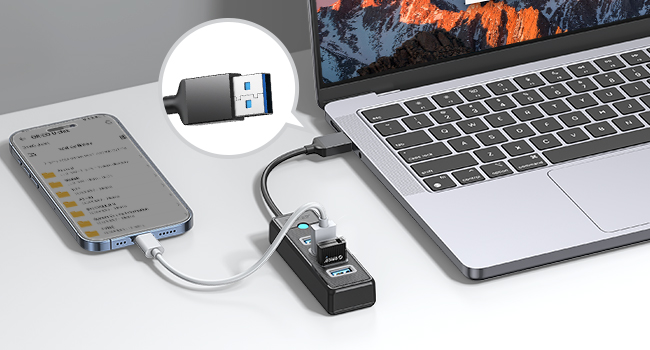
Image: The ORICO 4-Port USB 3.0 Hub connected to a laptop, demonstrating stable connection and simultaneous reading of two 1TB 2.5-inch SSDs without external power.
6. പരിപാലനം
- വൃത്തിയാക്കൽ: Use a soft, dry cloth to clean the surface of the hub. Avoid using liquid cleaners or solvents.
- സംഭരണം: നേരിട്ടുള്ള സൂര്യപ്രകാശവും കടുത്ത താപനിലയും ഏൽക്കാത്ത തണുത്തതും വരണ്ടതുമായ സ്ഥലത്ത് ഹബ് സൂക്ഷിക്കുക.
- കൈകാര്യം ചെയ്യൽ: Avoid dropping or subjecting the hub to strong impacts. Do not attempt to disassemble the device.
7. പ്രശ്നപരിഹാരം
- ഉപകരണം തിരിച്ചറിഞ്ഞിട്ടില്ല:
- Ensure the hub is securely plugged into a functioning USB port on your computer.
- ഉപകരണം പ്രവർത്തിക്കുന്നുണ്ടെന്ന് ഉറപ്പാക്കാൻ, കമ്പ്യൂട്ടറിന്റെ USB പോർട്ടിലേക്ക് നേരിട്ട് ഉപകരണം ബന്ധിപ്പിക്കാൻ ശ്രമിക്കുക.
- നിങ്ങളുടെ കമ്പ്യൂട്ടർ പുനരാരംഭിച്ച് ഹബ് വീണ്ടും ബന്ധിപ്പിക്കുക.
- മന്ദഗതിയിലുള്ള ഡാറ്റ കൈമാറ്റം:
- Ensure both the hub and the connected device are utilizing USB 3.0 ports and cables. USB 2.0 connections will operate at slower speeds.
- Avoid connecting multiple high-bandwidth devices simultaneously if experiencing slowdowns.
- LED ഇൻഡിക്കേറ്റർ ഓണല്ല:
- Check the connection between the hub and your computer.
- നിങ്ങളുടെ കമ്പ്യൂട്ടറിൽ മറ്റൊരു USB പോർട്ട് പരീക്ഷിക്കുക.
8 സ്പെസിഫിക്കേഷനുകൾ
| മോഡൽ നമ്പർ | PW4U-U3-015-BK |
| ബ്രാൻഡ് | ഒറിക്കോ |
| ഹാർഡ്വെയർ ഇന്റർഫേസ് | USB 3.0 |
| തുറമുഖങ്ങൾ | 4 x USB 3.0 ടൈപ്പ്-എ ഫീമെയിൽ |
| ഡാറ്റ ട്രാൻസ്ഫർ വേഗത | 5Gbps വരെ |
| ഉൽപ്പന്ന അളവുകൾ | 3.66 x 1.18 x 0.59 ഇഞ്ച് (9.3 x 3.0 x 1.5 സെ.മീ) |
| ഇനത്തിൻ്റെ ഭാരം | 2.47 ഔൺസ് (70 ഗ്രാം) |
| കേബിൾ നീളം | Approximately 0.49 ft (15 cm) |
| നിറം | കറുപ്പ് |
| പ്രത്യേക സവിശേഷതകൾ | Indicator Light, Lightweight, Plug and Play, Portable |
| അനുയോജ്യമായ ഉപകരണങ്ങൾ | Laptops, Desktops, Card Readers, Keyboards, Mouse, XBOX, PS4, HDD, USB Fan, etc. |

Image: The ORICO 4-Port USB 3.0 Hub displaying its compact dimensions and short cable length.

Image: Universal compatibility for the USB 3.0 (Male) connector with devices like PC, Car, Host, PS3/PS4, and for USB 3.0 (Female) ports with Mouse, Camera, Keyboard, Card Reader, HDD.

Image: Universal compatibility for the USB-C (Male) connector with devices like MacBook, Galaxy, iPad, and for USB 3.0 (Female) ports with USB Flash Drive, Keyboard, Printer, PS3/PS4, Mouse, 2.5" HDD.
9. വാറൻ്റി വിവരങ്ങൾ
ORICO products typically come with a standard manufacturer's warranty. Please refer to the product packaging or the official ORICO webനിങ്ങളുടെ പ്രദേശത്തിനും വാങ്ങൽ തീയതിക്കും ബാധകമായ നിർദ്ദിഷ്ട വാറന്റി നിബന്ധനകൾക്കും വ്യവസ്ഥകൾക്കും സൈറ്റ് സന്ദർശിക്കുക. വാറന്റി ക്ലെയിമുകൾക്കായി നിങ്ങളുടെ വാങ്ങലിന്റെ തെളിവ് സൂക്ഷിക്കുക.
10. പിന്തുണ
For technical support, product inquiries, or further assistance, please visit the official ORICO website or contact their customer service through the channels provided on their webസൈറ്റ്. കൂടുതൽ വിവരങ്ങൾ ഇവിടെ കണ്ടെത്താം ആമസോണിലെ ORICO സ്റ്റോർ.


