ആമുഖം
This manual provides detailed instructions for setting up, operating, and maintaining your litokam 2K Indoor Pan/Tilt Home Security Camera. Please read this guide thoroughly before use to ensure proper functionality and safety.

Figure 1: litokam 2K Indoor Pan/Tilt Security Cameras
ബോക്സിൽ എന്താണുള്ളത്
- litokam 2K Indoor Pan/Tilt Camera (2 units)
- Power Adapter (2 units)
- യുഎസ്ബി കേബിൾ (2 യൂണിറ്റുകൾ)
- മൗണ്ടിംഗ് ആക്സസറികൾ (സ്ക്രൂകൾ, വാൾ പ്ലഗുകൾ)
- ഉപയോക്തൃ മാനുവൽ
ഉൽപ്പന്നം കഴിഞ്ഞുview
The litokam 2K Indoor Camera offers advanced surveillance features for home security, pet monitoring, and baby monitoring. Key features include:
- 2K HD റെസല്യൂഷൻ: വ്യക്തവും വിശദവുമായ വീഡിയോ നൽകുന്നു.
- 360° പാൻ/ടിൽറ്റ്: Offers comprehensive coverage with remote control via the app.
- മോഷൻ ഡിറ്റക്ഷനും ട്രാക്കിംഗും: Alerts you to movement and tracks subjects automatically.
- മെച്ചപ്പെടുത്തിയ രാത്രി കാഴ്ച: ക്ലിയർ viewing up to 33 feet in low light conditions.
- ടു-വേ ഓഡിയോ: Allows for real-time communication.
- ലോക്കൽ & ക്ലൗഡ് സംഭരണം: Supports Micro SD card (up to 128GB, not included) and cloud storage options.
- അലക്സാ ഇന്റഗ്രേഷൻ: Compatible with Amazon Alexa for voice control.
സജ്ജീകരണ നിർദ്ദേശങ്ങൾ
- പവർ കണക്ഷൻ: നൽകിയിരിക്കുന്ന USB കേബിളും പവർ അഡാപ്റ്ററും ഉപയോഗിച്ച് ക്യാമറ ഒരു പവർ സ്രോതസ്സിലേക്ക് ബന്ധിപ്പിക്കുക. ക്യാമറ യാന്ത്രികമായി ഓണാകും.
- ആപ്പ് ഡൗൺലോഡ്: Download the 'little elf smart' app from your smartphone's app store (iOS or Android).
- അക്കൗണ്ട് രജിസ്ട്രേഷൻ: ആപ്പ് തുറന്ന് സ്ക്രീനിലെ നിർദ്ദേശങ്ങൾ പാലിച്ച് പുതിയൊരു അക്കൗണ്ട് രജിസ്റ്റർ ചെയ്യുക അല്ലെങ്കിൽ നിങ്ങൾക്ക് ഇതിനകം അക്കൗണ്ട് ഉണ്ടെങ്കിൽ ലോഗിൻ ചെയ്യുക.
- ഉപകരണം ചേർക്കുക: Tap the '+' icon in the app to add a new device. Select your camera model and follow the in-app prompts to connect it to your 2.4GHz Wi-Fi network. Note: This camera supports 2.4GHz Wi-Fi only.
- മൗണ്ടിംഗ് (ഓപ്ഷണൽ): If wall mounting, use the provided mounting accessories. Ensure the camera is securely fastened and has a clear field of view.
പ്രവർത്തന നിർദ്ദേശങ്ങൾ
1. തത്സമയം View കൂടാതെ പാൻ/ടിൽറ്റ്/സൂം ചെയ്യുക
Once connected, access the live feed through the 'little elf smart' app. Use the on-screen controls to pan (horizontal rotation), tilt (vertical movement), and digitally zoom the camera to adjust your viewing ആംഗിൾ.

Figure 2: 360° Panoramic Navigation via App
2. മോഷൻ ഡിറ്റക്ഷനും ട്രാക്കിംഗും
The camera utilizes Smart Perceive Technology for motion detection. When motion is detected, you will receive an alert notification on your phone. You can adjust the motion detection sensitivity within the app settings. Enable auto movement tracking to have the camera follow detected objects.

Figure 3: Motion Detection Alerts
3. ടു-വേ ഓഡിയോ
Use the built-in microphone and speaker to communicate with individuals or pets near the camera. Tap the microphone icon in the app to speak, and listen through the app's speaker.

ചിത്രം 4: ടു-വേ ഓഡിയോ കമ്മ്യൂണിക്കേഷൻ
4. നൈറ്റ് വിഷൻ
The camera automatically switches to night vision mode in low light conditions using its intelligent IR-Cut switch. It provides clear black and white video up to 33 feet in complete darkness.

Figure 5: Enhanced Night Vision in operation
5. വീഡിയോ സംഭരണം
Recordings can be saved in two ways:
- മൈക്രോ എസ്ഡി കാർഡ്: Insert a Micro SD card (up to 128GB, not included) into the camera's slot for local storage.
- ക്ലൗഡ് സംഭരണം: Subscribe to the optional cloud storage service through the app for secure, remote video backup.

Figure 6: Micro SD Card Slot for Storage
6. Multi-User & Multiple View
Share camera access with family and friends through the app. The 'little elf smart' app supports viewing up to 16 live video feeds on one screen from multiple cameras.
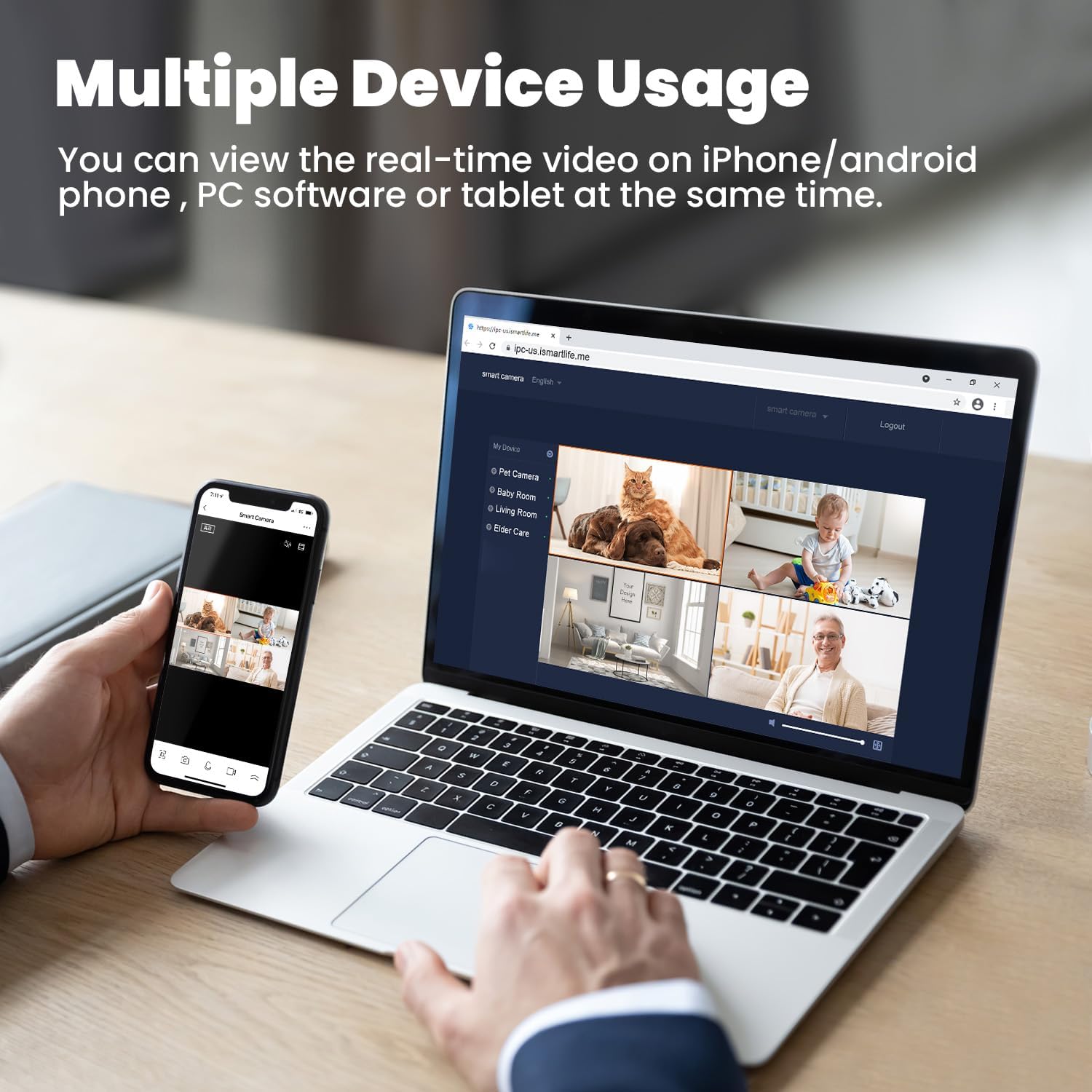
Figure 7: Multiple Device Viewing
7. അലക്സാ ഇന്റഗ്രേഷൻ
The litokam camera is compatible with Amazon Alexa. You can use voice commands to view അനുയോജ്യമായ Alexa- പ്രാപ്തമാക്കിയ ഉപകരണങ്ങളിൽ നിങ്ങളുടെ ക്യാമറ ഫീഡ്.

ചിത്രം 8: അലക്സാ ഇന്റഗ്രേഷൻ
8. കരച്ചിൽ കണ്ടെത്തൽ
The camera can detect baby crying and send notifications to your phone. This feature can be configured in the app settings, offering two options for crying or sound detection.

Figure 9: Baby Cry Detection Notification
മെയിൻ്റനൻസ്
- വൃത്തിയാക്കൽ: ക്യാമറ ലെൻസും ബോഡിയും വൃത്തിയാക്കാൻ മൃദുവായതും ഉണങ്ങിയതുമായ തുണി ഉപയോഗിക്കുക. കഠിനമായ രാസവസ്തുക്കളോ ഉരച്ചിലുകളോ ഉള്ള വസ്തുക്കൾ ഉപയോഗിക്കുന്നത് ഒഴിവാക്കുക.
- സോഫ്റ്റ്വെയർ അപ്ഡേറ്റുകൾ: Regularly check the 'little elf smart' app for firmware updates to ensure optimal performance and security.
- പ്ലേസ്മെൻ്റ്: നേരിട്ടുള്ള സൂര്യപ്രകാശം, താപ സ്രോതസ്സുകൾ, ഈർപ്പം എന്നിവയിൽ നിന്ന് അകന്ന്, സ്ഥിരമായ ഒരു സ്ഥലത്താണ് ക്യാമറ സ്ഥാപിച്ചിരിക്കുന്നതെന്ന് ഉറപ്പാക്കുക.
ട്രബിൾഷൂട്ടിംഗ്
- ക്യാമറ വൈഫൈയിലേക്ക് കണക്റ്റ് ചെയ്യുന്നില്ല:
- നിങ്ങളുടെ വൈഫൈ നെറ്റ്വർക്ക് 2.4GHz ആണെന്ന് ഉറപ്പാക്കുക. ക്യാമറ 5GHz വൈഫൈ പിന്തുണയ്ക്കുന്നില്ല.
- കൃത്യതയ്ക്കായി നിങ്ങളുടെ വൈഫൈ പാസ്വേഡ് പരിശോധിക്കുക.
- ക്യാമറ നിങ്ങളുടെ വൈഫൈ റൂട്ടറിന് അടുത്തേക്ക് നീക്കുക.
- ക്യാമറയും റൂട്ടറും പുനരാരംഭിക്കുക.
- Frequent Motion Detection Alerts:
- Adjust the motion detection sensitivity in the app settings to a lower level.
- Ensure the camera is not pointed at areas with constant, non-critical movement (e.g., curtains near a window, tree branches).
- മോശം ചിത്രത്തിന്റെ ഗുണനിലവാരം:
- ക്യാമറ ലെൻസ് വൃത്തിയുള്ളതാണെന്ന് ഉറപ്പാക്കുക.
- Check your internet connection speed. A stable connection is required for optimal 2K streaming.
- ടു-വേ ഓഡിയോ പ്രശ്നങ്ങൾ:
- Ensure your phone's microphone and speaker are enabled and not muted.
- Check the volume settings in the app.
സ്പെസിഫിക്കേഷനുകൾ
| ഫീച്ചർ | സ്പെസിഫിക്കേഷൻ |
|---|---|
| മോഡൽ നമ്പർ | LF-P1t |
| വീഡിയോ ക്യാപ്ചർ റെസല്യൂഷൻ | 2K (Effective Still Resolution 2 MP) |
| കണക്റ്റിവിറ്റി പ്രോട്ടോക്കോൾ | വൈഫൈ (2.4GHz മാത്രം) |
| Pan/Tilt Field of View | 360 ഡിഗ്രി (തിരശ്ചീനം) |
| ഡിജിറ്റൽ സൂം | 3x |
| നൈറ്റ് വിഷൻ റേഞ്ച് | 33 അടി വരെ |
| സ്റ്റോറേജ് ഓപ്ഷനുകൾ | മൈക്രോ എസ്ഡി കാർഡ് (പരമാവധി 128 ജിബി), ക്ലൗഡ് സ്റ്റോറേജ് |
| ടു-വേ ഓഡിയോ | അതെ |
| കൺട്രോളർ തരം | ആമസോൺ അലക്സ |
| പവർ ഉറവിടം | കോർഡഡ് ഇലക്ട്രിക് (10 വോൾട്ട്, 10 വാട്ട്സ്) |
| ഇനത്തിന്റെ അളവുകൾ (L x W x H) | 3.54 x 3.54 x 4.33 ഇഞ്ച് |
| ഇനത്തിൻ്റെ ഭാരം | 1.54 പൗണ്ട് |
| ഇൻഡോർ/ഔട്ട്ഡോർ ഉപയോഗം | ഇൻഡോർ |
വാറൻ്റിയും പിന്തുണയും
Your litokam 2K Indoor Pan/Tilt Home Security Camera comes with a 2 വർഷത്തെ വാറൻ്റി. We also offer a 30-ദിവസത്തെ പണം-ബാക്ക് ഗ്യാരണ്ടി നിങ്ങളുടെ മനസ്സമാധാനത്തിനായി.
For technical assistance or any inquiries, please contact our customer support team:
- 24/7 Live Service: ഉടനടി സഹായത്തിന് ലഭ്യമാണ്.
- തത്സമയ ചാറ്റ്: Access through the 'little elf smart' app or our official webസൈറ്റ്.
- കോൾ സെൻ്റർ: Contact us by phone for direct support.
- Online Email: Send your queries via email for detailed responses.
Please refer to the contact information provided in the product packaging or on the official litokam webനിർദ്ദിഷ്ട പിന്തുണാ ചാനലുകൾക്കായുള്ള സൈറ്റ്.
സുരക്ഷാ വിവരങ്ങൾ
- Do not expose the camera to extreme temperatures, humidity, or direct water.
- കേടുപാടുകൾ തടയാൻ നൽകിയിരിക്കുന്ന പവർ അഡാപ്റ്റർ മാത്രം ഉപയോഗിക്കുക.
- Keep the camera and its accessories out of reach of children and pets.
- Do not attempt to disassemble or repair the camera yourself. Contact support for service.
- ക്യാമറ അമിതമായി ചൂടാകുന്നത് തടയാൻ ചുറ്റും ശരിയായ വായുസഞ്ചാരം ഉറപ്പാക്കുക.


