1. ആമുഖം
This manual provides detailed instructions for the installation, operation, and maintenance of your AMANSON H6 ATX Mid Tower PC Case. Please read this manual thoroughly before beginning assembly to ensure proper setup and to maximize the performance and longevity of your system components. This case is designed for gaming enthusiasts, offering a panoramic view with tempered glass and robust cooling capabilities.
2. ഉൽപ്പന്ന സവിശേഷതകൾ
- Panoramic Tempered Glass Design: Equipped with tempered glass on the front and left side, providing a clear view of internal components and RGB lighting (fans not included).
- Broad Motherboard Compatibility: ATX, Micro-ATX, Mini-ITX മദർബോർഡുകൾ പിന്തുണയ്ക്കുന്നു.
- വിപുലമായ തണുപ്പിക്കൽ പിന്തുണ: Accommodates up to 10 x 120mm fans (fans not included) for optimal airflow. Supports top-mounted 360mm, 280mm, or 240mm integrated water cooling radiators.
- വിശാലമായ ഇൻ്റീരിയർ: Maximum graphics card length of 360mm and CPU cooler height of 155mm.
- ഫ്ലെക്സിബിൾ സ്റ്റോറേജ് ഓപ്ഷനുകൾ: Features 1 x 3.5" HDD bay and 4 x 2.5" SSD bays.
- Convenient Front I/O Panel: Includes 1 x USB 3.0 port, 1 x Type-C port, and HD audio jacks for easy peripheral connectivity.
- കാര്യക്ഷമമായ കേബിൾ മാനേജ്മെൻ്റ്: ഉപയോഗിച്ച് രൂപകൽപ്പന ചെയ്തത് ample space behind the motherboard tray and a dust filter for a clean build and improved airflow.
3 സ്പെസിഫിക്കേഷനുകൾ
| ഫീച്ചർ | സ്പെസിഫിക്കേഷൻ |
|---|---|
| മോഡൽ | H6 |
| കേസ് തരം | മിഡ് ടവർ |
| അളവുകൾ (L x W x H) | 420mm x 272.5mm x 399mm (Case Body) |
| മെറ്റീരിയൽ | സ്റ്റീൽ, ടെമ്പർഡ് ഗ്ലാസ് |
| മദർബോർഡ് പിന്തുണ | ATX, മൈക്രോ-ATX, മിനി-ITX |
| വിപുലീകരണ സ്ലോട്ടുകൾ | 7 |
| 3.5" ഡ്രൈവ് ബേകൾ | 1 |
| 2.5" ഡ്രൈവ് ബേകൾ | 4 |
| I/O പോർട്ടുകൾ | 1 x USB 3.0, 1 x Type-C, HD Audio (Mic & Headphone) |
| പരമാവധി GPU ദൈർഘ്യം | 360 മി.മീ |
| പരമാവധി CPU കൂളർ ഉയരം | 155 മി.മീ |
| Fan Support (120mm) | Top: 3, Front: 3, Side: 3, Bottom: 3, Rear: 1 (Total up to 10 fans) |
| റേഡിയേറ്റർ പിന്തുണ | മുകളിൽ: 360mm / 280mm / 240mm |
| ഭാരം | 7.87 കി.ഗ്രാം (ഉൽപ്പന്നം) |
Note: Fan and ARGB components are not included with the case. Actual external dimensions may vary slightly due to feet or protrusions.

ചിത്രം 1: An illustration of the AMANSON H6 PC case, highlighting its overall external dimensions for reference.
4. പാക്കേജ് ഉള്ളടക്കം
താഴെ കൊടുത്തിരിക്കുന്ന എല്ലാ ഇനങ്ങളും നിങ്ങളുടെ പാക്കേജിൽ ഉണ്ടെന്ന് ദയവായി ഉറപ്പാക്കുക:
- AMANSON H6 ATX Mid Tower PC Case (1 unit)
- ആക്സസറി ബോക്സ് (സ്ക്രൂകൾ, സ്റ്റാൻഡ്ഓഫുകൾ, കേബിൾ ടൈകൾ മുതലായവ അടങ്ങിയിരിക്കുന്നു)
- ഉപയോക്തൃ മാനുവൽ (ഈ പ്രമാണം)
Note: Cooling fans and ARGB components are sold separately and are not included with the case.
5. സജ്ജീകരണ ഗൈഡ്
Follow these steps for proper installation of your PC components into the AMANSON H6 case.
5.1. കേസ് തയ്യാറാക്കൽ
Before installing any components, ensure the case is placed on a stable, flat surface. Remove the side panels to gain access to the interior.

ചിത്രം 2: The AMANSON H6 features hinged tempered glass side panels for easy access to internal components. Gently open the side panel to begin assembly.
5.2. മദർബോർഡ് ഇൻസ്റ്റാളേഷൻ
- Identify the correct standoff positions for your ATX, Micro-ATX, or Mini-ITX motherboard. The case comes with pre-installed standoffs for standard ATX. Adjust or install additional standoffs as needed using the provided tools.
- സ്ക്രൂ ദ്വാരങ്ങൾ വിന്യസിച്ചുകൊണ്ട്, നിങ്ങളുടെ മദർബോർഡ് സ്റ്റാൻഡ്ഓഫുകളിൽ ശ്രദ്ധാപൂർവ്വം വയ്ക്കുക.
- Secure the motherboard with the appropriate screws from the accessory box. Do not overtighten.

ചിത്രം 3: This diagram illustrates the compatible motherboard sizes (ITX, M-ATX, ATX) and potential fan/radiator mounting locations within the AMANSON H6 case, highlighting its versatile space system.
5.3. Storage Device Installation (HDD/SSD)
The AMANSON H6 supports 1 x 3.5" HDD and 4 x 2.5" SSDs.
- Locate the drive bays behind the motherboard tray and in the PSU shroud area.
- For 3.5" HDDs, slide the drive into the designated cage and secure it with screws.
- For 2.5" SSDs, mount them onto the dedicated brackets using screws.
- Connect SATA data and power cables to your installed drives.
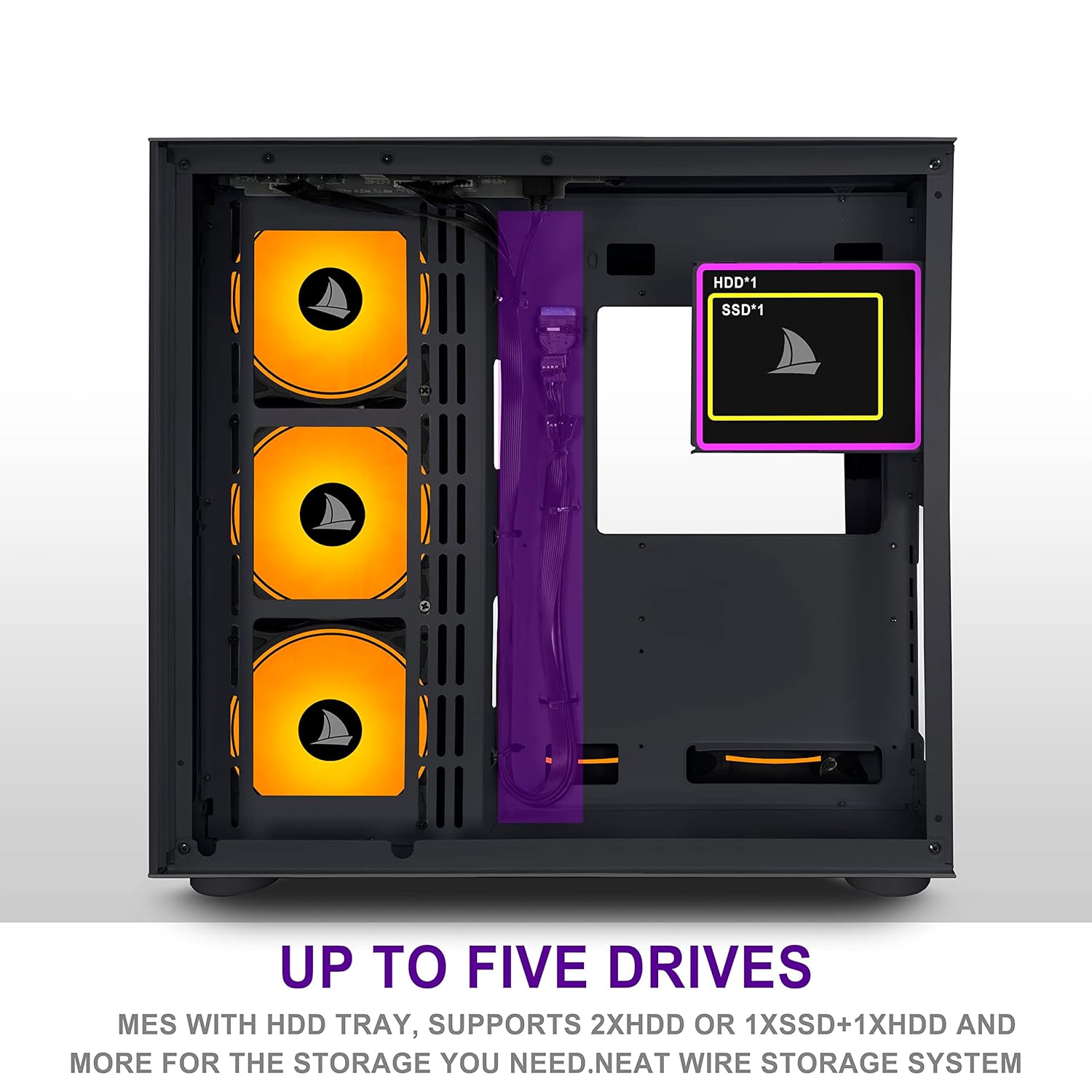
ചിത്രം 4: This image highlights the locations for installing up to five storage drives (1x HDD, 4x SSDs) within the AMANSON H6 case, facilitating a neat wire storage system.
5.4. ഗ്രാഫിക്സ് കാർഡ് ഇൻസ്റ്റലേഷൻ
- കേസിന്റെ പിൻഭാഗത്ത് നിന്ന് ആവശ്യമായ എക്സ്പാൻഷൻ സ്ലോട്ട് കവറുകൾ നീക്കം ചെയ്യുക.
- Insert your graphics card into the appropriate PCIe slot on your motherboard, ensuring it is fully seated.
- സ്ക്രൂകൾ ഉപയോഗിച്ച് ഗ്രാഫിക്സ് കാർഡ് കേസിൽ ഉറപ്പിക്കുക.
- Connect any required PCIe power cables from your power supply to the graphics card.
5.5. പവർ സപ്ലൈ ഇൻസ്റ്റലേഷൻ
- Position your ATX power supply unit (PSU) into the dedicated compartment at the bottom rear of the case.
- Secure the PSU to the case with screws from the rear.
- Route the necessary power cables through the cable management cutouts to reach your motherboard, graphics card, and storage devices.
5.6. കേബിൾ മാനേജ്മെന്റ്
The AMANSON H6 offers ample space behind the motherboard tray for cable routing. Utilize the cable tie points and included cable ties to organize and secure cables, improving airflow and aesthetics.
5.7. ഫാൻ, റേഡിയേറ്റർ ഇൻസ്റ്റാളേഷൻ
The case supports extensive cooling configurations. Fans are not included.
- Fan Placement: Install 120mm fans in the designated locations: Top (3), Front (3), Side (3), Bottom (3), Rear (1).
- Radiator Placement: A 360mm, 280mm, or 240mm radiator can be mounted at the top of the case.
- Ensure fans are oriented correctly for optimal airflow (intake or exhaust) based on your cooling strategy.

ചിത്രം 5: The zoning design concept of the AMANSON H6 case, viewed from the front, illustrates the internal layout optimized for component separation and efficient cooling.
6. പ്രവർത്തന നിർദ്ദേശങ്ങൾ
Once all components are installed and cables are connected, close the side panels. Connect your monitor, keyboard, mouse, and power cable to the system. Press the power button on the front I/O panel to start your computer.
6.1. ഫ്രണ്ട് I/O പാനൽ
- പവർ ബട്ടൺ: സിസ്റ്റം ഓൺ അല്ലെങ്കിൽ ഓഫ് ചെയ്യുന്നു.
- യുഎസ്ബി 3.0 പോർട്ട്: അനുയോജ്യമായ ഉപകരണങ്ങളുപയോഗിച്ച് അതിവേഗ ഡാറ്റ കൈമാറ്റത്തിനായി.
- ടൈപ്പ്-സി പോർട്ട്: Modern reversible connector for various peripherals.
- HD ഓഡിയോ ജാക്കുകൾ: ഹെഡ്ഫോണുകളും മൈക്രോഫോണുകളും ബന്ധിപ്പിക്കുക.
7. പരിപാലനം
നിങ്ങളുടെ പിസി ഘടകങ്ങളുടെ ഒപ്റ്റിമൽ പ്രകടനവും ദീർഘായുസ്സും ഉറപ്പാക്കാൻ പതിവ് അറ്റകുറ്റപ്പണികൾ സഹായിക്കുന്നു.
- പൊടി വൃത്തിയാക്കൽ: Periodically clean dust filters (if applicable) and the interior of the case using compressed air or a soft brush. Dust accumulation can hinder airflow and lead to overheating.
- ബാഹ്യ ശുചീകരണം: Wipe the exterior surfaces, especially the tempered glass panels, with a soft, lint-free cloth and a mild glass cleaner (avoid abrasive materials).
- കേബിൾ പരിശോധന: Ensure all internal cables remain securely connected and are not obstructing airflow.
8. പ്രശ്നപരിഹാരം
നിങ്ങൾക്ക് പ്രശ്നങ്ങൾ നേരിടുകയാണെങ്കിൽ, ഇനിപ്പറയുന്ന അടിസ്ഥാന ട്രബിൾഷൂട്ടിംഗ് ഘട്ടങ്ങൾ പരിഗണിക്കുക:
- സിസ്റ്റം ഓണാക്കുന്നില്ല:
- Ensure the power cable is securely connected to both the PSU and the wall outlet.
- Check that the PSU switch is in the "ON" position.
- Verify all power connections to the motherboard and components are secure.
- Confirm the front panel power switch cable is correctly connected to the motherboard header.
- ഡിസ്പ്ലേ ഔട്ട്പുട്ട് ഇല്ല:
- Ensure your monitor is connected to the graphics card (not the motherboard's integrated graphics ports, unless you are using integrated graphics).
- ഗ്രാഫിക്സ് കാർഡ് അതിന്റെ PCIe സ്ലോട്ടിൽ വീണ്ടും സ്ഥാപിക്കുക.
- Check all power cables to the graphics card.
- അമിത ചൂടാക്കൽ പ്രശ്നങ്ങൾ:
- Verify all case fans are spinning and oriented correctly for optimal airflow.
- Clean any dust accumulation from fans, radiators, and filters.
- Ensure CPU cooler is properly seated and making good contact with the CPU.
For more complex issues, consult the manuals for your individual components (motherboard, GPU, PSU) or seek professional assistance.
9. വാറൻ്റിയും പിന്തുണയും
The AMANSON H6 PC Case comes with a standard manufacturer's warranty. Please refer to the warranty policy provided at the time of purchase or contact your retailer for specific details regarding warranty coverage and duration.
For technical support or inquiries, please contact AMANSON customer service through the official website or your point of purchase. When contacting support, please have your product model (H6) and purchase information readily available.


