1. ആമുഖം
നിങ്ങളുടെ MUB-യുടെ ഇൻസ്റ്റാളേഷൻ, പ്രവർത്തനം, പരിപാലനം എന്നിവയ്ക്കുള്ള വിശദമായ നിർദ്ദേശങ്ങൾ ഈ മാനുവൽ നൽകുന്നു.VIEW 5MP Outdoor Security Camera (Model ZY-C8-5MP). Please read this manual thoroughly before using the product to ensure proper functionality and safety. Keep this manual for future reference.
2. ഉൽപ്പന്നം കഴിഞ്ഞുview
2.1 പാക്കേജ് ഉള്ളടക്കം
- എം.യു.ബിVIEW 5എംപി ഔട്ട്ഡോർ സെക്യൂരിറ്റി ക്യാമറ
- പവർ അഡാപ്റ്റർ
- മൗണ്ടിംഗ് സ്ക്രൂകളും വാൾ പ്ലഗുകളും
- നെറ്റ്വർക്ക് കേബിളിനുള്ള വാട്ടർപ്രൂഫ് കിറ്റ് (ബാധകമെങ്കിൽ)
- ദ്രുത ആരംഭ ഗൈഡ്
2.2 ക്യാമറ ഘടകങ്ങൾ
Familiarize yourself with the main components of your security camera:

ചിത്രം 2.2.1: എം.യു.ബിVIEW 5MP Outdoor Security Camera. The image displays the camera unit with its dual antennas, lens, and LED lights, alongside a smartphone screen showing a live feed from the camera of a house.
- ക്യാമറ ലെൻസ്: വീഡിയോ foo ക്യാപ്ചർ ചെയ്യുന്നുtage.
- ഇൻഫ്രാറെഡ് LED-കൾ: Provide night vision capabilities.
- വൈറ്റ് ലൈറ്റ് എൽഇഡികൾ: Enable full-color night vision and can act as a deterrent.
- മൈക്രോഫോൺ: For audio input (two-way audio).
- സ്പീക്കർ: For audio output (two-way audio).
- ഇരട്ട ആന്റിനകൾ: For stable 2.4G WiFi connection.
- പവർ പോർട്ട്: പവർ അഡാപ്റ്ററുമായി ബന്ധിപ്പിക്കുന്നു.
- റീസെറ്റ് ബട്ടൺ: ക്യാമറ ഫാക്ടറി ക്രമീകരണങ്ങളിലേക്ക് പുനഃസജ്ജമാക്കാൻ ഉപയോഗിക്കുന്നു.
- SD കാർഡ് സ്ലോട്ട്: For local storage (supports up to 128GB, SD card not included).

ചിത്രം 2.2.2: Connectivity and Durability. This image highlights the camera's support for 2.4GHz WiFi (not 5GHz) and its weatherproof design, indicating operation between -10°C/14°F and 60°C/140°F, suitable for outdoor use.
3. സജ്ജീകരണം
3.1 ഇൻസ്റ്റലേഷൻ
- ഒരു ലൊക്കേഷൻ തിരഞ്ഞെടുക്കുക: തെളിഞ്ഞ കാലാവസ്ഥയുള്ള ഒരു പുറം സ്ഥലം തിരഞ്ഞെടുക്കുക. view of the area you wish to monitor and within range of your 2.4GHz Wi-Fi network. Ensure there is access to a power outlet.
- ക്യാമറ ഘടിപ്പിക്കുക:
- Use the provided mounting template (if included) to mark drill holes.
- ദ്വാരങ്ങൾ തുരന്ന് മതിൽ പ്ലഗുകൾ തിരുകുക.
- നൽകിയിരിക്കുന്ന സ്ക്രൂകൾ ഉപയോഗിച്ച് ക്യാമറ ബേസ് ഭിത്തിയിൽ ഉറപ്പിക്കുക.
- പവർ കണക്ഷൻ: പവർ അഡാപ്റ്റർ ക്യാമറയുമായി ബന്ധിപ്പിച്ച് ഒരു പവർ ഔട്ട്ലെറ്റിൽ പ്ലഗ് ചെയ്യുക.
- വാട്ടർപ്രൂഫ് സംരക്ഷണം: For outdoor installations, use the waterproof kit to protect the network cable connection (if applicable) from moisture.
3.2 App Connection (2.4G WiFi)
The camera connects via 2.4GHz WiFi for a stable connection.

ചിത്രം 3.2.1: Stable WiFi Connection. This image illustrates the camera's 5dBi dual antennas designed for a more stable 2.4G WiFi connection, alongside a smartphone screen displaying device information including signal strength.
- ആപ്പ് ഡൗൺലോഡ് ചെയ്യുക: ഇതിനായി തിരയുക the "MUBVIEW" app (or specified app in the Quick Start Guide) on your smartphone's app store (iOS or Android).
- രജിസ്റ്റർ ചെയ്യുക/ലോഗിൻ ചെയ്യുക: ആപ്പ് തുറന്ന് ഒരു അക്കൗണ്ട് സൃഷ്ടിക്കുക അല്ലെങ്കിൽ നിങ്ങൾക്ക് ഇതിനകം ഒന്ന് ഉണ്ടെങ്കിൽ ലോഗിൻ ചെയ്യുക.
- ഉപകരണം ചേർക്കുക: Follow the in-app instructions to add your new camera. This typically involves:
- Powering on the camera and waiting for its indicator light to flash (indicating pairing mode).
- Scanning a QR code on the camera or manually selecting the device type.
- Connecting your phone to your 2.4GHz Wi-Fi network and entering the Wi-Fi password into the app.
- The app will then guide you through connecting the camera to your Wi-Fi.
- നിങ്ങളുടെ ക്യാമറയ്ക്ക് പേര് നൽകുക: Assign a name to your camera for easy identification.
4. പ്രവർത്തന നിർദ്ദേശങ്ങൾ
4.1 തത്സമയം View കൂടാതെ പാൻ/ടിൽറ്റ് നിയന്ത്രണം
Access the live feed from your camera through the MUBVIEW app. The camera offers 360° coverage with Pan (355° horizontal) and Tilt (90° vertical) functionality.
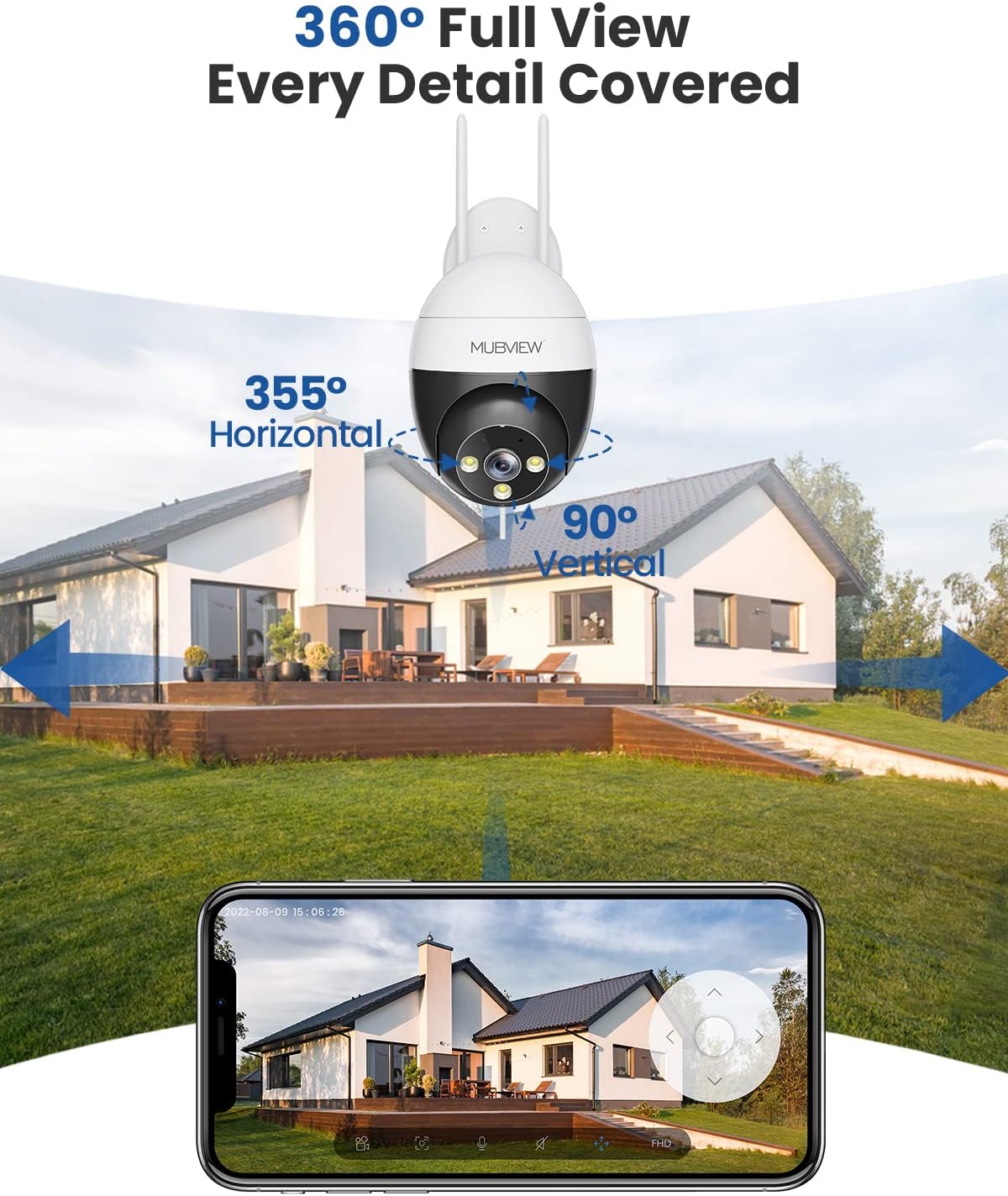
ചിത്രം 4.1.1: 360° Full View. This image demonstrates the camera's pan and tilt capabilities, offering 355° horizontal rotation and 90° vertical rotation for comprehensive area coverage.
- In the app's live view, use the directional controls to pan the camera horizontally and tilt it vertically to adjust the viewing ആംഗിൾ.
- You can save preset positions for quick access to specific areas.
4.2 Human Detection and Auto Tracking
The camera is equipped with advanced human detection and auto-tracking features to enhance security.

ചിത്രം 4.2.1: Auto Tracking in Action. This image shows the camera's auto-tracking feature, capturing the movement of a child playing soccer and generating an alert message for motion detection.
- മനുഷ്യ കണ്ടെത്തൽ: The camera can differentiate between human shapes and other moving objects, reducing false alarms. Enable this feature in the app settings.
- യാന്ത്രിക ട്രാക്കിംഗ്: ഒരു മനുഷ്യനെ കണ്ടെത്തുമ്പോൾ, ക്യാമറയ്ക്ക് അതിന്റെ ഫീൽഡിനുള്ളിൽ അവരുടെ ചലനം പിന്തുടരാൻ യാന്ത്രികമായി പാൻ ചെയ്യാനും ടിൽറ്റ് ചെയ്യാനും കഴിയും. view.
- അലേർട്ടുകൾ: Configure push notifications in the app to receive alerts when motion or human detection is triggered.
4.3 Night Vision and Full Color Night Vision
The camera provides clear surveillance even in low-light conditions.
- ഇൻഫ്രാറെഡ് നൈറ്റ് വിഷൻ: Automatically switches to black and white infrared mode in darkness for clear visibility.
- പൂർണ്ണ വർണ്ണ രാത്രി ദർശനം: Utilizes built-in white light LEDs to provide color images at night when sufficient light is detected or can be manually activated.
- Adjust night vision settings (e.g., auto, infrared, full color) within the app.
4.4 ടു-വേ ഓഡിയോ
Communicate with visitors or deter intruders using the camera's built-in microphone and speaker.
- ലൈവിൽ view, ക്യാമറയുടെ സ്പീക്കറിലൂടെ സംസാരിക്കാൻ മൈക്രോഫോൺ ഐക്കണിൽ ടാപ്പ് ചെയ്യുക.
- ക്യാമറയുടെ ചുറ്റുപാടിൽ നിന്നുള്ള ഓഡിയോ കേൾക്കാൻ സ്പീക്കർ ഐക്കണിൽ ടാപ്പ് ചെയ്യുക.
4.5 24/7 റെക്കോർഡിംഗും സംഭരണവും
The camera supports continuous recording and various storage options.

ചിത്രം 4.5.1: Recording Options. This image highlights the camera's 24/7 recording capability, offering a free 7-day cloud service and support for local storage via an SD card up to 128GB (not included).
- പ്രാദേശിക സംഭരണം: Insert a microSD card (up to 128GB, not included) into the camera's SD card slot for continuous or event-based recording.
- ക്ലൗഡ് സംഭരണം: The camera offers a free 7-day cloud service for event recording. Additional cloud storage plans may be available through the app.
- പ്ലേബാക്ക്: റെക്കോർഡ് ചെയ്ത foo ആക്സസ് ചെയ്യുകtage via the app's "History" or "Cloud" sections.
5. പരിപാലനം
- വൃത്തിയാക്കൽ: വ്യക്തമായ ചിത്ര നിലവാരം ഉറപ്പാക്കാൻ, മൃദുവായതും ഉണങ്ങിയതുമായ തുണി ഉപയോഗിച്ച് ക്യാമറ ലെൻസ് പതിവായി തുടയ്ക്കുക. കഠിനമായ രാസവസ്തുക്കൾ ഉപയോഗിക്കരുത്.
- ഫേംവെയർ അപ്ഡേറ്റുകൾ: Check the app periodically for firmware updates. Keeping your camera's firmware up-to-date ensures optimal performance and security.
- വൈദ്യുതി വിതരണം: പവർ അഡാപ്റ്ററിനും കേബിളിനും കേടുപാടുകൾ സംഭവിച്ചിട്ടില്ലെന്ന് ഉറപ്പാക്കുക.
- നെറ്റ്വർക്ക് കണക്ഷൻ: Verify your Wi-Fi signal strength periodically to ensure a stable connection.
6. പ്രശ്നപരിഹാരം
| പ്രശ്നം | സാധ്യമായ പരിഹാരം |
|---|---|
| ക്യാമറ ഓഫ്ലൈനാണ്/വൈഫൈയിലേക്ക് കണക്റ്റുചെയ്യാൻ കഴിയില്ല. |
|
| മോശം ചിത്ര നിലവാരം |
|
| ചലന കണ്ടെത്തൽ അലേർട്ടുകൾ വളരെ ഇടയ്ക്കിടെ/അപൂർവ്വമായി മാത്രമേ ലഭിക്കൂ |
|
| ടു-വേ ഓഡിയോ പ്രവർത്തിക്കുന്നില്ല |
|
7 സ്പെസിഫിക്കേഷനുകൾ
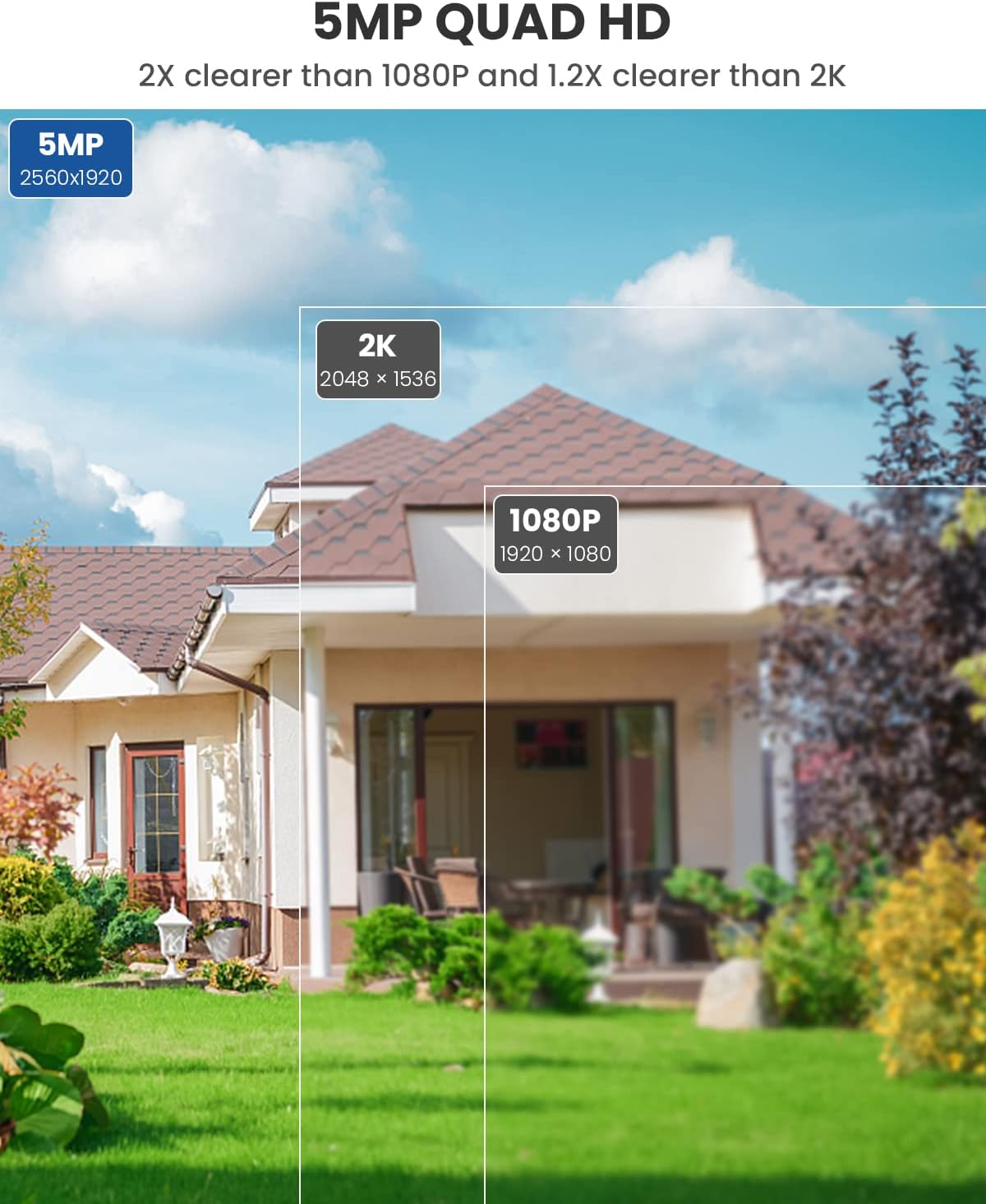
ചിത്രം 7.1.1: 5MP Quad HD Resolution. This image visually compares the clarity of 5MP (2560x1920) resolution, stating it is 2X clearer than 1080P and 1.2X clearer than 2K (2048x1536).
| ഫീച്ചർ | വിശദാംശങ്ങൾ |
|---|---|
| മോഡൽ നമ്പർ | ZY-C8-5MP |
| റെസലൂഷൻ | 5എംപി (2560x1920) |
| പാൻ/ടിൽറ്റ് ശ്രേണി | 355° തിരശ്ചീനം, 90° ലംബം |
| കണക്റ്റിവിറ്റി | 2.4GHz വൈ-ഫൈ (IEEE 802.11b/g/n) |
| നൈറ്റ് വിഷൻ | Infrared Night Vision, Full Color Night Vision |
| ഓഡിയോ | ടു-വേ ഓഡിയോ (ബിൽറ്റ്-ഇൻ മൈക്രോഫോണും സ്പീക്കറും) |
| സ്റ്റോറേജ് ഓപ്ഷനുകൾ | മൈക്രോഎസ്ഡി കാർഡ് (128GB വരെ, ഉൾപ്പെടുത്തിയിട്ടില്ല), ക്ലൗഡ് സ്റ്റോറേജ് |
| പ്രത്യേക സവിശേഷതകൾ | മനുഷ്യനെ കണ്ടെത്തൽ, ഓട്ടോ ട്രാക്കിംഗ് |
| പവർ ഉറവിടം | കോർഡഡ് ഇലക്ട്രിക് (10 വാട്ട്സ്) |
| പ്രവർത്തന താപനില | -10°C മുതൽ 60°C വരെ (14°F മുതൽ 140°F വരെ) |
| മെറ്റീരിയൽ | ലോഹം |
| അളവുകൾ (L x W x H) | 8 x 6 x 10 സെ.മീ |
| ഭാരം | 599 ഗ്രാം |
8. വാറൻ്റിയും പിന്തുണയും
For warranty information and technical support, please refer to the warranty card included in your product packaging or visit the official MUBVIEW website. You may also contact MUBVIEW customer service through the contact information provided in the app or on their webസൈറ്റ്.


