1. ആമുഖം
This manual provides essential information for the safe and efficient operation of your Cuifati 30A MPPT Solar Controller. Please read these instructions carefully before installation and use to ensure optimal performance and longevity of the product.
The Cuifati 30A MPPT Solar Controller is designed to manage the power flow from your solar panels to your battery bank, ensuring efficient charging and protecting your batteries from overcharge and over-discharge. It features an intelligent regulator compatible with 12V, 24V, 36V, and 48V systems, a built-in USB port for device charging, and an LCD digital panel for easy monitoring and parameter configuration.
2. ഉൽപ്പന്നം കഴിഞ്ഞുview
2.1 പ്രധാന സവിശേഷതകൾ
- വിശാലമായ അനുയോജ്യത: 12V, 24V, 36V, 48V ബാറ്ററി സിസ്റ്റങ്ങളെ പിന്തുണയ്ക്കുന്നു.
- Integrated USB Output: Two 5V/2A USB ports for charging mobile devices.
- ബുദ്ധിപരമായ സംരക്ഷണം: Features protection against overcurrent, short-circuit, inverse polarity, low voltagഇ, ഓവർചാർജ്.
- LCD ഡിസ്പ്ലേ: Provides real-time status and data, allowing for convenient mode switching and parameter configuration.
- Automatic System Management: Manages solar panel and battery operations automatically with a built-in industrial microcontroller.
2.2 ഘടകങ്ങൾ
The solar controller unit includes the main control module with an LCD screen, USB ports, and terminal connections for solar panels, battery, and load. The device is housed in an engineering plastic casing designed for durability.

ചിത്രം 1: മുൻഭാഗം view of the Cuifati 30A MPPT Solar Controller, showing the LCD display, USB ports, and connection terminals.
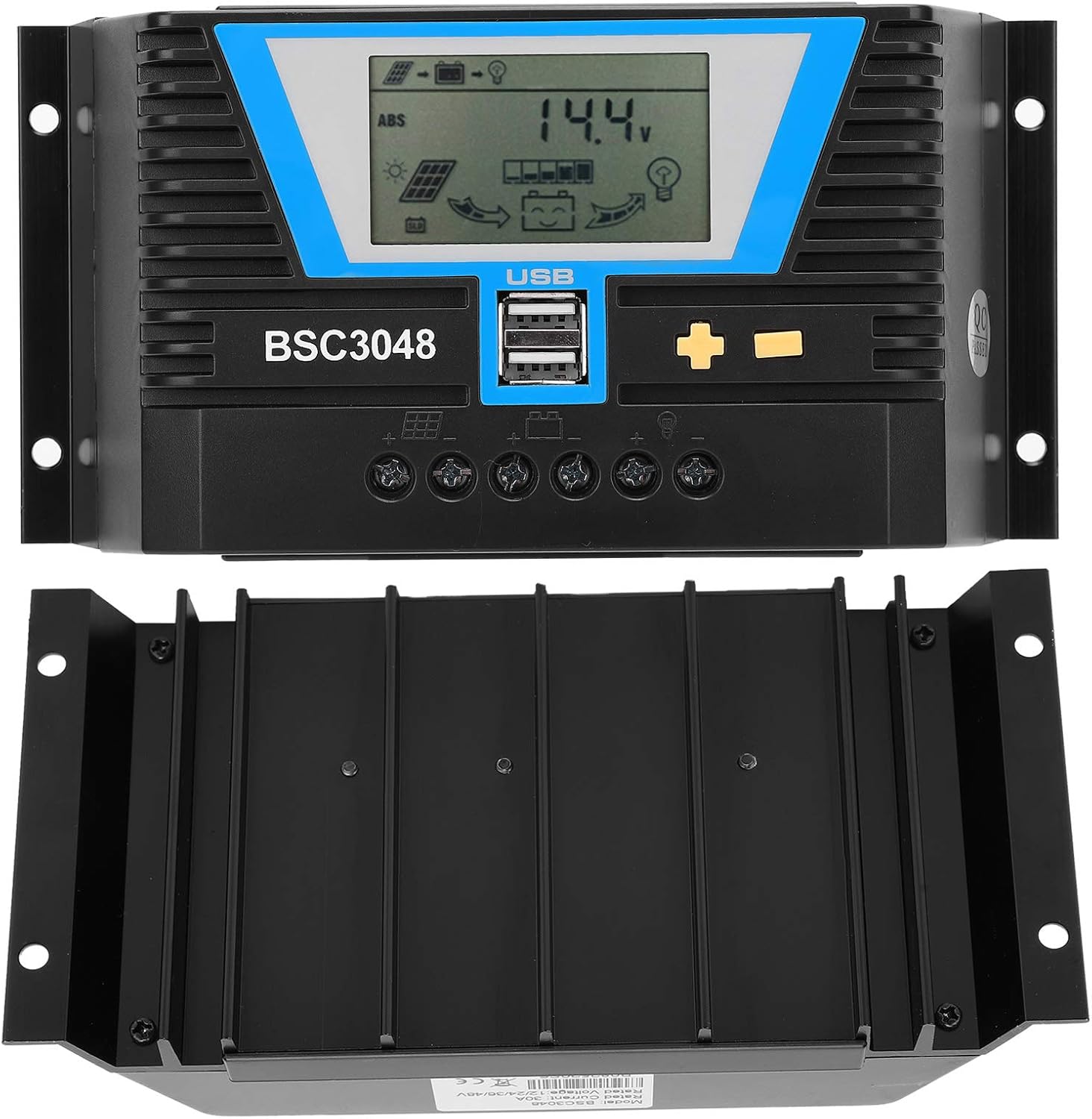
ചിത്രം 2: മുന്നിലും താഴെയും view of the solar controller, highlighting the heat sink fins for efficient cooling.
3 സ്പെസിഫിക്കേഷനുകൾ
| പരാമീറ്റർ | മൂല്യം |
|---|---|
| ഇനം തരം | സോളാർ കൺട്രോളർ |
| മെറ്റീരിയൽ | എഞ്ചിനീയറിംഗ് പ്ലാസ്റ്റിക് |
| റേറ്റുചെയ്ത കറൻ്റ് | 30എ |
| റേറ്റുചെയ്ത വർക്കിംഗ് വോളിയംtage | 12V/24V/36V/48V (Auto-sensing) |
| സോളാർ പാനൽ ഇൻപുട്ട് വോളിയംtage | ≤100V |
| സ്റ്റാറ്റിക് നഷ്ടം | ≤30mA |
| Loop Pressure Drop | ≤0.3V |
| USB ഔട്ട്പുട്ട് | 5V/2A x 2 |
| പ്രവർത്തന താപനില | -20~ +55℃ |
| സംരക്ഷണ നില | IP32 |
| ആപേക്ഷിക ആർദ്രത | ≤95%, കണ്ടൻസേഷൻ ഇല്ല |
| ടെർമിനൽ വലുപ്പം | 6AWG/16mm² |
| പാക്കേജ് അളവുകൾ | 8.66 x 4.57 x 2.24 ഇഞ്ച് |
| ഇനത്തിൻ്റെ ഭാരം | 1.1 പൗണ്ട് (0.5 കിലോഗ്രാം) |
4. സജ്ജീകരണവും ഇൻസ്റ്റാളേഷനും
Proper installation is crucial for the safe and efficient operation of your solar charging system. Please follow these steps carefully:
4.1 സുരക്ഷാ മുൻകരുതലുകൾ
- Ensure all connections are secure and correct to prevent damage to the controller or other components.
- Always connect the battery first, then the solar panel, and finally the load. Disconnect in the reverse order.
- Install the controller in a well-ventilated area, away from direct sunlight, high temperatures, and moisture.
- Use appropriate wire gauges for all connections to minimize power loss and prevent overheating.
4.2 കണക്ഷൻ ഘട്ടങ്ങൾ
- ബാറ്ററി ബന്ധിപ്പിക്കുക: Connect the positive and negative terminals of your battery to the corresponding battery terminals on the solar controller. Ensure correct polarity. The LCD display should light up.
- സോളാർ പാനൽ ബന്ധിപ്പിക്കുക: Connect the positive and negative terminals of your solar panel(s) to the corresponding solar panel terminals on the controller. Ensure correct polarity.
- ലോഡ് ബന്ധിപ്പിക്കുക (ഓപ്ഷണൽ): If you are connecting a DC load directly to the controller, connect its positive and negative terminals to the load terminals on the controller.

ചിത്രം 3: ക്ലോസപ്പ് view of the controller's connection terminals for solar panels, battery, and load.
5. പ്രവർത്തന നിർദ്ദേശങ്ങൾ
The Cuifati solar controller features an intuitive LCD display and control buttons for easy operation and monitoring.
5.1 എൽസിഡി ഡിസ്പ്ലേയും ബട്ടണുകളും
The LCD screen displays various system parameters such as battery voltage, charging current, discharge current, and operating modes. The controller typically has three buttons: a 'Mode' button, a '+' button, and a '-' button.

Figure 4: The controller's LCD display and control buttons, along with a guide to basic operations.
5.2 അടിസ്ഥാന പ്രവർത്തനങ്ങൾ
| മോഡ് | പ്രവർത്തന നിർദ്ദേശം |
|---|---|
| ബ്രൗസ് മോഡ് | Short press the "+" or "-" button to cycle through display parameters. |
| സ്വിച്ച് ലോഡുചെയ്യുക | When the load is set to 24-hour mode, short press "+" on the main interface to toggle the load. Do not manually switch the load in other working modes. |
| മോഡ് സജ്ജമാക്കുക | In the settable interface, long press "+" to enter parameter setting. Short press "+" or "-" to adjust the parameter. Long press "+" again to confirm and save the parameter setting. (Long pressing "-" will not save parameters and restore to the last setting). |
| പുനഃസജ്ജമാക്കുക | Long press "+" in the ambient temperature interface to reset the controller. |
5.3 യുഎസ്ബി ചാർജിംഗ്
The two 5V/2A USB ports can be used to charge compatible electronic devices such as mobile phones, tablets, and PCs. Simply connect your device using a standard USB cable.
6. പരിപാലനം
Regular maintenance ensures the longevity and optimal performance of your solar controller.
- ശുചിത്വം: Keep the controller clean and free from dust and debris. Use a dry cloth to wipe the surface.
- കണക്ഷനുകൾ: Periodically check all wire connections to ensure they are tight and free from corrosion. Loose connections can lead to power loss or overheating.
- വെൻ്റിലേഷൻ: കൺട്രോളർ അമിതമായി ചൂടാകുന്നത് തടയാൻ ഇൻസ്റ്റലേഷൻ ഏരിയ നന്നായി വായുസഞ്ചാരമുള്ളതാണെന്ന് ഉറപ്പാക്കുക.
- പരിസ്ഥിതി പരിശോധന: Verify that the controller is not exposed to excessive moisture, extreme temperatures, or direct sunlight, which can degrade its performance and lifespan.
7. പ്രശ്നപരിഹാരം
If you encounter issues with your Cuifati solar controller, refer to the following common problems and solutions:
7.1 No Display on LCD Screen
- ബാറ്ററി കണക്ഷൻ പരിശോധിക്കുക: Ensure the battery is correctly connected to the controller with the correct polarity. The controller draws power from the battery to operate its display.
- ബാറ്ററി വോളിയംtage: ബാറ്ററി വോളിയം ആണെന്ന് പരിശോധിക്കുകtage is within the operating range (12V-48V). If the battery is completely discharged, the controller may not power on.
7.2 ബാറ്ററി ചാർജ് ചെയ്യുന്നില്ല
- സോളാർ പാനൽ കണക്ഷൻ: Check if the solar panels are correctly connected to the controller with the correct polarity.
- സോളാർ പാനൽ ഔട്ട്പുട്ട്: Ensure the solar panels are receiving sufficient sunlight and are producing voltage. Use a multimeter to check the open-circuit voltagസോളാർ പാനലുകളുടെ ഇ.
- കൺട്രോളർ ക്രമീകരണങ്ങൾ: Verify that the battery type and charging parameters are correctly set in the controller's settings.
7.3 Load Not Working
- ലോഡ് കണക്ഷൻ: Ensure the load is correctly connected to the controller's load terminals.
- Load Switch Setting: Check the load switch setting on the controller. If it's in a timed mode, ensure the current time is within the active period.
- ബാറ്ററി വോളിയംtage: ബാറ്ററി വോള്യം ആണെങ്കിൽtage is too low, the controller may cut off the load to protect the battery.
- ഓവർലോഡ് സംരക്ഷണം: The controller has overload protection. Ensure the load current does not exceed the controller's rated load current.
8. വാറൻ്റിയും പിന്തുണയും
The Cuifati 30A MPPT Solar Controller comes with a 12-month warranty. For any issues or support inquiries, please contact Cuifati customer service via email. Please have your product model number (CUIFATImipqrgdwyu) and purchase details ready when contacting support.
വിപുലീകൃത കവറേജിനായി ഓപ്ഷണൽ പരിരക്ഷാ പദ്ധതികൾ ലഭ്യമാണ്:
- 3-വർഷ സംരക്ഷണ പദ്ധതി
- 4-വർഷ സംരക്ഷണ പദ്ധതി
For details on these plans, please refer to your purchase documentation or contact your retailer.