ആമുഖവും അവസാനിച്ചുview
This manual provides essential information for the Ulefone Note 14 Android 12 Unlocked Smartphone. Designed for ease of use, this device features a 6.52-inch display, a 4500mAh massive battery, and a dual AI camera system. It operates on Android 12, offering a personal, safe, and effortless user experience. The phone is ultra-slim and lightweight, ensuring comfortable handling.
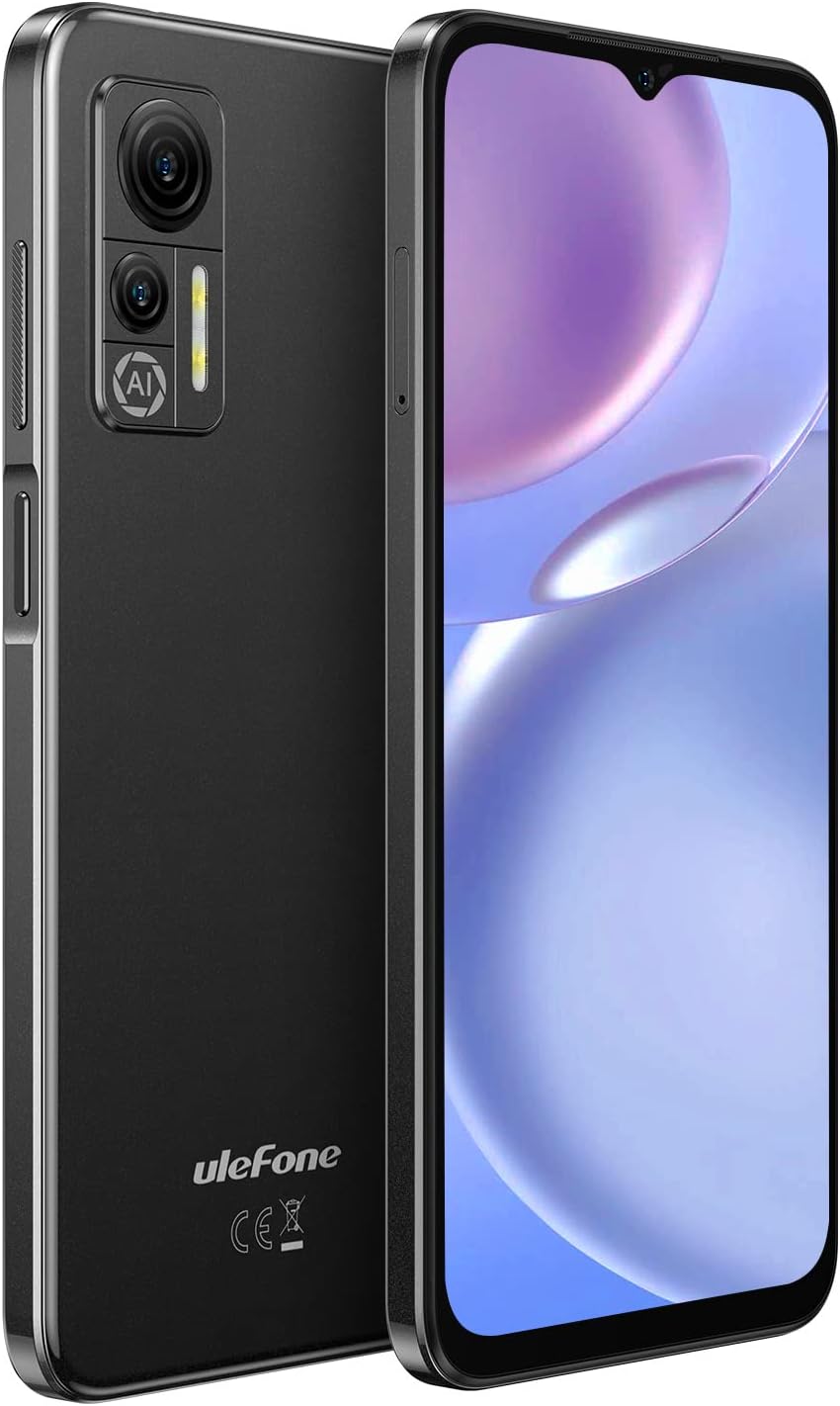
ചിത്രം: മുന്നിലും പിന്നിലും view of the Ulefone Note 14 smartphone in black.
ബോക്സിൽ എന്താണുള്ളത്
Upon unboxing your Ulefone Note 14, please verify that all the following items are included:
- എസി പവർ ചാർജർ (100~240V /US പ്ലഗ്)
- USB കേബിൾ
- ഫോൺ കേസ്
- സിം ട്രേ എജക്ടർ
സജ്ജമാക്കുക
SIM Card and Micro SD Card Installation
The Ulefone Note 14 supports a 3-card independent slot design, allowing for two Nano SIM cards and one TF (Micro SD) card to be used simultaneously. Use the provided SIM tray ejector tool to open the SIM tray located on the side of the device. Carefully place your Nano SIM cards and Micro SD card into their respective slots as indicated on the tray. Ensure the tray is fully inserted back into the phone.

Image: Close-up of the Ulefone Note 14's SIM tray, illustrating the dedicated slots for two Nano SIM cards and one Micro SD card.
ഉപകരണം ചാർജ് ചെയ്യുന്നു
Before initial use, fully charge your Ulefone Note 14. Connect the USB Type-C cable to the phone's charging port and the other end to the provided AC power charger. Plug the charger into a power outlet. The phone features a 4500mAh massive battery, providing extended usage time. A charging animation will appear on the screen indicating the charging status.

Image: The Ulefone Note 14 smartphone being charged via its USB Type-C port, with a battery charging indicator visible on the screen.
വീഡിയോ: ഒരു ഓവർview of the Ulefone Note 14, including a brief demonstration of its USB Type-C charging capability.
നിങ്ങളുടെ ഉപകരണം പ്രവർത്തിപ്പിക്കുന്നു
ഡിസ്പ്ലേ സവിശേഷതകൾ
The Ulefone Note 14 features a 6.52-inch waterdrop HD+ screen with a resolution of 720 x 1600 pixels. This display delivers vibrant colors and clear visuals, providing an immersive experience for media consumption and daily tasks. The waterdrop notch design maximizes the screen-to-body ratio for a broader view.

Image: The Ulefone Note 14's 6.52-inch waterdrop display, showcasing its visual quality with a dynamic image.
ക്യാമറ സിസ്റ്റം
Equipped with a dual AI camera system, the Ulefone Note 14 allows you to capture various moments. The main camera is 8MP, complemented by a depth sensor for enhanced photography. The front camera is 5MP, suitable for selfies and video calls. Features include Panorama, Portrait, Professional mode, Night mode, Beauty mode, and Slow Motion.

Image: Details of the Ulefone Note 14's camera specifications, including the 8MP main camera and 5MP front camera, along with various photography modes.
Video: A promotional video for the Ulefone Note 14, showcasing its camera capabilities with example photos and video clips.
ആൻഡ്രോയിഡ് 12 ഓപ്പറേറ്റിംഗ് സിസ്റ്റം
The Ulefone Note 14 runs on the latest Android 12 system, offering a redesigned user interface, enhanced privacy features, and a more personal and effortless experience. Enjoy new customization options, improved notifications, and better control over your data.

Image: The Ulefone Note 14 displaying the Android 12 operating system interface, highlighting its visual elements and features.
ഫേസ് അൺലോക്ക്
For convenient and secure access, the Ulefone Note 14 supports Face Unlock. This feature allows you to unlock your phone simply by looking at it, providing quick and hands-free access to your device and applications.
Video: A demonstration of the Ulefone Note 14's Face Unlock feature, showing the process of unlocking the device using facial recognition.
കണക്റ്റിവിറ്റി
The Ulefone Note 14 offers robust connectivity options. It supports 4G Dual SIM Dual Standby, compatible with T-Mobile and its MVNOs (e.g., Metro PCS, Mint Mobile). Please note it is NOT compatible with AT&T, Cricket, or CDMA Networks like Verizon, Sprint, and Boost Mobile. The device also includes Bluetooth, GPS, and OTG (On-The-Go) functionality, enabling direct data transmission and reverse charging.
മെയിൻ്റനൻസ്
ബാറ്ററി കെയർ
To maximize the lifespan and performance of your 4500mAh battery, consider the following tips:
- Avoid extreme temperatures, both hot and cold, as they can degrade battery health.
- Do not fully discharge the battery regularly. Charge it before it drops below 20%.
- Avoid overcharging; once the battery is full, disconnect the charger.
- Use only the original charger and USB cable provided with the device.
ട്രബിൾഷൂട്ടിംഗ്
If you encounter issues with your Ulefone Note 14, please refer to the following common solutions:
- നെറ്റ്വർക്ക് അനുയോജ്യത: Ensure your carrier is compatible with the device. This phone is compatible with T-Mobile and its MVNOs. It is NOT compatible with AT&T, Cricket, Verizon, Sprint, or Boost Mobile.
- No Data/Signal: If you experience issues with data connectivity or signal reception, first verify your SIM card is correctly inserted and activated. Check your network settings.
- പൊതുവായ പ്രശ്നങ്ങൾ: For any other issues, such as device freezing or lagging, try restarting the phone. If problems persist, ensure your software is up to date.
For persistent issues or technical support, please contact Ulefone support directly via email: amazon@ulefone.com.
സ്പെസിഫിക്കേഷനുകൾ
| ഫീച്ചർ | വിശദാംശങ്ങൾ |
|---|---|
| ഉൽപ്പന്ന അളവുകൾ | 6.49 x 3 x 0.35 ഇഞ്ച് |
| ഇനത്തിൻ്റെ ഭാരം | 6.7 ഔൺസ് |
| ഇനം മോഡൽ നമ്പർ | us-note 14 |
| ബാറ്ററികൾ | 1 ലിഥിയം പോളിമർ ബാറ്ററികൾ ആവശ്യമാണ്. (ഉൾപ്പെടുന്നു) |
| ഓപ്പറേറ്റിംഗ് സിസ്റ്റം | ആൻഡ്രോയിഡ് 12.0 |
| റാം | 7 ജിബി (3 ജിബി റാം + 4 ജിബി വെർച്വൽ റാം) |
| മെമ്മറി സ്റ്റോറേജ് കപ്പാസിറ്റി | 16 ജിബി (128 ജിബി വരെ വികസിപ്പിക്കാം) |
| വയർലെസ് കമ്മ്യൂണിക്കേഷൻ ടെക്നോളജീസ് | സെല്ലുലാർ |
| കണക്റ്റിവിറ്റി ടെക്നോളജികൾ | Bluetooth, Wi-Fi, GPS, OTG |
| ഹ്യൂമൻ ഇന്റർഫേസ് ഇൻപുട്ട് | ടച്ച് സ്ക്രീൻ |
| സ്കാനർ റെസല്യൂഷൻ | 720 x 1600 (എച്ച്ഡി+) |
| മറ്റ് ക്യാമറ സവിശേഷതകൾ | Rear (8MP Main, Depth Sensor), Front (5MP) |
| ഓഡിയോ ജാക്ക് | 3.5 മി.മീ |
| ഫോം ഫാക്ടർ | ടച്ച് സ്ക്രീൻ |
| നിറം | കറുപ്പ് |
| ബാറ്ററി പവർ റേറ്റിംഗ് | 4500 മില്ലിamp മണിക്കൂറുകൾ |
| ഫോൺ ടോക്ക് ടൈം | 25 മണിക്കൂർ |
| ഫോൺ സ്റ്റാൻഡ്ബൈ സമയം (ഡാറ്റ സഹിതം) | 246 മണിക്കൂർ |
| നിർമ്മാതാവ് | യുലെഫോൺ |
| സ്ക്രീൻ വലിപ്പം | 6.52 ഇഞ്ച് |
| മോഡലിൻ്റെ പേര് | യുലെഫോൺ നോട്ട് 14 |
| വയർലെസ് കാരിയർ | T-Mobile (Compatible) |
വാറൻ്റിയും പിന്തുണയും
Your Ulefone Note 14 purchased from the Ulefone Direct - US Store is covered by a two-year warranty. We offer a free return or replacement policy within 60 days of purchase.
For any inquiries, technical assistance, or warranty claims, please contact Ulefone support at: amazon@ulefone.com.


