1. ആമുഖം
This manual provides detailed instructions for the assembly, operation, and maintenance of your Dripex Adjustable Electric Standing Desk. Please read this manual thoroughly before installation and use to ensure proper function and safety. Keep this manual for future reference.
2 സുരക്ഷാ വിവരങ്ങൾ
- ഭാരം ശേഷി: Do not exceed the maximum weight recommendation of 176 pounds (80 kg) on the desktop. Overloading can cause damage or injury.
- അസംബ്ലി: It is recommended that two people assemble this desk due to the weight and size of components.
- പിഞ്ച് പോയിന്റുകൾ: Keep hands and fingers clear of moving parts during height adjustment to avoid pinching.
- ശക്തി: Ensure the power cord is properly connected and not damaged. Do not operate the desk if the cord is frayed or damaged.
- പ്ലേസ്മെൻ്റ്: Place the desk on a level surface. Ensure there is sufficient clearance around the desk for safe operation and to prevent collision with other objects.
- കുട്ടികളും വളർത്തുമൃഗങ്ങളും: ജോലി സമയത്ത് കുട്ടികളെയും വളർത്തുമൃഗങ്ങളെയും മേശയിൽ നിന്ന് അകറ്റി നിർത്തുക.
- ദ്രാവകങ്ങൾ: Avoid spilling liquids on the control panel or electrical components.
The desk features an anti-collision system and overload protection to enhance safety during operation.
3. പാക്കേജ് ഉള്ളടക്കം
അസംബ്ലി ആരംഭിക്കുന്നതിന് മുമ്പ്, എല്ലാ ഭാഗങ്ങളും ഉണ്ടെന്നും കേടുപാടുകൾ സംഭവിച്ചിട്ടില്ലെന്നും ഉറപ്പാക്കുക. ഘടകങ്ങളുടെ ദൃശ്യ തിരിച്ചറിയലിനായി അസംബ്ലി വീഡിയോ കാണുക.
- Desktop sections (K1, K2)
- Leg columns (B)
- Motor (D)
- Connecting rod (A)
- Side brackets (E, F)
- Feet (J)
- Control panel (M)
- Power adapter and cables (S10)
- Cable clips (S10)
- കപ്പ് ഹോൾഡർ
- ഹെഡ്ഫോൺ ഹുക്ക്
- Various screws and tools (S2, S3, S6, S7, S8, S11, S12, S13)
4. അസംബ്ലി നിർദ്ദേശങ്ങൾ
ശരിയായ അസംബ്ലിക്ക് ഈ ഘട്ടങ്ങൾ ശ്രദ്ധാപൂർവ്വം പാലിക്കുക. അസംബ്ലിക്ക് രണ്ട് പേർ ഉണ്ടായിരിക്കുന്നതാണ് ഉചിതം.
Video: Dripex Electric Standing Height Adjustable Desk - 63 Inches. This video demonstrates the complete assembly process for the desk.
Step 1: Assemble the Motor and Connecting Rod
- Insert the connecting rod (A) into the motor (D) and one leg column (B). Ensure the 'Front' indicator on the leg column faces forward.
- Attach the second leg column (B) to the other end of the connecting rod (A).
- Secure the motor (D) and connecting rod (A) to the leg columns.
ഘട്ടം 2: സൈഡ് ബ്രാക്കറ്റുകൾ ഘടിപ്പിക്കുക
- Attach the side brackets (E, F) to the top of the leg columns using the provided screws (S6, S3).
- ബ്രാക്കറ്റുകൾ സുരക്ഷിതമായി ഉറപ്പിച്ചിട്ടുണ്ടെന്ന് ഉറപ്പാക്കുക.
Step 3: Install Feet and Support Arms
- Attach the feet (J) to the bottom of the leg columns using screws (S6).
- Install the support arms (I) to the leg columns using screws (S6, S3).
- പ്രധാനപ്പെട്ടത്: Ensure the table legs are vertical to the connecting rod. Tighten all screws securely.
Step 4: Mount the Desktop
- Place the desktop sections (K1, K2) upside down on a soft, clean surface.
- Align the two desktop boards and secure them together using screws (S8). Ensure they are aligned and seamless.
- Carefully place the assembled frame onto the desktop, aligning the screw holes.
- Secure the frame to the desktop using screws (S8).
- Attach the control panel (M) and power adapter (S10) to the underside of the desk using screws (S8). Use cable clips (S10) to manage cables.
- Install the cup holder and headphone hook as desired.
- Insert the cable grommets (S13) into the desktop holes.
Step 5: Factory Reset (Initial Setup)
After assembly, perform a factory reset to synchronize the motors:
- Press and hold the UP (▲) and DOWN (▼) buttons on the control panel simultaneously for 5 seconds.
- Release your fingers when the display shows '---'.
- The desk will automatically lower to its lowest point. This indicates a successful factory reset and installation.
5. പ്രവർത്തന നിർദ്ദേശങ്ങൾ

The Dripex Intelligent Control Lifter provides intuitive control over your desk's height and features. The control panel includes buttons for UP/Down movement, a sedentary reminder, a reset function, and memory presets for sitting and standing heights.
ഉയരം ക്രമീകരിക്കൽ
- മുകളിലേക്ക്/താഴേക്ക്: Press the ▲ (Up) button to raise the desk and the ▼ (Down) button to lower it. Release the button at your desired height.
മെമ്മറി പ്രീസെറ്റുകൾ
- മെമ്മറി ഉയരം സജ്ജമാക്കുക: Adjust the desk to your preferred sitting or standing height. Press the 'M' button, then press one of the numbered memory buttons (e.g., '1' for sitting, '2' for standing) to save the current height.
- Recall Memory Height: Press the corresponding numbered memory button (e.g., '1' or '2') to automatically move the desk to the saved height.
ഉദാസീനമായ ഓർമ്മപ്പെടുത്തൽ
- Press the 'T' button to activate or deactivate the sedentary reminder. When active, the desk will prompt you to change positions after a set time (e.g., 45 minutes sitting, 15 minutes standing).
പ്രവർത്തനം പുന et സജ്ജമാക്കുക
- If the desk encounters an error or does not move smoothly, perform a reset by pressing the 'RESET' button. The desk will move to its lowest position and then slightly up to recalibrate.
6. സവിശേഷതകൾ

The Dripex Adjustable Electric Standing Desk is designed with several features to enhance user experience and safety:
- ആന്റി-കൊളിഷൻ സിസ്റ്റം: The desk automatically stops and reverses slightly if it encounters an obstacle during height adjustment, preventing damage or injury.
- ഓവർലോഡ് സംരക്ഷണം: The motor is protected against excessive weight, ensuring longevity and safe operation.
- കുറഞ്ഞ ശബ്ദ പ്രവർത്തനം: The electric motor operates quietly, with noise levels typically below 45dB, minimizing disruption in your workspace.
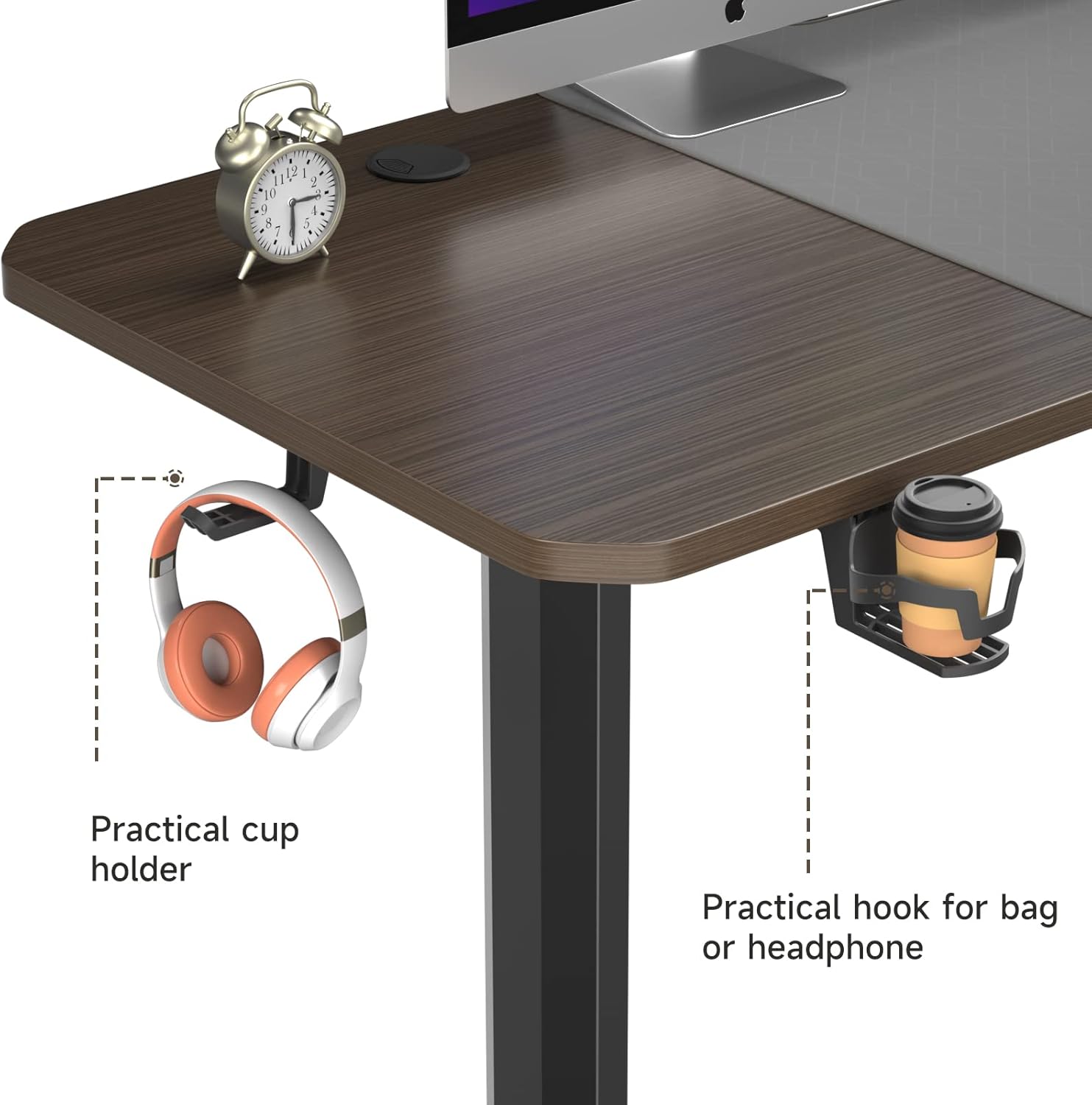
Additional convenient features include:
- Practical Cup Holder: A removable cup holder keeps your beverages secure and within reach.
- ഹെഡ്ഫോൺ ഹുക്ക്: A convenient hook allows you to hang your headphones or bag, keeping your desktop clutter-free.
7 സ്പെസിഫിക്കേഷനുകൾ

The desk features a spacious desktop and a robust frame, designed for ergonomic use.
| ഫീച്ചർ | സ്പെസിഫിക്കേഷൻ |
|---|---|
| ബ്രാൻഡ് | ഡ്രിപെക്സ് |
| മോഡൽ നമ്പർ | ക്രമീകരിക്കാവുന്ന ഇലക്ട്രിക് സ്റ്റാൻഡിംഗ് ഡെസ്ക് |
| ഡെസ്ക് ഡിസൈൻ | സ്റ്റാൻഡിംഗ് ഡെസ്ക് |
| ഉൽപ്പന്ന അളവുകൾ (D x W x H) | 28"D x 63"W x 46"H |
| ക്രമീകരിക്കാവുന്ന ഉയരം പരിധി | 28 ഇഞ്ച് (മിനിറ്റ്) മുതൽ 46 ഇഞ്ച് (പരമാവധി) വരെ |
| നിറം | ഗ്രേ ബ്രൗൺ |
| മികച്ച മെറ്റീരിയൽ തരം | മരം |
| അടിസ്ഥാന മെറ്റീരിയൽ | അലോയ് സ്റ്റീൽ |
| പരമാവധി ഭാരം ശുപാർശ | 176 പൗണ്ട് (80 കി.ഗ്രാം) |
| ഇനത്തിൻ്റെ ഭാരം | 56 പൗണ്ട് (25.4 കി.ഗ്രാം) |
| ലിഫ്റ്റിംഗ് മെക്കാനിസം | ഇലക്ട്രിക് |
| പ്രത്യേക സവിശേഷതകൾ | Adjustable Height, Electric, Anti-collision, Overload Protection, Low Noise |
| ഉൾപ്പെടുത്തിയ ഘടകങ്ങൾ | Cup Holder, Headphone Hook |
8. പരിപാലനം
- വൃത്തിയാക്കൽ: ഡെസ്ക്ടോപ്പും ഫ്രെയിമും ഒരു സോഫ്റ്റ്, ഡി ക്ലീനർ ഉപയോഗിച്ച് തുടയ്ക്കുക.amp തുണി. കഠിനമായ രാസവസ്തുക്കളോ ഉരച്ചിലുകളുള്ള ക്ലീനറുകളോ ഒഴിവാക്കുക.
- കേബിൾ മാനേജുമെന്റ്: Regularly check and organize cables to prevent tangles and damage. Use the provided cable clips.
- സ്ക്രൂവിന്റെ ഇറുകിയത: എല്ലാ സ്ക്രൂകളും കണക്ഷനുകളും ഇറുകിയതാണെന്ന് ഉറപ്പാക്കാൻ ഇടയ്ക്കിടെ പരിശോധിക്കുക. ആവശ്യമെങ്കിൽ വീണ്ടും മുറുക്കുക.
- മോട്ടോർ കെയർ: Avoid overloading the desk beyond its specified weight capacity to ensure the longevity of the electric motor.
9. പ്രശ്നപരിഹാരം
| പ്രശ്നം | സാധ്യമായ കാരണം | പരിഹാരം |
|---|---|---|
| ഡെസ്ക് ചലിക്കുന്നില്ല അല്ലെങ്കിൽ നിയന്ത്രണങ്ങളോട് പ്രതികരിക്കുന്നില്ല. | Power connection issue, motor error, or control panel malfunction. | Check if the power cord is securely plugged into the wall outlet and the desk. Perform a factory reset (see Section 4, Step 5). If the issue persists, contact customer support. |
| മേശ അസമമായി നീങ്ങുന്നു അല്ലെങ്കിൽ അസാധാരണമായ ശബ്ദങ്ങൾ ഉണ്ടാക്കുന്നു. | Loose connections, uneven load, or motor synchronization issue. | Ensure the desk is on a level surface and the weight is evenly distributed. Check all assembly screws for tightness. Perform a factory reset. |
| ആന്റി-കൊളിഷൻ സിസ്റ്റം ഇടയ്ക്കിടെ സജീവമാകുന്നു. | Obstruction in the desk's path. | Ensure there are no objects above or below the desk that could interfere with its movement. |
| Sedentary reminder not working. | Reminder function is deactivated. | Press the 'T' button on the control panel to activate the sedentary reminder. |
10. വാറൻ്റിയും പിന്തുണയും
The Dripex Adjustable Electric Standing Desk comes with a limited warranty. For specific warranty details, please refer to the warranty card included with your product or contact Dripex customer support.
If you encounter any issues not covered in this troubleshooting guide or require further assistance, please contact Dripex customer support through the retailer where you purchased the product or visit the official Dripex webബന്ധപ്പെടാനുള്ള വിവരങ്ങൾക്കുള്ള സൈറ്റ്.


