1. ഉൽപ്പന്നം കഴിഞ്ഞുview
The Seculife Kids GPS Tracker S4 is a compact and lightweight real-time tracking device designed for enhanced safety and independence. It features an SOS button for emergencies, a two-way speakerphone for communication, and advanced geofencing capabilities. This device is particularly useful for monitoring children, including those with special needs or autism.

Figure 1: Seculife Kids GPS Tracker S4 device and mobile application interface.
പ്രധാന സവിശേഷതകൾ:
- 24/7 Real-Time Tracking: Monitor location anytime, anywhere.
- SOS ബട്ടൺ: Dedicated button for immediate emergency assistance.
- 2-Way Speakerphone: Crystal-clear communication with pre-set contacts.
- ജിയോഫെൻസിംഗ്: Set up safe zones and receive alerts for entry/exit.
- മൊബൈൽ ആപ്പ്: Compatible with iOS & Android for comprehensive control and monitoring.
- Durable & Splash Resistant: Designed for active daily use.
പ്രധാന കുറിപ്പ്: A paid Voice, SMS, and Data cellular subscription is required for unlimited distance tracking and full functionality. Monthly or annual subscription plans are available.
2. സജ്ജീകരണവും സജീവമാക്കലും
2.1 ബോക്സിൽ എന്താണുള്ളത്
- Seculife Kids SOS GPS Tracker S4
- മാഗ്നെറ്റിക് ചാർജിംഗ് കേബിൾ
- കേബിൾ ബേസ്
- Access to Seculife Mobile App (iOS & Android)
- Preinstalled 5G 4G LTE SIM card
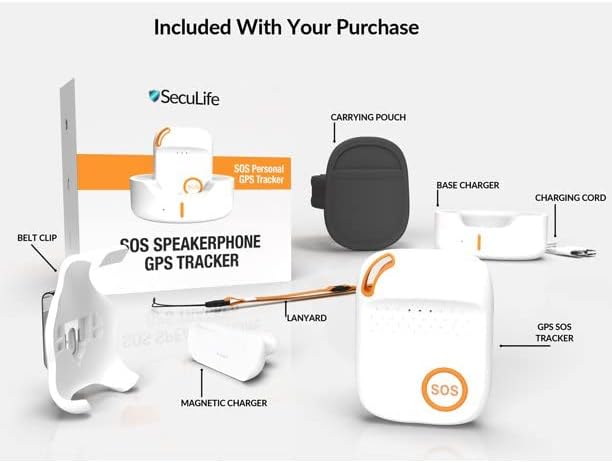
Figure 2: Included items with your Seculife Kids GPS Tracker S4 purchase.
2.2 പ്രാരംഭ ചാർജിംഗ്
Before first use, fully charge your Seculife S4 tracker using the provided magnetic charging cable and cable base. Connect the cable to a standard USB power adapter (not included) or a computer USB port. The device is ready for use out of the box after charging.
2.3 Activation Process
To activate your device and set up your subscription, please visit the official Seculife website or contact customer support. User manuals will be emailed upon activation and are available for download on the Seculife site. Live customer support is available 7 days a week to guide you through the activation process.
Video 1: Unboxing the SecuLife Kids SOS Emergency Life Saving GPS Tracker, showing its components and initial setup.
3. പ്രവർത്തന നിർദ്ദേശങ്ങൾ
3.1 തത്സമയ ട്രാക്കിംഗ്
The Seculife S4 provides 24/7 real-time tracking. You can monitor the device's location through the dedicated mobile application. The app displays the current location and historical location data, allowing you to review past movements.

Figure 3: Accurate and reliable GPS tracking displayed on the mobile app.
Video 2: Demonstration of the SecuLife Kids SOS Emergency GPS Tracker's real-time tracking capabilities.
3.2 SOS Button & 2-Way Speakerphone
The device features a prominent SOS button. In an emergency, pressing this button will automatically dial pre-set emergency contacts and initiate a two-way speakerphone call. This allows for immediate communication and assistance.

Figure 4: The SOS GPS Tracker S4 with its emergency button.
Video 3: Highlighting the 2-way calling feature of the SecuLife Kids GPS Tracker.
3.3 ജിയോഫെൻസിംഗ്
Utilize the mobile app to set up multiple geofenced areas. You will receive instant alerts via push notifications, SMS, and email when the tracker enters or leaves these designated safe zones. This feature is ideal for child monitoring and ensuring they stay within expected boundaries.

Figure 5: Tracking for kids with special needs, showing geofence capabilities.
Video 4: Demonstrating the geofencing feature of the SecuLife Kids GPS Tracker to prevent a child from getting lost.
4. പരിപാലനം
4.1 ബാറ്ററി ലൈഫും ചാർജിംഗും
The Seculife S4 is equipped with a Lithium Polymer battery. Battery life varies depending on tracking frequency settings. More frequent updates (e.g., every minute) will consume battery faster than less frequent updates (e.g., every hour or day). Always ensure the device is charged regularly to maintain continuous tracking.
Use only the provided Magnetic Charging Cable and Cable Base for charging. Do not use unauthorized chargers or cables.
4.2 Durability & Care
The device features a durable and splash-resistant design. While it can withstand splashes, it is not completely waterproof. Avoid submerging the device in water or exposing it to heavy rain for extended periods. Clean the device with a soft, dry cloth. Do not use harsh chemicals or abrasive materials.
5. പ്രശ്നപരിഹാരം
If you encounter any issues with your Seculife Kids GPS Tracker S4, please refer to the user manual provided at activation or contact Seculife customer support. Common issues may include:
- No Location Updates: Check cellular signal strength in the area and ensure the subscription is active.
- ബാറ്ററി വേഗത്തിൽ തീർന്നു: Adjust tracking frequency settings in the mobile app to a less frequent interval.
- ഉപകരണം പ്രതികരിക്കുന്നില്ല: Ensure the device is charged. If unresponsive, contact customer support.

Figure 6: Seculife offers live customer support 7 days a week.
6 സ്പെസിഫിക്കേഷനുകൾ
| ഫീച്ചർ | വിവരണം |
|---|---|
| ഉൽപ്പന്ന അളവുകൾ | 2.5 x 1.8 x 0.7 ഇഞ്ച് |
| ഇനത്തിൻ്റെ ഭാരം | 1.25 പൗണ്ട് |
| ബാറ്ററികൾ | 1 ലിഥിയം പോളിമർ ബാറ്ററി (ഉൾപ്പെടുത്തിയിരിക്കുന്നു) |
| കണക്റ്റിവിറ്റി ടെക്നോളജി | സെല്ലുലാർ |
| പ്രത്യേക സവിശേഷതകൾ | SOS 2-Way Calling, Auto Answering Speakerphone, Real-Time Tracking, Historical Location Data, Geofencing, Mobile App with Push Notifications, SMS, Email |
| പിന്തുണയ്ക്കുന്ന ആപ്ലിക്കേഷൻ | Contacts, GPS |
| ഉൽപ്പന്നത്തിൻ്റെ പ്രത്യേക ഉപയോഗങ്ങൾ | Children Monitoring |
7. വാറൻ്റിയും പിന്തുണയും
Seculife is a U.S.-based company committed to customer satisfaction. We provide:
- Live Customer Support: Available 7 days a week to assist with activation and any questions.
- ആജീവനാന്ത വാറൻ്റി: Offered on all devices with a current active subscription.
For support, please refer to the contact information provided during activation or visit the Seculife webസൈറ്റ്.


