ആമുഖം
This manual provides detailed instructions for the operation and maintenance of your Victor VHRP-1100 Lakeshore 5-in-1 Turntable System. This versatile audio system integrates a record player, Bluetooth connectivity, USB playback and recording, and an FM radio, all within a compact unit with built-in stereo speakers. Please read this manual thoroughly before use to ensure proper function and longevity of your device.
പ്രധാനപ്പെട്ട സുരക്ഷാ വിവരങ്ങൾ
- ഊർജ്ജ സ്രോതസ്സ്: നിർദ്ദിഷ്ട പവർ അഡാപ്റ്റർ മാത്രം ഉപയോഗിക്കുക. വോളിയം ഉറപ്പാക്കുകtagഇ നിങ്ങളുടെ പ്രാദേശിക വൈദ്യുതി വിതരണവുമായി പൊരുത്തപ്പെടുന്നു.
- ജലവും ഈർപ്പവും: മഴ, ഈർപ്പം, തുള്ളികൾ/തെറിച്ചിൽ ദ്രാവകങ്ങൾ എന്നിവ യൂണിറ്റിൽ ഏൽപ്പിക്കരുത്. പാത്രങ്ങൾ പോലുള്ള ദ്രാവകങ്ങൾ നിറച്ച വസ്തുക്കൾ യൂണിറ്റിൽ വയ്ക്കരുത്.
- വെൻ്റിലേഷൻ: ആവശ്യത്തിന് വായുസഞ്ചാരം ഉറപ്പാക്കുക. വായുസഞ്ചാര ദ്വാരങ്ങൾ തടയരുത്.
- ചൂട്: റേഡിയേറ്ററുകൾ, ഹീറ്റ് രജിസ്റ്ററുകൾ, സ്റ്റൗകൾ അല്ലെങ്കിൽ മറ്റ് ഉപകരണങ്ങൾ (ഉൾപ്പെടെ) പോലുള്ള താപ സ്രോതസ്സുകളിൽ നിന്ന് യൂണിറ്റ് അകറ്റി നിർത്തുക. ampലൈഫയറുകൾ) ചൂട് ഉത്പാദിപ്പിക്കുന്നത്.
- വൃത്തിയാക്കൽ: ഉണങ്ങിയ തുണി ഉപയോഗിച്ച് മാത്രം വൃത്തിയാക്കുക.
- സേവനം: ഈ ഉൽപ്പന്നം സ്വയം സേവിക്കാൻ ശ്രമിക്കരുത്. യോഗ്യതയുള്ള സേവന ഉദ്യോഗസ്ഥർക്ക് എല്ലാ സേവനങ്ങളും റഫർ ചെയ്യുക.
- പ്ലേസ്മെൻ്റ്: വീഴാതിരിക്കാൻ യൂണിറ്റ് ഒരു സ്ഥിരതയുള്ളതും പരന്നതുമായ പ്രതലത്തിൽ വയ്ക്കുക.
പാക്കേജ് ഉള്ളടക്കം
താഴെ ലിസ്റ്റ് ചെയ്തിരിക്കുന്ന എല്ലാ ഇനങ്ങളും നിങ്ങളുടെ പാക്കേജിൽ ഉൾപ്പെടുത്തിയിട്ടുണ്ടെന്ന് ഉറപ്പാക്കുക:
- Victor VHRP-1100 Lakeshore 5-in-1 Turntable System
- UL Approved Adaptor
- ഉപയോക്തൃ മാനുവൽ (ഈ പ്രമാണം)
- ദ്രുത സജ്ജീകരണ ഗൈഡ്
ഉൽപ്പന്നം കഴിഞ്ഞുview
Familiarize yourself with the components of your Victor VHRP-1100 Lakeshore turntable system.

ചിത്രം 1: ടോപ്പ് ഡൗൺ view of the Victor VHRP-1100 Lakeshore turntable system with a record on the platter and the dust cover open. This image shows the overall layout of the unit, including the control panel at the front.
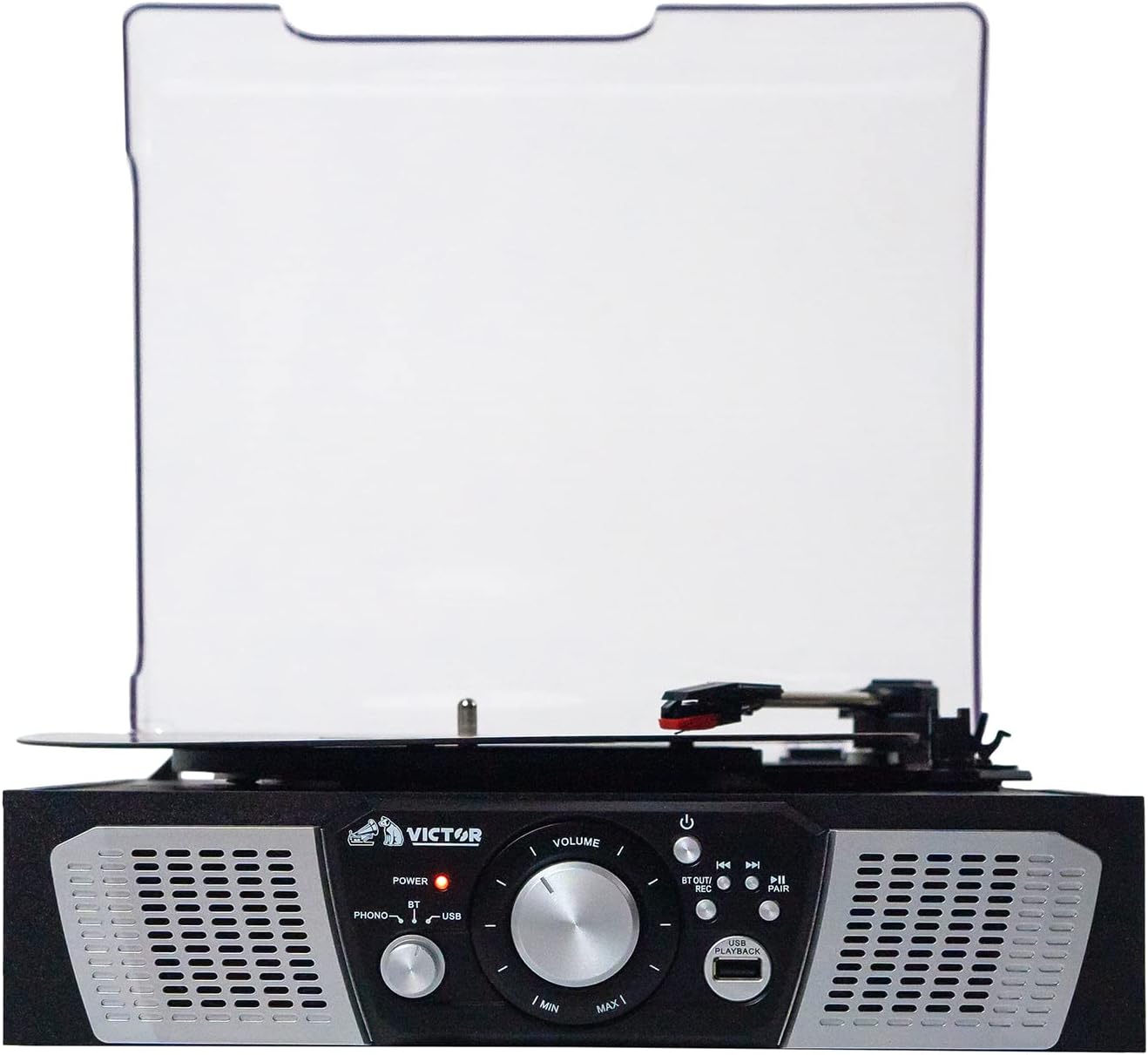
ചിത്രം 2: ഫ്രണ്ട് view of the Victor VHRP-1100 Lakeshore turntable system, highlighting the control panel with the power button, volume knob, function selector, and USB port. The built-in stereo speakers are visible on either side.

ചിത്രം 3: പിൻഭാഗം view of the Victor VHRP-1100 Lakeshore turntable system, showing the DC 9V power input and the AUX OUT (RCA L/R) ports for connecting to external audio systems.
ഫ്രണ്ട് പാനൽ നിയന്ത്രണങ്ങൾ:
- പവർ ബട്ടൺ: യൂണിറ്റ് ഓണാക്കുകയോ ഓഫാക്കുകയോ ചെയ്യുന്നു.
- വോളിയം നോബ്: ഓഡിയോ ഔട്ട്പുട്ട് ലെവൽ ക്രമീകരിക്കുന്നു.
- ഫംഗ്ഷൻ സെലക്ടർ: Switches between Phono, Bluetooth, USB, and FM Radio modes.
- USB പോർട്ട്: യുഎസ്ബി പ്ലേബാക്കിനും റെക്കോർഡിംഗിനും.
- Playback/Recording Controls: Buttons for play, pause, skip tracks, and initiate recording.
- ജോടി ബട്ടൺ: ബ്ലൂടൂത്ത് ജോടിയാക്കൽ ആരംഭിക്കുന്നു.
പിൻ പാനൽ കണക്ഷനുകൾ:
- DC 9V ഇൻപുട്ട്: Connects to the provided UL Approved Adaptor.
- AUX OUT (RCA L/R): ബാഹ്യ ഉപകരണങ്ങളുമായി ബന്ധിപ്പിക്കുന്നു ampലൈഫറുകൾ അല്ലെങ്കിൽ പവർ സ്പീക്കറുകൾ.
സജ്ജമാക്കുക
- അൺപാക്ക് ചെയ്യുന്നു: Carefully remove the unit from its packaging. Retain all packaging materials for future transport or storage.
- പ്ലേസ്മെൻ്റ്: നേരിട്ടുള്ള സൂര്യപ്രകാശം, താപ സ്രോതസ്സുകൾ, അമിതമായ പൊടി അല്ലെങ്കിൽ വൈബ്രേഷൻ എന്നിവയിൽ നിന്ന് അകലെ പരന്നതും സ്ഥിരതയുള്ളതുമായ ഒരു പ്രതലത്തിൽ ടേൺടേബിൾ സ്ഥാപിക്കുക.
- പവർ കണക്ഷൻ: Connect the provided UL Approved Adaptor to the DC 9V input on the rear of the unit. Plug the adaptor into a standard wall outlet.
- പൊടി കവർ: The unit comes with a clear dust cover. Carefully attach it to the hinges at the back of the turntable.
- External Audio Connection (Optional): If you wish to connect the turntable to an external amplifier or powered speakers, use RCA cables (not included) to connect the AUX OUT (R/L) ports on the back of the unit to the corresponding audio inputs on your external system.
വീഡിയോ 1: A short video demonstrating the Victor Lakeshore VHRP-1100-ES turntable system in a room setting, providing a visual context for its size and appearance.
വീഡിയോ 2: ഒരു 360-ഡിഗ്രി view of the Victor Lakeshore VHRP-1100-ES turntable system, allowing users to observe all angles and details of the product before or during setup.
പ്രവർത്തന നിർദ്ദേശങ്ങൾ
1. Turntable Operation (Playing Vinyl Records)
- പവർ ഓൺ: യൂണിറ്റ് ഓണാക്കാൻ പവർ ബട്ടൺ അമർത്തുക.
- ഫോണോ മോഡ് തിരഞ്ഞെടുക്കുക: Use the Function Selector to choose "Phono" mode.
- Open Dust Cover: പൊടി കവർ ഉയർത്തുക.
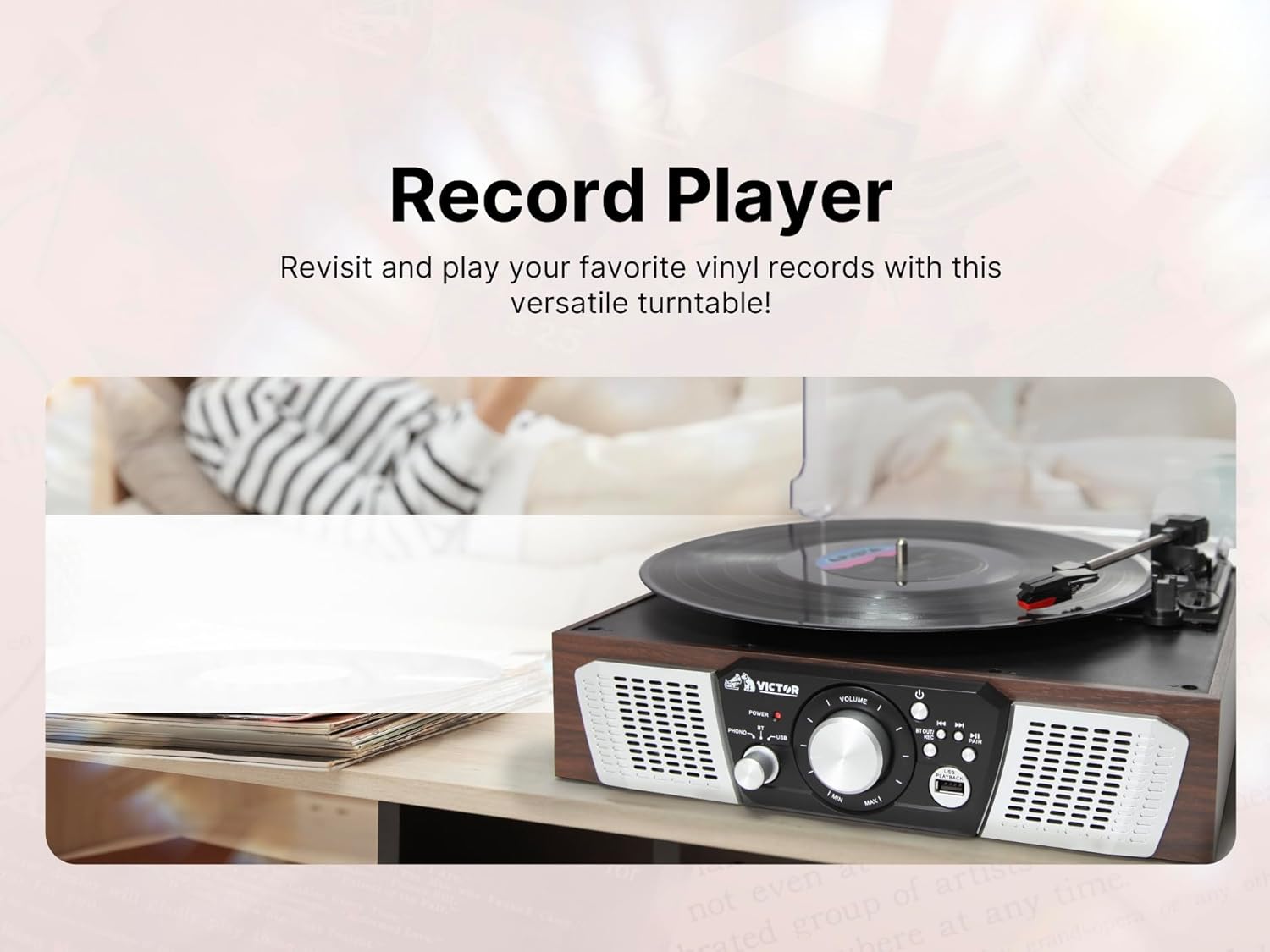
- സ്ഥല രേഖ: ടർടേബിൾ പ്ലാറ്ററിൽ ഒരു വിനൈൽ റെക്കോർഡ് ശ്രദ്ധാപൂർവ്വം വയ്ക്കുക.
- വേഗത തിരഞ്ഞെടുക്കുക: Adjust the speed selector (usually a switch near the platter) to match the record's RPM (33 1/3, 45, or 78 RPM). For 45 RPM records, place the included 45 RPM adapter on the spindle.
- റിലീസ് ടോൺ ആം: Gently move the tone arm from its rest and position the stylus over the desired track on the record.
- താഴ്ന്ന ടോൺ ആം: Slowly lower the tone arm onto the record. The platter will begin to spin, and audio will play through the built-in speakers or connected external speakers.
- വോളിയം ക്രമീകരിക്കുക: Use the Volume knob to adjust the listening level.
- End of Play: At the end of the record, the tone arm may automatically return to its rest (auto-stop feature, if present). If not, manually lift the tone arm and return it to its rest.
ചിത്രം 4: An image depicting a hand carefully placing a vinyl record onto the platter of the Victor VHRP-1100 Lakeshore turntable, illustrating the initial step of playing a record.
2. Bluetooth Operation (Wireless Streaming)
- പവർ ഓൺ: യൂണിറ്റ് ഓണാക്കാൻ പവർ ബട്ടൺ അമർത്തുക.
- ബ്ലൂടൂത്ത് മോഡ് തിരഞ്ഞെടുക്കുക: Use the Function Selector to choose "Bluetooth" mode. The Bluetooth indicator light will flash, indicating it's in pairing mode.
- ഉപകരണത്തിൽ ബ്ലൂടൂത്ത് പ്രവർത്തനക്ഷമമാക്കുക: നിങ്ങളുടെ സ്മാർട്ട്ഫോണിലോ, ടാബ്ലെറ്റിലോ, മറ്റ് ബ്ലൂടൂത്ത് പ്രവർത്തനക്ഷമമാക്കിയ ഉപകരണത്തിലോ, ബ്ലൂടൂത്ത് പ്രവർത്തനക്ഷമമാക്കി ലഭ്യമായ ഉപകരണങ്ങൾക്കായി തിരയുക.
- ഉപകരണം ജോടിയാക്കുക: Select "VHRP-1100" from the list of devices. Once paired, the Bluetooth indicator light will stop flashing and remain solid.
- സംഗീതം പ്ലേ ചെയ്യുക: Start playing music on your connected device. The audio will stream wirelessly to the turntable's speakers.
- വോളിയം ക്രമീകരിക്കുക: Control the volume using both your connected device and the Volume knob on the turntable.

ചിത്രം 5: An image showing a person enjoying music wirelessly from the Victor VHRP-1100 Lakeshore turntable through Bluetooth headphones, demonstrating the Bluetooth output capability.
3. USB പ്ലേബാക്ക്
- പവർ ഓൺ: യൂണിറ്റ് ഓണാക്കാൻ പവർ ബട്ടൺ അമർത്തുക.
- യുഎസ്ബി ഡ്രൈവ് ചേർക്കുക: MP3 ഓഡിയോ അടങ്ങിയ ഒരു USB ഫ്ലാഷ് ഡ്രൈവ് ഇടുക. fileമുൻ പാനലിലെ USB പോർട്ടിലേക്ക് s.
- യുഎസ്ബി മോഡ് തിരഞ്ഞെടുക്കുക: Use the Function Selector to choose "USB" mode. The unit will automatically begin playing the first compatible audio file.
- പ്ലേബാക്ക് നിയന്ത്രിക്കുക: Use the Playback/Recording controls (Play/Pause, Skip Forward/Backward) to navigate your music files.
- വോളിയം ക്രമീകരിക്കുക: Use the Volume knob to adjust the listening level.

ചിത്രം 6: This image illustrates a USB flash drive connected to the USB port of the Victor VHRP-1100 Lakeshore turntable, indicating the readiness for digital audio playback.
4. USB Recording (Digitizing Vinyl)
- Prepare for Playback: Follow steps 1-6 of "Turntable Operation" to prepare your vinyl record for playback.
- യുഎസ്ബി ഡ്രൈവ് ചേർക്കുക: യുഎസ്ബി പോർട്ടിൽ ഒരു യുഎസ്ബി ഫ്ലാഷ് ഡ്രൈവ് ചേർത്തിട്ടുണ്ടെന്ന് ഉറപ്പാക്കുക.
- റെക്കോർഡിംഗ് ആരംഭിക്കുക: While the record is playing, press the "REC" button (part of the Playback/Recording controls). The recording indicator will illuminate, and the audio from the record will be converted and saved as an MP3 file USB ഡ്രൈവിൽ.
- റെക്കോർഡിംഗ് നിർത്തുക: Press the "REC" button again to stop recording. The recording indicator will turn off.
- Access Recorded Files: Switch to USB mode to listen to your newly recorded digital files.

ചിത്രം 7: This image shows a person relaxing while the Victor VHRP-1100 Lakeshore turntable is actively recording vinyl audio to a USB drive, highlighting the convenience of the USB recording feature.
5. എഫ്എം റേഡിയോ പ്രവർത്തനം
- പവർ ഓൺ: യൂണിറ്റ് ഓണാക്കാൻ പവർ ബട്ടൺ അമർത്തുക.
- എഫ്എം മോഡ് തിരഞ്ഞെടുക്കുക: Use the Function Selector to choose "FM Radio" mode.
- ട്യൂൺ സ്റ്റേഷനുകൾ: Use the tuning knob or buttons (if available) to scan for FM radio stations. The unit will automatically stop at strong signals.
- വോളിയം ക്രമീകരിക്കുക: Use the Volume knob to adjust the listening level.
- ആൻ്റിന: For improved FM reception, extend the FM wire antenna located at the back of the unit.
മെയിൻ്റനൻസ്
- യൂണിറ്റ് വൃത്തിയാക്കൽ:
മൃദുവായതും ഉണങ്ങിയതുമായ തുണി ഉപയോഗിച്ച് യൂണിറ്റിന്റെ പുറംഭാഗം തുടയ്ക്കുക. അബ്രാസീവ് ക്ലീനറുകൾ, മെഴുക് അല്ലെങ്കിൽ ലായകങ്ങൾ എന്നിവ ഉപയോഗിക്കരുത്, കാരണം അവ ഫിനിഷിന് കേടുവരുത്തും.
- സ്റ്റൈലസ് കെയർ:
The stylus (needle) is a delicate component. Clean it periodically with a soft brush, brushing from back to front. Avoid touching the stylus with your fingers.
A worn stylus can damage records and degrade sound quality. Replace the stylus approximately every 300-500 hours of playback, or if you notice a decrease in sound quality.
- പൊടി കവർ:
Keep the dust cover closed when the unit is not in use to protect the turntable and stylus from dust and debris. Clean the dust cover with a soft, damp തുണി.
ട്രബിൾഷൂട്ടിംഗ്
| പ്രശ്നം | സാധ്യമായ കാരണം | പരിഹാരം |
|---|---|---|
| ശക്തിയില്ല | പവർ അഡാപ്റ്റർ ബന്ധിപ്പിച്ചിട്ടില്ല അല്ലെങ്കിൽ ഔട്ട്ലെറ്റ് തകരാറിലാണ്. | പവർ അഡാപ്റ്റർ യൂണിറ്റിലേക്കും പ്രവർത്തിക്കുന്ന ഒരു പവർ ഔട്ട്ലെറ്റിലേക്കും സുരക്ഷിതമായി ബന്ധിപ്പിച്ചിട്ടുണ്ടെന്ന് ഉറപ്പാക്കുക. |
| സ്പീക്കറുകളിൽ നിന്ന് ശബ്ദമില്ല | Volume too low, incorrect mode selected, or external speakers not connected/powered. | Increase the volume. Verify the correct function mode (Phono, Bluetooth, USB, FM) is selected. If using external speakers, ensure they are properly connected and powered on. |
| ടേണബിൾ കറങ്ങുന്നില്ല | Unit not powered on, Phono mode not selected, or tone arm not moved over record. | Ensure the unit is powered on and in Phono mode. Gently move the tone arm over the record to activate the platter. |
| ബ്ലൂടൂത്ത് ജോടിയാക്കുന്നില്ല | Unit not in Bluetooth mode, device too far, or previously paired with another device. | Ensure the unit is in Bluetooth mode and the indicator is flashing. Move your device closer. Disconnect from other Bluetooth devices and try pairing again. |
| Poor sound quality (vinyl) | Dirty record, dirty/worn stylus, or incorrect speed setting. | Clean your records. Clean or replace the stylus. Ensure the correct RPM speed is selected for the record. |
സ്പെസിഫിക്കേഷനുകൾ

ചിത്രം 8: An image displaying the key dimensions (length, width, height) and weight of the Victor VHRP-1100 Lakeshore turntable system, providing essential physical specifications.
- മോഡൽ: വിഎച്ച്ആർപി-1100
- ഉൽപ്പന്ന അളവുകൾ: 12.9 x 12.4 x 4.8 ഇഞ്ച്
- ഇനത്തിൻ്റെ ഭാരം: 4.84 പൗണ്ട്
- പവർ ഇൻപുട്ട്: DC 9V
- തിരിയാവുന്ന വേഗത: 33 1/3, 45, 78 ആർപിഎം
- കണക്റ്റിവിറ്റി: Bluetooth, USB, FM Radio
- ഓഡിയോ ഔട്ട്പുട്ട്: Built-in Stereo Speakers, AUX OUT (RCA L/R)
- മെറ്റീരിയൽ: പ്ലാസ്റ്റിക്
വാറൻ്റിയും പിന്തുണയും
For warranty information and technical support, please refer to the warranty card included with your product or visit the official Victor webസൈറ്റ്. വാങ്ങിയതിന്റെ തെളിവായി നിങ്ങളുടെ വാങ്ങൽ രസീത് സൂക്ഷിക്കുക.
നിർമ്മാതാവ്: വിക്ടർ
For further assistance, please contact Victor customer support.


