1. ആമുഖവും ഉൽപ്പന്നവും കഴിഞ്ഞുview
The SHARP GC52BEB is a versatile kitchen appliance combining microwave, grill, and convection oven functions. Designed for efficiency and ease of use, it features a 25-liter capacity, 900W microwave power, 1200W grill power, and 2050W convection power. This appliance offers 11 power levels and 14 automatic programs, including a defrost function based on time and weight. Its flatbed design ensures easy cleaning and maximizes usable space.
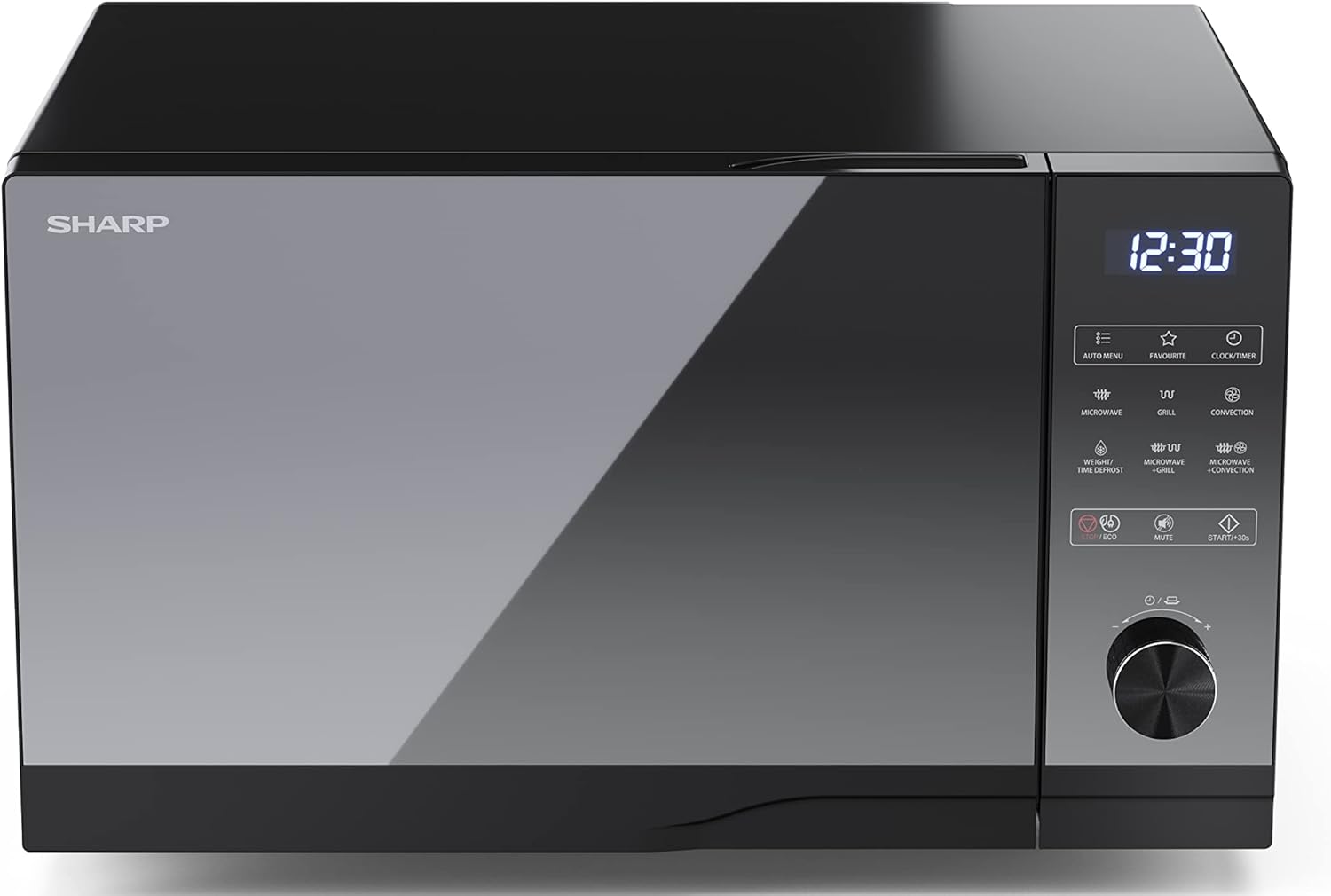
ചിത്രം 1: മുൻഭാഗം view of the SHARP GC52BEB microwave oven.
2. പ്രധാന സുരക്ഷാ നിർദ്ദേശങ്ങൾ
തീപിടുത്തം, വൈദ്യുതാഘാതം, വ്യക്തികൾക്ക് പരിക്കേൽക്കൽ, അല്ലെങ്കിൽ അമിതമായ മൈക്രോവേവ് ഊർജ്ജത്തിന് വിധേയമാകൽ എന്നിവ കുറയ്ക്കുന്നതിന് വൈദ്യുത ഉപകരണങ്ങൾ ഉപയോഗിക്കുമ്പോൾ എല്ലായ്പ്പോഴും അടിസ്ഥാന സുരക്ഷാ മുൻകരുതലുകൾ പാലിക്കുക.
- ഉപകരണം ഉപയോഗിക്കുന്നതിന് മുമ്പ് എല്ലാ നിർദ്ദേശങ്ങളും വായിക്കുക.
- Do not operate the oven if it is damaged or malfunctioning. Contact qualified service personnel for repair.
- ശരിയായ വായുസഞ്ചാരം ഉറപ്പാക്കുക. വായുസഞ്ചാര ദ്വാരങ്ങളൊന്നും തടയരുത്.
- സ്ഫോടനത്തിന് സാധ്യതയുള്ളതിനാൽ ദ്രാവകങ്ങളോ മറ്റ് ഭക്ഷണങ്ങളോ അടച്ച പാത്രങ്ങളിൽ ചൂടാക്കരുത്.
- Never use metal utensils, foil, or dishes with metallic trim in the microwave mode, as this can cause arcing.
- ഉപകരണം ഉപയോഗിക്കുമ്പോൾ കുട്ടികളെ സൂക്ഷ്മമായി നിരീക്ഷിക്കുക.
- ടി ചെയ്യാൻ ശ്രമിക്കരുത്amper with, adjust, or repair the door, control panel, safety interlock switches, or any other part of the oven.
- അടുപ്പ് പതിവായി വൃത്തിയാക്കുക, ഭക്ഷണ നിക്ഷേപം നീക്കം ചെയ്യുക. വൃത്തിയുള്ള അവസ്ഥയിൽ അടുപ്പ് പരിപാലിക്കുന്നതിൽ പരാജയപ്പെടുന്നത് ഉപരിതലത്തിൻ്റെ തകർച്ചയിലേക്ക് നയിച്ചേക്കാം, അത് ഉപകരണത്തിൻ്റെ ജീവിതത്തെ പ്രതികൂലമായി ബാധിക്കുകയും ഒരു അപകടകരമായ സാഹചര്യത്തിലേക്ക് നയിക്കുകയും ചെയ്യും.
3. ഉൽപ്പന്ന ഘടകങ്ങൾ
The SHARP GC52BEB microwave oven includes the following main components and accessories:
- Oven Cavity (interior)
- Control Panel with Touch Buttons and Rotary Dial
- ഓവൻ വാതിൽ, ഹാൻഡിൽ സഹിതം
- Grill Rack (for grilling)
- ബേക്കിംഗ് ട്രേ (സംവഹന പാചകത്തിന്)
- പവർ കോർഡ്

ചിത്രം 2: ഇൻ്റീരിയർ view with grill rack.
4. സജ്ജീകരണം
4.1 അൺപാക്കിംഗ്
Carefully remove the microwave oven and all packing materials from the carton. Check the oven for any damage, such as dents or a misaligned door. Do not operate the oven if it is damaged. Retain packaging materials for future transport if needed.
4.2 പ്ലേസ്മെൻ്റ്
Place the oven on a flat, stable surface that can support its weight. Ensure there is adequate ventilation space around the oven: at least 20 cm (8 inches) above, 10 cm (4 inches) at the rear, and 5 cm (2 inches) on each side. Do not place the oven near heat sources or in a damp പരിസ്ഥിതി.
4.3 പവർ കണക്ഷൻ
പവർ കോർഡ് ഒരു ഗ്രൗണ്ടഡ് ഇലക്ട്രിക്കൽ ഔട്ട്ലെറ്റിലേക്ക് പ്ലഗ് ചെയ്യുക. വോള്യം ഉറപ്പാക്കുകtage ഉപകരണത്തിന്റെ സ്പെസിഫിക്കേഷനുകളുമായി പൊരുത്തപ്പെടുന്നു.
5. പ്രവർത്തന നിർദ്ദേശങ്ങൾ
5.1 കൺട്രോൾ പാനൽ ഓവർview
The control panel features a digital display, touch buttons for various functions (e.g., Microwave, Grill, Convection, Auto Menu, Defrost), and a rotary dial for setting time, weight, or temperature. Refer to the labels on the control panel for specific functions.
5.2 ക്ലോക്ക് ക്രമീകരിക്കുക
- Press the 'CLOCK/TIMER' button.
- Use the rotary dial to set the hour. Press 'CLOCK/TIMER' again to confirm.
- Use the rotary dial to set the minutes. Press 'CLOCK/TIMER' again to confirm.
5.3 മൈക്രോവേവ് പാചകം
- ഭക്ഷണം മൈക്രോവേവിൽ സൂക്ഷിക്കാൻ പറ്റുന്ന ഒരു പാത്രത്തിൽ അടുപ്പിനുള്ളിൽ വയ്ക്കുക.
- Press the 'MICROWAVE' button repeatedly to select the desired power level (e.g., 900W, 700W, etc.).
- Use the rotary dial to set the cooking time.
- Press 'START/+30s' to begin cooking.
5.4 ഗ്രിൽ പാചകം
- നൽകിയിരിക്കുന്ന ഗ്രിൽ റാക്കിൽ ഭക്ഷണം വയ്ക്കുക.
- Press the 'GRILL' button.
- Use the rotary dial to set the grilling time.
- Press 'START/+30s' to begin.
5.5 Convection Cooking (Hot Air)
- Place food on the baking tray or a heat-resistant dish.
- Press the 'CONVECTION' button.
- Use the rotary dial to set the desired temperature. Press 'CONVECTION' again to confirm.
- Use the rotary dial to set the cooking time.
- Press 'START/+30s' to begin.
5.6 കോമ്പിനേഷൻ പാചകം
The oven offers combination modes (Microwave + Grill, Microwave + Convection) for faster and more thorough cooking. Refer to the specific icons on the control panel and the full manual for detailed instructions on setting these modes.
5.7 ഡിഫ്രോസ്റ്റ് ഫംഗ്ഷൻ
ഡീഫ്രോസ്റ്റ് ഫംഗ്ഷൻ നിങ്ങളെ ഭാരം അല്ലെങ്കിൽ സമയം അനുസരിച്ച് ഭക്ഷണം ഡീഫ്രോസ്റ്റ് ചെയ്യാൻ അനുവദിക്കുന്നു.
- Press the 'WEIGHT/TIME DEFROST' button.
- Use the rotary dial to select either weight or time, and adjust the value accordingly.
- Press 'START/+30s' to begin defrosting.
5.8 ഓട്ടോമാറ്റിക് പ്രോഗ്രാമുകൾ
The oven includes 14 automatic programs for various food types. Press the 'AUTO MENU' button and use the rotary dial to select the desired program. Follow the on-screen prompts for weight or quantity, then press 'START/+30s'.
5.9 ചൈൽഡ് ലോക്ക്
To activate the child lock, press and hold the 'STOP/ECO' button for 3 seconds until a lock indicator appears on the display. To deactivate, press and hold the 'STOP/ECO' button again for 3 seconds.
5.10 Eco Function
The Eco function helps reduce energy consumption. Press the 'STOP/ECO' button briefly to activate or deactivate this mode. In Eco mode, the display may dim or turn off after a period of inactivity.
6. വൃത്തിയാക്കലും പരിപാലനവും
പതിവായി വൃത്തിയാക്കുന്നതും ശരിയായ അറ്റകുറ്റപ്പണികൾ നടത്തുന്നതും നിങ്ങളുടെ മൈക്രോവേവ് ഓവന്റെ ദീർഘായുസ്സും മികച്ച പ്രകടനവും ഉറപ്പാക്കും.
- പുറം: പരസ്യം ഉപയോഗിച്ച് ബാഹ്യ പ്രതലങ്ങൾ തുടയ്ക്കുകamp തുണിയും മൃദുവായ ഡിറ്റർജൻ്റും. ഉരച്ചിലുകൾ ഉള്ള ക്ലീനറുകൾ ഒഴിവാക്കുക.
- ഇൻ്റീരിയർ: The flatbed design makes the interior easy to clean. Wipe the oven cavity with a damp cloth after each use. For stubborn food spills, place a bowl of water with lemon juice inside and microwave for a few minutes to loosen residue, then wipe clean.
- വാതിലും മുദ്രയും: Clean the door, door seals, and adjacent parts carefully with a damp ചോർച്ചയോ സ്പാറ്ററുകളോ നീക്കം ചെയ്യാനുള്ള തുണി.
- ആക്സസറികൾ: Wash the grill rack and baking tray in warm, soapy water.
- പവർ ഓഫ്: വൃത്തിയാക്കുന്നതിന് മുമ്പ് എല്ലായ്പ്പോഴും ഉപകരണം അൺപ്ലഗ് ചെയ്യുക.
7. പ്രശ്നപരിഹാരം
If you encounter problems with your microwave oven, refer to the following table for common issues and solutions.
| പ്രശ്നം | സാധ്യമായ കാരണം | പരിഹാരം |
|---|---|---|
| ഓവൻ ആരംഭിക്കുന്നില്ല. | പവർ കോർഡ് പ്ലഗ് ഇൻ ചെയ്തിട്ടില്ല; വാതിൽ ശരിയായി അടച്ചിട്ടില്ല; ഫ്യൂസ് പൊട്ടിത്തെറിച്ചു അല്ലെങ്കിൽ സർക്യൂട്ട് ബ്രേക്കർ ട്രിപ്പുചെയ്തു. | പവർ കോർഡ് സുരക്ഷിതമായി പ്ലഗ് ഇൻ ചെയ്തിട്ടുണ്ടെന്ന് ഉറപ്പാക്കുക; വാതിൽ ദൃഢമായി അടയ്ക്കുക; വീട്ടിലെ ഫ്യൂസ്/സർക്യൂട്ട് ബ്രേക്കർ പരിശോധിക്കുക. |
| ഭക്ഷണം ചൂടാക്കുന്നില്ല. | Door not closed properly; Incorrect cooking time/power level set. | Ensure door is fully closed; Adjust cooking time and power level. |
| പ്രവർത്തന സമയത്ത് അസാധാരണമായ ശബ്ദം. | Metal objects inside; Appliance not on a level surface. | Remove any metal objects; Place the oven on a flat, stable surface. |
| Display shows 'LOCK'. | ചൈൽഡ് ലോക്ക് സജീവമാക്കി. | Press and hold the 'STOP/ECO' button for 3 seconds to deactivate. |
ഈ പരിഹാരങ്ങൾ പരീക്ഷിച്ചതിന് ശേഷവും പ്രശ്നം നിലനിൽക്കുകയാണെങ്കിൽ, ദയവായി ഉപഭോക്തൃ പിന്തുണയുമായി ബന്ധപ്പെടുക.
8 സ്പെസിഫിക്കേഷനുകൾ
Key technical specifications for the SHARP GC52BEB microwave oven:
- മോഡൽ നമ്പർ: GC52BEB
- നിർമ്മാതാവ്: ഷാർപ്പ്
- മൈക്രോവേവ് പവർ: 900W
- ഗ്രിൽ പവർ: 1200W
- സംവഹന ശക്തി: 2050W
- ശേഷി: 25 ലിറ്റർ
- ഉൽപ്പന്ന അളവുകൾ (D x W x H): 28.7 x 49 x 49.5 സെ.മീ
- ഭാരം: 18.6 കി.ഗ്രാം
- നിറം: കറുപ്പ്
- പ്രത്യേക സവിശേഷതകൾ: Electronic control, Flat design (easy to clean), Timer function, Clock, Child lock, Silent mode, Oven cavity lighting, Eco function.
- ഇൻസ്റ്റലേഷൻ തരം: ഫ്രീസ്റ്റാൻഡിംഗ്
- മെറ്റീരിയൽ: സ്റ്റെയിൻലെസ്സ് സ്റ്റീൽ, ഗ്ലാസ്

Figure 3: SHARP GC52BEB dimensions.
9. വാറൻ്റിയും പിന്തുണയും
This SHARP appliance comes with a standard manufacturer's warranty. Please refer to the warranty card included in your product packaging for specific terms, conditions, and duration of coverage. Keep your proof of purchase for warranty claims.
For technical assistance, spare parts, or service inquiries, please contact SHARP customer support. Contact details can typically be found on the manufacturer's official webസൈറ്റ് അല്ലെങ്കിൽ വാറന്റി ഡോക്യുമെന്റേഷനിൽ.


