1. ആമുഖം
Thank you for choosing the IWEUKJLO DC403 Digital Camera. This compact and versatile camera is designed for ease of use, making it suitable for students, teens, and adults. It features 1080P FHD video recording, 44MP photo resolution, 16X digital zoom, and various functions to capture your memorable moments. Please read this manual carefully to ensure proper operation and maintenance of your device.
2. ഉൽപ്പന്നം കഴിഞ്ഞുview
The IWEUKJLO DC403 Digital Camera is a portable device equipped with a range of features for both photography and videography. Its lightweight design makes it ideal for on-the-go use.
പ്രധാന സവിശേഷതകൾ:
- ഉയർന്ന മിഴിവ്: 1080P FHD video and 44MP (max) photo resolution.
- ഡിജിറ്റൽ സൂം: 16X digital zoom for capturing distant subjects.
- ഇമേജ് സ്റ്റെബിലൈസേഷൻ: Digital anti-shaking function for clearer shots.
- സ്മാർട്ട് ഫംഗ്ഷനുകൾ: Face detection, smile capture, self-timer, continuous shooting.
- ബിൽറ്റ്-ഇൻ ലൈറ്റ്: Fill light for improved low-light photography.
- കണക്റ്റിവിറ്റി: USB Type-C for data transfer and webക്യാം പ്രവർത്തനം.
- ഓഡിയോ: Internal microphone and speaker for sound recording.
ബോക്സിൽ എന്താണുള്ളത്:
- IWEUKJLO DC403 ഡിജിറ്റൽ ക്യാമറ
- 32 ജിബി ടിഎഫ് കാർഡ്
- Rechargeable Li-ion Battery (3.7V 700mAh)
- യുഎസ്ബി ടൈപ്പ്-സി കേബിൾ
- പവർ അഡാപ്റ്റർ
- റിസ്റ്റ് സ്ട്രാപ്പ്
- ക്യാമറ സഞ്ചി
- ക്ലീനിംഗ് തുണി
- ഉപയോക്തൃ മാനുവൽ


3. സജ്ജീകരണം
3.1. ബാറ്ററി ഇൻസ്റ്റാളേഷൻ
- Locate the battery compartment cover on the side of the camera.
- Slide the cover to open the compartment.
- Insert the provided Li-ion battery into the compartment, ensuring the correct orientation (match the arrows/contacts).
- ബാറ്ററി കമ്പാർട്ട്മെന്റ് കവർ സുരക്ഷിതമായി സ്ഥലത്ത് ക്ലിക്ക് ചെയ്യുന്നത് വരെ അടയ്ക്കുക.
3.2. മെമ്മറി കാർഡ് ഇൻസ്റ്റാളേഷൻ
- With the battery compartment open, locate the TF (Micro SD) card slot.
- Insert the 32GB TF card into the slot with the metal contacts facing down, until it clicks into place.
- നീക്കം ചെയ്യാൻ, കാർഡ് പുറത്തേക്ക് വരുന്നത് വരെ സൌമ്യമായി അകത്തേക്ക് തള്ളുക.

3.3 ബാറ്ററി ചാർജ് ചെയ്യുന്നു
- Connect the USB Type-C cable to the camera's charging port.
- നൽകിയിരിക്കുന്ന പവർ അഡാപ്റ്ററുമായി USB കേബിളിന്റെ മറ്റേ അറ്റം ബന്ധിപ്പിക്കുക.
- ഒരു മതിൽ ഔട്ട്ലെറ്റിലേക്ക് പവർ അഡാപ്റ്റർ പ്ലഗ് ചെയ്യുക.
- The charging indicator light on the camera will illuminate during charging and turn off when fully charged.
4. പ്രവർത്തന നിർദ്ദേശങ്ങൾ
4.1. പവർ ഓൺ/ഓഫ്
- To power on: Press and hold the power button located on the top of the camera.
- To power off: Press and hold the power button again. The camera also features an auto power-off function (configurable in settings).
4.2. ഫോട്ടോ എടുക്കൽ
- Ensure the camera is in photo mode (indicated by an icon on the screen).
- എൽസിഡി സ്ക്രീൻ ഉപയോഗിച്ച് നിങ്ങളുടെ ഷോട്ട് ഫ്രെയിം ചെയ്യുക.
- Press the shutter button (usually the large button on top) halfway down to focus, then fully press to capture the photo.
4.3. വീഡിയോകൾ റെക്കോർഡുചെയ്യുന്നു
- Switch the camera to video mode (usually via a mode button or dial).
- Press the shutter button to start recording. A timer will appear on the screen.
- റെക്കോർഡിംഗ് നിർത്താൻ ഷട്ടർ ബട്ടൺ വീണ്ടും അമർത്തുക.
- Use the 'OK' button to pause or resume recording.
4.4. സൂം ഫംഗ്ഷൻ
Use the W (Wide) and T (Telephoto) buttons on the camera to zoom in or out digitally. The camera supports up to 16X digital zoom.

4.5. മെനു നാവിഗേഷനും ക്രമീകരണങ്ങളും
Press the 'M' (Menu) button to access camera settings. Use the directional buttons (up, down, left, right) to navigate and 'OK' to select.
- ചിത്രത്തിൻ്റെ വലുപ്പം: Adjust photo resolution (e.g., 5MP, 8MP, 10MP, 12MP, 44MP).
- ആന്റി-ഷേക്ക്: Enable or disable digital image stabilization.
- മുഖം തിരിച്ചറിയൽ: Turn on/off face detection for improved portrait shots.
- സ്മൈൽ ക്യാപ്ചർ: ഒരു പുഞ്ചിരി കണ്ടെത്തുമ്പോൾ യാന്ത്രികമായി ഒരു ഫോട്ടോ എടുക്കുന്നു.
- സ്വയം-ടൈമർ: Set a delay (e.g., 2s, 5s, 10s) before taking a photo.
- ISO: Adjust light sensitivity (Auto, 100, 200, 400).
- ഇഫക്റ്റുകൾ: Apply various filters (Normal, B&W, Sepia, Red, etc.).
- ഭാഷ: നിങ്ങൾ ഇഷ്ടപ്പെടുന്ന ഭാഷ തിരഞ്ഞെടുക്കുക.
- തീയതി: നിലവിലെ തീയതിയും സമയവും സജ്ജമാക്കുക.
- ഓട്ടോ പവർ ഓഫ്: Configure the time before the camera automatically shuts down (e.g., 1, 2, or 3 minutes).
- ശബ്ദ പ്രഭാവം: ബട്ടൺ ശബ്ദങ്ങൾ പ്രാപ്തമാക്കുക അല്ലെങ്കിൽ അപ്രാപ്തമാക്കുക.

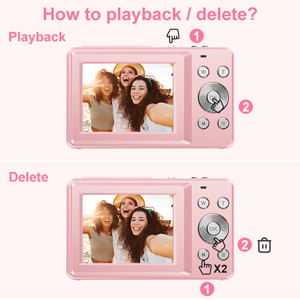
4.6. Viewing and Deleting Photos/Videos
- Press the 'M' (Menu) button twice to enter playback mode.
- Use the directional buttons to scroll through your captured media.
- ഇല്ലാതാക്കാൻ എ file: അതേസമയം viewing a photo/video, press the trash can icon button (often combined with 'OK' or a dedicated button). Confirm deletion when prompted.
4.7. Webcam Mode and Connecting to Computer
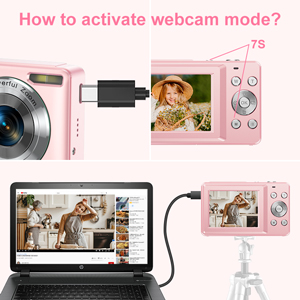
- യുഎസ്ബി ടൈപ്പ്-സി കേബിൾ ഉപയോഗിച്ച് ക്യാമറ നിങ്ങളുടെ കമ്പ്യൂട്ടറുമായി ബന്ധിപ്പിക്കുക.
- The camera should prompt you to select a mode (e.g., Mass Storage, PC Camera/Webcam). Select 'PC Camera' or 'Webcam'.
- നിങ്ങളുടെ കമ്പ്യൂട്ടർ ക്യാമറയെ ഒരു ആയി തിരിച്ചറിയണം webcam. You can then use it for video calls or live streaming on compatible platforms.
- For transferring photos/videos, select 'Mass Storage' mode when connected to the computer. The camera's memory card will appear as a removable drive.

5. പരിപാലനം
5.1. ക്യാമറ വൃത്തിയാക്കൽ
- Use the provided cleaning cloth to gently wipe the camera body and LCD screen.
- കഠിനമായ പാടുകൾക്ക്, ചെറുതായി dampen the cloth with water or a specialized lens cleaning solution (do not spray directly onto the camera).
- കഠിനമായ രാസവസ്തുക്കളോ ഉരച്ചിലുകളോ ഉപയോഗിക്കുന്നത് ഒഴിവാക്കുക.
5.2. ബാറ്ററി പരിചരണം
- ഉപയോഗത്തിലില്ലാത്തപ്പോൾ തണുത്തതും ഉണങ്ങിയതുമായ സ്ഥലത്ത് ബാറ്ററി സൂക്ഷിക്കുക.
- അങ്ങേയറ്റത്തെ താപനിലയിലേക്ക് ബാറ്ററി തുറന്നുകാട്ടുന്നത് ഒഴിവാക്കുക.
- ക്യാമറ കൂടുതൽ നേരം ഉപയോഗിക്കില്ലെങ്കിൽ, ബാറ്ററി നീക്കം ചെയ്യുക.
6. പ്രശ്നപരിഹാരം
- Camera won't turn on: ബാറ്ററി ശരിയായി ചേർത്തിട്ടുണ്ടെന്നും പൂർണ്ണമായും ചാർജ്ജ് ചെയ്തിട്ടുണ്ടെന്നും ഉറപ്പാക്കുക.
- ഫോട്ടോകൾ/വീഡിയോകൾ എടുക്കാൻ കഴിയില്ല: Check if the memory card is inserted correctly and has sufficient free space.
- മോശം ചിത്ര നിലവാരം: Ensure the lens is clean. Adjust ISO settings for low light. Check lighting conditions.
- ക്യാമറ മരവിക്കുന്നു: Remove and reinsert the battery to reset the device.
- കമ്പ്യൂട്ടർ ക്യാമറ തിരിച്ചറിയുന്നില്ല: Ensure the USB cable is securely connected and try a different USB port. Select the correct mode on the camera (Mass Storage or PC Camera).
7 സ്പെസിഫിക്കേഷനുകൾ
| മോഡൽ നമ്പർ | DC403 |
| ഉൽപ്പന്ന അളവുകൾ | 2.24 x 0.78 x 3.66 ഇഞ്ച് |
| ഇനത്തിൻ്റെ ഭാരം | 9.1 ഔൺസ് |
| ഫോട്ടോ റെസല്യൂഷൻ | 44MP (max) |
| വീഡിയോ റെസല്യൂഷൻ | 1080P FHD |
| ഒപ്റ്റിക്കൽ സൂം | 16X |
| ഇമേജ് സ്റ്റെബിലൈസേഷൻ | ഡിജിറ്റൽ |
| ഫോട്ടോ സെൻസർ ടെക്നോളജി | CMOS |
| പിന്തുണച്ചു File ഫോർമാറ്റ് | എ.വി.ഐ |
| ബാറ്ററികൾ | 1007 12V batteries required (Li-ion polymer Battery 3.7V 700mAh) |
| നിർമ്മാതാവ് | IWEUKJLO |
8. വാറൻ്റിയും പിന്തുണയും
This product comes with a standard manufacturer's warranty. For any issues, suggestions, or warranty claims, please contact IWEUKJLO customer support through your purchase platform or the contact information provided in the product packaging. Please retain your proof of purchase for warranty service.


