1. ആമുഖം
The Cuifati XS11 is a compact and portable mini smartphone designed for ease of use and convenience. Running on Android 6.0, it offers essential smartphone functionalities in a small form factor, making it an ideal backup phone or a primary device for users preferring a minimalist design. This manual provides detailed instructions on setting up, operating, maintaining, and troubleshooting your XS11 Mini Smartphone.

ചിത്രം 1: മുൻഭാഗം view of the Cuifati XS11 Mini Smartphone.
2. പാക്കേജ് ഉള്ളടക്കം
Before you begin, please ensure all items are present in your product package:
- 1 x Cuifati XS11 Mini Mobile Phone
- 1 x ഫോൺ കേസ്
- 1 x ചാർജിംഗ് കേബിൾ (മൈക്രോ USB)
- 1 x Mobile Phone Film (Screen Protector)
- 1 x Card Pin (SIM Tray Ejector)
- 1 x ഉപയോക്തൃ മാനുവൽ
3. സജ്ജീകരണം
3.1 സിം കാർഡും മെമ്മറി കാർഡും ചേർക്കൽ
The XS11 Mini Smartphone supports one standard memory card slot and one micro memory card slot, which can also be used for a small memory card. To insert your SIM card(s) and/or memory card:
- Locate the SIM/memory card tray on the side of the phone.
- നൽകിയിരിക്കുന്ന കാർഡ് പിൻ ട്രേയുടെ അടുത്തുള്ള ചെറിയ ദ്വാരത്തിലേക്ക് തിരുകുക, അത് പുറത്തെടുക്കുക.
- Carefully place your SIM card(s) and/or memory card into the designated slots on the tray. Ensure the gold contacts are facing down.
- ട്രേ അതിന്റെ സ്ഥാനത്ത് ക്ലിക്കായി വരുന്നത് വരെ ഫോണിലേക്ക് പതുക്കെ തിരികെ തള്ളുക.
പ്രധാന കുറിപ്പ്: Please ensure your SIM card supports 2G GSM 850, 900, 1800, 1900 frequencies and 3G WCDMA B1, B5 for network compatibility.
3.2 പ്രാരംഭ പവർ ഓണും ചാർജിംഗും
To power on your device for the first time, press and hold the power button located on the side of the phone until the screen lights up. It is recommended to fully charge the device before first use.
- Connect the Micro USB charging cable to the charging port at the bottom of the phone.
- കേബിളിന്റെ മറ്റേ അറ്റം അനുയോജ്യമായ ഒരു USB പവർ അഡാപ്റ്ററിലേക്കോ കമ്പ്യൂട്ടറിന്റെ USB പോർട്ടിലേക്കോ ബന്ധിപ്പിക്കുക.
- ചാർജിംഗ് ഇൻഡിക്കേറ്റർ സ്ക്രീനിൽ ദൃശ്യമാകും. ബാറ്ററി ഐക്കൺ പൂർണ്ണമായി കാണിക്കുന്നത് വരെ ഫോൺ ചാർജ് ചെയ്യാൻ അനുവദിക്കുക.

Figure 2: Cuifati XS11 Mini Smartphone demonstrating its compact size.
4. പ്രവർത്തന നിർദ്ദേശങ്ങൾ
4.1 അടിസ്ഥാന നാവിഗേഷൻ
The XS11 Mini Smartphone features a 2.5-inch touchscreen display. Navigate by tapping, swiping, and pinching. The Android 6.0 operating system provides a familiar interface for most smartphone users.
4.2 കോളുകൾ വിളിക്കുകയും സന്ദേശങ്ങൾ അയയ്ക്കുകയും ചെയ്യുന്നു
- കോളുകൾ: Tap the Phone icon on the home screen, enter the number using the dial pad, and tap the call button.
- സന്ദേശങ്ങൾ: Tap the Messages icon, then tap the new message icon. Enter the recipient's number or select from contacts, type your message, and tap send.
4.3 Internet Connectivity and App Downloads
The device supports 3G internet connectivity. To connect to Wi-Fi, go to Settings > Wi-Fi, select your network, and enter the password. You can download various applications such as WhatsApp, Facebook, Instagram, and more from the pre-installed app store.
4.4 ക്യാമറ ഉപയോഗം
The XS11 is equipped with a 2MP front camera and a 5MP rear camera. To use the camera:
- ഹോം സ്ക്രീനിലെ ക്യാമറ ഐക്കണിൽ ടാപ്പ് ചെയ്യുക.
- സ്ക്രീൻ ഉപയോഗിച്ച് നിങ്ങളുടെ ഷോട്ട് ഫ്രെയിം ചെയ്യുക a ആയി viewഫൈൻഡർ.
- ഒരു ഫോട്ടോ എടുക്കാൻ ഷട്ടർ ബട്ടൺ ടാപ്പ് ചെയ്യുക.
- ക്യാമറ സ്വിച്ച് ഐക്കൺ ഉപയോഗിച്ച് മുൻ ക്യാമറയും പിൻ ക്യാമറയും തമ്മിൽ മാറുക.
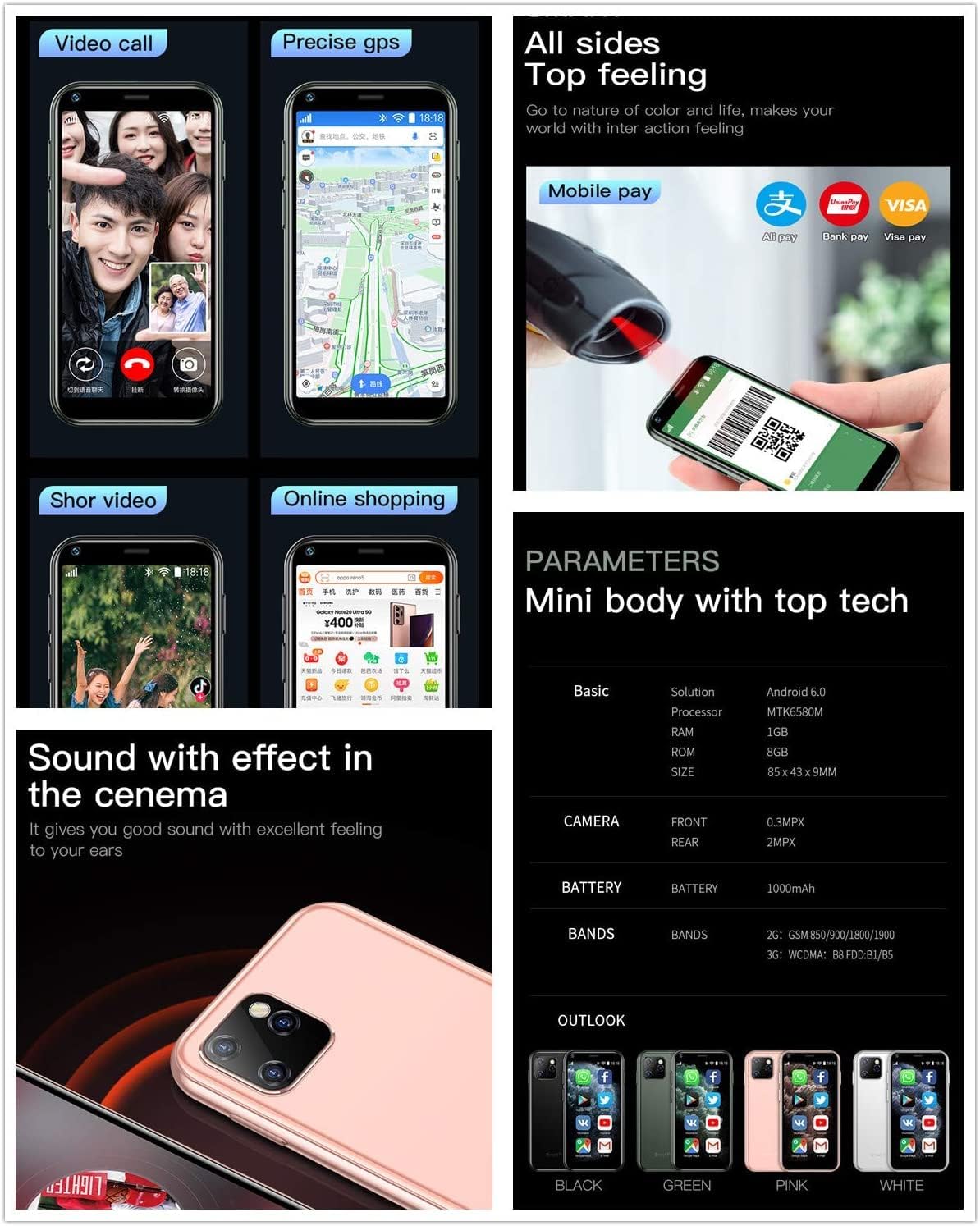
ചിത്രം 3: ഉദാamples of Cuifati XS11 Mini Smartphone functionalities.
5. പരിപാലനം
5.1 ഉപകരണം വൃത്തിയാക്കുന്നു
To keep your phone clean, gently wipe the screen and body with a soft, lint-free cloth. Avoid using harsh chemicals or abrasive materials that could damage the screen or finish.
5.2 ബാറ്ററി കെയർ
The XS11 Mini Smartphone has a built-in 1580mAh Li-ion battery. To prolong battery life:
- തീവ്രമായ താപനില ഒഴിവാക്കുക.
- ബാറ്ററി ഇടയ്ക്കിടെ പൂർണ്ണമായും തീർന്നുപോകാൻ അനുവദിക്കരുത്.
- Use the provided charging cable or a certified compatible charger.
5.3 സോഫ്റ്റ്വെയർ അപ്ഡേറ്റുകൾ
Periodically check for software updates in Settings > About phone > System updates to ensure your device has the latest features and security patches.
6. പ്രശ്നപരിഹാരം
6.1 പൊതുവായ പ്രശ്നങ്ങളും പരിഹാരങ്ങളും
- ഫോൺ ഓണാക്കുന്നില്ല: ബാറ്ററി ചാർജ് ചെയ്തിട്ടുണ്ടെന്ന് ഉറപ്പാക്കുക. ഒരു ചാർജറുമായി ബന്ധിപ്പിച്ച് വീണ്ടും ശ്രമിക്കുക.
- നെറ്റ്വർക്ക് സിഗ്നൽ ഇല്ല: Check if the SIM card is properly inserted. Verify that your SIM card supports the phone's network standards (2G GSM 850/900/1800/1900, 3G WCDMA B1/B5). Try restarting the phone.
- Apps not downloading/working: Ensure you have a stable internet connection (Wi-Fi or mobile data). Check available storage space (8GB ROM).
- മന്ദഗതിയിലുള്ള പ്രകടനം: Close unnecessary background applications. Clear cache regularly.
6.2 ഫാക്ടറി റീസെറ്റ്
നിങ്ങൾക്ക് സ്ഥിരമായ പ്രശ്നങ്ങൾ അനുഭവപ്പെടുകയാണെങ്കിൽ, ഫാക്ടറി റീസെറ്റ് വഴി അവ പരിഹരിക്കപ്പെട്ടേക്കാം. മുന്നറിയിപ്പ്: A factory reset will erase all data on your phone. Back up important data before proceeding. To perform a factory reset, go to Settings > Backup & reset > Factory data reset.
7 സ്പെസിഫിക്കേഷനുകൾ
Detailed technical specifications for the Cuifati XS11 Mini Smartphone:
| ഫീച്ചർ | സ്പെസിഫിക്കേഷൻ |
|---|---|
| മോഡൽ | XS11 (CUIFATIvy3ouge960-11) |
| ഓപ്പറേറ്റിംഗ് സിസ്റ്റം | ആൻഡ്രോയിഡ് 6.0 |
| റാം | 1 ജിബി |
| റോം (ആന്തരിക സംഭരണം) | 8 ജിബി |
| സ്ക്രീൻ വലിപ്പം | 2.5 ഇഞ്ച് |
| ഉൽപ്പന്ന വലുപ്പം | 85 x 43 x 9 മിമി (3.3 x 1.7 x 0.35 ഇഞ്ച്) |
| ആകെ ഭാരം | 141 ഗ്രാം (5.0 oz) |
| മുൻ ക്യാമറ | 2എംപി |
| പിൻ ക്യാമറ | 5എംപി |
| നെറ്റ്വർക്ക് സ്റ്റാൻഡേർഡ് | 3G: WCDMA B1, B5; 2G: GSM 850, 900, 1900, 2100 |
| ബാറ്ററി തരം | 1580mAh Li-ion ബാറ്ററി (ബിൽറ്റ്-ഇൻ) |
| ചാർജിംഗ് ഇൻ്റർഫേസ് | മൈക്രോ യുഎസ്ബി |
| മെറ്റീരിയൽ | ABS and LCD (Aviation Plastic Material Body) |
8. വാറൻ്റിയും പിന്തുണയും
Cuifati offers a 90-day exchange policy for this product. For any issues or support inquiries not covered in this manual, please contact Cuifati customer service through the retailer where you purchased the device or visit the official Cuifati store page for more information.
You can visit the Cuifati Store for additional product information and support: Cuifati Official Store

