1. ആമുഖം
This manual provides detailed instructions for the safe and efficient use of your Intenso Video Scooter BT MP3 Player. Please read this manual thoroughly before operating the device and retain it for future reference. This device allows you to play music (MP3), videos (MP4), and view images on its 1.8-inch color display, with the added convenience of Bluetooth connectivity.
2. ഉൽപ്പന്നം കഴിഞ്ഞുview
The Intenso Video Scooter BT is a compact and portable media player designed for on-the-go entertainment. It features a 1.8-inch color display, 16 GB of internal storage, and Bluetooth for wireless audio streaming.

ചിത്രം 2.1: The Intenso Video Scooter BT MP3 Player in blue, shown with the included headphones connected. The microUSB port for charging and data transfer, and the microSD card slot for expandable storage, are visible on the side.
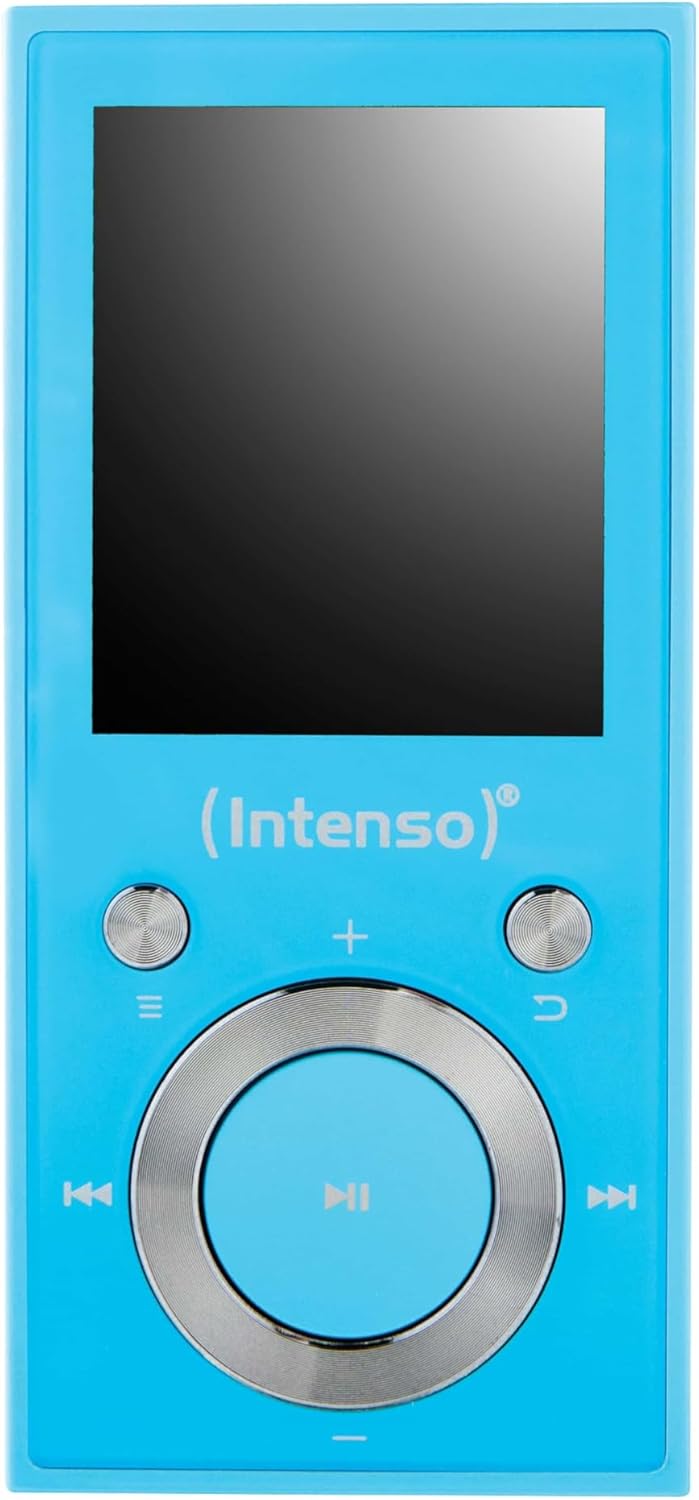
ചിത്രം 2.2: ഒരു ക്ലോസപ്പ് view of the Intenso Video Scooter BT MP3 Player's front panel, displaying the 1.8-inch screen and the navigation buttons. The central button is for play/pause/confirm, surrounded by directional controls, and dedicated buttons for menu, back, and volume.
പാക്കേജ് ഉള്ളടക്കം:
- Intenso Video Scooter BT MP3 Player
- ഹെഡ്ഫോണുകൾ
- USB കേബിൾ
- ഉപയോക്തൃ മാനുവൽ (ഈ പ്രമാണം)
3. സജ്ജീകരണം
3.1 ഉപകരണം ചാർജ് ചെയ്യുന്നു
- Connect the small end of the included USB cable to the microUSB port on the player.
- Connect the large end of the USB cable to a powered USB port on a computer or a compatible USB wall adapter (not included).
- The battery indicator on the screen will show charging status. A full charge typically takes approximately 2-3 hours.
3.2 ഒരു മൈക്രോ എസ്ഡി കാർഡ് ചേർക്കൽ
The device supports microSDHC cards for expanded storage. To insert a card:
- Locate the microSD card slot on the side of the player.
- സ്വർണ്ണ കോൺടാക്റ്റുകൾ താഴേക്ക് അഭിമുഖമായി വരുന്ന തരത്തിൽ, അത് സ്ഥലത്ത് ക്ലിക്കായി വരുന്ന വരെ മൈക്രോ എസ്ഡി കാർഡ് സ്ലോട്ടിലേക്ക് സൌമ്യമായി തിരുകുക.
- നീക്കം ചെയ്യാൻ, കാർഡ് പുറത്തേക്ക് വരുന്നത് വരെ ചെറുതായി ഉള്ളിലേക്ക് തള്ളുക.
3.3 Connecting to a Computer and Transferring Files
- പ്ലെയർ ഓണാണെന്ന് ഉറപ്പാക്കുക.
- Connect the player to your computer using the supplied USB cable.
- The player will appear as a removable disk drive on your computer.
- Drag and drop your desired MP3 music, MP4 videos, or image files into the appropriate folders on the player or inserted microSD card.
- USB കേബിൾ വിച്ഛേദിക്കുന്നതിന് മുമ്പ് നിങ്ങളുടെ കമ്പ്യൂട്ടറിൽ നിന്ന് ഉപകരണം സുരക്ഷിതമായി പുറത്തെടുക്കുക.
4. പ്രവർത്തന നിർദ്ദേശങ്ങൾ
4.1 പവർ ഓൺ/ഓഫ്
- പവർ ഓണാക്കാൻ: Press and hold the power button (often integrated with the play/pause button or a dedicated side button) for a few seconds until the screen illuminates.
- പവർ ഓഫ് ചെയ്യാൻ: Press and hold the power button again until the device shuts down.
4.2 മെനു നാവിഗേഷൻ
Use the directional buttons around the central 'Play/Pause/Confirm' button to navigate through menus. The 'Menu' button (often represented by three horizontal lines) typically brings up options or returns to the main menu. The 'Back' button (often a curved arrow) returns to the previous screen.
4.3 മ്യൂസിക് പ്ലേബാക്ക്
- പ്രധാന മെനുവിൽ നിന്ന്, 'സംഗീതം' തിരഞ്ഞെടുക്കുക.
- Browse through your music library by artist, album, genre, or all songs.
- Select a song and press the central 'Play/Pause' button to begin playback.
- Use the left/right directional buttons to skip tracks.
- Use the volume buttons (often '+' and '-') to adjust the audio level.
- Press the 'Play/Pause' button to pause or resume playback.
4.4 വീഡിയോ പ്ലേബാക്ക്
- പ്രധാന മെനുവിൽ നിന്ന്, 'വീഡിയോ' തിരഞ്ഞെടുക്കുക.
- Browse and select the desired video file.
- Press the central 'Play/Pause' button to start playback.
4.5 ബ്ലൂടൂത്ത് കണക്റ്റിവിറ്റി
To pair your Intenso Video Scooter BT with Bluetooth headphones or speakers:
- From the main menu, navigate to 'Bluetooth'.
- നിങ്ങളുടെ ബ്ലൂടൂത്ത് ഓഡിയോ ഉപകരണം ജോടിയാക്കൽ മോഡിലാണെന്ന് ഉറപ്പാക്കുക.
- 'തിരഞ്ഞെടുക്കുക'ഇതിനായി തിരയുക Devices' on the player.
- ലിസ്റ്റിൽ നിങ്ങളുടെ ഉപകരണം പ്രത്യക്ഷപ്പെട്ടുകഴിഞ്ഞാൽ, ജോടിയാക്കാൻ അത് തിരഞ്ഞെടുക്കുക.
- After successful pairing, audio will be routed to the connected Bluetooth device.
5. പരിപാലനം
- വൃത്തിയാക്കൽ: ഉപകരണം വൃത്തിയാക്കാൻ മൃദുവായതും ഉണങ്ങിയതുമായ തുണി ഉപയോഗിക്കുക. ലിക്വിഡ് ക്ലീനറുകളോ ലായകങ്ങളോ ഉപയോഗിക്കരുത്.
- സംഭരണം: നേരിട്ടുള്ള സൂര്യപ്രകാശവും കടുത്ത താപനിലയും ഏൽക്കാത്ത തണുത്തതും വരണ്ടതുമായ സ്ഥലത്ത് പ്ലെയർ സൂക്ഷിക്കുക.
- ബാറ്ററി കെയർ: ബാറ്ററി ലൈഫ് വർദ്ധിപ്പിക്കാൻ, ബാറ്ററി ഇടയ്ക്കിടെ പൂർണ്ണമായും ഡിസ്ചാർജ് ചെയ്യുന്നത് ഒഴിവാക്കുക. ദീർഘനേരം ഉപയോഗത്തിലില്ലെങ്കിൽ പോലും ഉപകരണം പതിവായി ചാർജ് ചെയ്യുക.
- സോഫ്റ്റ്വെയർ അപ്ഡേറ്റുകൾ: Check the official Intenso webഒപ്റ്റിമൽ പ്രകടനം ഉറപ്പാക്കാൻ ലഭ്യമായ ഏതെങ്കിലും ഫേംവെയർ അപ്ഡേറ്റുകൾക്കായി ഇടയ്ക്കിടെ സൈറ്റ് സന്ദർശിക്കുക.
6. പ്രശ്നപരിഹാരം
ഉപകരണം ഓണാകുന്നില്ല:
- Ensure the battery is charged. Connect the player to a power source and allow it to charge for at least 30 minutes before attempting to power on again.
- If the device is unresponsive, locate the 'RESET' pinhole (if present, often on the side or back) and gently press it with a thin object (e.g., a paperclip) to restart the device.
ശബ്ദമില്ല:
- വോളിയം ലെവൽ പരിശോധിക്കുക.
- Ensure headphones are properly connected or that Bluetooth headphones/speakers are paired and connected.
- Test with different headphones to rule out a faulty pair.
ബ്ലൂടൂത്ത് കണക്ഷൻ പ്രശ്നങ്ങൾ:
- Ensure both the player and the Bluetooth audio device are sufficiently charged.
- Make sure both devices are within close proximity (typically within 10 meters) and free from obstructions.
- ഉപകരണങ്ങൾ ജോടിയാക്കി മാറ്റി വീണ്ടും ജോടിയാക്കാൻ ശ്രമിക്കുക.
- Restart both the player and the Bluetooth audio device.
Files Not Appearing or Playing:
- എന്ന് പരിശോധിക്കുക files are in a supported format (MP3 for audio, MP4 for video).
- ഉറപ്പാക്കുക files were transferred correctly to the device's internal storage or the microSD card.
- If using a microSD card, ensure it is properly inserted and not corrupted.
7 സ്പെസിഫിക്കേഷനുകൾ
| മോഡലിൻ്റെ പേര് | വീഡിയോ സ്കൂട്ടർ ബി.ടി |
| ഇനം മോഡൽ നമ്പർ | 3717474 |
| ബ്രാൻഡ് | ഇൻ്റൻസോ |
| മെമ്മറി സ്റ്റോറേജ് കപ്പാസിറ്റി | 16 ജിബി |
| സ്ക്രീൻ വലിപ്പം | 1.8 ഇഞ്ച് |
| കണക്റ്റിവിറ്റി ടെക്നോളജി | USB, ബ്ലൂടൂത്ത് |
| അനുയോജ്യമായ ഉപകരണങ്ങൾ | ബ്ലൂടൂത്ത് ഉപകരണങ്ങൾ |
| മീഡിയ തരം | എംപി3, എംപി4 |
| പ്രത്യേക ഫീച്ചർ | MP3 Playback, Video Playback |
| ഉൽപ്പന്ന അളവുകൾ | 6.3 x 3.54 x 1.97 ഇഞ്ച് |
| ഇനത്തിൻ്റെ ഭാരം | 0.917 ഔൺസ് |
| ബാറ്ററികൾ | 1 ലിഥിയം പോളിമർ ബാറ്ററി (ഉൾപ്പെടുത്തിയിരിക്കുന്നു) |
8. വാറൻ്റിയും പിന്തുണയും
For warranty information and technical support, please refer to the documentation included with your product or visit the official Intenso webസൈറ്റ്. വാറന്റി ക്ലെയിമുകൾക്കായി നിങ്ങളുടെ വാങ്ങലിന്റെ തെളിവ് സൂക്ഷിക്കുക.


